





Kilrah
Members
-
Joined
-
Last visited
Everything posted by Kilrah
-
Need to check your local market, but look for used/recertified.
-
7.3.2 if your license allows for it.
-
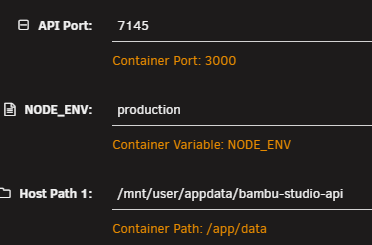
Just add a container and give it the repo address and the ports/vars it needs and a path.
-
You can use tailscale if you wish, sure. Might need some wrangling of the config to allow access through plain http if you don't want to deal with certs.
-
Wait until it updates, looks like it's stuck again.

-
Go check / set the timezone again. 7.3 changed how they're defined.
-
It's when gluetun updates that the issue happens, because then the container the others are supposed to use for networking doesn't exist anymore so they can't start. DockerMan knows that and rebuilds all dependent containers when gluetun updates but the plugin doesn't.
-
No reason it'd have been that big so I still suspect misleading usage reporting, as mentioned du on the docker filesystem is useless, and one of the drawbacks of using docker folder is that since it's right on the drive understanding space usage is pretty much impossible.
-
Disable container autoupdate. When the gluetun container updates (which is shown happening in your log) it makes a new container, so the one referred to by the others then doesn't exist anymore.
-
You seem to have Docker in Folder mode, you can't use du on that, it'll just recurse over shared mounts. Try and see Container usage on the docker page. Also switch the page to advanced mode and remove any orphan images.
-
He often develops/releases stuff along with a video and then moves on to the next thing, never maintaining them.
-
The Enhanced Syslog plugin has a filter to exclude things from being logged but you have to add them manually.
-
Go to Apps, Statistics, Invalid templates, search for gyroidvault, you'll find { "TemplatePath": "/tmp/GitHub/repositoryClone/TeeCodeDev/unraid-templates/templates/GyroidVault.xml", "errors": [ "char '&' is not expected." ], "FirstSeen": null },Looks like (at least) you have an unescaped & , and it's in a changelog block that's also missing the <Changes> start tag. A simple XML validator would catch that.
-
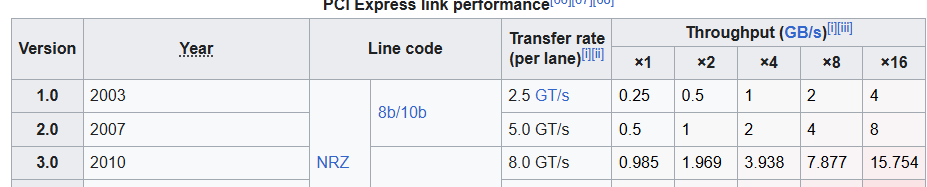
https://www.servethehome.com/lsi-sas-2008-raid-controller-hba-information/ Shows as 5GT/s, so Gen2 in the log
-
SAS2008 is PCIe2 so if it was listed as Gen3 that'd have been a listing error
-
That's a PCIe2 card, working as such. Quadro might get downgraded because of it, or you have to check BIOS settings
-
What cards are we talking of?
-
Looks like mine is already on 3.0.2, did nothing. Current template already has a secret key variable in the advanced section.
-
I meant more "see how much data there is, compare to typical drive read speed" but that works too. That was in response to you seeing it used to be fast and now it's slow, if that was both with the same options then either you now have much more data or something's going wrong if it now takes longer for the same amount of data. Don't know of one but you could probably make a script that checks whether rsync succeeded or errored and retries if it errored.
-
One of your drives keeps disconnecting, seems to be sdk. You didn't post full diagnostics so can't really give more details.
-
Clearing the secure boot keys was the issue, you don't want to do that.
-
I would run checksum once or twice a year to verify that the data hasn't been corrupted for some reason, but also in a way that it only shows discrepancies instead of updating so I can verify which side is correct. Would also check how long it should take to read that amount of data and check it takes about the expected time when it runs to hopefully catch a failing drive that's slower than it should.
-
Probably want to remove --checksum, that means each side will need to read the entirety of each file on both sides every time it runs.
-
The repo has a rule about it, you may or may not agree with it but it's there and submissions need to follow it. If you don't agree then you don't submit. If you do anyway don't be surprised if you get refused. Even more so when OP demonstrated his lack of care/concern by asking where the rules were and being pointed to them, showing he didn't even bother with the basics.
-
No, but you should be posting in that app's support thread.

