





Kilrah
Members
-
Joined
-
Last visited
Everything posted by Kilrah
-
Yeah it crashes either because the rootfs is full or you were using more than half the RAM already. It should just not log that much, are you sure you turned off all logging?
-
Also if you're using cloudflare proxy that's not gonna go through. Not at all what nextcloud is meant for though.
-
Tried another drive? There's always this: https://docs.unraid.net/unraid-os/getting-started/manual-install-method/
-
Set that one back.
-
When you do a "Compose down" in Compose manager it removes the containers but not the images, you have to delete them yourself (docker page in advanced mode will show them, or you can use e.g. "docker image prune -a" to remove all unused images)
-
AFAIK everything since 8th gen from 7 years ago does everything you would want transcoding wise, so probably not much point getting the latest.
-
It has worked that way from the start, which is almost 20 years ago. So that "great reputation" should on the opposite prove it's not a problem for most. The creator tool definitely needs fixing though. Don't know why v2 is still blocking sandisk. AFAIK it was originally done because there was a wave of counterfeit Sandisk drives, but that hasn't been a major problem in years...
-
Unraid's own files are already verified by checksums. Not the user config though. A checksum can only detect a problem, not fix it.
-
Probably because there isn't much to review. Quicksync "just works" and has done so for pretty much a decade at this point. On Unraid Ultras will need 7.1, in beta now.
-
Been a while since I looked at the LSIO container but AFAIK folders are arranged differently. If you do a test fresh install of this one to see where the folders are and copy the ones from your container to the right places it should work. You'll probably have to adjust file/folder ownership too.
-
That's about normal for transfers between 2 array disks. Unlike writes from other sources the seeking needed to update parity is taxing. Also ZFS in array is known to be slow.
-
For you maybe, but then you must have had something in your environment causing it. MariaDB is the standard, it works, mine's been running with it for half a decade without issues,...
-
Might be an extension you have, I've never had an issue with chrome.
-
Some enclosures encrypt the drive, some reserve some of the first sectors so the disk shows smaller in the enclosure than it would when attached directly so when you do so there's "no partition table" cause it's shifted etc Note that as long as the enclosure is USB3 or better you won't see a difference in performance.
-
You could look at https://hub.docker.com/repository/docker/kilrah/nextcloud-ffmpeg/tags?page=1 If you specify no tag it'll be "latest", which if you look at the hashes currently matches 31.0.1 if you specify the repository line as e.g. kilrah/nextcloud-ffmpeg:30 then it'll only get updates for the 30 branch and not move to 31 until you change it (recommended). If you want a very specific version you'd specify e.g :30.0.0
-
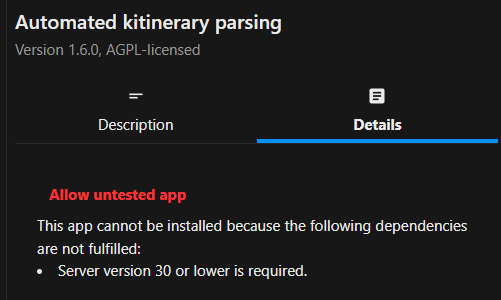
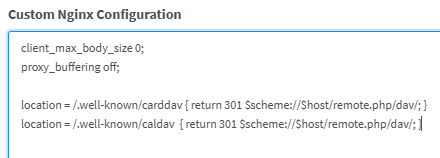
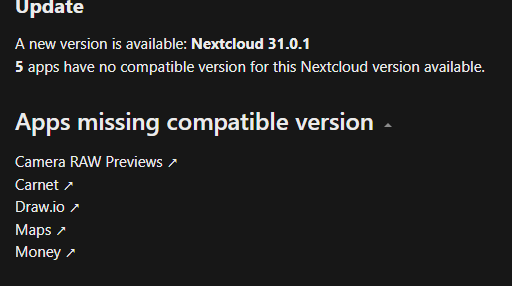
Looks like that app is not compatible with 31 yet, might be why. It's never a good idea to use latest/default with nextcloud, often when a new version comes out apps take a few weeks/months to get updated for it, if they do. Should always pin to a major version e.g. :30 and watch for the incompatible app list in admin settings before switching, resp. make a test install to see if forcing those to install actually works or causes issues. My instance is still on 30 because while most of those below seem to actually work on 31 draw.io doesn't and I need it. If you're reverse-proxying that needs to be configured to pass it, e.g.
-
Uninstall the old Mover tuning plugin you likely have that doesn't know about 7, and if you really need it install the current version.
-
That would do it, the plugin just checks in the syslog whether any out of memory condition was logged since boot.
-
You can get AIO to run without issues if you consider it as an "island" and never modify its data externally but you're making it hard on yourself, it's a heavy lump of stuff with a lot that's usually unnecessary for a home install and not well tailored to unraid unless you understand everything. Simple official nextcloud container and a mariadb instance is easier. Some guidance here:
-
I wouldn't reboot but just delete those logfiles and change the logging settings so it doesn't happen again. Failure to boot can be due to BIOS settings like fast boot you couldn't change remotely.
-
Yep, 27G in /tmp is definitely not normal. Seems you have detailed logging enabled for mover tuning and possibly mover itself and it's filling up your memory with tons of logs. Made worse by apparently running the mover every hour.
-
rsync first makes a temp file, then renames it (to avoid leaving a partial file if the transfer is interrupted mid-way). What format? The error is about setting permissions, if it's one that doesn't support linux permissions this is normal, should be able to set it to be ignored. Also should probably be in the LuckyBackup support thread.
-
Parity rebuild restores a drive exactly as it was, can't change filesystem without manually copying all the data somewhere else, formatting, then copying back. If the array is now happy with the new (but empty) drive just mount the old drive in Unassigned Devices and copy data to the new drive hoping it lives long enough. DiskX is all that matters, sdX can change at any time so it's not a proper way to refer to drives. Post diagnostics and Main page screenshots if you need further input.
-
Thanks, I've pushed an update to the template to add the new path.
-
You hadn't, and it's your first post here... had you asked you'd have been pointed to the manual you could have also looked up on your own, particularly the section about "drive unexpectedly becoming unmountable": https://docs.unraid.net/unraid-os/troubleshooting/data-recovery/#unmountable-disks It's stable, but nothing in the world can guarantee data safety, especially not on consumer setups. The only data safety you ever get is backup copies of anything important on completely independent hardware.


