






dopeytree
Members
-
Joined
-
Last visited
Everything posted by dopeytree
-
Does unraid publish any stats on hardware anywhere a bit like steam do? It would clog this thread up so would need to be somewhere else maybe a website. Would be interesting to see some more numbers on what everyones running and average power consumption (probably only achievable on systems with ups attached).
-
@de-sascha Just guessing now but how does it look if you dive further into the network card settings? MTU Disable NIC Flow Control Disable NIC Offload Ethernet NIC Rx Buffer Ethernet NIC Tx Buffer Do you have Wake On Lan turned on?
-
Try toggling the 'native ASPM' setting in bios see if you get same result with it on / off. Also have you updated bios firmware? sometimes they ship with crappy firmware.
-
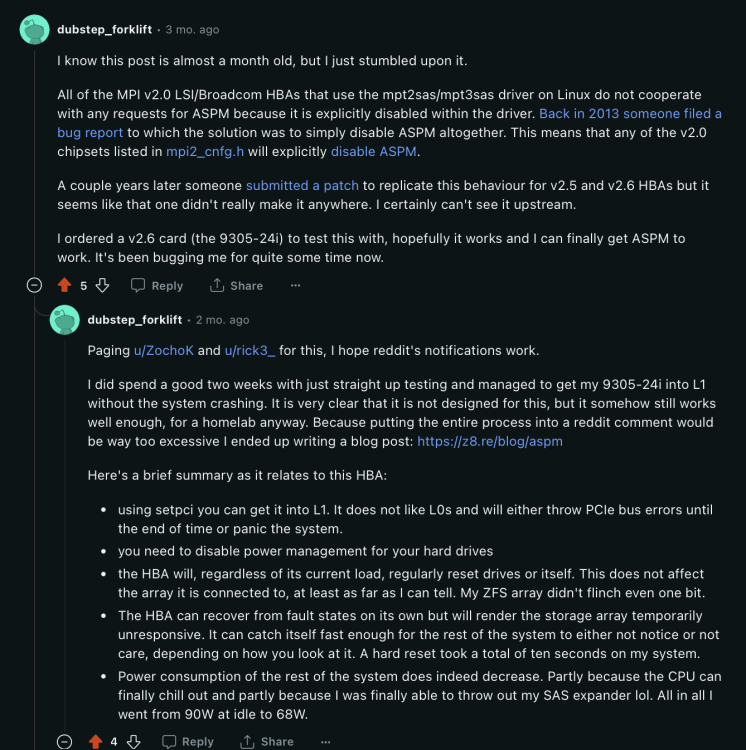
The history of how ASPM got removed from HBA Cards drivers (mp2sas / mp3sas) & how some guy managed to override it - https://z8.re/blog/aspm
-
Yeah they sound a bit shit. How come there is no alternative chips sort of between a these 6port asmedia chips that run on pcie2 & a full blown power-hungry HBA. Don't intel have some sata controllers chips? Is it not possible to use the chips motherboards use? I guess maybe the best thing would be one of those pcie3 x8 or x16 cards that have 4x nvme carrier cards with each using a m.2 - sata adapter. that would give 4x6 = 24 sata ports. No idea on how reliable that would be tho & more expensive cost but would likely use less power than HBA. HBA power cost is more in not allowing the cpu any lower than c2 states rather than how much power the HBA uses. This is because no ASPM on HBA cards.
-
Anyone used one of these 16port cards? seem to use multiple 4x ASM1064 chips. https://www.aliexpress.com/item/1005003245467069.html?src=google&src=google&albch=shopping&acnt=272-267-0231&slnk=&plac=&mtctp=&albbt=Google_7_shopping&gclsrc=aw.ds&albagn=888888&ds_e_adid=&ds_e_matchtype=&ds_e_device=c&ds_e_network=x&ds_e_product_group_id=&ds_e_product_id=en1005003245467069&ds_e_product_merchant_id=109201355&ds_e_product_country=GB&ds_e_product_language=en&ds_e_product_channel=online&ds_e_product_store_id=&ds_url_v=2&albcp=20695911516&albag=&isSmbAutoCall=false&needSmbHouyi=false&gad_source=1&aff_fcid=993b0d89fef740b4ade2b1c9a0283751-1705105835592-09975-UneMJZVf&aff_fsk=UneMJZVf&aff_platform=aaf&sk=UneMJZVf&aff_trace_key=993b0d89fef740b4ade2b1c9a0283751-1705105835592-09975-UneMJZVf&terminal_id=d3967fd9788548dcbe243aa961131528&afSmartRedirect=y
-
Did you go to unraid main and toggle read/write view on? This will show the on drive speed rather than the blackmagic disk speedster running via something else.

-
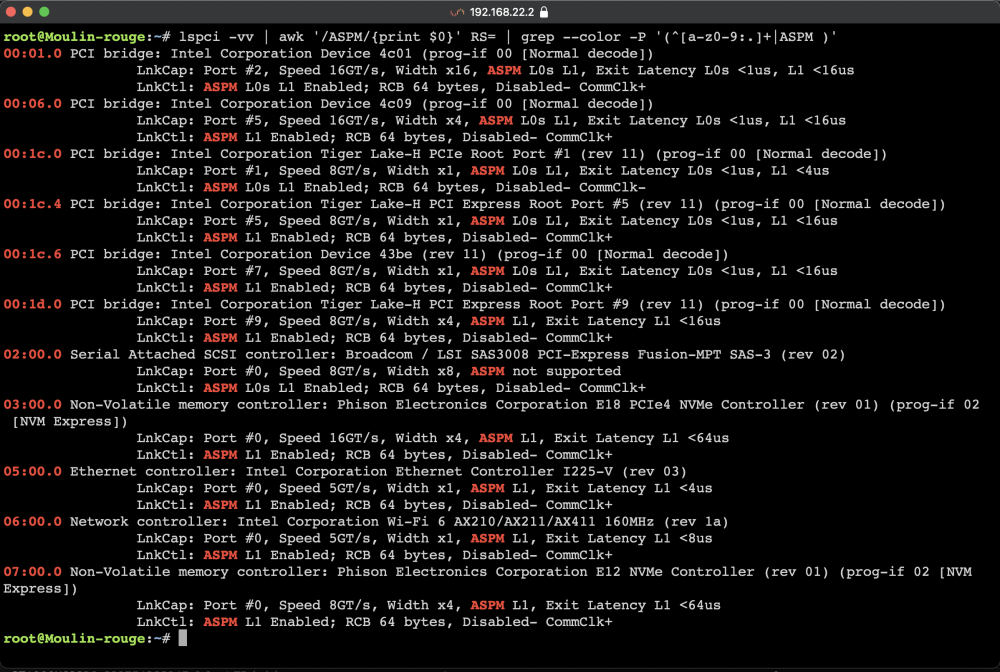
Sorted. and only enables APSM on devices with APSM. I still need to follow the deep guide on forcing APSM on the hba card. https://z8.re/blog/aspm
-
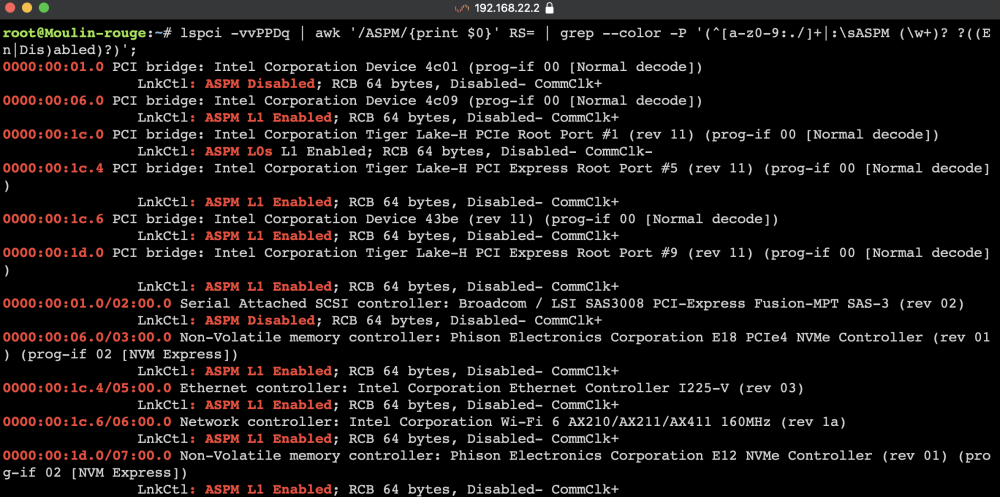
What would be my ROOT_COMPLEX & ENDPOINT's? ROOT_COMPLEX= 00:01.0 # (pcie bridge) ENDPOINT= 02:00.0 # (LSI card) Also how are folks running the ASPM script? User scripts? Do you run it once or are you somehow adding it to the go file? https://github.com/Mechitworks/Linuxscripts/blob/main/H610-ASPM.bash Thanks root@Moulin-rouge:~# lspci -vvPPDq | awk '/ASPM/{print $0}' RS= | grep --color -P '(^[a-z0-9:./]+|:\sASPM (\w+)? ?((En|Dis)abled)?)'; 0000:00:01.0 PCI bridge: Intel Corporation Device 4c01 (prog-if 00 [Normal decode]) LnkCtl: ASPM Disabled; RCB 64 bytes, Disabled- CommClk+ 0000:00:06.0 PCI bridge: Intel Corporation Device 4c09 (prog-if 00 [Normal decode]) LnkCtl: ASPM L1 Enabled; RCB 64 bytes, Disabled- CommClk+ 0000:00:1c.0 PCI bridge: Intel Corporation Tiger Lake-H PCIe Root Port #1 (rev 11) (prog-if 00 [Normal decode]) LnkCtl: ASPM L0s L1 Enabled; RCB 64 bytes, Disabled- CommClk- 0000:00:1c.4 PCI bridge: Intel Corporation Tiger Lake-H PCI Express Root Port #5 (rev 11) (prog-if 00 [Normal decode]) LnkCtl: ASPM L1 Enabled; RCB 64 bytes, Disabled- CommClk+ 0000:00:1c.6 PCI bridge: Intel Corporation Device 43be (rev 11) (prog-if 00 [Normal decode]) LnkCtl: ASPM L1 Enabled; RCB 64 bytes, Disabled- CommClk+ 0000:00:1d.0 PCI bridge: Intel Corporation Tiger Lake-H PCI Express Root Port #9 (rev 11) (prog-if 00 [Normal decode]) LnkCtl: ASPM L1 Enabled; RCB 64 bytes, Disabled- CommClk+ 0000:00:01.0/02:00.0 Serial Attached SCSI controller: Broadcom / LSI SAS3008 PCI-Express Fusion-MPT SAS-3 (rev 02) LnkCtl: ASPM Disabled; RCB 64 bytes, Disabled- CommClk+ 0000:00:06.0/03:00.0 Non-Volatile memory controller: Phison Electronics Corporation E18 PCIe4 NVMe Controller (rev 01) (prog-if 02 [NVM Express]) LnkCtl: ASPM L1 Enabled; RCB 64 bytes, Disabled- CommClk+ 0000:00:1c.4/05:00.0 Ethernet controller: Intel Corporation Ethernet Controller I225-V (rev 03) LnkCtl: ASPM L1 Enabled; RCB 64 bytes, Disabled- CommClk+ 0000:00:1c.6/06:00.0 Network controller: Intel Corporation Wi-Fi 6 AX210/AX211/AX411 160MHz (rev 1a) LnkCtl: ASPM L1 Enabled; RCB 64 bytes, Disabled- CommClk+ 0000:00:1d.0/07:00.0 Non-Volatile memory controller: Phison Electronics Corporation E12 NVMe Controller (rev 01) (prog-if 02 [NVM Express]) LnkCtl: ASPM L1 Enabled; RCB 64 bytes, Disabled- CommClk+
-
Nice like the look of the 8bay machine.. thats enough to make it work.
-
Not quite sure what you mean. Mover is a binary on / off action so it has either moved or not moved. Any backup of a cache drive will contain files not moved to array. So mover would run when set and then each cache backup would remove the moved files by principal they'd be gone from the source cache drive. Anyway I've moved onto a newer system now of splitting my cache drives up so I keep NVMe for appdata & VM's etc and other new folders. Then for my 'data' share i.e plex & media downloads I'm using several 2.5" SSD's in a zfs pool so 4x 2TB drives in a z1 pool gives 2TB parity & 6TB usable which is plenty of space before mover has to run. Mover tuning moves files over 90days old to the array if the pool is over 70% full. This seems to work well.
-
10fps is quite high for detection. Frigate recommends 5fps. My cameras go up in 2s so 2,4,6,8,10 etc. have found 4fps works just as well with less cpu strain. See how you go with it. If you need more personalised help try creating an issue on the GitHub for frigate here and one of the devs will help. https://github.com/blakeblackshear/frigate/issues
-
Looking into USB JBOD's... which sata chips are we saying are the most efficient and which are to avoid? https://www.amazon.co.uk/ORICO-External-Enclosure-Enterprise-Expansion/dp/B0B7JMCK66/ref=sr_1_1?crid=T71O20UHM4BB&keywords=ORICO-3559C3&qid=1704853454&sprefix=orico-3559c3%2Caps%2C78&sr=8-1&ufe=app_do%3Aamzn1.fos.d7e5a2de-8759-4da3-993c-d11b6e3d217f&th=1

-
Maybe something like this ORICO-3559C3 5x bay drive with usbc for 10Gb speed (1250MB/s) could handle ZFS if you wanted to or SSDs https://www.orico.cc/us/product/detail/7164.html
-
Nice out of interest can you give us the cpu frequencies? how does it idle and how is the boost cpu? Also how big is your plex library? Mines about 24GB. Also do you happen to run frigate? I'm curious how well it runs. I am contemplating a future build maybe with a USB DAS. Will need to sift through and find low power models but that maybe an option to ditch the HBA & chassis. Although everyone says HBA are gold standard for sata chips they don't mention that HBA's stop your cpu going lower than c2. I wonder how nvme's compare to 2.5" ssds? Some high speed gen4's can use 10w each.. I am using 4x 2.5" 2TB ssds in a zfs pool for plex that works well. Has no app data so can sleep when not in use. Another thing folks don't really talk about is 2.5Gb network ports are quite power hungry. I got rid of my switch because it sat at about 20-25w. when 1Gb one is about 0.3-2w
-
And a x8 slot PCIe 3.0 x8 slot gives 7880MB/s which divided by 150MB = 52 drives so you'd be able to write to 52 drives at 150MB/s at the exact same time. In theory anyway. In practice you never write to the same drives at once BUT you may need to read from them all at once during parity checks. Anyway I would always split up arrays into other pools. Hopefully in the future unraid will allow multiple unraid arrays for if you want say a maximum of 20x drives in any pool. With this level of bandwidth you can do ZFS stuff as all disks are accessed at the same time. I use some 2.5" SSDs this way. Comparatively the unraid array accesses single disks at a time.
-
Out of interest what is your idle cpu with boost disabled? My 11900t is 800mhz - 11000mhz so too slow for lots of things. Currently using turbo boost on schedule via the tips & tweaks plugin.
-
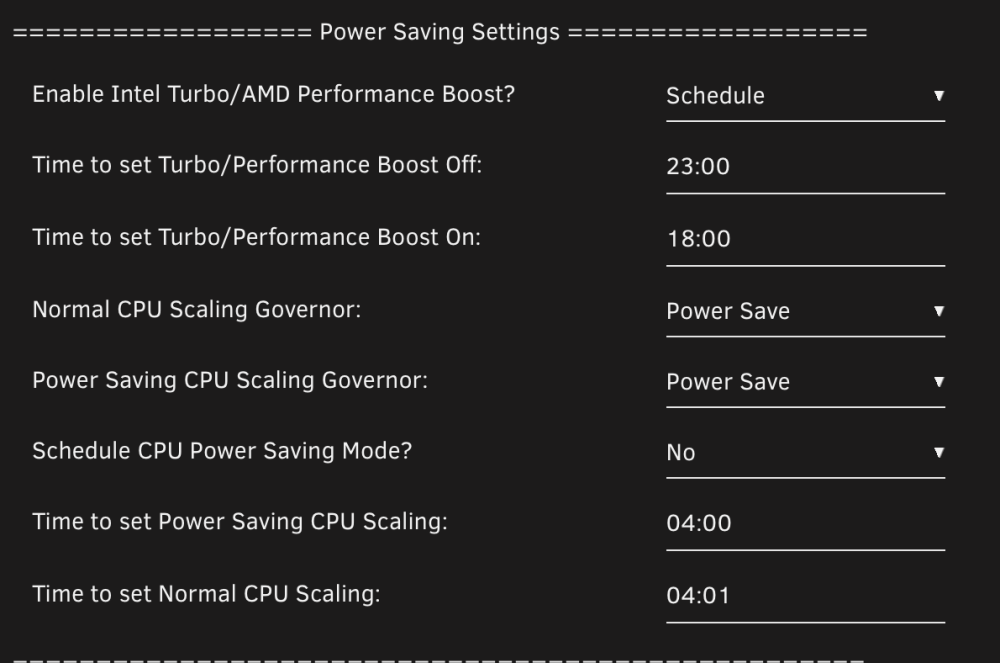
Having some issues getting boost scheduling to work. It may just need a re-boot after changing boost to schedule? Currently boost is ON and it should have swapped to Off due to the time being before 18:00. Also we should match the settings for the 2x scheduled items. Boost & CPU mode. Easiest is add the word schedule to the title so 'enable / schedule Intel Turbo/AMD Performance Boost?' But maybe 'Intel Turbo/AMD Performance Boost MODE' is better contextually? Or add another line 'Schedule Boost' = On / Off See screenshot below.
-
Further down the rabbit hole.. this was my experience with raytracing gaming with a nvidia low power 75w graphics card rtx a2000. Allocated 6/12 cores to the container & VM. Then tested 1 by 1. - Steam-headless 55fps (container) = all cores 2.2Ghz - WindowsVM 23fps (vm) = all cores 3.4Ghz The myth that gaming needs the latest 5Ghz cpu is long overdue a visit from the grip reaper. (Have since sold the card and use a steamdeck for gaming 10-20w)
-
A LSI card can have 1000 drives attached via a single sas port with the use of SAS expanders (these are built into HBA drive chassis in servers) so the extra bandwidth is useful whereas generally Sata cards seem to top out at 6x ports.
-
Docker containers are practically direct on metal so lower level (nearer) the hardware than VM's. This is why you get such good performance & why steam headless gives much greater performance while actually running the cpu cores lower than when compared to a windows VM. To understand if your VM is affecting idle state you'd need to provide more detail like which cores are allocated to the VM & are any of those cores isolated to the VM. Bearing in mind home-assistant is pretty small on performance, I wouldn't expect it to affect much UNLESS you are running something like frigate or other addons in the VM.
-
Your system sounds ok (not 200w+ etc). Could change the cctv to use an SSD? Perhaps instead chase down your AP & switch energy although its similar to mine. I got rid of my 2.5Gb switch and use a n100 box with 2.5Gb as pfsense direct to the unraid system then use cheap TPlink switches for all 1Gb stuff and they use less than 1w. Old 2.5Gb switches use alot of power. Also changed my wifi AP's to energy efficient ones that are slightly older but work great and still provide faster than our 600Mb fibre link. These use barley any power 2-5w each & I have 3x wifi APs. I use these TP-Link TL-WA1201 https://www.amazon.co.uk/gp/product/B084BGKJZT/ref=ppx_yo_dt_b_search_asin_title?ie=UTF8&th=1
-
5Gb is not a standard thing it specific to certain manufacturers and often 10Gb cards can't do 5Gb. Go with what is built into your system so use the 1Gb or 2.5Gb for the main network then if you need fast transfer you can add a 10Gb card to both pcs directly connected to each other and only use when needed as this saves the need for a 10Gb switch (unless you already have one). You could use SFPs with a DAC cable. This is a cheap setup. The main issue though is HD speed and most will never max out a 2.5Gb connection. SSD's can max out a 10Gb connection but remember if you copying to a normal unraid array it will be as fast as your slowest drive. You can get round this by building a ZFS pool of spinning disks
-
Currently have an 11900t (11th gen i9 supposedly 35w) but obviously tdp is bollocks and they boost up to 150w. So just wondered if anyone who has real world experience with a 12 / 13 / 14th gen intel cpu & HBA lsi card can talk about their Cstate/s & CPU boosts. Generally with a HBA cart the C states get limited to c2 which means the cpu stays boosted more than is needed. But what I want to know is how this works with these efficiency cores on the new cpu's? Basically if I did go and swap to a newer cpu would their be a noticeable drop in power usage or would it stay boosted like currently. Anyone got some data? Thanks
-
The n100 is definitely more than 6watts real world usage. I'd say mine is around 10/15w as a simple pfsense box. which fits with your post too. Don't forget TDP is only actually a measure meant of heat it is nothing to do with energy efficiency. It is a marketing CON. A n100 if using a fully boosted cpu will be way more. We all need to measure at the plug with a 'kill a watt' or ups to see real world usage. I think 65w or less is good for a fully built system with large memory 10g card, HBA etc. If you dont have all that should be able to get 20w system?








