






dopeytree
Members
-
Joined
-
Last visited
Everything posted by dopeytree
-
Is it at all possible to have a zfs pool that exists within this plugin? What I'm thinking is that I have this one pool of drives that I could use in a USB chasis and just plug in when I need access to them. Sort of like cold storage. They are ZFS pool for speed because when needed it's large video files from a drone as ZFS helps speed up file transfers.
-
I've just ordered one of these aliexpress specials 'ERYING Motherboard with Onboard 13th gen CPU i5 13500H DDR4'. Will report back once it arrives. £260. Specs: 8 efficiency cores & 4 performance cores. (laptop cpu) 2x DDR4 slots 1Gb lan (the ddr5 models have 2.5Gb lans but then Id have to buy ddr5 ram) 2x sata ports 2x m.2 slots (pcie4.0 x4) Expansion pcie4.0 x8 slot + a pcie3.0 x4 slot So already more than a n100 & or n305 board. https://www.aliexpress.com/item/1005006144634993.html?spm=a2g0o.order_list.order_list_main.15.21ef18026B6KO7 https://www.intel.com/content/www/us/en/products/sku/232147/intel-core-i513500h-processor-18m-cache-up-to-4-70-ghz/specifications.html
-
What do intel say?
-
Most of the CWWK n100 / n305 boards use a JMB sata chipset which will cause higher wattage. Still not much on such a low power build but the only board I can see of theirs with a ASMedia chip is the one with the sideway pcie slot. Which will not fit neatly into a case although you could use some pcie risers to make it all work.
-
Yeah its just 6x ports isn't very much and total waste of the pcie bandwidth available.. Have 2x 12bay SAS enclosures & am slowing populating with access to spare 10TB drives. If I had infinite cash I suppose I could replace the 10TB's with larger disks but I resent the prices for 18TB and larger. So currently sticking with 8TB, 10TB & 12TB drives. What do you use in your system?
-
Exploring options to reduce system energy consumption. Just curious if anyone has tried a HBA in a m.2 -> pcie adapter? As this could be a way of using a n100 or newer type mini pc system.
-
High friends. Just curious who's got the lowest wattage for an active system running frigate NVR & plex and whats your build.
-
I ended up with all my current recordings getting deleted from the drive but anyway got it up and working now with a new config. Might make a script to do a monthly backup to array. Only thing I did notice is v13 bit more fussy about low bit rate feeds as in not doing detection when it did on v12. So for one of the old budget cameras I changed the detection from substream to the main 1080p steam. In time I'll change the camera for another annke c500 as you can control the bit rate so 640x360 but at 3Mb/s so not blocky. Works great for low cpu detection. Anyway thanks again for bringing this to unraid. The new sound detection is cool eh.
-
Ok it looks like version 13 has been pushed out on the 12 stable channel.. Starting Frigate (0.13.0-01e2d20)
-
Latest STABLE 12 update seems to have killed frigate. It's in a loop now of crashing. Anyone else got this?
-
Ah cool thanks for helping me investigate.
-
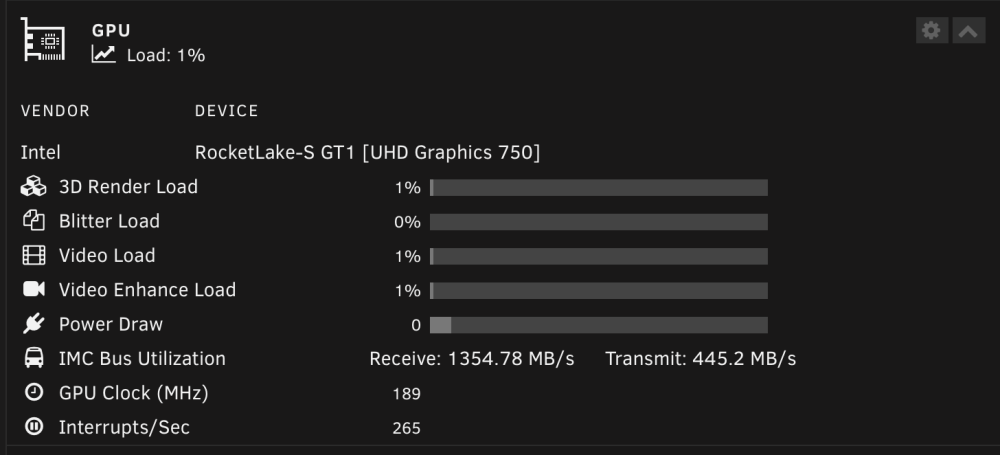
Same for both package or max setting. It shows a 0 but the graph moves left & right so it has some data.Got an issue with power draw not showing correctly. fairly minor but if anyone has a fix holla. CPU is 11900t (es test model.)
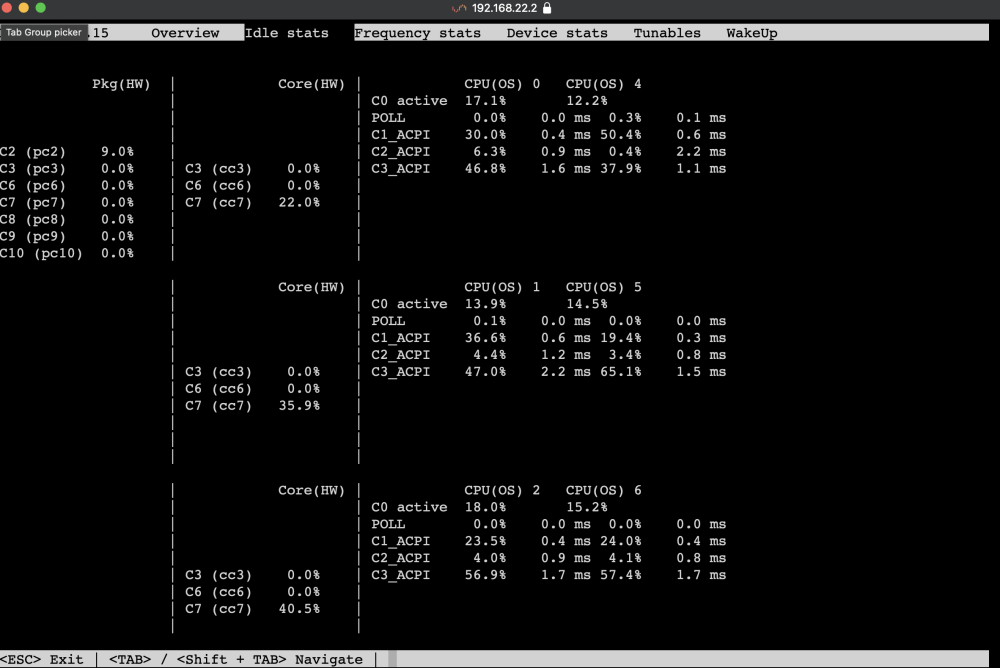
 In an ideal world the motherboard would use a ASM1166 chip for sata ports as this has ASPM support.Do you have an intel i226v type network card? i.e 2.5GbNot sure if it's just checking in or doing an actual backup but every15mins seems a bit OTT? Daily would be fine..What's your bluetooth device? Mine is a combined intel ax200 module that is pcie but the Bluetooth appears on usb but the wifi side is on pcie. I think this is the source of the issue & or maybe a driver issue. I'll try getting a portable windows install going so I can update some firmwaresPossible something to do with Uefi vs bios. Check your bios settings then also check the USB stick...same version here. I might do an experiment and see if another 11th gen cpu changes it.Mines a 11900t but shows up as Processor:Genuine Intel® 0000 @ 1.10GHz This is what powertop gives me:
 TaThis may interest you qnaps new sata card uses 2x A1164 & a switcher chip. Uses SFF-8088 ports, each carrying four SATA lanes.https://www.servethehome.com/qnap-tl-d800s-review-an-8-bay-sata-jbod-das/Anyone know how to find this old documentation? The new documentation doesn't really exist and the old one https://legacy.wiki.unraid.net/Manual/Troubleshooting seems differtent. I did some tinkering with APSM roots and one of the drives has disabled. It will only be some minor file if at all (as my array shares are mainly read only) and I would prefer to not rebuild a whole drive as it takes about 32hours.Haven't run my VM's for a few months now. Gone to spin up my windows VM to try and edit a bios. But remembered this issue where NoVNC doesnt work on Safari web browser. Before all I would do is copy and paste the web address into chrome and off I go. But someone's changed how the novnc tab works. It loads as a pop up with a hidden address bar so I cannot copy and paste. A work around is usually to force it to open in a new tab by holding down command as you click the link but this also doesn't work... Are we able to change it back to how it used to work?




