DanielPT
Members
-
Joined
-
Last visited
Everything posted by DanielPT
-
It is becurse my app data backup is going to that drive. And that is a problem when i restore that it is with root. I will like to do it with nobody 😊
-
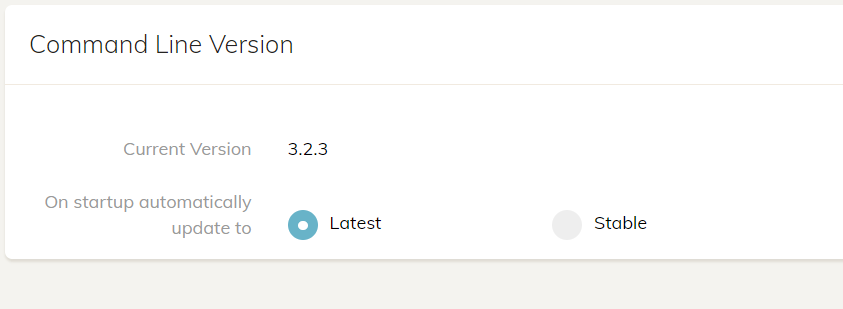
Am i looking the wroung place? Just did a "Check for updates" But no updates?
-
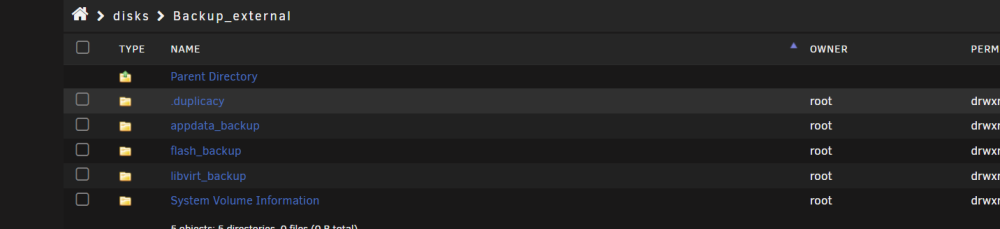
Ouh can you tell me a little more? i can see that the folders are root. So i cant change that? Do you now my options?
-
Ouh that is a good question Where can i find that? Can this help? Jan 18 09:51:02 Kratos kernel: sd 1:0:0:0: [sdb] 500118191 512-byte logical blocks: (256 GB/238 GiB) Jan 18 09:51:02 Kratos kernel: sd 1:0:0:0: [sdb] Write Protect is off Jan 18 09:51:02 Kratos kernel: sd 1:0:0:0: [sdb] Mode Sense: 47 00 00 08 Jan 18 09:51:02 Kratos kernel: sd 1:0:0:0: [sdb] Write cache: enabled, read cache: enabled, doesn't support DPO or FUA Jan 18 09:51:02 Kratos kernel: sdb: sdb1 Jan 18 09:51:02 Kratos kernel: sd 1:0:0:0: [sdb] Attached SCSI disk Jan 18 09:51:24 Kratos emhttpd: SAMSUNG_MZ7TD256HAFV-000L9_S17LNSADC18583 (sdb) 512 500118191 Jan 18 09:51:24 Kratos emhttpd: read SMART /dev/sdb Jan 18 09:52:24 Kratos unassigned.devices: Mounting partition 'sdb1' at mountpoint '/mnt/disks/Backup_external'... Jan 18 09:52:24 Kratos unassigned.devices: Mount cmd: /sbin/mount -t 'exfat' -o rw,relatime,nodev,nosuid,umask=000 '/dev/sdb1' '/mnt/disks/Backup_external' Jan 18 09:52:24 Kratos unassigned.devices: Successfully mounted '/dev/sdb1' on '/mnt/disks/Backup_external'.
-
Hi I use this wonderful plugin thanks for that! Im using it for a external SSD disk where i store my "Appdata backup" But i cant change the "owner" to "nobody" why is that? Can i change it somehow? Thanks!
-
@KluthR AH okay i just tryed to make a restore of a file in my picture folder that has "owner" nobody and that worked! When will the plugin be done and I can change it to "nobody" ?
-
HI I cant change a backup owner? Is that becurse the folder "Backup_external" is owned by root?

-
Hi sir Meny thanks! How can i test that? I can see that duplicacy container is set to USR_ID 99 and GRP_ID 100 if that say you something. I made a post here https://forums.unraid.net/topic/152827-restoring-with-duplicacy-fails-becurse-of-permissions/
-
HI all I use this nice plugin to backup all my containers Dont know if im totally off course here I do the backup to a external SSD. Everything good. But i also use duplicacy to backup the external drive to a google drive. But when i restore i get “ERROR RESTORE_CHOWN Failed to change uid or gid: lchown” Something about permissions Restoring with duplicacy fails becurse of permissions? - General Support - Unraid Dont know if i overthink this can be done with a -ignore-owner in duplicacy. But can i be that the "App data" plugin is been making the backuop with a user and when duplicacy is restoring its trying to set the owner that Appdata backup is using? Can find a good answer to this. Regards Daniel
-
HI i need a little help with duplicacy. When i try to restore a file i get this “ERROR RESTORE_CHOWN Failed to change uid or gid: lchown” Im being told in this topic that is becurse the container is been running as a specefic user. Dont know if this could help? https://medium.com/redbubble/running-a-docker-container-as-a-non-root-user-7d2e00f8ee15 I made this topic https://forum.duplicacy.com/t/restore-gui-fails-failed-to-set-the-modification-time-chtimes/8433/2 And another has the same problem https://forum.duplicacy.com/t/failed-to-change-uid-or-gid-restore-failure/6107?fbclid=IwAR3UwTViM2yyYxinvuhOCbuplD96ydLtnwxhLGITFtmp9O9i_EipM1gGnmc Any good ideas? Thanks!
-
Sorry I gort it working. It was the port config under the container
-
Hi all Im trying to make a restore test. 1: I made a share called "Restore" - Permissions I tryed changing the owner to root but no diffrence. 2: I madded the folder into duplicacy WHen a make a restore i get this “ERROR RESTORE_CHOWN Failed to change uid or gid: lchown” Im being told that it is becurse of the USR-ID nad GBR-ID. https://forum.duplicacy.com/t/restore-gui-fails-failed-to-set-the-modification-time-chtimes/8433 And the -ignore-owner is working. But why cant i do i wothout? duplicacy docker settings More info: https://forum.duplicacy.com/t/failed-to-change-uid-or-gid-restore-failure/6107?fbclid=IwAR2K0lsSz3FD0T9JK8TUbjlnG3Xk4Efv2c2ho6BTBgAUyrI_nfdK8J2lCqs 2024-02-08 17:06:15.824 ERROR RESTORE_CHOWN Failed to change uid or gid: lchown /Restore/ab_20240208_020001/my-Dozzle.xml: operation not permitted Can somebody help me do this with success? Regards Daniel


-
HI all I want to change this to use my "Costum network" but then i dont get access to the webui. It only works on "Host" somebody know why? I have alot of dockers working
-
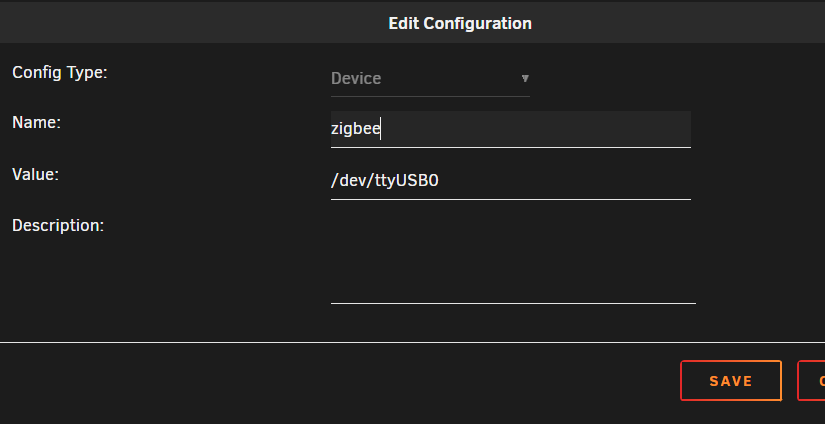
Hi Can you help me a little? I tryed to get youre "Guide" to work but HA didnt see it But after i did this it worked. But will it change after every reboot?
-
Hi all Im running Home assistant in docker. I have an USB dongel Sonoff Zigbee controller 3.0. How can i passthough the dongel to my docker? Im a little confused about all the topic and the correct way doing this. Do i need this? I can see this in the log Feb 2 15:08:31 Kratos kernel: usb 1-14: USB disconnect, device number 7 Feb 2 15:08:31 Kratos kernel: cp210x ttyUSB0: cp210x converter now disconnected from ttyUSB0 Feb 2 15:08:31 Kratos kernel: cp210x 1-14:1.0: device disconnected Feb 2 15:09:27 Kratos kernel: usb 1-14: new full-speed USB device number 8 using xhci_hcd Feb 2 15:09:27 Kratos kernel: cp210x 1-14:1.0: cp210x converter detected Feb 2 15:09:27 Kratos kernel: usb 1-14: cp210x converter now attached to ttyUSB0 Feb 2 15:36:28 Kratos kernel: usb 1-14: USB disconnect, device number 8 Feb 2 15:36:28 Kratos kernel: cp210x ttyUSB0: cp210x converter now disconnected from ttyUSB0 Feb 2 15:36:28 Kratos kernel: cp210x 1-14:1.0: device disconnected Feb 2 15:37:24 Kratos kernel: usb 1-14: new full-speed USB device number 9 using xhci_hcd Feb 2 15:37:24 Kratos kernel: cp210x 1-14:1.0: cp210x converter detected Feb 2 15:37:24 Kratos kernel: usb 1-14: cp210x converter now attached to ttyUSB0 Thanks!
-
Hi all. EDIT: I tryed connection with a JAVA edition to this. Im all new to Minecraft. I installed this great docker. Log: NO LOG FILE! - Failed to up file descriptor limit Operation not permitted NO LOG FILE! - setting up server logging... [2024-01-25 18:16:01:942 INFO] Starting Server [2024-01-25 18:16:01:942 INFO] Version: 1.20.51.01 [2024-01-25 18:16:01:942 INFO] Session ID: 6b3ab049-31f3-4e30-bbde-22549c8a0df3 [2024-01-25 18:16:01:942 INFO] Build ID: 20414424 [2024-01-25 18:16:01:942 INFO] Branch: r/20_u5 [2024-01-25 18:16:01:942 INFO] Commit ID: 62ad6027dc354090f841dd996363408bb43fdfd4 [2024-01-25 18:16:01:942 INFO] Configuration: Publish [2024-01-25 18:16:01:942 INFO] Level Name: Bedrock level [2024-01-25 18:16:01:943 INFO] No CDN config file found for dedicated server [2024-01-25 18:16:01:943 INFO] Game mode: 0 Survival [2024-01-25 18:16:01:943 INFO] Difficulty: 1 EASY [2024-01-25 18:16:01:944 INFO] Content logging to console is enabled. [2024-01-25 18:16:02:334 INFO] Opening level 'worlds/Bedrock level/db' [2024-01-25 18:16:02:892 INFO] IPv4 supported, port: 19132: Used for gameplay and LAN discovery [2024-01-25 18:16:02:892 INFO] IPv6 not supported [2024-01-25 18:16:02:902 INFO] Server started. [2024-01-25 18:16:02:902 INFO] ================ TELEMETRY MESSAGE =================== [2024-01-25 18:16:02:902 INFO] Server Telemetry is currently not enabled. [2024-01-25 18:16:02:902 INFO] Enabling this telemetry helps us improve the game. [2024-01-25 18:16:02:902 INFO] [2024-01-25 18:16:02:902 INFO] To enable this feature, add the line 'emit-server-telemetry=true' [2024-01-25 18:16:02:902 INFO] to the server.properties file in the handheld/src-server directory But i cant connect? It is on my LAN. Meny thanks!

-
Thanks! That did the trick
-
Ouh i got the ecact same problem
-
DId the update and no problems. I also disabled login for lan. I have a pretty strong pw
-
I havent updated for a long time becurse of the admin webui error. Is it safe to upgrade? I use admin/"MYWONPW"
-
HI all I want to use photosync to upload my pictures. And i think the best solution is to use FTP. But the build in FTP server is not very configurable. What is the best docker for this? I want to only share this folder on the FTP (Only on LAN) /mnt/user/data/media/pictures but how can i only share this? Thanks!
-
HI and thanks for this! I tryed making a script with this: "#!/bin/bash docker exec PhotoPrism photoprism index --cleanup" But it dosent run? I tryed running it and it run fine? Log: Script Starting Dec 07, 2023 21:47.01 Full logs for this script are available at /tmp/user.scripts/tmpScripts/PhotoPrism Index/log.txt time="2023-12-07T21:47:03+01:00" level=info msg="Become a member today, support our mission and enjoy our member benefits! 💎" time="2023-12-07T21:47:03+01:00" level=info msg="Visit https://www.photoprism.app/membership to learn more." time="2023-12-07T21:47:03+01:00" level=info msg="indexing originals in /photoprism/originals" time="2023-12-07T21:47:03+01:00" level=info msg="classify: loading nasnet" time="2023-12-07T21:47:06+01:00" level=info msg="classify: loading labels from labels.txt" time="2023-12-07T21:47:06+01:00" level=info msg="index: found no .ppignore file" time="2023-12-07T21:47:06+01:00" level=info msg="metadata: 20230415_161418.jpg has time offset UTC+2 (exiftool)" time="2023-12-07T21:47:06+01:00" level=info msg="metadata: 20230415_161418.jpg has time offset UTC+2 (exiftool)" time="2023-12-07T21:47:07+01:00" level=info msg="metadata: 20230805_103958.jpg has time offset UTC+2 (exiftool)" time="2023-12-07T21:47:07+01:00" level=info msg="metadata: 20230805_103958.jpg has time offset UTC+2 (exiftool)" time="2023-12-07T21:47:07+01:00" level=info msg="media: created 11 thumbnails for 20230415_161418.jpg [971.776134ms]" time="2023-12-07T21:47:08+01:00" level=info msg="faces: loading facenet" time="2023-12-07T21:47:08+01:00" level=info msg="media: created 11 thumbnails for 20230805_103958.jpg [1.020408965s]" time="2023-12-07T21:47:08+01:00" level=info msg="media: 20230805_103958.jpg was taken at 2023-08-05 10:39:59.053 +0000 UTC (meta)" time="2023-12-07T21:47:09+01:00" level=info msg="index: found 1 face in 20230415_161418.jpg [1.279918588s]" time="2023-12-07T21:47:09+01:00" level=info msg="media: 20230415_161418.jpg was taken at 2023-04-15 16:14:18.455 +0000 UTC (meta)" time="2023-12-07T21:47:12+01:00" level=info msg="index: added main jpg file 20230805_103958.jpg" time="2023-12-07T21:47:12+01:00" level=info msg="index: matched 2 labels with 20230415_161418.jpg [3.373451468s]" time="2023-12-07T21:47:12+01:00" level=info msg="index: added main jpg file 20230415_161418.jpg" time="2023-12-07T21:47:12+01:00" level=info msg="index: updated 2 files [8.609189675s]" time="2023-12-07T21:47:12+01:00" level=info msg="cleanup: removed 0 index entries and deleted 0 sidecar files [354.405µs]" time="2023-12-07T21:47:12+01:00" level=info msg="cleanup: searching for orphaned cache files" time="2023-12-07T21:47:12+01:00" level=info msg="cleanup: deleted 19 files from cache [2.639866ms]" time="2023-12-07T21:47:12+01:00" level=info msg="cleanup: deleted 19 files in total [4.660941ms]" time="2023-12-07T21:47:12+01:00" level=info msg="indexed 7 files in 8.657699195s" Script Finished Dec 07, 2023 21:47.12 Full logs for this script are available at /tmp/user.scripts/tmpScripts/PhotoPrism Index/log.txt

-
I had to use "Host" to get it working. Dont know why?
-
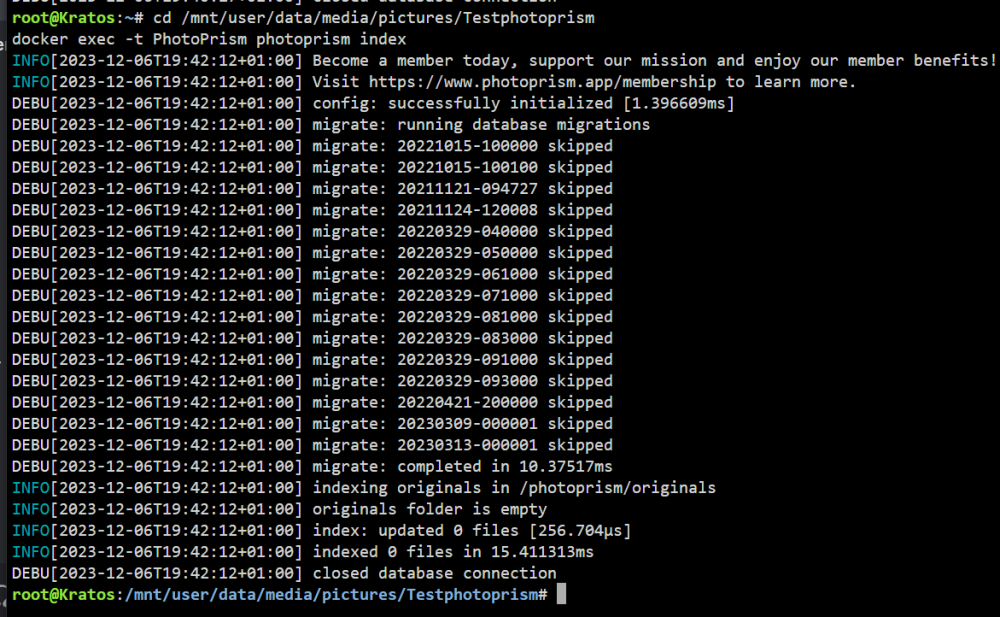
Okay my command above does not work So i tryed youre script. But i dont understand why it is not removing the 3 files i deleted though SMB in my "test" path
-
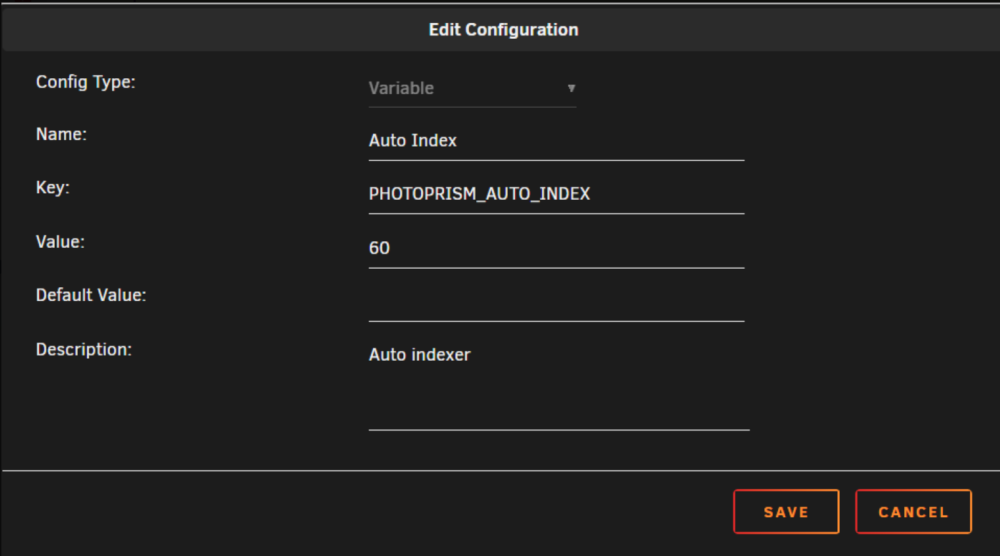
I also swt the Photoprism to my costum network but didnt work. Then i changed it to host now it works. Im struggeling with 2 things and it is hard getting help How can i make 2 users in CLU? docker compose exec photoprism photoprism users add -p BLABLA -n "Daniel" Daniel https://docs.photoprism.app/user-guide/users/cli/ And how can i setup auto index? This dosent work. Any good ideas?