





Mainfrezzer
Members
-
Joined
-
Last visited
Everything posted by Mainfrezzer
-
im not quite sure why you want volatile backups of volatile files on the same machine. You can just set the interval to 0, which disables all the backup functionality and you achieve the same. Although do be aware that without backups or that double RAM "backup" idea, any crash of the system will result in containers, that have been installed post array start, going missing, since theres no information about them. The whole backup is basically just a "docker integrity" mechanism that at worse, you only use an hour of changes.
-
you probably logged into ghcr.io with docker at some point and the token ran out/permissions arent right. docker logout ghcr.io
-
You forgot to update the container path in the template, its still pointing towards /mnt/user/appdata/pelican-wing/data for /mnt/cache/OnyxHosting/pelican-wing/data
-
You need to set the trusted proxies in the settings of the panel
-
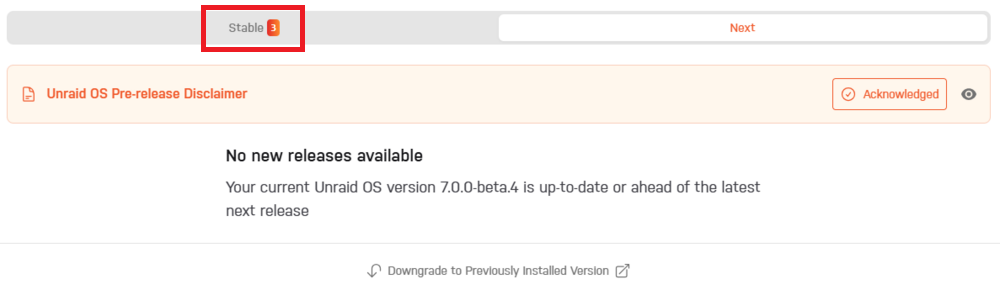
click there and you see the stable versions to update to
-
Set in the panel 443 not 8443 (the notice there doesnt make any sense https://developers.cloudflare.com/network/websockets/) For your wing, depending on your configuration you probably have to set it like this Set the config.yml to 8080 and point your cloudflare tunnel to unraidip and the port you picked here If you point the cloudflare tunnel directly at the wing container ip, you can leave the config.yml at what it is currently and then point your cloudflare tunnel at wingcontainerip:port from the config.yml

-
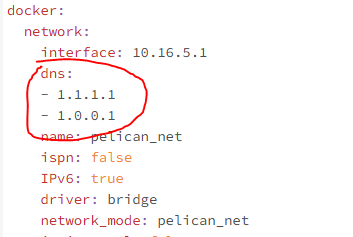
i did test it on 3 different machines with 2 different isps now. Its all the same, wether its cloudflare as dns, my dns or a dns with lancache on the same machine as the wing is running on. The only difference that is tangible is wether or not you have exclusive shares enabled in unraid on the relevant disks (i.e lancache and docker) and thats only for the preallocation of diskspace. I test downloaded ark surival ascended and with exclusive shares it was done in seconds while without it, it took minutes. (or instead of exlusive shares direct mount to disk i.e. /mnt/cache/appdata instead of /mnt/user/appdata) *The tested machines range from a toaster with a celeron n3000 over a j4125 and a 14100, all with a ssd pool as target. The lancache and dns in question was done by this lxc container https://github.com/Mainfrezzer/unraid_lxc_alpine_adguardcould you elaborate what you mean by "worse than normal"? I would suspect that either the dns works or it doesnt when you define it. So i dont think the dns part is the issue or is it? What does the dns say on requests? What does the lancache log say about access and caching? Edit: Your lancache doesn't happen to download to the same disk as the docker container, does it?just replace the dns entries in the wing config.yml with your dns server that has the lancache info
 thats good, the question is, can your unraid server? If it does, then i would chuck it up as just temporary issue. clearing the cache should fix it as evidently, there isnt an issue *anymore* Edit: But theres still the posibility that github just ratelimits you, for god knows why. In the last couple days i personally had issues accessing repos so could be just that too. Who knows. Edit2: Well, i shouldnt have mentioned it i guess 🙈
 that one in particular is in fact an image of a question mark. This one is the zfs-master one, that shouldnt be a question mark https://raw.githubusercontent.com/IkerSaint/ZFS-Master-Unraid/main/zfs.master/images/zfs.master.pngif you want to keep the default save location as it is (which isnt a bad idea) you can just create a path mapping via the unraid template like this
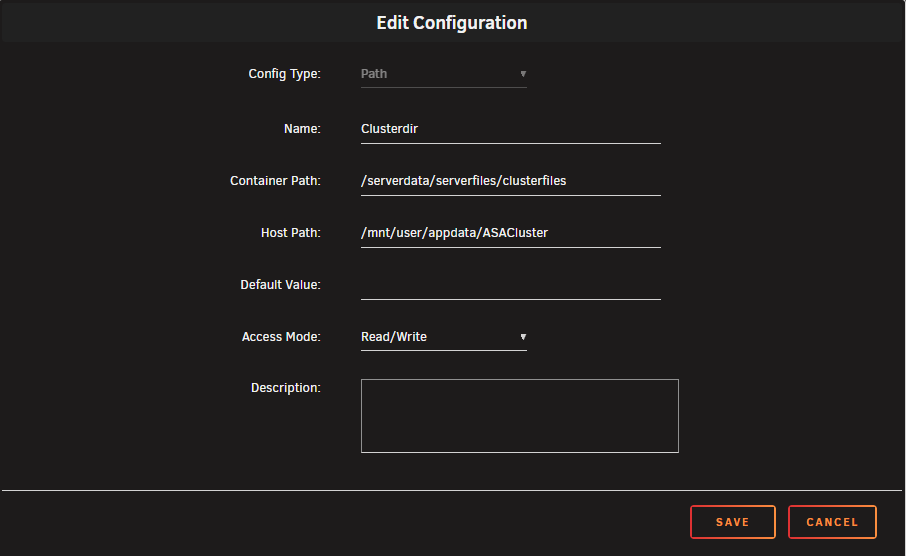 its the same as it was in ARK:SE With "-ClusterDirOverride=/serverdata/serverfiles/clusterfiles" (this should be the default) in the "Extra Game Parameters" you can select where wthin the container filepath you want the cluster storage to be.Oh okay, i was made aware of that recently but i still dont have a good solution for that issue yet. Could you use this as your config.yml, that should solve that problem. You just need to fill your own uuid, token_id and token, also change the timezone to match yours. debug: false uuid: TO BE FILLED token_id: TO BE FILLED token: TO BE FILLED api: host: 0.0.0.0 port: 8080 ssl: enabled: false cert: /etc/letsencrypt/live/192.168.0.160/fullchain.pem key: /etc/letsencrypt/live/192.168.0.160/privkey.pem disable_remote_download: false upload_limit: 256 trusted_proxies: [] system: root_directory: /mnt/user/appdata/pelican-wing log_directory: /mnt/user/appdata/pelican-wing/log data: /mnt/user/appdata/pelican-wing/data archive_directory: /mnt/user/appdata/pelican-wing/data/archives backup_directory: /mnt/user/appdata/pelican-wing/data/backups tmp_directory: /tmp/pelican username: nobody timezone: Europe/Berlin user: rootless: enabled: false container_uid: 0 container_gid: 0 uid: 99 gid: 100 mount_passwd: true passwd_file: /etc/passwd disk_check_interval: 150 activity_send_interval: 60 activity_send_count: 100 check_permissions_on_boot: true enable_log_rotate: true websocket_log_count: 150 sftp: bind_address: 0.0.0.0 bind_port: 2022 read_only: false crash_detection: enabled: true detect_clean_exit_as_crash: true timeout: 60 crash_detection_activity_lines: 2 backups: write_limit: 0 compression_level: best_speed remove_backups_on_server_delete: true transfers: download_limit: 0 openat_mode: auto docker: network: interface: 10.16.5.1 dns: - 1.1.1.1 - 1.0.0.1 name: pelican_net ispn: false IPv6: false driver: bridge network_mode: pelican_net is_internal: false enable_icc: true network_mtu: 1500 interfaces: v4: subnet: 10.16.5.0/24 gateway: 10.16.5.1 domainname: "" registries: {} tmpfs_size: 100 container_pid_limit: 512 installer_limits: memory: 1024 cpu: 100 overhead: override: false default_multiplier: 1.05 multipliers: {} use_performant_inspect: true userns_mode: "" log_config: type: local config: compress: "false" max-file: "1" max-size: 5m mode: non-blocking throttles: enabled: true lines: 2000 line_reset_interval: 100 remote: 'http://192.168.0.160' remote_query: timeout: 30 boot_servers_per_page: 50 allowed_mounts: [] Search: blacklisted_dirs: - node_modules - .wine - appcache - depotcache - vendor max_recursion_depth: 8 BlockBaseDirMount: true allowed_origins: [] allow_cors_private_network: false ignore_panel_config_updates: falsewithout the log a bit hard to say but if its a couple seconds afterwards its most likely the missing config.yml
 this isnt an issue with unraid, the issue is that the author deleted the repos. (this is only counting for enhanced.log, file.activity, libvirt.hotplug.usb and open.files) The libvirt.hotplug.usb does still exist as repo but the overall template repo is gone so, yeah.config.zipYeah, absolutelyNo, the amount of lanes are only important for feeding the GPU/vram with lots and lots of data quickly. Transcoding basically needs nothing in that regard. If you run something like games (although it doesn't matter there in the most cases either) or LLM, that would matterreads are free on flash based storage, writing is wearing it.You need to enable host access in the docker config if you try to access the pi hole from unraid itself. By default it's a security feature of docker to not allow host to container communication on Mac/ipvlanIntentional, for changing ipv4 and ipv6 addresses, it's in the release notes I'm sureOh, you're right. I should add that to the search term. "Ram disk" would have worked 😄


