





Mainfrezzer
Members
-
Joined
-
Last visited
Everything posted by Mainfrezzer
-
7 starts fine with #!/bin/bash # Start the Management Utility /usr/local/sbin/emhttp not sure what youre looking for the only change that happened was the removal of the & at some point
-
7.0.0 # ------------------------------------------------- # RAM-Disk for Docker json/log files v1.6 for 7.0.0 # ------------------------------------------------- # check compatibility echo -e "5c359d63bcbd1e44299c8c9bafae7776 /etc/rc.d/rc.docker\n599b889ae544489329bfa813fd6e3765 /usr/local/emhttp/plugins/dynamix/scripts/monitor" | md5sum --check --status && compatible=1 if [[ $compatible ]]; then # create RAM-Disk on starting the docker service sed -i '/nohup/i \ # move json/logs to ram disk\ rsync -aH --delete /var/lib/docker/containers/ ${DOCKER_APP_CONFIG_PATH%/}/containers_backup\ mountpoint -q /var/lib/docker/containers || mount -t tmpfs tmpfs /var/lib/docker/containers || logger -t docker Error: RAM-Disk could not be mounted!\ rsync -aH --delete ${DOCKER_APP_CONFIG_PATH%/}/containers_backup/ /var/lib/docker/containers\ logger -t docker RAM-Disk created' /etc/rc.d/rc.docker # remove RAM-Disk on stopping the docker service sed -i '/tear down the bridge/i \ # backup json/logs and remove RAM-Disk\ rsync -aH --delete /var/lib/docker/containers/ ${DOCKER_APP_CONFIG_PATH%/}/containers_backup\ umount /var/lib/docker/containers || logger -t docker Error: RAM-Disk could not be unmounted!\ rsync -aH --delete ${DOCKER_APP_CONFIG_PATH%/}/containers_backup/ /var/lib/docker/containers\ logger -t docker RAM-Disk removed' /etc/rc.d/rc.docker # Automatically backup Docker RAM-Disk sed -i '/^<?PHP$/a \ $sync_interval_minutes=30;\ if ( ! ((date("i") * date("H") * 60 + date("i")) % $sync_interval_minutes) && file_exists("/var/lib/docker/containers")) {\ exec("\ [[ ! -d /var/lib/docker_bind ]] && mkdir /var/lib/docker_bind\ if ! mountpoint -q /var/lib/docker_bind; then\ if ! mount --bind /var/lib/docker /var/lib/docker_bind; then\ logger -t docker Error: RAM-Disk bind mount failed!\ fi\ fi\ if mountpoint -q /var/lib/docker_bind; then\ rsync -aH --delete /var/lib/docker/containers/ /var/lib/docker_bind/containers && logger -t docker Success: Backup of RAM-Disk created.\ umount -l /var/lib/docker_bind\ else\ logger -t docker Error: RAM-Disk bind mount failed!\ fi\ ");\ }' /usr/local/emhttp/plugins/dynamix/scripts/monitor else logger -t docker "Error: RAM-Disk Mod found incompatible files: $(md5sum /etc/rc.d/rc.docker /usr/local/emhttp/plugins/dynamix/scripts/monitor | xargs)" fi Nothing has changed since the beta 3 -> rc-2 script. Just reposting it as it supersedes the 6.12.14 one
-
Docker is operating on Unraid, not the Wings Container. It doesnt have access to what you map inside the Wings container. If you would mount "/mnt/server/gameservers/ark/mods/" & "/mnt/server/gameservers/ark/arksecluster/", that would work. Edit: to be a bit more precise, You can map 1:1, as i did with the Pelican - Data for example. Host: "/mnt/server/gameservers/ark/mods/" Container: "/mnt/server/gameservers/ark/mods/" Although, im not sure if you really need to mount the paths into the Wing Container first, although could be. The Panel mount options should look like Source: /mnt/server/gameservers/ark/mods/ target: /mods Source: /mnt/server/gameservers/ark/arksecluster/ target: /arksecluster
-
The Docker bar has nothing to do with RAM at all. Its space usage of your docker.img/drive your docker folder is on Edit: Exhibit A


-
I would say, theoretically it would work. Your only issue is, and thats coming from the page you linked, "Mounts cannot be mounted to or inside of /home/container or any subdirectory of it" All gameserver files are stored in /home/container of each gameserver. Now if pelican will prevent you from doing so, i have no clue. You would have to try that out
-
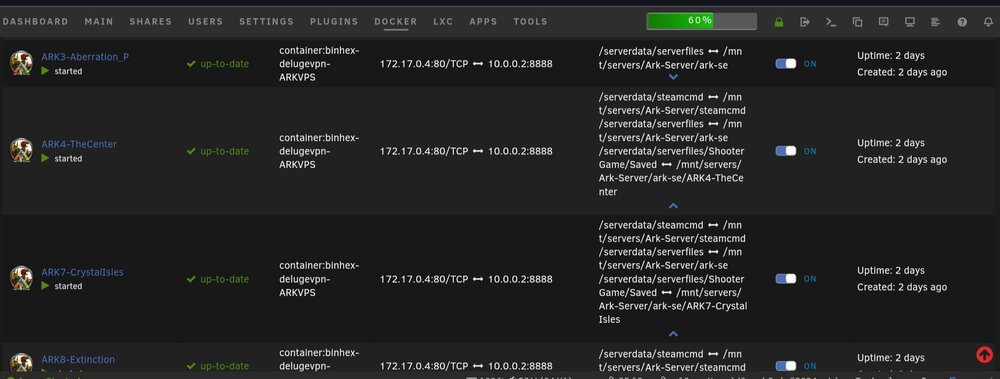
Yeah it would be possible but its a pain in the butt because of the nature of it. You have have to sync the plugins/mods all by hand because of the uid system. It's meant mainly for individual servers for different users. If you wanna run a whole stack of servers with the same setup, the gameserver container from ich777 would be more fitting. I've a bunch of servers running of 1 install for example
-
Unraid, if unraid is the docker host for the wing container.
-
your torrent client (qbittorrent-nox) looks like it its having a fun time with ram usage. Limit its ram allowance so it gets killed before the server runs out of ram or have a look at another solution.
-
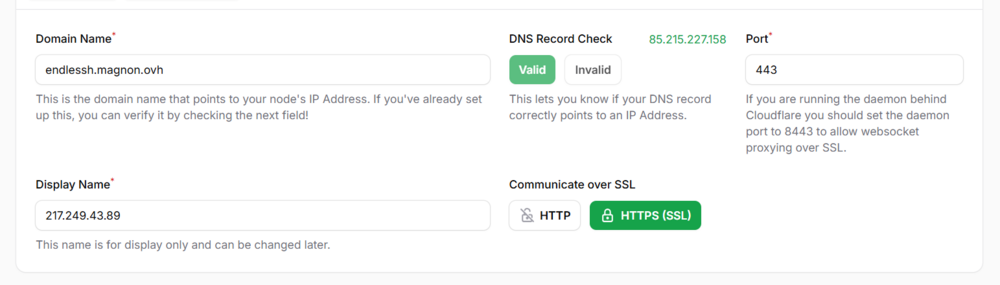
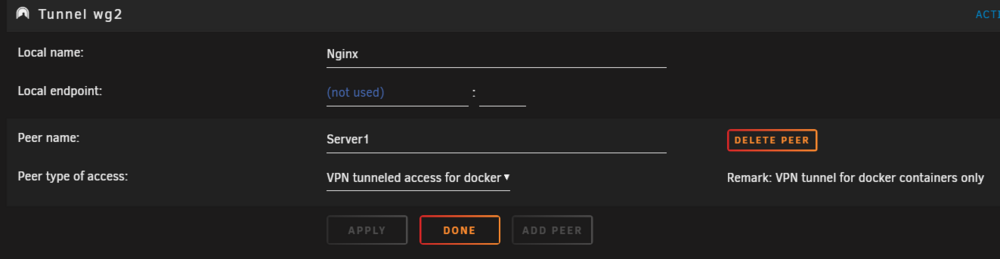
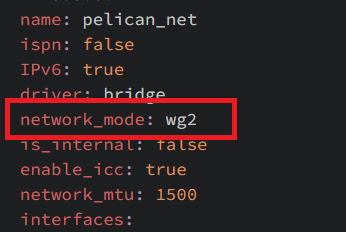
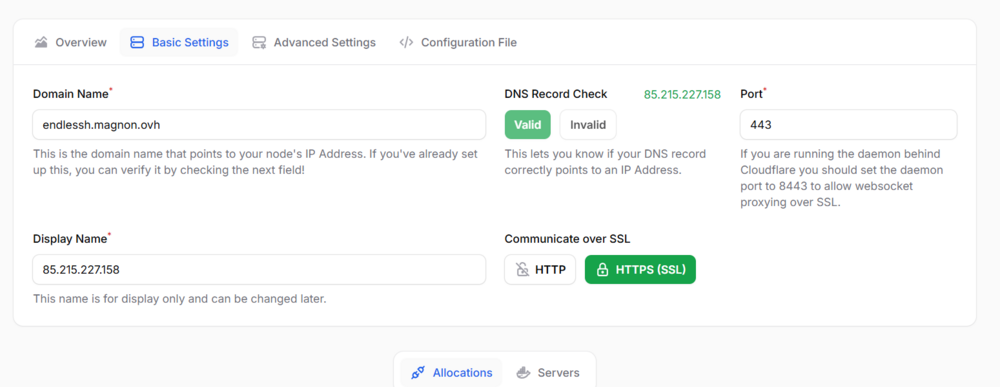
Of course. Im gonna outline the 2 common processes in case someone else needs it at some point too. First: The "home" way. This will use your Public Home IP to be able to join the game servers. The Panel and Wing are still behind the Proxies. In case you have a static ipv4, you can just enter your own home public ip4 in the alias Parts. This will display your own ipv4 throughout the UI. (The same applies to the sFTP option thats available) Once you finished adding the allocations, you need to open the ports in your router/firewall to enable people to join the servers via your home ipv4 address. Second: The "VPS Tunnel" way. For that, you idealy have a cheap VPS somewhere. On the VPS you ideally install wireguard and docker*. Docker we can use for the Proxy, you could skip that part when you use Cloudflare but overall it would make things "simpler" since the DNS entries for the domains point towards the correct IP but its absolutely not needed. *Docker is not needed and "only" needed if you wanna use your own reverse proxy. After you setup Wireguard on the VPS (theres a lot of guides for all the distros Providers offer), you add the wireguard client config to Unraid. Specifically for VPN tunneled access for docker Little warning: If you are NOT on Unraid 7 RC-2, this WILL have issues with Minecraft specifically (maybe some others too). Its fixable and i will absolutely help sorting that out. At this point, if the wireguard tunnel is working, all you need to think about are the port allocations you want to use since we need to add routing rules to the wireguard config on the VPS, so that the traffic, that arrives at the VPS gets routed to the UnRaid server. (the server might have a seperate firewall where you need to open the ports too) This is an example for an Ubuntu VPS and a Ark Survival Evolved Gameserver. PreUp = iptables -t nat -A PREROUTING -i ens6 -p udp --dport 7777 -j DNAT --to-destination 10.123.0.2:7777 PostDown = iptables -t nat -D PREROUTING -i ens6 -p udp --dport 7777 -j DNAT --to-destination 10.123.0.2:7777 PreUp = iptables -t nat -A PREROUTING -i ens6 -p udp --dport 7778 -j DNAT --to-destination 10.123.0.2:7778 PostDown = iptables -t nat -D PREROUTING -i ens6 -p udp --dport 7778 -j DNAT --to-destination 10.123.0.2:7778 PreUp = iptables -t nat -A PREROUTING -i ens6 -p udp --dport 27015 -j DNAT --to-destination 10.123.0.2:27015 PostDown = iptables -t nat -D PREROUTING -i ens6 -p udp --dport 27015 -j DNAT --to-destination 10.123.0.2:27015 This takes the incomming connections of udp port 7777,7778,27015 and sends them to the wireguard client ip of unraid, in this case 10.123.0.2 All that is needed on the Pelican Wing side of things, is one single change in the config.yml. The network_mode needs to be changed to the interface that the "wireguard tunnel for docker" is. This ensures all gameserver containers are hooked up to the vpn and their traffic is routed over it. Edit: Before i forget, the wireguard config on the server should include the following, again, Ubuntu example PreUp = iptables -t nat -A POSTROUTING -o ens6 -j MASQUERADE PostDown = iptables -t nat -D POSTROUTING -o ens6 -j MASQUERADE to ensure that all the gameservers can communicate with the "outside" world.
-
It depends. it can be as simple as adding "-mods=" to the runtime or it can be a pain in the butt if you try to run the AsaApi thingy
-
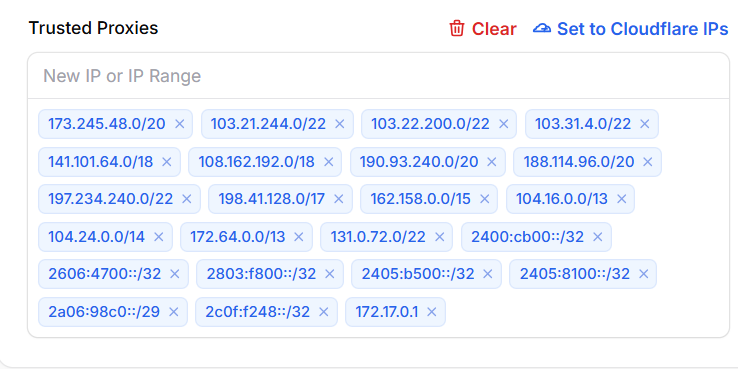
Im pretty sure that i solved the issue now. At least my tests with a cloudflare tunnel were successfull. i also tested nginx. in case its still not working, add the cloudflare ips to the trusted proxies under settings and in case you funnel it over unraid, include the unraid docker ip as well. In my case, its enought to set "172.17.0.1" on the trusted IP list. I just have the cloudflare tunnel container (172.17.0.5) directed at 172:17.0.1:800. I would reckon that for the public proxy, you have to add the public ips. also, its no longer running over caddy. If something pops up thats not working, yell at me. 😅
-
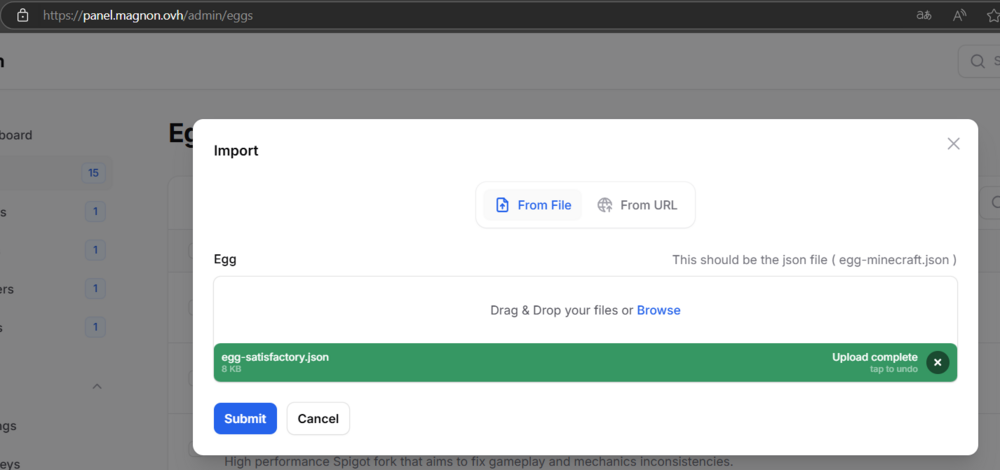
@Dr0on you can download the container with the tag "expbeta16" i.e. mainfrezzer/pelican-panel:expbeta16 Edit: its fixed with the newest update I know kind of whats causing this but will need some time to come up with a permanent solution to that problem. Also exists in the official build/container.
-
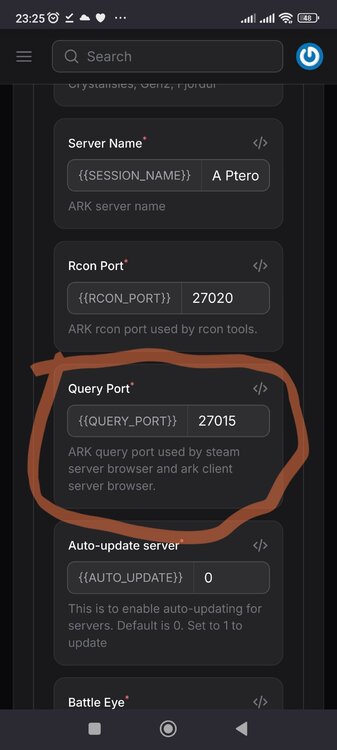
I need to check that, i do have the issue with the json upload too. Ill get back to that tomorrow. Thats an issue with steam games, you need change the query port from 27015 to 7777 To the IP part, thats normal. Its a bridge network. The containers are not getting tunneled over the wing container. You can make use of unraids feature for wireguard Tunnels for dockers with pelican, so you can expose the gameservers over a vps for example.
-
You could have a look at "Sunshine"https://app.lizardbyte.dev/Sunshine/?lng=en
-
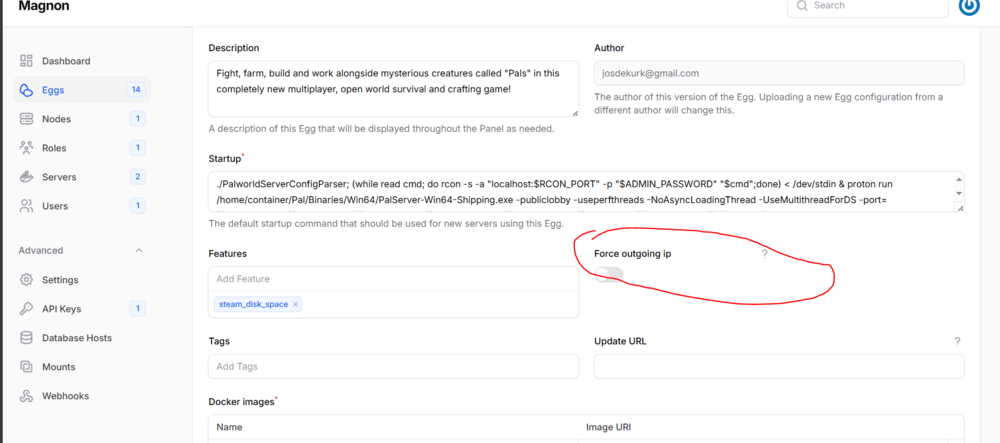
Im intrigued now. Could you share your webpanel settings for that node and the config.yml? of course, stip the uuid: token_id: token: and any other personalized info from it Also. does the Egg youre using have a "force_outgoing_ip" option? Edit: Turn this off in the Eggs @Gorden
-
Nen instant reboot geht auch via Terminal, solange das noch funktioniert echo b > /proc/sysrq-trigger Den Powerknopf gedrückt halten tuts auch^^
-
depends what version you have, there were some issues with docker in the early 6.12.x versions, otherwise, i personally have only encountered this issue when the server ran out of memory.
-
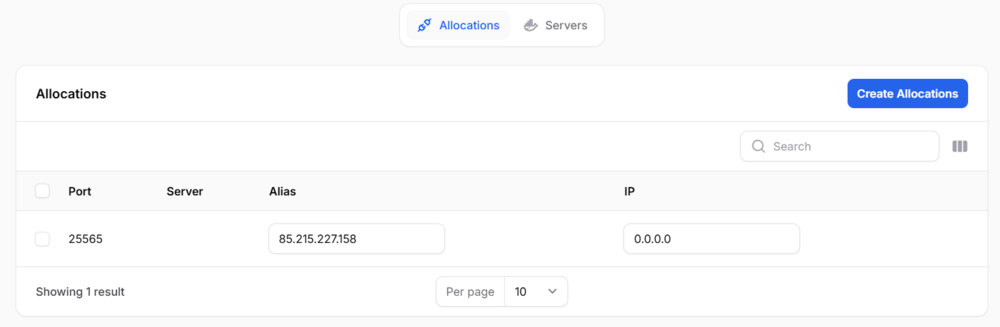
i did poke in the files and found a reference to the weird ip- network that popped up. But i havent found under which circumstances that interface gets created. if a.ForceOutgoingIP { enableIPv6 := false // define a bool variable e.log().Debug("environment/docker: forcing outgoing IP address") networkName := "ip-" + strings.ReplaceAll(strings.ReplaceAll(a.DefaultMapping.Ip, ".", "-"), ":", "-") networkMode = container.NetworkMode(networkName) But how you triggered that, is a mystery to me at this point in time but it seems it has something to do with the way allocations are handled. Edit: i would set the allocations like i did in this screenshot at the bottom of the post
-
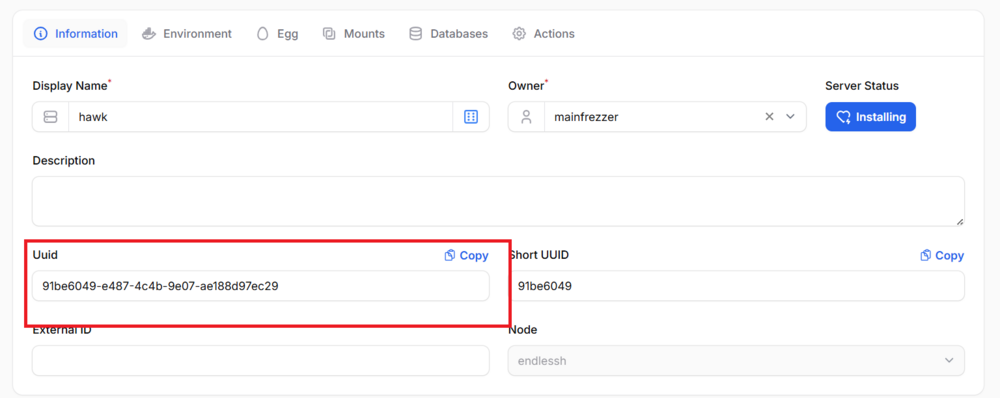
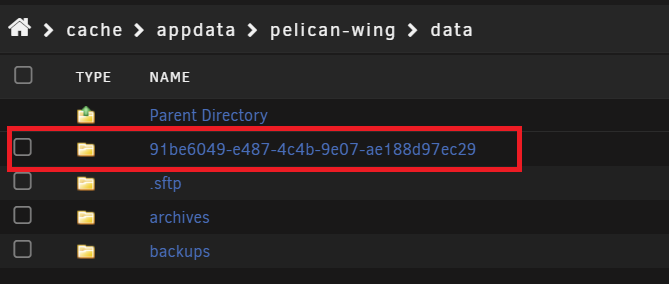
restoring the progress should be as simple as copying the files from the old location to the new. But how you ended up with that new strange interface and a completely new uuid, thats a mystery to me.
-
It depends how youre running the container and how the vpn connection is made. I havent messed around with Tailscale at all so i cant say anything about the integration part of it. Generally i would assume, once you added the Adguard container to the tailscale network, its as simple as to declare that tailscale ip as DNS Server(if you didnt limit the listening interfaces to a single one) That seems very odd. The network infos are all stored in the Wing Appdata location "/mnt/cache/appdata/pelican-wing/etc/pelican" in the config.yml. This would be the container default. docker: network: interface: 10.16.5.1 dns: - 1.1.1.1 - 1.0.0.1 name: pelican_net ispn: false IPv6: true driver: bridge network_mode: pelican_net is_internal: false enable_icc: true network_mtu: 1500 interfaces: v4: subnet: 10.16.5.0/24 gateway: 10.16.5.1 v6: subnet: fd00:10:16:5::/64 gateway: fd00:10:16:5::1011 Given that the game progress vanished, it seems like something "bad" happened, since the container infos are stored by guid Did you change anything about the locations after you first set up the container?
-
Da wäre ich überfragt. Bei mir hat es einfach gereicht die Karte auf "on" zusetzen um den Fehler los zu werden. Ich hab aber auch nicht die Firmware verändert, ist noch die drauf, mit der sie zu mir kam.
-
Nicht auf dem PCIe Root Bus anwenden sondern auf die ASM1166 Deshalb sagte ich ja ändern je nach System. /pci/devices/0000:01:00.0/ ist die ASM1166 bei mir. Edit: So sieht das ganze bei mir in der Go File aus (ich benutze kein "powertop --auto-tune") # Runtime PM for PCI devices echo auto | tee /sys/bus/pci/devices/????:??:??.?/power/control echo on | tee /sys/bus/pci/devices/0000:01:00.0/power/control echo on | tee /sys/bus/pci/devices/0000:02:00.0/power/control 1:00.0 Ist die ASM1166 2:00.0 ist in dem Fall mein NIC

-
For the Glad the first thing was solved. The allocation part is a bit unintuitive, i would say. Just pick any ip and after you added them, you can do the following 0.0.0.0 ensures the gameserver is listening to all interfaces and can actually start and not complain about not being able to bind to that ip address and the alias, is what is shown everywhere in the ui. So you can pick what address is to be shown.
-
It depends, if you want your UnRaid server to use the PiHole then yes. I personally wouldnt recommend it, since it will be a Chicken Egg Problem. Although doable with static DNS Server. First DNS your pihole, second a external one. Also VPN connections are a bit more "involved" with that setting enabled.
-
Die ASM1166 bleiben dann halt an und schalten sich nicht aus, an den C-States ändert das nix. Aber der PCIe Root Port hört wenigstens auf zu meckern.








