





Mainfrezzer
Members
-
Joined
-
Last visited
Everything posted by Mainfrezzer
-
Das ist schon mal gut, die Dateien sollten ja dann nicht mehr da sein. Funktioniert es denn jetzt nach dem erneuten speichern im GUI?
-
Okay, dann hab ich die Vermutung dass da mal was schief gelaufen ist Das sieht mir nämlich nach 2x videoschnitt aus. Während man auf der Einstellungsseite für das videoschnitt-Share ist, einmal das Webterminal in Unraid öffnen, das eingeben um die beiden Dateien zu löschen und dann anschließend erneut speichern. rm /boot/config/shares/videoschnitt.cfg && rm /boot/config/shares/Videoschnitt.cfg

-
Einfach hier erneut Apply drücken Halt in den "Comments" kurz ne 1 rein, wieder rausnehmen und dann wird "Apply" orange.
-
Wenn das Unraid Patch Plugin installiert ist, hilft der Patch für 7.0.0. Mover hat nen Bug mit Leerzeichen. Ansonsten, falls man das Patch Plugin nicht benutzt. Abwarten bis zum nächsten Release oder den Ordner umbenennen damit keine Leerzeichen bleiben Edit: Ich sehe gerade, die Konfigdatei für videoschnitt ist leer. Bitte einmal erneut im GUI speichern. (I.e. einmal kurz irgendwo mal ne "1" setzen, wieder rausnehmen und dann kann man speichern.)
-
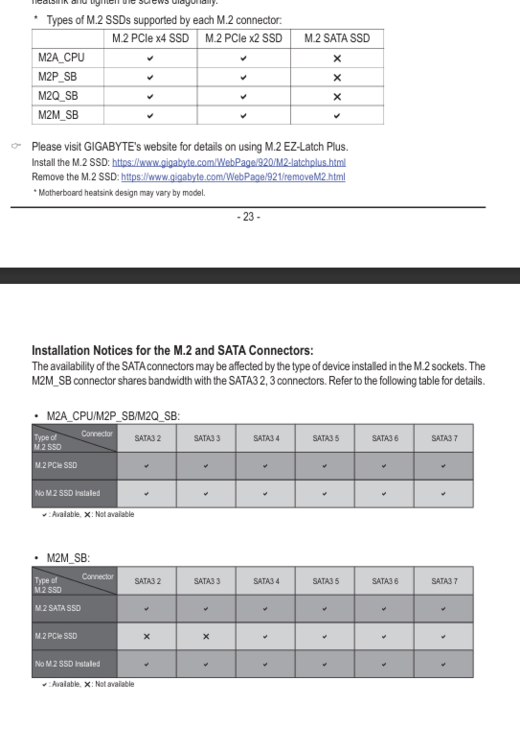
Würde fast die Behauptung aufstellen dass jedes z97 Board, welches NVMe-Support hatte, das Problem hat. (wobei ich mir sicher bin dass da nen paar m.2 Sata auch bei sind, die das Problem haben) Ganz spezifisch kann ich das Asus z97-Pro Gamer benennen Edit: Übrigens, OP benutzt ein 13900, Gigabyte Z790 Gaming X, 64GB DDR 5 RAM, 6xHDD + 3xNVME
-
put a "/" behind appdata
-
you can change the path from "/mnt/user/appdata/kiwix-serve/" to where you want to store the files For example /mnt/user/SHARE/data/kiwix/ or something The container itself is stored under "/mnt/user/system/docker", probably, most likely. As all docker images are.

-
you must have something scheduled that starts that container at 4:40 and turns off after its done whatever its doing. But what that container is and what that container does 🤷♂️ There isnt anything else in there, at that time, that suggest any issue with networking.
-
those messages just let you know that a container started and stopped. Otherwise without any diagnostics, its akin to fortune telling
-
Theres a fix in the comments of it. https://github.com/timothymiller/cloudflare-ddns/issues/202
-
It should usually take the whatever is set in Settings -> Management Access because its fetching the info from the "NGINX_DEFAULTURL" in /usr/local/emhttp/state/nginx.ini
-
Its a default kernel feature. https://docs.kernel.org/admin-guide/pm/cpufreq.html kernel.org/doc/Documentation/cpu-freq/governors.txt
-
Das liegt an der ausgeschalteten Brücke. Dann benutzt Unraid eth0 und vhost0. vhost0 wird die andere macadresse sein. Edit: ach ich sehe gerade das die Brücke doch benutzt wird, allerdings mit Host Zugriff angeschaltet, dann ist es shim-br0
-
Jedes mal ist das ja nun nicht. Das beste ist, man legt das ganze vorher an, mit clients etc, ändert es dann manuell und dann muss man sich darum nicht mehr kümmern^^ Weil realistisch gesehen, wie oft und wie vielen Clients gibt man schon unbegrenzten Zugriff aufs gesamte Heimnetzwerk inkl. Internet. Wird ja wohl höchstens 1, 2 vielleicht 3 Clients sein. Laptop und Smartphone oder so. Für das meiste reichen ja point-to-point Verbindungen(ich weiß gerade nicht wie die im deutschen UI heißen, glaube Server zu Server?!)
-
Ich werte das mit dem Host-Zugang dann mal als "ja". Tunnel stoppen im Gui. Manuell die Dateien, für den Tunnel auf den USB-Stick ändern, speichern und im GUI den Tunnel wieder starten. Jede Änderung die im GUI danach durchgeführt wird, löscht die Modifizierung wieder. Um es kurz auf deutsch zusammenzufassen. Die Einträge müssen, für wg0, welcher ja der Tunnel-Zugang ist, von br0 auf shim-br0 gewechselt werden.
-
Wurde "Host-Zugang zu benutzerdefinierten Netzwerken" aktiviert? Läuft das Netzwerk über br0 oder eth0 mit vhost0?
-
Since the issue made it to the stable, im gonna leave it here and close the prerelease issue for it Edit: There is a bit more to the display issue with the height set to fixed. Like, somebody wants to escape the browser window 🫣
-
If its any similar to jellyfin, youre really out of luck . In jellyfin, as soon as a user is logged in(iirc correctly a firetv stick that tries to connect constantly also cause this, been a while since that device acted up), it constantly modifies the database. keeping tabs on on the user and playback and stuff like that. You could move your database in ram but while possible, its absolutely not recommended^^ Edit: if you *really* want to do this, well you would have to go with the manual modification from this thread and change the following lines PLEXPATH_HERE & DATABASE_PATH_HERE should be the plex folder, /mnt/user/appdata isnt needed to add, so just "/plex/database" /dev/shm/plexdb is just randomly chosen by me. All you would have to do is map the docker mapping for the database from /mnt/user/appdata/plex/database to /dev/shm/plexdb BUT BIG FAT BEWARE if your server goes off for any reason and is not properly shutdown, the database is gone. DO THIS AT YOUR OWN RISK # ------------------------------------------------- # RAM-Disk for Docker json/log files v1.6 for 7.0.0 # ------------------------------------------------- # check compatibility echo -e "5c359d63bcbd1e44299c8c9bafae7776 /etc/rc.d/rc.docker\n599b889ae544489329bfa813fd6e3765 /usr/local/emhttp/plugins/dynamix/scripts/monitor" | md5sum --check --status && compatible=1 if [[ $compatible ]]; then # create RAM-Disk on starting the docker service sed -i '/nohup/i \ # move json/logs to ram disk\ rsync -aH --delete /var/lib/docker/containers/ ${DOCKER_APP_CONFIG_PATH%/}/containers_backup\ mountpoint -q /var/lib/docker/containers || mount -t tmpfs tmpfs /var/lib/docker/containers || logger -t docker Error: RAM-Disk could not be mounted!\ rsync -aH --delete ${DOCKER_APP_CONFIG_PATH%/}/containers_backup/ /var/lib/docker/containers\ logger -t docker RAM-Disk created\ #PLEX-DB-Mod\ rsync -aH --delete ${DOCKER_APP_CONFIG_PATH%/}/PLEXPATH_HERE/DATABASE_PATH_HERE/ /dev/shm/plexdb\ logger -t Plex DB moved to RAM' /etc/rc.d/rc.docker # remove RAM-Disk on stopping the docker service sed -i '/tear down the bridge/i \ # backup json/logs and remove RAM-Disk\ rsync -aH --delete /var/lib/docker/containers/ ${DOCKER_APP_CONFIG_PATH%/}/containers_backup\ umount /var/lib/docker/containers || logger -t docker Error: RAM-Disk could not be unmounted!\ rsync -aH --delete ${DOCKER_APP_CONFIG_PATH%/}/containers_backup/ /var/lib/docker/containers\ logger -t docker RAM-Disk removed\ #PLEX-DB-Mod\ rsync -aH --delete /dev/shm/plexdb/ ${DOCKER_APP_CONFIG_PATH%/}/PLEXPATH_HERE/DATABASE_PATH_HERE\ logger -t Plex DB moved to Appdata' /etc/rc.d/rc.docker # Automatically backup Docker RAM-Disk sed -i '/^<?PHP$/a \ $sync_interval_minutes=30;\ if ( ! ((date("i") * date("H") * 60 + date("i")) % $sync_interval_minutes) && file_exists("/var/lib/docker/containers")) {\ exec("\ [[ ! -d /var/lib/docker_bind ]] && mkdir /var/lib/docker_bind\ if ! mountpoint -q /var/lib/docker_bind; then\ if ! mount --bind /var/lib/docker /var/lib/docker_bind; then\ logger -t docker Error: RAM-Disk bind mount failed!\ fi\ fi\ if mountpoint -q /var/lib/docker_bind; then\ rsync -aH --delete /var/lib/docker/containers/ /var/lib/docker_bind/containers && logger -t docker Success: Backup of RAM-Disk created.\ umount -l /var/lib/docker_bind\ else\ logger -t docker Error: RAM-Disk bind mount failed!\ fi\ ");\ }' /usr/local/emhttp/plugins/dynamix/scripts/monitor else logger -t docker "Error: RAM-Disk Mod found incompatible files: $(md5sum /etc/rc.d/rc.docker /usr/local/emhttp/plugins/dynamix/scripts/monitor | xargs)" fi
-
Das Ding ist seit 2 Jahren nicht einmal updated worden. Herzlichen Glückwunsch. Alternative suchen^^ Das hier ist nen Fork der vor 6 Monaten das letzte Update bekommen hat, https://hub.docker.com/r/drwarpman/sinusbot-docker, könnte eventuell helfen, aber die Hoffnung nicht zu hoch setzen (i.e. im Template das Repository von "sinusbot/docker" auf "drwarpman/sinusbot-docker" ändern, wobeis für Discord nen extra tag von "drwarpman/sinusbot-docker:discord" gibt)
-
magnon-box-diagnostics-20250119-0850.zip perfect timing for that, since that file is just 5 mins older than the diag.

-
After the update i found a file called "dead.letter" at the /root dir Starting File Activity... /usr/local/emhttp/plugins/file.activity/scripts/rc.file.activity: line 6: /tmp/file.activity/file.activity.disks: No such file or directory
-
Bitteschön. Wäre aber auch selbst möglich gewesen via VM^^ Irgend ein Linux live ISO oder Windows ISO hätte der Firefox schon runter bekommen, obwohl ich bei Windows nicht weis ob die Webseiten noch laufen statt dem Programm.
-
Wenn mich nicht alles irrt, müsste das dieses Problem sein Ne wirkliche Lösung gibts dafür nicht.
-
The Plugin aims to reduce the (write-) wear on your SSD(s) by incorporating the script(s) from @mgutt. Upon the first array start, when the plugin is installed, it will move the docker status and log files into your RAM.* A backup of the logs will be sync'd, to your appdata location every 30 minutes by default. You can change the interval from every minute to every 60 minutes on the plugins setting page (or set it to 0 to disable the automatic backup completely). It will also let you know, if the script applied the modifications or not. If you happen to boot into a version of unraid which is not supported yet, nothing will happen. If the plugin then recieves an update, to support your version, a simple array stop and start will apply the necessary modifications.(i do hope im fast enough to update the plugin just in time so it runs uninterrupted, but im just human^^) All versions* should be supported now *If you happen to find an incompatible one, let me know, unless its absolutely ancient If you want to uninstall the plugin and remove the modifications, you would have to reboot your system stop your array and then uninstall the plugin. This removes every modification done to the system. If you remove the plugin without stopping the array first, you have to perform a reboot. In the future, im planning to change the process and allow a more easy way of removal, that doesnt require a reboot, for now, its just an alleviation of manual checking, upon up and downgrading, if you used it in your go file before. If youre curious on how it works, head over here: *As long as you dont have a modified /etc/rc.d/rc.docker and/or /dynamix/scripts/monitor file will have a look at that too This should be resolved now. Github: https://github.com/Mainfrezzer/unRAID-RAM-Disk
-
Wenn kein Container läuft, wird kein neuer Handshake ausgeführt bis irgend ein Container wieder an dem Interface hängt.





