





Mainfrezzer
Members
-
Joined
-
Last visited
Everything posted by Mainfrezzer
-
Also, der Firefox Container war durchgehend für 6 Tage am laufen, ja? Das mach ich dann jetzt auch nochmal. Wusste ja nicht wie lange ich da gucken muss 😅
-
You have to expose the internal ports of the Jdownloader on GluetunVPN. I.e dont pick the 8070, pick 8080 as container port.
-
<?xml version="1.0"?> <Container version="2"> <Name>StreamMaster</Name> <Repository>senexcrenshaw/streammaster:latest</Repository> <Registry>https://hub.docker.com/repository/docker/senexcrenshaw/streammaster/general</Registry> <Network>bridge</Network> <MyIP/> <Shell>sh</Shell> <Privileged>false</Privileged> <Support>https://forums.unraid.net/topic/144857-support-streammaster/</Support> <Project>https://github.com/SenexCrenshaw/StreamMaster/</Project> <Overview>StreamMaster is a versatile streaming application that allows users to import an unlimited number of M3U and EPG files for a wide range of streaming content. The platform offers robust analytics tools for tracking performance and gaining insights, as well as customizable logos for a unique user experience. It also features seamless integration with popular streaming platforms like Plex and Emby. Built on the latest React and C# core technologies, StreamMaster ensures fast and reliable streaming across various operating systems. Additional features like robust proxying and the ability to have multiple clients on a single backend stream make it a comprehensive solution for today's streaming needs.</Overview> <Category>MediaApp:Other</Category> <WebUI>http://[IP]:[PORT:7088]/</WebUI> <TemplateURL>https://raw.githubusercontent.com/Austin1/unraid-streammaster/master/StreamMaster.xml</TemplateURL> <Icon>https://raw.githubusercontent.com/SenexCrenshaw/StreamMaster/refs/heads/main/streammasterwebui/public/images/streammaster_logo.png</Icon> <ExtraParams/> <PostArgs/> <CPUset/> <DateInstalled>1736996015</DateInstalled> <DonateText>If you find this project useful please STAR it on GitHub and become a Patreon of the project! We need funding to keep it going!</DonateText> <DonateLink>https://www.patreon.com/user?u=52683080</DonateLink> <Requires/> <Config Name="Host Port 1" Target="7095" Default="7095" Mode="tcp" Description="" Type="Port" Display="always" Required="true" Mask="false">7095</Config> <Config Name="Host Port 2" Target="7096" Default="7096" Mode="tcp" Description="" Type="Port" Display="always" Required="true" Mask="false">7096</Config> <Config Name="Host Path 1" Target="/config/tv-logos" Default="/mnt/user/appdata/StreamMaster/tv-logos" Mode="rw" Description="" Type="Path" Display="always" Required="true" Mask="false">/mnt/user/appdata/StreamMaster/tv-logos</Config> <Config Name="PostgresUser" Target="POSTGRES_USER" Default="sm" Mode="" Description="" Type="Variable" Display="always" Required="false" Mask="false">sm</Config> <Config Name="PUID" Target="PUID" Default="99" Mode="" Description="PUID" Type="Variable" Display="advanced" Required="false" Mask="false">99</Config> <Config Name="PGID" Target="PGID" Default="100" Mode="" Description="" Type="Variable" Display="advanced" Required="false" Mask="false">100</Config> <Config Name="AppData Config Path" Target="/config" Default="/mnt/user/appdata/StreamMaster" Mode="rw" Description="" Type="Path" Display="advanced-hide" Required="true" Mask="false">/mnt/user/appdata/StreamMaster</Config> <TailscaleStateDir/> </Container> you missed one single "="
-
Thats a plugin
-
https://slackers.it/repository/slackware64-current/p7zip/ download the "p7zip-17.05-x86_64-1cf.txz" and put it in the extra folder on the usb, once in there, you can run "upgradepkg --install-new /boot/extra/p7zip-17.05-x86_64-1cf.txz" to install it without having to reboot. if you want to change your script, thats up to you
-
you picked a theme with a color, not just a color. Azur and Grey are completely different themes to the "default" white and black
-
The Nvidia drivers seem to install fine. On the otherhand, it appears, you dont even have a Nvidia GPU in your system. Its not detected at all
-
Make a dummy change and save that share again in the config it says that the Downloads share doesnt use cache and exclusively lives on the nvme
-
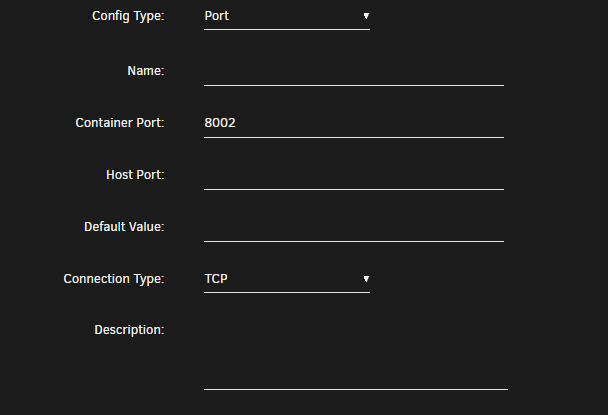
Does the website for the Wing panel display anything when you visit it? i.e. if you do not see that message, then your forwarding/proxying is off. Since i dont know how you have your reverse proxy setup, i can only guess that youre maybe missing the correct port export in the template. The default thats set is 8080, so in your case, you would have to add a new port mapping on 8002 in the container.
-
Ich hab das jetzt auch mal angeworfen und lass das mal laufen. Mal gucken ob da was passiert. Edit: Ich hab den Container die ganze Zeit bis heute morgen um 9 laufen lassen. Nix ungewöhnliches passiert. Hatte den jetzt über 5 Stunden aus, gestartet, funktioniert auch. Kann nix ungewöhnliches feststellen.
-
Welcher Proton VPN ist das denn? Free oder Paid? Ich weiß das Proton die Verbindung kappt bei nicht http/https Verbindungen im Free plan. Falls Free, welche Docker werden denn benutzt? Um das zu testen müsst ich die selben Container mal laufen lassen
-
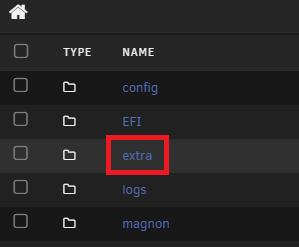
https://github.com/mgutt/unraid-packages/blob/main/6.11.0/powertop-2.15-x86_64-1.txz runterladen und auf dem USB Stick in den Ordner "extra" packen, dann wird das beim start installiert
-
you can comment it out/remove it if you want. (the powergovenor) The setting is in "Settings -> PowerMode" now and does the same.
-
yeah, because they only got corrected now, the next one doesnt have them anymore. Jan 10 19:03:28 kernel: md: recovery thread: Q corrected, sector=1565565768 Jan 10 19:03:28 kernel: md: recovery thread: Q corrected, sector=1565565776 Jan 10 19:03:28 kernel: md: recovery thread: Q corrected, sector=1565565784 Jan 10 19:03:28 kernel: md: recovery thread: Q corrected, sector=1565565792 Jan 10 19:03:28 kernel: md: recovery thread: Q corrected, sector=1565565800
-
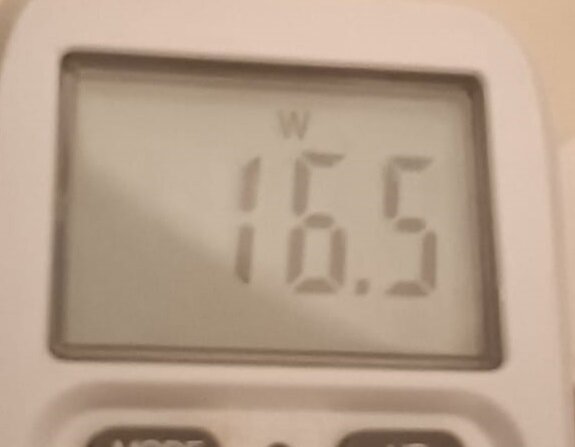
Been a while since i tinkered with that board. I can only use an old post i posted on german forums here, I had 6 hdds and 2 ssds, had an ~10 year old BeQuiet 300 Watt atx psu tho. With the BeQuiet PURE POWER 12 M 550W its certainly lower, i didnt retest it properly, only when the board was naked, with the exception of 1 SSD, it was at 7 Watt while with the old psu, around 11 Watt. Edit: Heres it is currently with 2 HHDs and 1 SSD .
-
Genau so. (da bin ich mir zu 90% sicher, müsste jetzt nochmal nachgucken ob dem auch tatsächlich so ist) Alles vor Alderlake sollte aber eigentlich problemlos an CPU Slots funktionieren. Edit: Hab nachgeguckt. Ja mit Alderlake bzw 600/700er Chipsatz, hat es zu 100% angefangen das Problem mit den CPU Slots.
-
Das wird eventuell nix bringen bei Raptorlake. Es kommt drauf an wo die drin steckt. Wenn die an nem Slot hängt der CPU Lanes benutzt, wird das egal mir welcher Firmware nichts. Muss nen Chipsatz PCIe Slot sein und wenn es dann immer noch nicht geht, dann eventuell ans flashen denken.
-
Im pretty sure the AsRock Boards are all capped at C6 Given that you mention C6 specifically there, i bet the bios/uefi are identical between the j4125 ive and yours. So yeah, they put a cap on that. Not worth it either, cause they draw so little power anyway.
-
Im not on 6.12.10 but on 7 and cannot recreate it. Afaik there wasnt a change either. without it, its certainly up

.thumb.jpeg.b2fd1de53f83bf654b87858a45b87486.jpeg)
.thumb.jpeg.908e9fe531ed1e89e69b2fee9746fb49.jpeg)
.thumb.jpeg.b67107ae5cec07c9b6c094578c6e7363.jpeg)
-
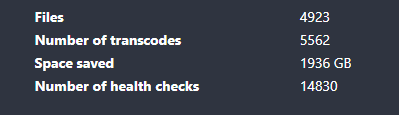
yeah its great. Unraid is just my TDARR Server and use my Windows PCs with their nvidia gpus(3070 and 1060) to transcode on it. Since ive A LOT of Video footage piling up, its a god damn lifesaver.
-
on br0/eth0 with its own ip
-
If you really want to run this in bridge mode, you have to disable the VM Service Edit: I mean, unless you actually dont use regular dns requests, which i highly doubt. But if thats the case, just change the port 53. But otherwise, 53 is the default for all regular dns requests and the VM Manager occupies that port already.
-
go to the plugins tab and update the community store app before accessing it. If i recall, there was a fix for something in there in one of the versions. Your CA is also quite out of date, given it says update to 2024.12.14 and the current version is 2025.01.06
-
this checkbox has to be ticked and then the manual check has to be invoked, otherwise the errors stay there.

-
/usr/local/sbin/emhttp & this is from 6.11.5, not sure what version are you on that you have emhttpd^^





.jpeg.fe711c3eddda976abe5d1d2348edbc47.jpeg)
.jpeg.d53faae023955cf3a8af8cc1e646ee8f.jpeg)
.jpeg.bb64197e83f967dab4759c5ab118f0e5.jpeg)
