





Mainfrezzer
Members
-
Joined
-
Last visited
Everything posted by Mainfrezzer
-
yep, can confirm, its still dead on 6.12.4. Im sad about it. If you really really wanna use it and dont need any of the 6.12 features, it works on 6.11.5
-
Muss direkt auf dem usb stick unter /config/wireguard/wgX.conf geändert werden. Wenn man das übers GUI ändert, dann landet man wieder bei eth0 bzw br0 oder sonstiges. Was wunderbar funktioniert solange Host Access deaktiviert ist^^
-
In case anyone stumbles upon it later on: The Cloudflare certificates only work for Cloudflare services. Theyre not "real" certificates. They only work between your service and the servers of cloudflare. ZeroSSL or LetsEncrypt are the way to go.
-
The setting "Header show description:" in the display settings does not work anymore Edit: 6.12.7-rc2 has the issue resolved
-
Klingt stark nach Host Access enabled. Da müsste man manuell den Adapter ändern in der wireguard config. Mit dem neuen System in 12.4 hab ich's noch nicht ausprobiert, in den vorherigen Versionen musste man in der config von z.b. br0 die 4 Einträge auf shim-br0 ändern. Problem dass da auftreten kann ist allerdings dass wenn der Server mal Probleme hat und das Array nicht läuft, man nicht mehr drauf kommt. Kann natürlich gelöst werden indem man 2 Verbindungen einrichtet und nur einen davon auf das shim Interface wechselt. Dann hat man nen Backup. Im Notfall. Hatte das hier auch Mal ins Forums gepostet vor Ner ganzen Weile für 6.11.5 glaube ich. Für 6.12.4 müsste ich tatsächlich Mal später gucken. Stecke gerade noch im Zug fest Update: 6.12.4 ist das selbe, schimpft sich jetzt nur vhost0 statt eth0 (bei macvlan setups, was ich hier jetzt mal ganz stark annehme)
-
I'm already flabbergasted by the default 22 port. I would definitely second the wireguard setup.
-
Es gibt Local-link (fe80::) ULA (unique local address fd00:: z.b.) und GUA (Global unicast address), welches die öffentliche Adresse der Maschine ist. Prefix beziehen sich nur auf die GUA. Der Rest ist alles intern. Das sinnvollste ist ne Mac Adresse zu vergeben und die Zuweisung dem Router zu überlassen. Alles andere ist auf dynamischen Zuweisungen nur Arbeit die man sich sparen kann. Im Fall vom DNS Server kann man einfach die fe80:: Adresse angeben. Achtung für Fritzbox Nutzer mit fritzos 7.50 oder höher, wenn das pihole oder sonstige bei Internet->Zugangsdaten->DNS eingetragen wird, muss die ula genommen werden. Die Fritzbox sind mit dem 7.50 Update verschlimmbessert worden und die können keine fe80 Adressen mehr erreicht.
-
You can either change the checksum or delete the compatibility check. Works on 12.4 # ------------------------------------------------- # RAM-Disk for Docker json/log files v1.6 for 6.12.4 # ------------------------------------------------- # check compatibility echo -e "45361157ef841f9a32a984b056da0564 /etc/rc.d/rc.docker\n9f0269a6ca4cf551ef7125b85d7fd4e0 /usr/local/emhttp/plugins/dynamix/scripts/monitor" | md5sum --check --status && compatible=1 if [[ $compatible ]]; then # create RAM-Disk on starting the docker service sed -i '/nohup/i \ # move json/logs to ram disk\ rsync -aH --delete /var/lib/docker/containers/ ${DOCKER_APP_CONFIG_PATH%/}/containers_backup\ mountpoint -q /var/lib/docker/containers || mount -t tmpfs tmpfs /var/lib/docker/containers || logger -t docker Error: RAM-Disk could not be mounted!\ rsync -aH --delete ${DOCKER_APP_CONFIG_PATH%/}/containers_backup/ /var/lib/docker/containers\ logger -t docker RAM-Disk created' /etc/rc.d/rc.docker # remove RAM-Disk on stopping the docker service sed -i '/tear down the bridge/i \ # backup json/logs and remove RAM-Disk\ rsync -aH --delete /var/lib/docker/containers/ ${DOCKER_APP_CONFIG_PATH%/}/containers_backup\ umount /var/lib/docker/containers || logger -t docker Error: RAM-Disk could not be unmounted!\ rsync -aH --delete ${DOCKER_APP_CONFIG_PATH%/}/containers_backup/ /var/lib/docker/containers\ logger -t docker RAM-Disk removed' /etc/rc.d/rc.docker # Automatically backup Docker RAM-Disk sed -i '/^<?PHP$/a \ $sync_interval_minutes=30;\ if ( ! ((date("i") * date("H") * 60 + date("i")) % $sync_interval_minutes) && file_exists("/var/lib/docker/containers")) {\ exec("\ [[ ! -d /var/lib/docker_bind ]] && mkdir /var/lib/docker_bind\ if ! mountpoint -q /var/lib/docker_bind; then\ if ! mount --bind /var/lib/docker /var/lib/docker_bind; then\ logger -t docker Error: RAM-Disk bind mount failed!\ fi\ fi\ if mountpoint -q /var/lib/docker_bind; then\ rsync -aH --delete /var/lib/docker/containers/ /var/lib/docker_bind/containers && logger -t docker Success: Backup of RAM-Disk created.\ umount -l /var/lib/docker_bind\ else\ logger -t docker Error: RAM-Disk bind mount failed!\ fi\ ");\ }' /usr/local/emhttp/plugins/dynamix/scripts/monitor else logger -t docker "Error: RAM-Disk Mod found incompatible files: $(md5sum /etc/rc.d/rc.docker /usr/local/emhttp/plugins/dynamix/scripts/monitor | xargs)" fi
-
just looking at it the log, bluetooth issue. Aug 29 23:06:54 Odin bluetoothd[20739]: src/adv_monitor.c:btd_adv_monitor_offload_supported() Manager is NULL, get offload support failed ### [PREVIOUS LINE REPEATED 38033 TIMES] ###
-
In der rechten Menuleiste das grüne Schloss anklicken, dann klappt das verschieben. Ist seit 6.12.X neu.
-
Are you running a bridged network? If you want to use macvlan you have to disable network bridging in the network settings page. https://docs.unraid.net/unraid-os/release-notes/6.12.4/
-
Die Frage die sich mir stellt ist, warum der "Jdownloader-Nic" in nem ganz anderen Subnetz sein muss. Dass man ihn einen dedizierten Nic für den vollen Transfer zur Verfügung stellen möchte, das ist verständlich. Ist ja auch einfach realisiert. Jedoch nicht warum man gleich nen anderes Subnetz braucht. Plex auf eth0 und Jdownloader auf eth1 festzusetzen ist doch schon genug oder umgekehrt. (sofern der Switch die Datenraten beider nics zusammen schafft)
-
Der Dockerhost kann bei design nicht mit dem Dockercontainer kommunizieren wenn dieser über ipvlan oder macvlan läuft. (Umgekehrt natürlich auch) Entweder man stellt in den Dockereinstellungen "Host access to custom networks" auf ein oder man benutzt das LXC Plugin fürs Pihole. (alternativ kann man natürlich auch den DNS Server fürs Unraidsystem auf die üblichen verdächtigen setzen (i.e. 8.8.8.8, 1.1.1.1, 9.9.9.9) dann hat sich das Problem auch erledigt. Abgesehen von der lokalen Namensauflösung. Da müsste dann allerdings noch ein statischer Eintrag ins Pihole eingetragen werden da das Pihole ja nix von dem Host weiß, bzw nichts wissen darf. Für die Clients aber unerheblich.)
-
auf die if= Pfade achten. Da steht nicht /dev/zero
-
Kommt drauf an. Wenn 6.11.5 benutzt wird ist es 5.19.17 ansonsten wie @DataCollector es zeigt.
-
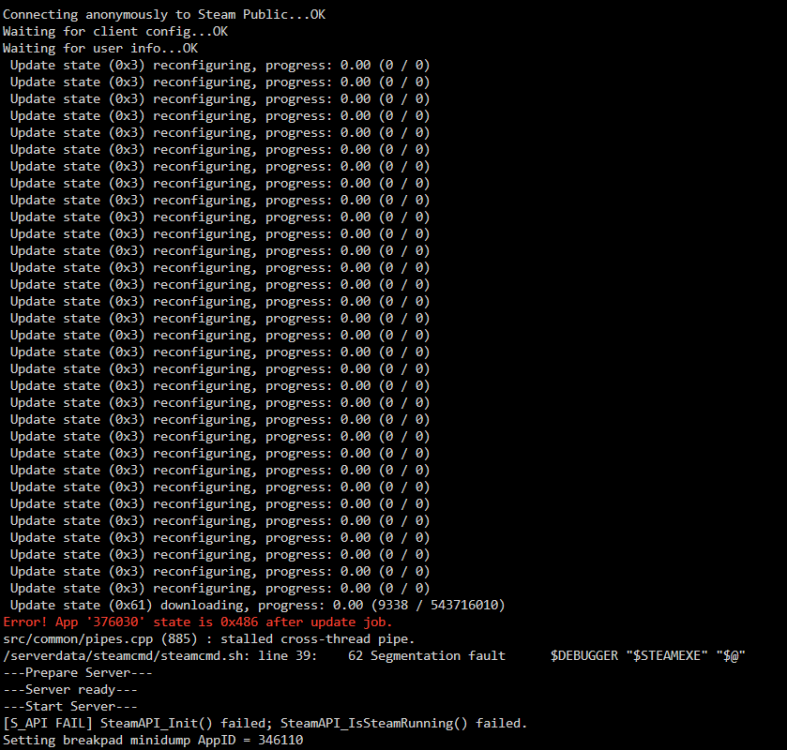
The container all run on the same ssd. The container that threw the error is #1 #1 didnt update, but did download and update all the gamefiles, that were supposed to be updated. #2 just started fine and worked fine, same with #3 (all container run of the same shared files) I only noticed because the version of that server was wrong, while the others were fine. And then i did the digging. seems to be a steam related issue since i did find alot of github mentiones of it. Pinning it to a singlethread did work (threw another error but idk why that came up since i dont use any workshop content). Ultimately i did deleted all steam files and started anew.
-
I did find out what caused it Bit odd that this particular container threw the error while the other ones, using the same files(this one is the update hub etc), worked fine. So far i havent been able to get this particular container running properly again but im working on it. *Took the axe approach, working again^^
-
To add to this, Linus did "respond" to the video https://linustechtips.com/topic/1526180-gamers-nexus-alleges-lmg-has-insufficient-ethics-and-integrity/page/16/#comment-16078641
-
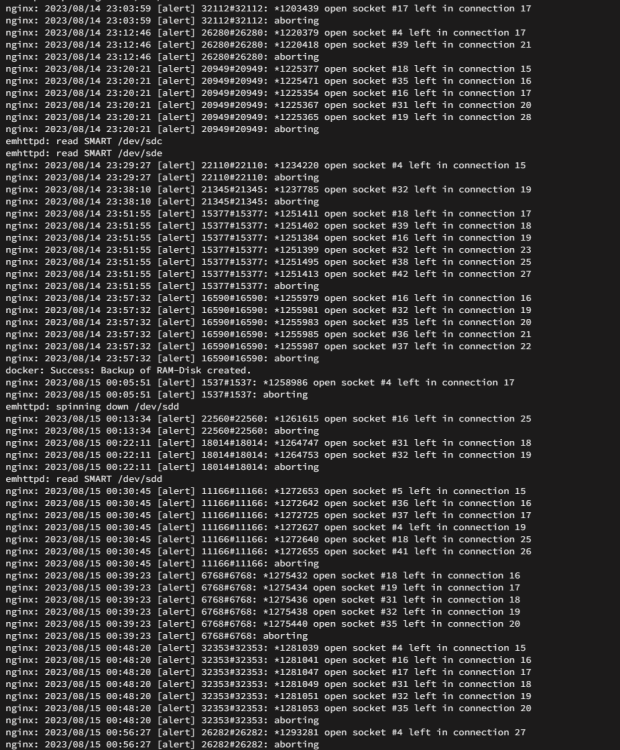
the nginx logs are very miniscule compared to the well over 100000 entries of your bluetooth issue within the first couple scrolls of the log. the nginx logs only appear if there is a browser session running, so if no one opens the webpage, its gone. Regarding the nginx crash itself. it does seem to be browser dependent. On Microsoft Edge, it looks like this If im on my Android Phone and use Chrome, i absolutely cant get the Webui to work properly at all. The Terminal is broken, the Log popup is broken. The page freezes horribly and i get worker exit message, as you do. I havent gotten around to test it with Firefox yet. it might fare better, but the only real solution is a downgrade to 6.11.5 or wait for 6.12.4.
-
A quick and dirty fix is to disable the sata ports in the bios or just shutdown the server, unplug enough sata cables, fire the system back up, upgrade and then re-enable the sata ports / plug the cables back in. Alternatively, just boot the usb key on a different pc and upgrade that way
-
Docker stoppen. In den Docker Einstellungen das "Docker directory:" löschen. Docker starten, die Apps(Docker-Container) aus dem Community App Store wieder installieren. Man kann Docker selbst nicht einfach 1:1 über verschiedene Dateisysteme kopieren. XFS benutzt overlay2, Btrfs irgendwas und zfs benutzt zfs. Der Appdata share beinhaltet die permanenten Daten, die wichtig sind. Alles im /system/docker ist absolut verwerfbar (bis eventuell auf die Netzwerkkonfiguartionsdatei)
-
I do have to correct myself, It didnt "kill" the running containers, i just checked the logs and it roughly happend at the exact time a update was distributed by steam. Still very odd since been runing fine for ages. Who knows what Gabe did.
-
Ive just noticed following syslog. First time ive seen that Has been the Ark variant. Might be worth keeping an eye on. since it killed all running docker that used that image
-
You do seem to have a bluetooth issue. For the NGINX issue, i would have said, 6.11.5 but since youre running ZFS, youre out of luck
-
Schon merkwürdig. Der Schreibtest fehlt übrigens noch






