





Mainfrezzer
Members
-
Joined
-
Last visited
Everything posted by Mainfrezzer
-
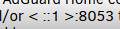
Im having a bit of trouble. I noticed that something is missing from one of my templates (which is somewhat important) Upon checking, it seems like CA strips [::1] completely. Even [::1] gets removed. But now it gets weird using [ ::1 ] or [ ::1 ] turns into < ::1 > for whatever reason. Edit: I think, this seems to be an Unraid issue, lmao lol.mp4 Edit2: After further investigation, no, this is a CA bug. While unraid turns [ into <, it displays [ correctly as [, yet CA strips it completely from any template. lol.mp4
-
Jau uptime kuma ist super dafür. Ich habs bei mir z.b. online auf nem Server und checke via ipv6 ob unraid läuft, ipv4 würde mir ja nur sagen ob mein Router im Internet erreichbar ist (was ich auch überprüfe) Im LAN kann man sowas natürlich auch einsetzen, allerdings falls das Internet mal ausfällt, unbrauchbar. Hier ist mein eigener Spam

-
given you still run an "out of date" bios, without the microcode update for 13th and 14th gen, you might be in for a "fun time"
-
As this is an Ark Issue, its a bit hard to determin whats the cause. Could you delete the /ShooterGame/Content/Paks folder and run the validation? if that doesnt work. You probably have to perform the nuclear method. Make a backup of your server whole config and setting and saved map (by default the complete saved folder (/ShooterGame/Saved), but if you run something more special, you need to adapt for your case) then delete all server files, reinstall the whole server and then restore your backup
-
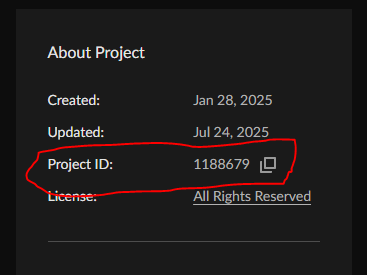
What mod are you trying to install? That mod does not exist. This is the number you have to set in -mods=
-
For the docker support If it's a specific container, post in the appropriate support thread from the template. If it's a general question, you can post it in general support.
-
Weird generator Ive fixed them up You should change your admin password as it was written in the GameUserSettings file^^ GameUserSettings.iniGame.ini
-
What did you try to set in which file? Ark removes improper set settings
-
You just have to edit the GAME_ID part in the template so it looks like 376030 -beta preaquatica Might have to set validation to true as well
-
its not necessary at all. its just "common" that people have hdds in the array and ssds in pools and thats where you usually want to store your gameservers on. /mnt/user/ works through FUSE and that can be hit or miss with games/gameservers. using /mnt/cache/XXX or /mnt/disk1/XXX bypasses that. also of note is that, if you use the array for it and you have a parity disk, the ark server saves by default ever 15 minutes, so your parity drive and array drive kicks in every 15 minutes.
-
if you dont have any pools, you can directly assign the array disk with /mnt/diskX/appdata (where X is the number of the drive)
-
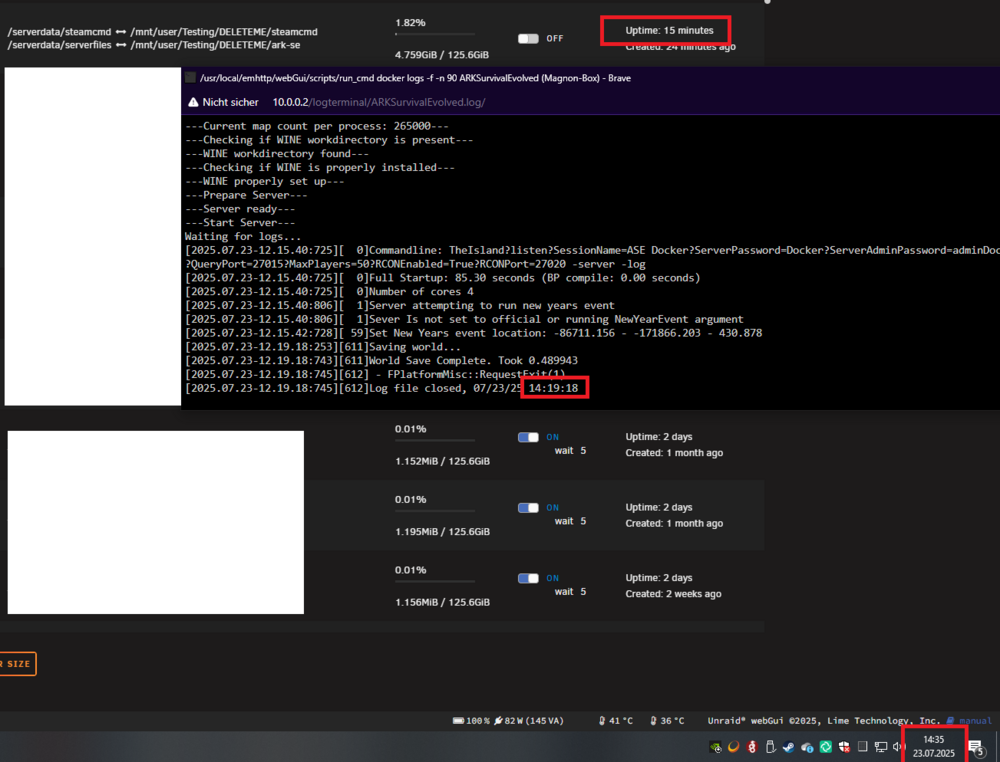
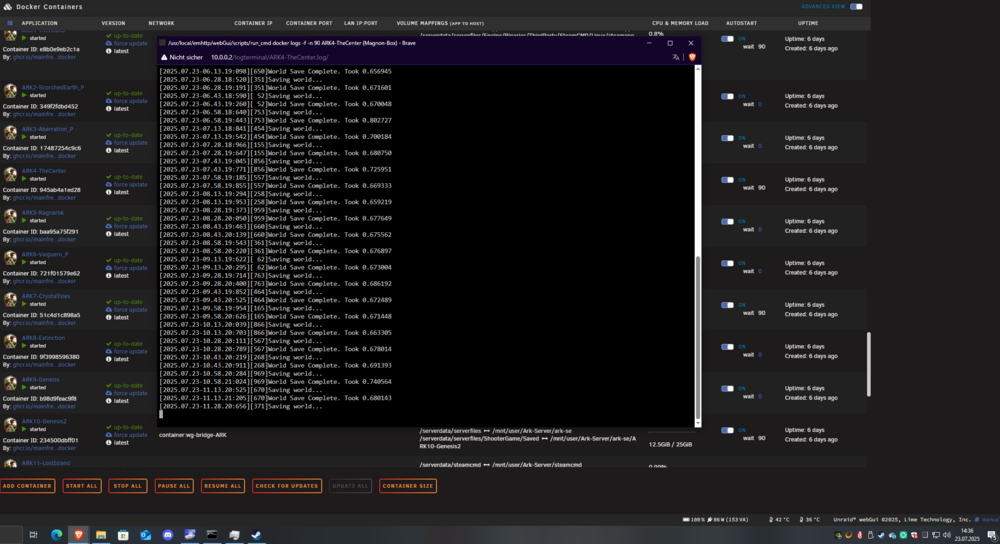
That doesnt look like crashing, the requestexit just means the server got told to shutdown, as to why, i cant tell from that Forgetting to run the maximum_map_count command does absolutely nothing. As nothing happens with the container. The container does not delete anything, at all, anything that could delete files of the server are either, Wildcard with their awful patches (i dont know if they fixed the char transfer deletion on clusters yet) or improper mappings, so the container gets written into RAM instead of a disk. They did update their server package twice earlier, so no clue if that is related to it. Also keep in mind, the ark log entries from within the docker logs window are 99% of the time from the prior start. As the shootergame.log gets read by the container before the server is catching up with starting itself and doing its logrotate job. As seen here this is what a server log looks after running for a while, as it fetches the "updated log"
-
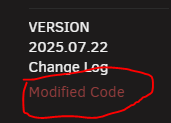
What does this mean and why is it blinking? Edit: Lmao, okay, the a update that released shortly after my comment got rid of it. thank you :D
-
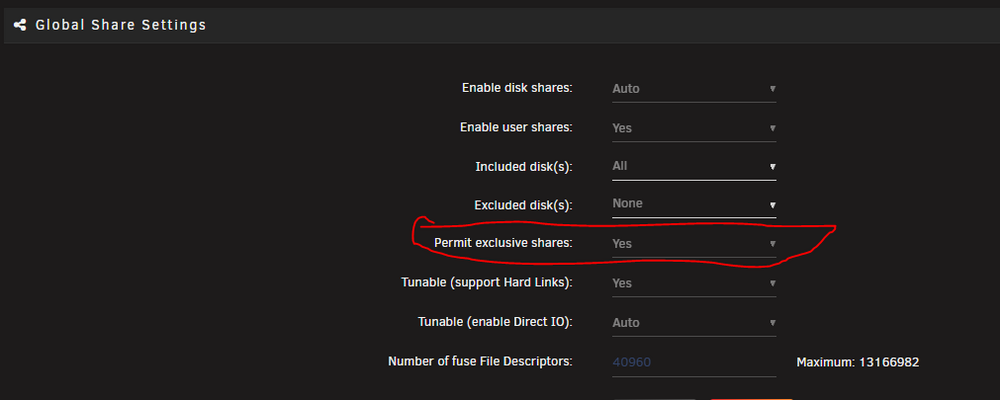
That its checking for logs for so long is odd, what are your system specs? Also are you using /mnt/user/XXX for the file storage or something like /mnt/cache/XXX? if its the /mnt/user/XXX, do you have exclusive shares enabled? That the shootergame.log is empty is normal, ASE buffers the log, unlike ASA, and it only gets written to it once the buffer is full (which can take a while) or when the server is shutdown. On restarts its moves the old file to a new one and looks like this the "network error: unable to query server info for invite" is usally the default message you get when you join over the lan tab externally over steam. Adding the server to your steam favorites and joining via the ingame browser should solve that but ill check it tomorrow/later because my client is currently on the preaquatica branch and i need to shovel the data around so i can quickly roll back once i updated it to the aquatica update.

-
The forum took a good while to send me the notification for your message and only got it a couple minutes ago xD But at least I was, by chance, in the discord over there 😀
-
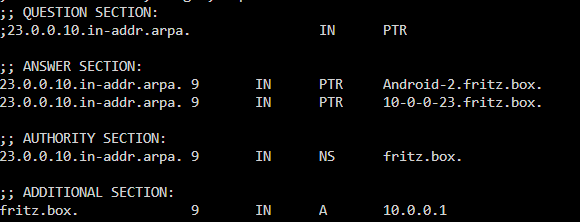
Das ist eine wunderbare Frage, das ist schon seit längerer Zeit kaputt. Hab das mit iPhones zuerst gemerkt. Sich mit AVM wegen Bugs o.Ä. Dingen auseinander zu setzen ist echt sinnlos, wie ich erfahren durfte. Das was noch funktioniert wie es soll sind Windows Geräte, Linux (zumindest die üblichen distros) und LXC Container (weil eh linux). Android, da hapert es schon. Da hab ich Dnsnamen die nicht den geräten entsprechen, jedoch semi funktionieren. Beste Beispiel, Firetv sticks. Echt der Knüller. Und ja, Docker Container tauchen entweder als PC-10-0-0-X oder PC-02-42-0A-00-00-A5 auf (das ging früher mal wunderbar) Das gleiche hab ich auch mit iPhones Ich habe, seit dem es kaputt ist, die Namen manuell in der Fritzbox gesetzt, mittlerweile mach ich's aber über einen separaten DNS Server.

-
the delay is how long to wait after this container has started. so sonarr starts and after 120 seconds the next container below it with autostart starts
-
your log is spammed to hell, holy moly. But youre probably chasing for something that opens folders, for that you need to setup your own inotifywatch
-
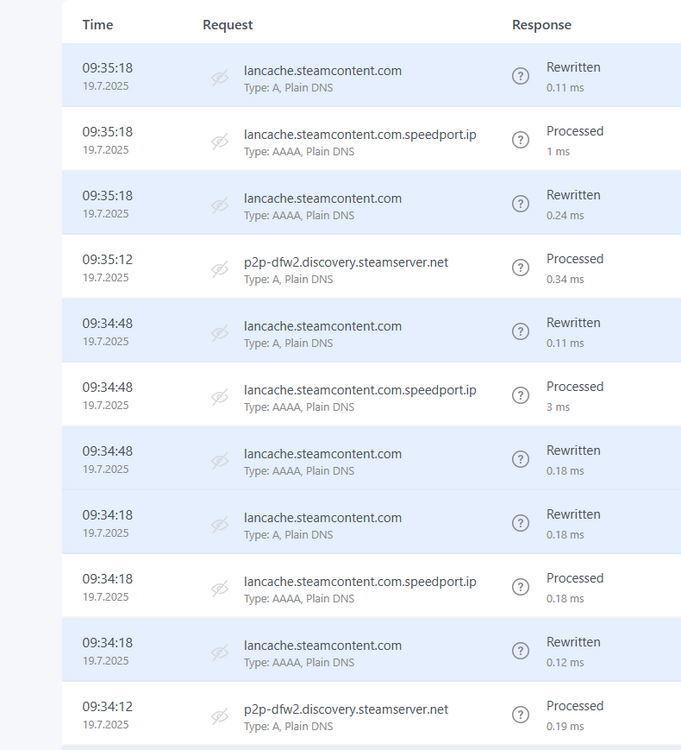
Its just adguard with a filterlist that rewrites the domains to the lancache |assetcdn.101.arenanetworks.com^$dnsrewrite=192.168.2.135 |assetcdn.101.arenanetworks.com^$dnstype=AAAA |assetcdn.102.arenanetworks.com^$dnsrewrite=192.168.2.135 |assetcdn.102.arenanetworks.com^$dnstype=AAAA |assetcdn.103.arenanetworks.com^$dnsrewrite=192.168.2.135 |assetcdn.103.arenanetworks.com^$dnstype=AAAA ||cdn.blizzard.com^$dnsrewrite=192.168.2.135 ||cdn.blizzard.com^$dnstype=AAAA |blizzard.vo.llnwd.net^$dnsrewrite=192.168.2.135 |blizzard.vo.llnwd.net^$dnstype=AAAA |blzddist1-a.akamaihd.net^$dnsrewrite=192.168.2.135 |blzddist1-a.akamaihd.net^$dnstype=AAAA |blzddist2-a.akamaihd.net^$dnsrewrite=192.168.2.135 |blzddist2-a.akamaihd.net^$dnstype=AAAA |blzddist3-a.akamaihd.net^$dnsrewrite=192.168.2.135 |blzddist3-a.akamaihd.net^$dnstype=AAAA |dist.blizzard.com^$dnsrewrite=192.168.2.135 |dist.blizzard.com^$dnstype=AAAA |dist.blizzard.com.edgesuite.net^$dnsrewrite=192.168.2.135 |dist.blizzard.com.edgesuite.net^$dnstype=AAAA |edge.blizzard.top.comcast.net^$dnsrewrite=192.168.2.135 |edge.blizzard.top.comcast.net^$dnstype=AAAA |level3.blizzard.com^$dnsrewrite=192.168.2.135 |level3.blizzard.com^$dnstype=AAAA |nydus.battle.net^$dnsrewrite=192.168.2.135 |nydus.battle.net^$dnstype=AAAA |cdn-11.eft-store.com^$dnsrewrite=192.168.2.135 |cdn-11.eft-store.com^$dnstype=AAAA |cl-453343cd.gcdn.co^$dnsrewrite=192.168.2.135 |cl-453343cd.gcdn.co^$dnstype=AAAA |cdn-eu1.homecomingservers.com^$dnsrewrite=192.168.2.135 |cdn-eu1.homecomingservers.com^$dnstype=AAAA |cdn-na1.homecomingservers.com^$dnsrewrite=192.168.2.135 |cdn-na1.homecomingservers.com^$dnstype=AAAA |cdn-na2.homecomingservers.com^$dnsrewrite=192.168.2.135 |cdn-na2.homecomingservers.com^$dnstype=AAAA |cdn-na3.homecomingservers.com^$dnsrewrite=192.168.2.135 |cdn-na3.homecomingservers.com^$dnstype=AAAA |cod-assets.cdn.callofduty.com^$dnsrewrite=192.168.2.135 |cod-assets.cdn.callofduty.com^$dnstype=AAAA |cod-assets.cdn.callofduty.com.edgesuite.net^$dnsrewrite=192.168.2.135 |cod-assets.cdn.callofduty.com.edgesuite.net^$dnstype=AAAA |pls.patch.daybreakgames.com^$dnsrewrite=192.168.2.135 |pls.patch.daybreakgames.com^$dnstype=AAAA |cdn.unrealengine.com^$dnsrewrite=192.168.2.135 |cdn.unrealengine.com^$dnstype=AAAA |cdn1.epicgames.com^$dnsrewrite=192.168.2.135 |cdn1.epicgames.com^$dnstype=AAAA |cdn1.unrealengine.com^$dnsrewrite=192.168.2.135 |cdn1.unrealengine.com^$dnstype=AAAA |cdn2.epicgames.com^$dnsrewrite=192.168.2.135 |cdn2.epicgames.com^$dnstype=AAAA |cdn2.unrealengine.com^$dnsrewrite=192.168.2.135 |cdn2.unrealengine.com^$dnstype=AAAA |cdn3.unrealengine.com^$dnsrewrite=192.168.2.135 |cdn3.unrealengine.com^$dnstype=AAAA |cloudflare.epicgamescdn.com^$dnsrewrite=192.168.2.135 |cloudflare.epicgamescdn.com^$dnstype=AAAA |download.epicgames.com^$dnsrewrite=192.168.2.135 |download.epicgames.com^$dnstype=AAAA |download2.epicgames.com^$dnsrewrite=192.168.2.135 |download2.epicgames.com^$dnstype=AAAA |download3.epicgames.com^$dnsrewrite=192.168.2.135 |download3.epicgames.com^$dnstype=AAAA |download4.epicgames.com^$dnsrewrite=192.168.2.135 |download4.epicgames.com^$dnstype=AAAA |egdownload.fastly-edge.com^$dnsrewrite=192.168.2.135 |egdownload.fastly-edge.com^$dnstype=AAAA |epicgames-download1.akamaized.net^$dnsrewrite=192.168.2.135 |epicgames-download1.akamaized.net^$dnstype=AAAA |fastly-download.epicgames.com^$dnsrewrite=192.168.2.135 |fastly-download.epicgames.com^$dnstype=AAAA |cdn.zaonce.net^$dnsrewrite=192.168.2.135 |cdn.zaonce.net^$dnstype=AAAA |level3.nwhttppatch.crypticstudios.com^$dnsrewrite=192.168.2.135 |level3.nwhttppatch.crypticstudios.com^$dnstype=AAAA |filedelivery.nexusmods.com^$dnsrewrite=192.168.2.135 |filedelivery.nexusmods.com^$dnstype=AAAA ||hac.lp1.d4c.nintendo.net^$dnsrewrite=192.168.2.135 ||hac.lp1.d4c.nintendo.net^$dnstype=AAAA ||hac.lp1.eshop.nintendo.net^$dnsrewrite=192.168.2.135 ||hac.lp1.eshop.nintendo.net^$dnstype=AAAA ||wup.eshop.nintendo.net^$dnsrewrite=192.168.2.135 ||wup.eshop.nintendo.net^$dnstype=AAAA ||wup.shop.nintendo.net^$dnsrewrite=192.168.2.135 ||wup.shop.nintendo.net^$dnstype=AAAA |ccs.cdn.wup.shop.nintendo.net.edgesuite.net^$dnsrewrite=192.168.2.135 |ccs.cdn.wup.shop.nintendo.net.edgesuite.net^$dnstype=AAAA |ecs-lp1.hac.shop.nintendo.net^$dnsrewrite=192.168.2.135 |ecs-lp1.hac.shop.nintendo.net^$dnstype=AAAA |geisha-wup.cdn.nintendo.net^$dnsrewrite=192.168.2.135 |geisha-wup.cdn.nintendo.net^$dnstype=AAAA |geisha-wup.cdn.nintendo.net.edgekey.net^$dnsrewrite=192.168.2.135 |geisha-wup.cdn.nintendo.net.edgekey.net^$dnstype=AAAA |idbe-wup.cdn.nintendo.net^$dnsrewrite=192.168.2.135 |idbe-wup.cdn.nintendo.net^$dnstype=AAAA |idbe-wup.cdn.nintendo.net.edgekey.net^$dnsrewrite=192.168.2.135 |idbe-wup.cdn.nintendo.net.edgekey.net^$dnstype=AAAA |receive-lp1.dg.srv.nintendo.net^$dnsrewrite=192.168.2.135 |receive-lp1.dg.srv.nintendo.net^$dnstype=AAAA |cdn-patch.swtor.com^$dnsrewrite=192.168.2.135 |cdn-patch.swtor.com^$dnstype=AAAA |lvlt.cdn.ea.com^$dnsrewrite=192.168.2.135 |lvlt.cdn.ea.com^$dnstype=AAAA |origin-a.akamaihd.net^$dnsrewrite=192.168.2.135 |origin-a.akamaihd.net^$dnstype=AAAA |patchcdn.pathofexile.com^$dnsrewrite=192.168.2.135 |patchcdn.pathofexile.com^$dnstype=AAAA |patches.totemarts.games^$dnsrewrite=192.168.2.135 |patches.totemarts.games^$dnstype=AAAA |patches.totemarts.services^$dnsrewrite=192.168.2.135 |patches.totemarts.services^$dnstype=AAAA ||dyn.riotcdn.net^$dnsrewrite=192.168.2.135 ||dyn.riotcdn.net^$dnstype=AAAA |l3cdn.riotgames.com^$dnsrewrite=192.168.2.135 |l3cdn.riotgames.com^$dnstype=AAAA |riotgamespatcher-a.akamaihd.net^$dnsrewrite=192.168.2.135 |riotgamespatcher-a.akamaihd.net^$dnstype=AAAA |riotgamespatcher-a.akamaihd.net.edgesuite.net^$dnsrewrite=192.168.2.135 |riotgamespatcher-a.akamaihd.net.edgesuite.net^$dnstype=AAAA |worldwide.l3cdn.riotgames.com^$dnsrewrite=192.168.2.135 |worldwide.l3cdn.riotgames.com^$dnstype=AAAA |patches.rockstargames.com^$dnsrewrite=192.168.2.135 |patches.rockstargames.com^$dnstype=AAAA ||gs2-ww-prod.psn.akadns.net^$dnsrewrite=192.168.2.135 ||gs2-ww-prod.psn.akadns.net^$dnstype=AAAA ||gs2.sonycoment.loris-e.llnwd.net^$dnsrewrite=192.168.2.135 ||gs2.sonycoment.loris-e.llnwd.net^$dnstype=AAAA ||gs2.ww.prod.dl.playstation.net^$dnsrewrite=192.168.2.135 ||gs2.ww.prod.dl.playstation.net^$dnstype=AAAA ||gs2.ww.prod.dl.playstation.net.edgesuite.net^$dnsrewrite=192.168.2.135 ||gs2.ww.prod.dl.playstation.net.edgesuite.net^$dnstype=AAAA |gs-sec.ww.np.dl.playstation.net^$dnsrewrite=192.168.2.135 |gs-sec.ww.np.dl.playstation.net^$dnstype=AAAA |gst.prod.dl.playstation.net^$dnsrewrite=192.168.2.135 |gst.prod.dl.playstation.net^$dnstype=AAAA |playstation4.sony.akadns.net^$dnsrewrite=192.168.2.135 |playstation4.sony.akadns.net^$dnstype=AAAA |psnobj.prod.dl.playstation.net^$dnsrewrite=192.168.2.135 |psnobj.prod.dl.playstation.net^$dnstype=AAAA |sgst.prod.dl.playstation.net^$dnsrewrite=192.168.2.135 |sgst.prod.dl.playstation.net^$dnstype=AAAA |theia.dl.playstation.net^$dnsrewrite=192.168.2.135 |theia.dl.playstation.net^$dnstype=AAAA |tmdb.np.dl.playstation.net^$dnsrewrite=192.168.2.135 |tmdb.np.dl.playstation.net^$dnstype=AAAA |uef.np.dl.playstation.net^$dnsrewrite=192.168.2.135 |uef.np.dl.playstation.net^$dnstype=AAAA |vulcan.dl.playstation.net^$dnsrewrite=192.168.2.135 |vulcan.dl.playstation.net^$dnstype=AAAA |patch-dl.ffxiv.com^$dnsrewrite=192.168.2.135 |patch-dl.ffxiv.com^$dnstype=AAAA |lancache.steamcontent.com^$dnsrewrite=192.168.2.135 |lancache.steamcontent.com^$dnstype=AAAA |live.patcher.elderscrollsonline.com^$dnsrewrite=192.168.2.135 |live.patcher.elderscrollsonline.com^$dnstype=AAAA |canary.lancache.net^$dnsrewrite=192.168.2.135 |canary.lancache.net^$dnstype=AAAA |canary.uklans.net^$dnsrewrite=192.168.2.135 |canary.uklans.net^$dnstype=AAAA |litmus.lancache.net^$dnsrewrite=192.168.2.135 |litmus.lancache.net^$dnstype=AAAA |litmus.uklans.net^$dnsrewrite=192.168.2.135 |litmus.uklans.net^$dnstype=AAAA |trigger.lancache.net^$dnsrewrite=192.168.2.135 |trigger.lancache.net^$dnstype=AAAA |trigger.uklans.net^$dnsrewrite=192.168.2.135 |trigger.uklans.net^$dnstype=AAAA ||cdn.ubi.com^$dnsrewrite=192.168.2.135 ||cdn.ubi.com^$dnstype=AAAA |content.warframe.com^$dnsrewrite=192.168.2.135 |content.warframe.com^$dnstype=AAAA |dl-wot-ak.wargaming.net^$dnsrewrite=192.168.2.135 |dl-wot-ak.wargaming.net^$dnstype=AAAA |dl-wot-cdx.wargaming.net^$dnsrewrite=192.168.2.135 |dl-wot-cdx.wargaming.net^$dnstype=AAAA |dl-wot-gc.wargaming.net^$dnsrewrite=192.168.2.135 |dl-wot-gc.wargaming.net^$dnstype=AAAA |dl-wot-se.wargaming.net^$dnsrewrite=192.168.2.135 |dl-wot-se.wargaming.net^$dnstype=AAAA |dl-wowp-ak.wargaming.net^$dnsrewrite=192.168.2.135 |dl-wowp-ak.wargaming.net^$dnstype=AAAA |dl-wowp-cdx.wargaming.net^$dnsrewrite=192.168.2.135 |dl-wowp-cdx.wargaming.net^$dnstype=AAAA |dl-wowp-gc.wargaming.net^$dnsrewrite=192.168.2.135 |dl-wowp-gc.wargaming.net^$dnstype=AAAA |dl-wowp-se.wargaming.net^$dnsrewrite=192.168.2.135 |dl-wowp-se.wargaming.net^$dnstype=AAAA |dl-wows-ak.wargaming.net^$dnsrewrite=192.168.2.135 |dl-wows-ak.wargaming.net^$dnstype=AAAA |dl-wows-cdx.wargaming.net^$dnsrewrite=192.168.2.135 |dl-wows-cdx.wargaming.net^$dnstype=AAAA |dl-wows-gc.wargaming.net^$dnsrewrite=192.168.2.135 |dl-wows-gc.wargaming.net^$dnstype=AAAA |dl-wows-se.wargaming.net^$dnsrewrite=192.168.2.135 |dl-wows-se.wargaming.net^$dnstype=AAAA |dl2.wargaming.net^$dnsrewrite=192.168.2.135 |dl2.wargaming.net^$dnstype=AAAA |wg.gcdn.co^$dnsrewrite=192.168.2.135 |wg.gcdn.co^$dnstype=AAAA |wgus-wotasia.wargaming.net^$dnsrewrite=192.168.2.135 |wgus-wotasia.wargaming.net^$dnstype=AAAA |wgus-woteu.wargaming.net^$dnsrewrite=192.168.2.135 |wgus-woteu.wargaming.net^$dnstype=AAAA ||dl.delivery.mp.microsoft.com^$dnsrewrite=192.168.2.135 ||dl.delivery.mp.microsoft.com^$dnstype=AAAA ||do.dsp.mp.microsoft.com^$dnsrewrite=192.168.2.135 ||do.dsp.mp.microsoft.com^$dnstype=AAAA ||microsoft.com.edgesuite.net^$dnsrewrite=192.168.2.135 ||microsoft.com.edgesuite.net^$dnstype=AAAA ||update.microsoft.com^$dnsrewrite=192.168.2.135 ||update.microsoft.com^$dnstype=AAAA ||windowsupdate.com^$dnsrewrite=192.168.2.135 ||windowsupdate.com^$dnstype=AAAA |amupdatedl.microsoft.com^$dnsrewrite=192.168.2.135 |amupdatedl.microsoft.com^$dnstype=AAAA |amupdatedl2.microsoft.com^$dnsrewrite=192.168.2.135 |amupdatedl2.microsoft.com^$dnstype=AAAA |amupdatedl3.microsoft.com^$dnsrewrite=192.168.2.135 |amupdatedl3.microsoft.com^$dnstype=AAAA |amupdatedl4.microsoft.com^$dnsrewrite=192.168.2.135 |amupdatedl4.microsoft.com^$dnstype=AAAA |amupdatedl5.microsoft.com^$dnsrewrite=192.168.2.135 |amupdatedl5.microsoft.com^$dnstype=AAAA |officecdn.microsoft.com^$dnsrewrite=192.168.2.135 |officecdn.microsoft.com^$dnstype=AAAA |officecdn.microsoft.com.edgesuite.net^$dnsrewrite=192.168.2.135 |officecdn.microsoft.com.edgesuite.net^$dnstype=AAAA |assets1.xboxlive.com^$dnsrewrite=192.168.2.135 |assets1.xboxlive.com^$dnstype=AAAA |assets1.xboxlive.com.nsatc.net^$dnsrewrite=192.168.2.135 |assets1.xboxlive.com.nsatc.net^$dnstype=AAAA |assets2.xboxlive.com^$dnsrewrite=192.168.2.135 |assets2.xboxlive.com^$dnstype=AAAA |d1.xboxlive.com^$dnsrewrite=192.168.2.135 |d1.xboxlive.com^$dnstype=AAAA |xbox-mbr.xboxlive.com^$dnsrewrite=192.168.2.135 |xbox-mbr.xboxlive.com^$dnstype=AAAA |xvcf1.xboxlive.com^$dnsrewrite=192.168.2.135 |xvcf1.xboxlive.com^$dnstype=AAAA |xvcf2.xboxlive.com^$dnsrewrite=192.168.2.135 |xvcf2.xboxlive.com^$dnstype=AAAA where 192.168.2.135 is this case is both, the dns and lancache. cause i was lazy and just used the lxc all in one lxc template container (https://github.com/Mainfrezzer/unraid_lxc_alpine_adguard)
-
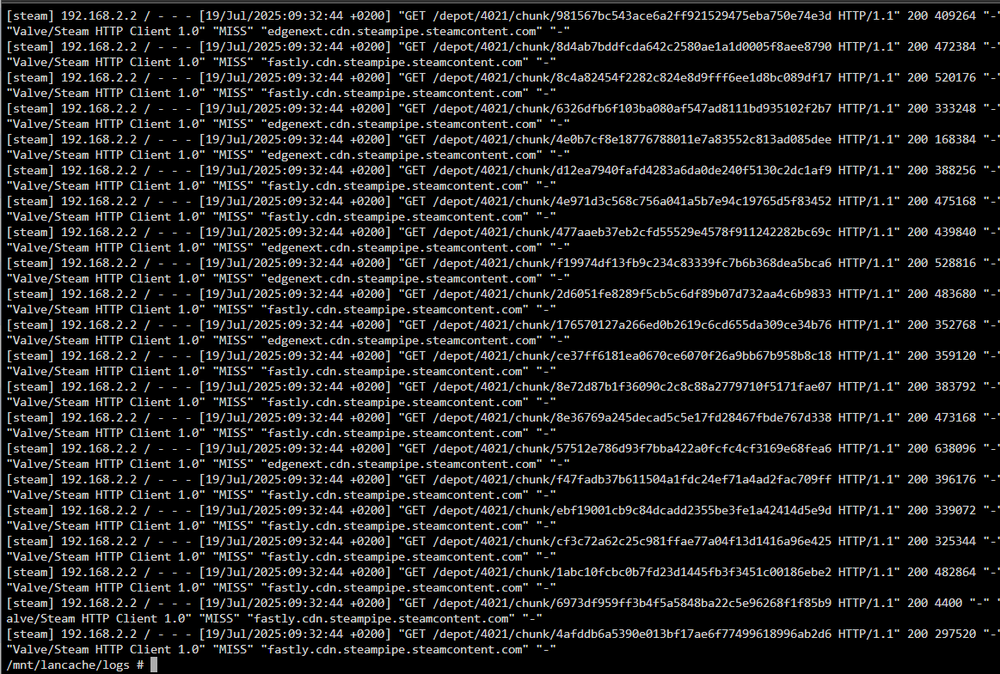
yes, the standard gmod egg thats there by default. Deployed it twice, first to fill the cache, then to use it just a snippet of the lancache log [steam] 192.168.2.2 / - - - [19/Jul/2025:09:37:09 +0200] "GET /depot/4023/chunk/c803e66d4a42c18895ddb3e4a802b592852dee48 HTTP/1.1" 200 204256 "-" "Valve/Steam HTTP Client 1.0" "MISS" "fastly.cdn.steampipe.steamcontent.com" "-" [steam] 192.168.2.2 / - - - [19/Jul/2025:09:37:09 +0200] "GET /depot/4023/chunk/f1e66cc3a6cff97eedb138d2f7fa59a6e734b03c HTTP/1.1" 200 291344 "-" "Valve/Steam HTTP Client 1.0" "MISS" "fastly.cdn.steampipe.steamcontent.com" "-" [steam] 192.168.2.2 / - - - [19/Jul/2025:09:37:09 +0200] "GET /depot/4023/chunk/a3510e66c8c90952e9218605541c6ecf7a5c4d9c HTTP/1.1" 200 287104 "-" "Valve/Steam HTTP Client 1.0" "MISS" "fastly.cdn.steampipe.steamcontent.com" "-" [steam] 192.168.2.2 / - - - [19/Jul/2025:09:37:09 +0200] "GET /depot/4023/chunk/62cb312c183bd8073e8e0d62b7ce61d83fb93cd3 HTTP/1.1" 200 157456 "-" "Valve/Steam HTTP Client 1.0" "MISS" "fastly.cdn.steampipe.steamcontent.com" "-" [steam] 192.168.2.2 / - - - [19/Jul/2025:09:37:09 +0200] "GET /depot/4023/chunk/5a30ffb058ba1eeb4e7baada7ecbdbb4068bd776 HTTP/1.1" 200 229840 "-" "Valve/Steam HTTP Client 1.0" "MISS" "fastly.cdn.steampipe.steamcontent.com" "-" [steam] 192.168.2.2 / - - - [19/Jul/2025:09:37:09 +0200] "GET /depot/4023/chunk/4f716c3b64efd7d0bba3cd84052d2ad449fa60cc HTTP/1.1" 200 385200 "-" "Valve/Steam HTTP Client 1.0" "MISS" "fastly.cdn.steampipe.steamcontent.com" "-" [steam] 192.168.2.2 / - - - [19/Jul/2025:09:37:09 +0200] "GET /depot/4023/chunk/fafba792c20b467b155692df1a7e26673e045443 HTTP/1.1" 200 118240 "-" "Valve/Steam HTTP Client 1.0" "MISS" "fastly.cdn.steampipe.steamcontent.com" "-" [steam] 192.168.2.2 / - - - [19/Jul/2025:09:37:09 +0200] "GET /depot/4023/chunk/4a12f867cc7a5d6d55e2c6dd9de7472170bdeba3 HTTP/1.1" 200 333728 "-" "Valve/Steam HTTP Client 1.0" "MISS" "fastly.cdn.steampipe.steamcontent.com" "-" [steam] 192.168.2.2 / - - - [19/Jul/2025:09:37:09 +0200] "GET /depot/4023/chunk/9a6a54459d665a0d69d0494dc755cafc9cd0d255 HTTP/1.1" 200 318320 "-" "Valve/Steam HTTP Client 1.0" "MISS" "fastly.cdn.steampipe.steamcontent.com" "-" [steam] 192.168.2.2 / - - - [19/Jul/2025:09:37:10 +0200] "GET /depot/4023/chunk/60f749884993cf81ce180c82b95caf818964a32b HTTP/1.1" 200 195536 "-" "Valve/Steam HTTP Client 1.0" "MISS" "steampipe.akamaized.net" "-" [steam] 192.168.2.2 / - - - [19/Jul/2025:09:42:42 +0200] "GET /depot/1006/manifest/7138471031118904166/5/7239027188943901838 HTTP/1.1" 200 3071 "-" "Valve/Steam HTTP Client 1.0" "MISS" "steampipe.akamaized.net" "-" [steam] 192.168.2.2 / - - - [19/Jul/2025:09:42:43 +0200] "GET /depot/4023/manifest/4682560487321813702/5/1135765742117716575 HTTP/1.1" 200 9095 "-" "Valve/Steam HTTP Client 1.0" "MISS" "steampipe.akamaized.net" "-" [steam] 192.168.2.2 / - - - [19/Jul/2025:09:42:43 +0200] "GET /depot/4021/manifest/5070358990555268659/5/2463400849461001250 HTTP/1.1" 200 494624 "-" "Valve/Steam HTTP Client 1.0" "MISS" "steampipe.akamaized.net" "-" [steam] 192.168.2.2 / - - - [19/Jul/2025:09:42:46 +0200] "GET /depot/1006/chunk/84b4358814d729d96dd5ca6e54530b26097f5d5e HTTP/1.1" 200 100672 "-" "Valve/Steam HTTP Client 1.0" "HIT" "steampipe.akamaized.net" "-" [steam] 192.168.2.2 / - - - [19/Jul/2025:09:42:46 +0200] "GET /depot/1006/chunk/0993f37e035851a90fd5f036fe4e1e74cd447058 HTTP/1.1" 200 91856 "-" "Valve/Steam HTTP Client 1.0" "HIT" "steampipe.akamaized.net" "-" [steam] 192.168.2.2 / - - - [19/Jul/2025:09:42:46 +0200] "GET /depot/1006/chunk/eedd80103b8e42621f276443fd43233959f27886 HTTP/1.1" 200 113168 "-" "Valve/Steam HTTP Client 1.0" "HIT" "steampipe.akamaized.net" "-" [steam] 192.168.2.2 / - - - [19/Jul/2025:09:42:46 +0200] "GET /depot/1006/chunk/8fbfaad58f94a38a581fb82b7d0a2c7568f6a452 HTTP/1.1" 200 175360 "-" "Valve/Steam HTTP Client 1.0" "HIT" "steampipe.akamaized.net" "-" [steam] 192.168.2.2 / - - - [19/Jul/2025:09:42:46 +0200] "GET /depot/1006/chunk/0830f469585c7026235d3730bb6daf1921dd7067 HTTP/1.1" 200 159360 "-" "Valve/Steam HTTP Client 1.0" "HIT" "steampipe.akamaized.net" "-" [steam] 192.168.2.2 / - - - [19/Jul/2025:09:42:46 +0200] "GET /depot/1006/chunk/fdc814dc4ad92efd8144ed15bcaf1a7fd82117b3 HTTP/1.1" 200 186336 "-" "Valve/Steam HTTP Client 1.0" "HIT" "steampipe.akamaized.net" "-" [steam] 192.168.2.2 / - - - [19/Jul/2025:09:42:46 +0200] "GET /depot/1006/chunk/74e2ba83820f14fac5f22f5a8f984d4ba23c2831 HTTP/1.1" 200 239568 "-" "Valve/Steam HTTP Client 1.0" "HIT" "steampipe.akamaized.net" "-" [steam] 192.168.2.2 / - - - [19/Jul/2025:09:42:46 +0200] "GET /depot/1006/chunk/353c2140a9eb93e049708848699bc53f68ad4154 HTTP/1.1" 200 251104 "-" "Valve/Steam HTTP Client 1.0" "HIT" "steampipe.akamaized.net" "-" [steam] 192.168.2.2 / - - - [19/Jul/2025:09:42:46 +0200] "GET /depot/1006/chunk/7d37175502f7e4c8efd92a62d10f4ffeebf14ec6 HTTP/1.1" 200 267088 "-" "Valve/Steam HTTP Client 1.0" "HIT" "steampipe.akamaized.net" "-" yes
-
I did tripple check it now, setting it like this will absolutely work with lancache
-
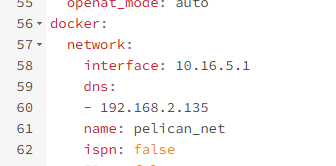
If you really suspect wings as the Integral part, you can set "--dns" in the extra parameters of wings unraid template, like --dns 192.168.2.10
-
Wings doesn't do the pull directly, it spawns a install routine container, you can change the DNS servers for the container deployed by the wing in the config.yml
-
With the preaquatica branch it's fine, as it used to be. The updated stuff works fine as long as you have standalone servers. Clusters are absolutely borked and obviously Crossplay too. I just rolled back all of my servers to the preaquatica stuff and called it done. I haven't opened a pr for it but I want to let you know in case you plan on updating a3c for 360.1+. the version file is no longer and the 11111111 mod doesn't exist anymore
-
The first image is just the response that the panel is offline. The second one seems to be a permission issue. Make sure that the pelican panel appdata folder is set to the owner nobody






