





spl147
Members
-
Joined
-
Last visited
Everything posted by spl147
-
Why not ask in the makemkv forum where the key is released? Or better yet buy one!! the creator of this docker has no control over when a new key is posted! a little google search would of answered your question
-
the first paragraph to spot on! the second i partial, i think sharing the same min/max fan speeds would be fine yes, but averaging both sensors at the same time is gonna spin fans faster anyway. so i think HDD sensor should be active only when HDDs are spun up and CPU sensor should only be active when HDD's are spun down. but seperate threshold for HDD's and CPU's is a MUST.
-
no, i mean when cpu temp sensor is selected for hdd spundown, have seperate/additional values for high and low CPU temp thresholds. right now when my hdds spindown my fans actually spin up. my HDD's idle @ 31c and my CPU's idle @ 38c FAN123456(13%):HDD Temp(88F) FAN123456(23%):HDD Spundown using Temp(100F)
-
@SimonF Did you ever look into adding seperate hi and low temps for when cpu is used when hdd's are spun down?
-
I agree documentation is horrendous. Yes install system temp, click detect then save then load if not already loaded, the in autofan click detect
-
Set min fan speed to 10 instead of 1.5
-
loading the plugin page takes a long time, then checking takes a while, the some plugins say not available. server-diagnostics-20240321-1036.zip
-
Google my friend, google
-
-
-
First step would be to try them from the command line to see if they actually work!
-
a little googling forund this: For fan settings we have below information: Below IPMI command format for fan control. Set Fan Control 0x3c 0x16 Byte1: 0x02 Byte2: FAN_NO Byte3: Duty1 Byte4: Duty2 Byte5: Duty3 Byte6: Temp1 Byte7: Temp2 Byte8: Temp3 Get Fan Control 0x3c 0x16 Byte1: 0x03 Byte2: FAN_NO Ex. Get fan 1 status $ Ipmitool -I lanplus -H 192.168.50.43 -U admin -P admin raw 0x3c 0x16 0x03 0x01 – 01 0a 32 64 14 50 5f Ex. Set fan 1 $ipmitool -I lanplus -H 192.168,50.43 -U admin -P admin raw 0x3c 0x16 0x02 0x01 0x14 0x32 0x64 0x14 0x50 0x5f - 01 14 32 64 14 50 5f
-
You have the wrong fan selected
-
Should of made sure the board you were gonna use was supported first!
-
whats the output of sensors detect?
-
did you actually read the output? the answers you seek are in the output! Trying family `ITE'... Yes Found unknown chip with ID 0x8688 Sorry, no sensors were detected. Either your system has no sensors, or they are not supported, or they are connected to an I2C or SMBus adapter that is not supported. If you find out what chips are on your board, check https://hwmon.wiki.kernel.org/device_support_status for driver status.
-
-
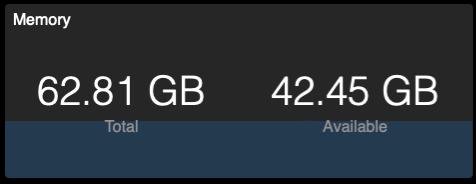
But the container still sees All the servers memory:
-
is --memory=1G not correct to limit memory usage by a docker? im getting this error: --memory=1G 'oznu/homebridge' WARNING: Your kernel does not support swap limit capabilities or the cgroup is not mounted. Memory limited without swap.
-
https://raw.githubusercontent.com/chriss158/dynamix/master/unRAIDv6/dynamix.s3.sleep.plg
-
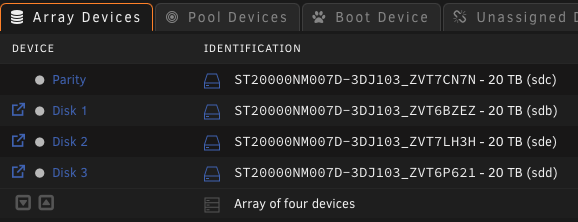
model numbers are in the UI:
-
Cpu fan should not be controlled by this plugin, and your hdd fan shows 0, i think your config is wrong, check your physical fan header labels
-
80c for high? are you crazy? look up the specs for your drives. most are 55-60c MAX! i use 30c for low and 55c for high then once your drives come back down to normal temps, play with max fan speed to keep drives around 40-42c
-
54c is really high! Post a pic of the fan setting page
-
Thats just for display in the footer Supermicro boards i believe only use the 1st 4 headers 20c is way to low for the low threshold. your hdds will never get that cold, so fans will always be spinning closer to max i would use 30-35c

