Sptz87
Members
-
Joined
-
Last visited
Everything posted by Sptz87
-
Here here please!
-
Wish I could help but I have no idea what I'm doing as a first time unraid user! Main thing I've seen is literally what I posted "amd_pstate_epp". The problem is this: I checked myself and it's correct. Only 3 frequency states are reported. Whilst using amd_pstate_epp should potentially be better but I have no idea how to do it and am afraid of borking my stable unraid build loool. I do have CPPC on auto and should change it to enabled anyways! Also CO to -30 as I know it's fully stable (this setup is the remnants of my gaming pc)
-
I'm gonna follow that thread thank you! So there's nothing more we can do with these Ryzen chips regarding lowering power consumption on idle?
-
Anyone here with an AMD Ryzen? I’m using the 5800x3d on unraid. Changed the governor from performance to ondemand. But I read that there’s an AMD specific driver that is supposedly tailored for these Ryzen cpus? Is that true? Like it’s stated here: https://wiki.archlinux.org/title/CPU_frequency_scaling#Scaling_drivers Has anyone used this at all in unraid? Or should I leave it as ondemand/performance realistically? And in the bios settings, CPCC, Global CStates etc are all on auto. ASPM is off but I think that's relevant to the gpu only (pcie). Basically I want this cpu to idle as deep as it did on Windows and scale up when needed.
-
Anyone here with an AMD Ryzen? I’m using the 5800x3d on unraid. Changed the governor from performance to ondemand. But I read that there’s an AMD specific driver that is supposedly tailored for these Ryzen cpus? Is that true? Like it’s stated here: https://wiki.archlinux.org/title/CPU_frequency_scaling#Scaling_drivers Has anyone used this at all in unraid? Or should I leave it as ondemand/performance realistically?
-
Ok, I was able to salvage it! I just had to reduce the cache pool array to 1 device. That was the reason why it was unmountable! So, I'm right now manually moving everything to the array so that I can then move it back when I format both SSDs (appdata, etc). Or is there a more gracious way of doing this?
-
How do I do that? Downloaded the diagnostics file but there's an insane amount. The problem is that the docker.img is also in this drive, so docker service doesn't even start. but that's not the most important at the moment, as both appdata and docker.img are there. Just to reiterate. I added the second ssd drive and started the array and it showed it wasnt mountable as it shows now even with just the initial one. No formats were done to the first / original drive. Here: The correct way to proceed in such a case is to follow the procedure for checking and repairing the file system. The vast majority of the time this will repair the disk that was previously showing as unmountable and now it will mount correctly and all your data will be intact. If you are not sure how to proceed then ask a question in the Unraid forums. It has a dead link: https://docs.unraid.net/unraid-os/manual/troubleshooting/storage-management.md/#checking-a-file-system
-
I noticed that I could actually remove the second one from the pool after all. Had to tick "yes, start array" as it would remove the second ssd. I did and it's still unmountable even though it wasn't formatted at all?! Did I just lose all my appdata? I do have one appdata backup thankfully. But is there a way to actually recover it manually?!

-
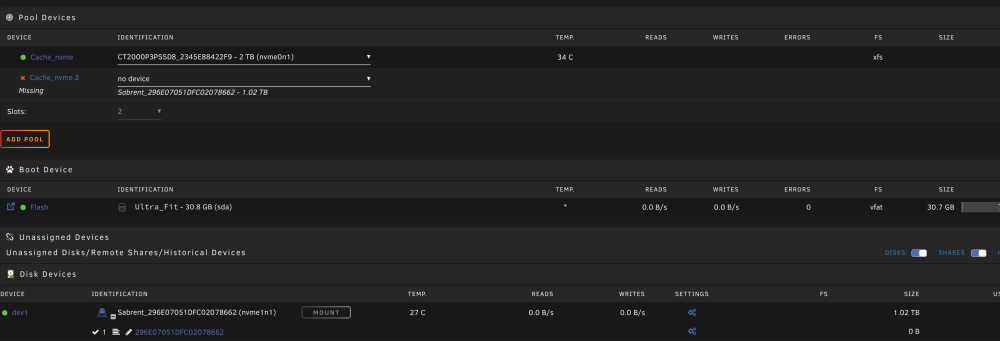
Hi all! So I may have screwed up. I have one nvme ssd as my cache pool, all appdata / appdata backup / etc is there. I wanted to add a second nvme ssd into the pool. So naively, I took the array offline and just added the new nvme and it showed it's unmountable as seen below: So I took it down and now I can't remove the second nvme from the pool. It always shows as missing. How can I actually backup the data in the first NVME so I can bring both nvmes in the cache pool online in order to format them etc? Thank you!!

-
Hi all, just a quick clarification. When using the "move files in cache at X percentage" basically means that there's no daemon or anything monitoring when the cache drive reaches X percentage right? It means that when the mover runs periodically at what is set on the default mover schedule, that it will only actually move IF it's over X percentage right?
-
Hi all! So, my ITX motherboard, Gigabyte B550i only has 4 SATA ports and 2 NVME, one cpu lane one mobo lane. Since I'm using a Node 804 I thought it'd make sense to have a nvme to sata adapter in the 2nd NVME lane which is at the back of the motherboard. Something like this: https://www.amazon.co.uk/gp/product/B09MSZCRBV/ref=ox_sc_saved_title_1?smid=AUCB63L4G9Y0L&th=1 Would something like the above adapter work ok and reliably?
-
Hi all! I left quite a few downloads running overnight and today woke up to sabnzbd's notifications stating "SQL command failed". I tried to open the logs within it and it just showed an error message, something .py related, didn't take a screenshot unfortunately. Both Radarr and Sonarr were also down. So I started to panic. I stopped all docker containers, checked the array and noticed the cache was almost full, probably 1.8TB used of 2TB. So I went in and manually deleted every single incomplete and complete usenet files. After a reboot, the docker containers all spun up, Radarr and Sonarr showed the root path was missing but it showed my previous root file (I changed yesterday all shares to the recommended by Trash-Guides for atomic/hardlinks as the imports were taking AGES). So, if my data share is set to cache -> array I assumed as it neared being full it'd be moved to the array automatically, or did it do that but the writing to the cache was quicker than the mover service? What I also assumed was that if the cache was full then the new files would be written to the secondary location (array) as I'm almost certain I read that? In fact, sabnzbd reports the array disk free space instead of the cache for some reason?! Even so, even if it was almost full, why would the database get screwed up like that? Any ideas? Is this expected behavior? Also, after changing the root path for both Sonarr and Radarr everything is now working properly. Is there a chance something was screwed up with this? I'm hoping not as setting everything up again would be a pain lool! Many thanks!


-
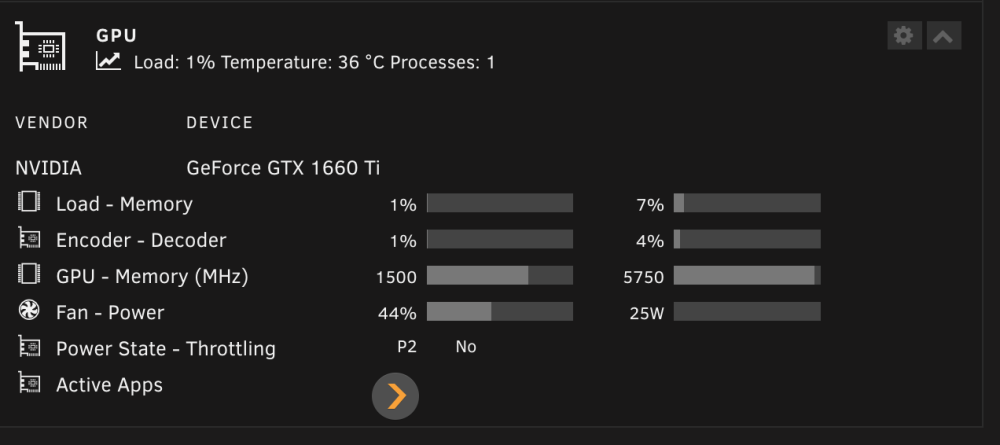
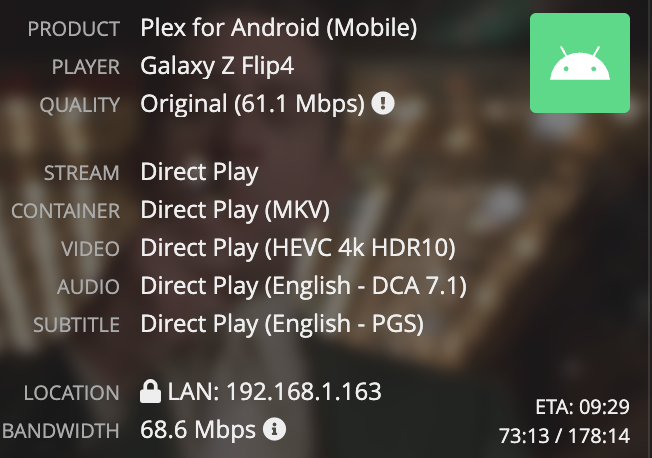
I'm sorry for reviving this thread but just wanted to ask another question related to this if that's ok! So I'm testing this out, have plex on my android phone, connected to the same network. I'm playing a large 4K 60 Mbps file, direct play to the phone. Absolutely 0 problems, super smooth, fast seek times, etc When I change the quality on the phone itself to say, 1080p 8Mbps. I get much more buffering and slower seek times than with direct play. On the same network. I honestly assumed this shouldn't be the case as the GPU would be fast enough as well as the bandwidth requirements would be way smaller? At the same time, it looks like it's barely affecting the GPU. Just hovering between 0-8% on Encoder / Decoder usage. Is this expected? It also seems to not change the size of the /tmp/plex_transcode/ almost at all, though I do see all the transcoded sections being created there. Just want to gauge if this is the expected performance on a setup like this? Specifically with such a powerful machine I was hoping it would eliminate most of these hurdles! +-----------------------------------------------------------------------------------------+ | NVIDIA-SMI 550.40.07 Driver Version: 550.40.07 CUDA Version: 12.4 | |-----------------------------------------+------------------------+----------------------+ | GPU Name Persistence-M | Bus-Id Disp.A | Volatile Uncorr. ECC | | Fan Temp Perf Pwr:Usage/Cap | Memory-Usage | GPU-Util Compute M. | | | | MIG M. | |=========================================+========================+======================| | 0 NVIDIA GeForce GTX 1660 Ti On | 00000000:07:00.0 Off | N/A | | 44% 36C P2 24W / 120W | 451MiB / 6144MiB | 3% Default | | | | N/A | +-----------------------------------------+------------------------+----------------------+ +-----------------------------------------------------------------------------------------+ | Processes: | | GPU GI CI PID Type Process name GPU Memory | | ID ID Usage | |=========================================================================================| | 0 N/A N/A 26040 C ...lib/plexmediaserver/Plex Transcoder 447MiB | +-----------------------------------------------------------------------------------------+
-
Is this still an issue? Was keen on trying Scrutiny but it's putting me off
-
Fast and simple. Thank you. Was afraid it somehow had installed it "outside" of the container image
-
Does unRAID come with nginx by default? I installed nginx-proxy-manager once but have since deleted the container as well as its appdata. Yet, I have this running as seen in htop: Should I just leave it? Is it at all related to the NPM docker? Thanks!

-
But as I've said, on that title for example, it was buffering every 3 seconds. And that snapshot in time was exactly how the CPU looked during the entire test stream I was doing! And this was on the same network, so shouldn't even be buffering every 3 seconds at all with this setup. Other files didn't have as much trouble, others did. With similar specs like truehd 7.1 audio etc
-
Gotcha. That makes sense. But shouldn't this CPU actually be able to handle that type of file?
-
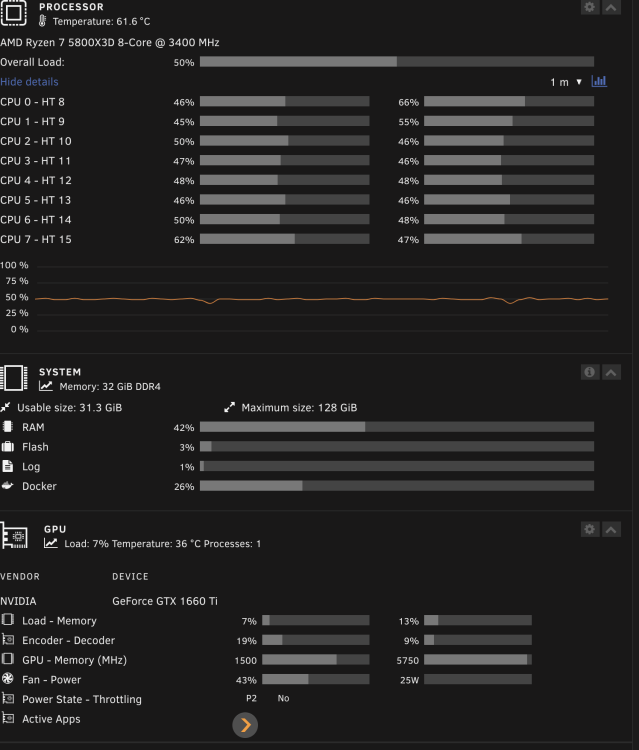
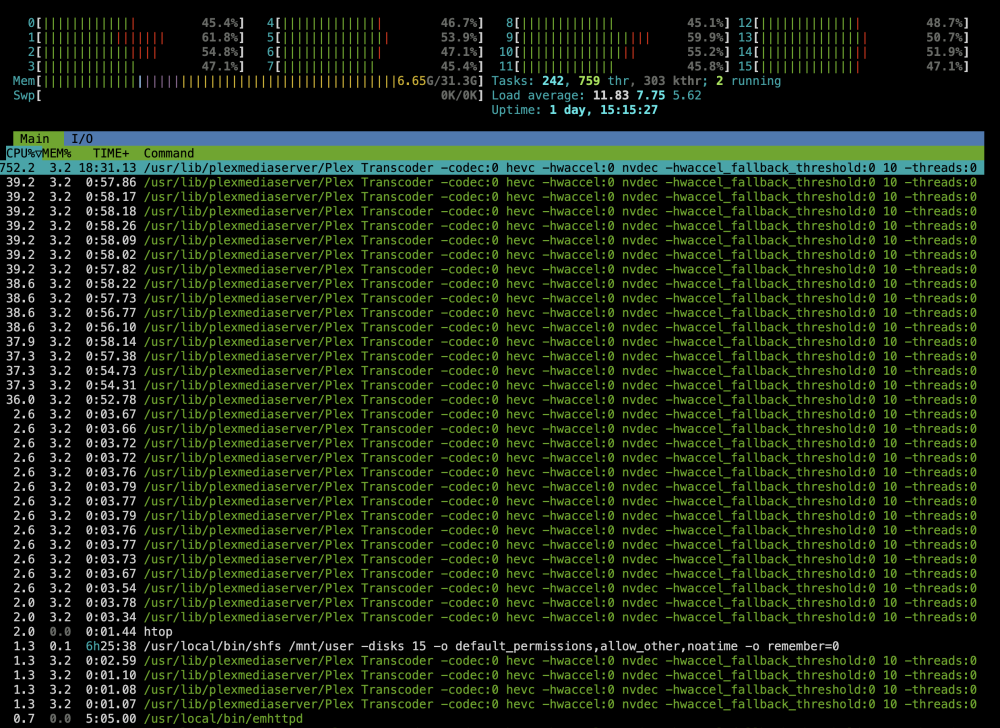
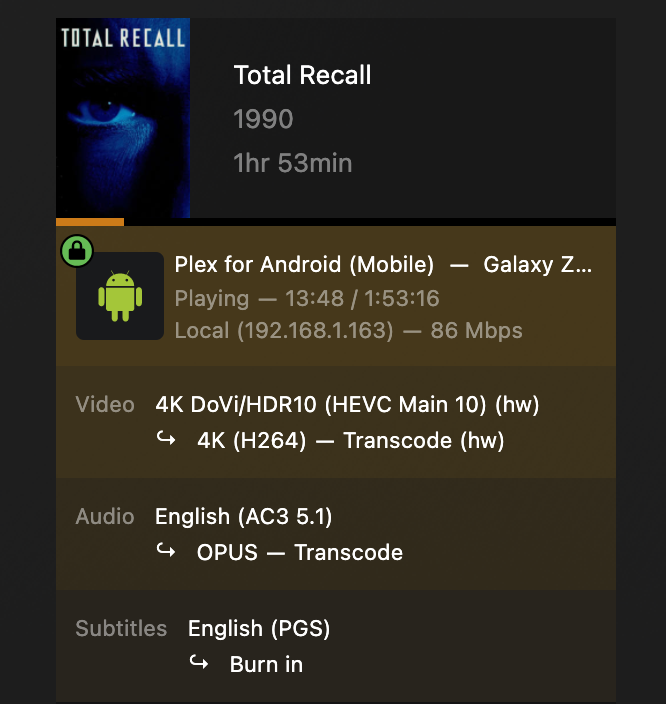
Hi all, So, I've got nvidia transcoding working correctly with transcoding offloaded to ram as well. It worked perfectly, I tested this morning at a friend's house and it was working perfectly fine, no buffering, no issues, transcoding a high bitrate video to still high bitrate 4K, it was seamless. Pretty happy! As I got home I decided to test through my phone and noticed that it was buffering a lot, I mean a lot. every 3 seconds. So I checked it out and the CPU usage was HIGH, even though it shows the GPU is being used but it's barely breaking a sweat? Does anyone have any idea what's actually happening? As soon as I change the transcode to 1080p on the phone then the CPU usage drops to 2% instantly and GPU usage goes up... Any ideas?? Thank you!
-
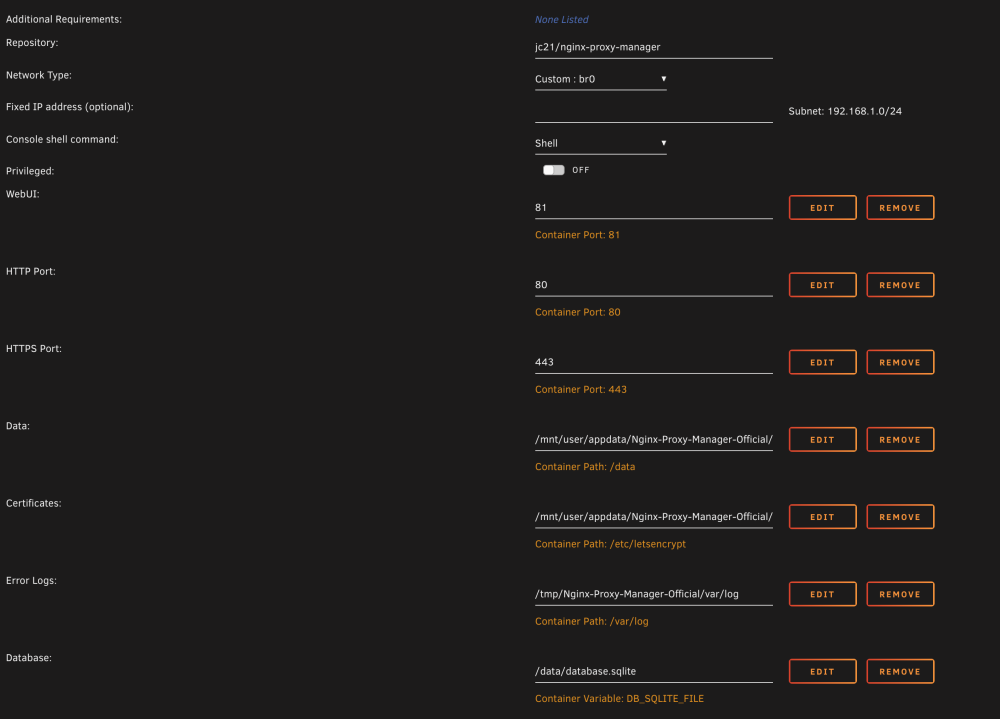
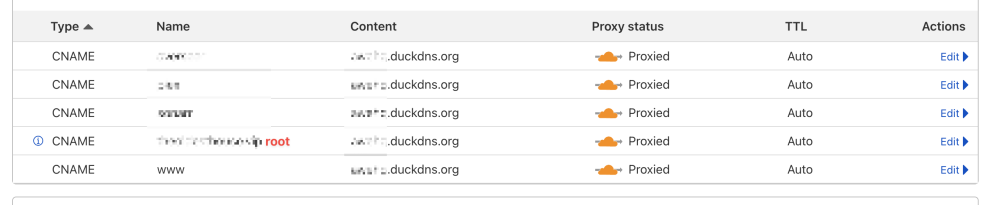
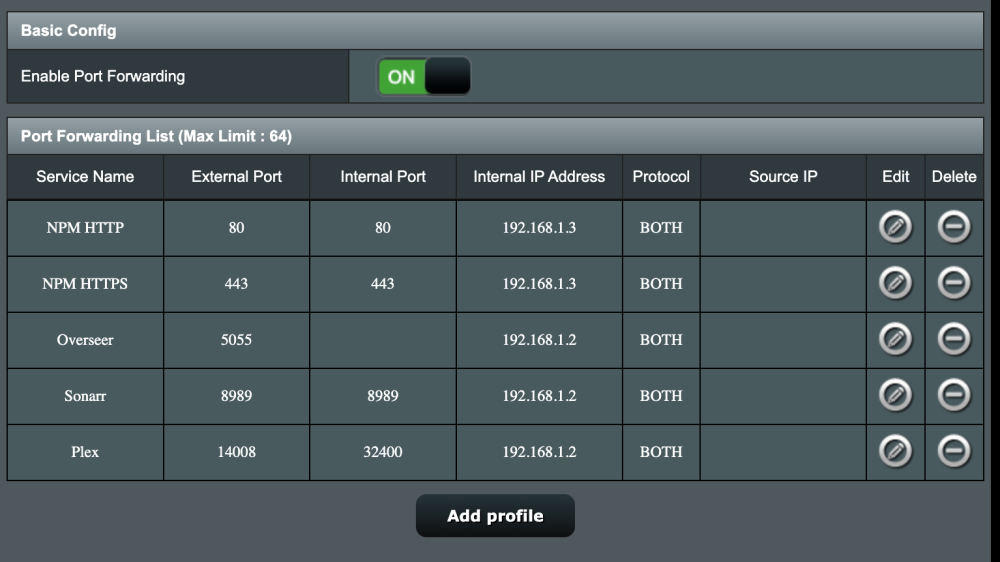
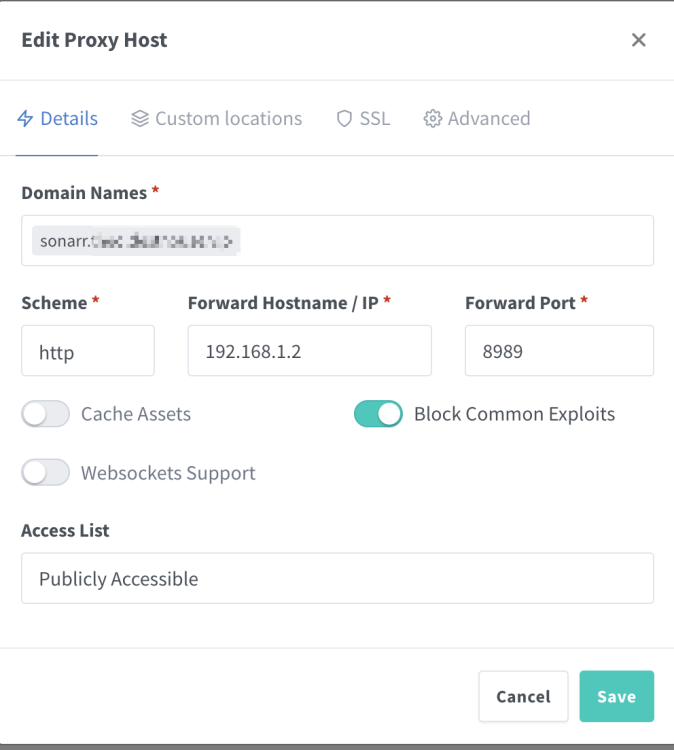
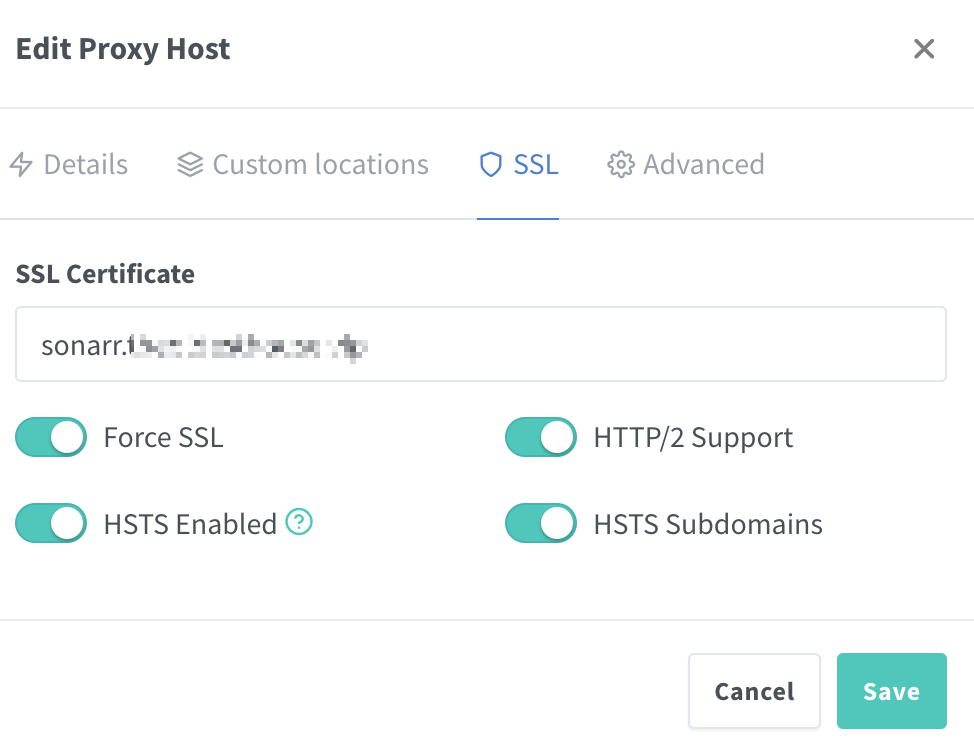
Hi everyone! I've been pulling my hair the last few hours trying to set this up. It should be pretty simple and I have 80% of it working, so I'll detail exactly what I'm doing. Goals: Expose specific dockers for me to manage outside the home Expose Plex + Overseer with custom DNS domains for easier sharing with friends and family What I've done so far: Changed unRAID's HTTP and HTTPS port as to not expose the webgui. Installed NGINX Proxy Manager with the following settings: Setup duckdns with my wan ip pointing to, let's call is. myserver.duckdns.org Bought a domain on Cloudflare and set it up as such: Forwarded all necessary ports on my AX88U router. (I manually changed in Plex's Settings the external port to be 14008 hence the mapping below) Setup NPM (example of Sonarr) Attempt to connect to sonarr results in: But, if I attempt to connect to myserver.duckdns.org:8989 it works perfectly. As well as if I connect to my wanip:8989. So the issue is definitely in the latter stage with NGINX PM / Cloudflare. BUT, if I go to the plex one: So, for some reason the plex dns leads to the "default page" but anything else just errors out. Any idea on where to go from here? Thanks!



-
Perfect! Thank you so much!! That works! With the previous setup of just "/tmp" I had, I transcoded a couple of times to test, are the odds high that Plex screwed up something inside /tmp during that time?
-
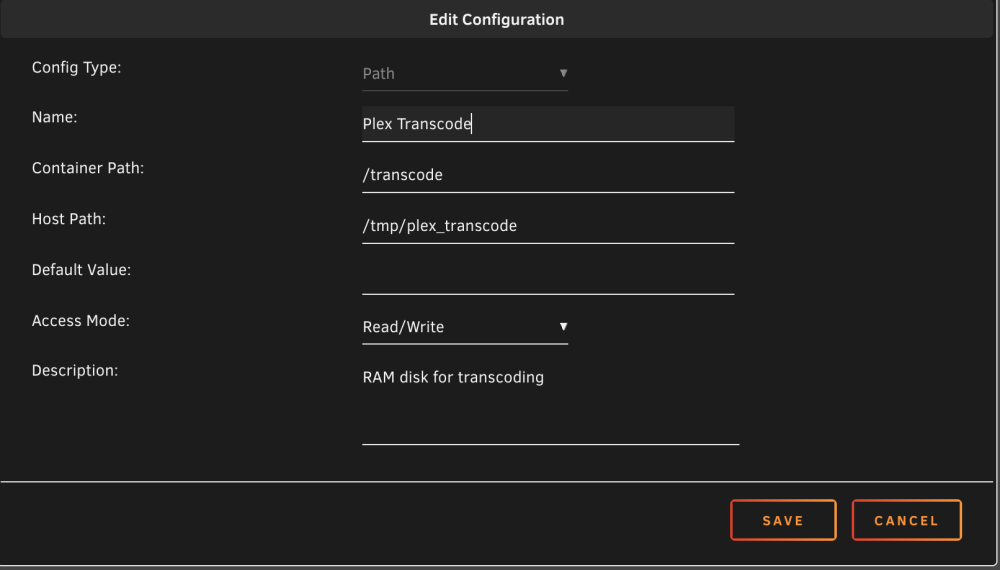
I think I understood? When I read your previous post I immediately changed the path config to this. As well as in temp directory in plex transcode settings to /tmp/plex_transcode, just to isolate it from the rest of /tmp Thing is, it shows it's mounted on tmpfs inside the container, as you've said. I can also see /tmp/plex_transcode at unraid level but nothing inside it when transcoding, only inside the container whilst I'm transcoding. Shouldn't this be theoretically correct and safe (as it's nested in its own folder) unraid level: root@xx:/mnt# df -h /tmp/plex_transcode/ Filesystem Size Used Avail Use% Mounted on rootfs 16G 1.2G 15G 8% / inside plex container: root@xx:/# df -h /tmp Filesystem Size Used Avail Use% Mounted on tmpfs 9.4G 172M 9.2G 2% /tmp
-
I'm sorry, I'm not sure I follow. I'm absolutely new at this so I apologize for the annoyance! As you can see in the image that is within the container, outside the container /tmp does not have a Transcode folder. I thought this was all happening exclusively within the container.
-
Actually I think I figured it out. I added a new path. Container Path: /transcode , Host Path: /tmp and it shows this: looks to be correct right?

-
Hm. I thought there was no need for that but that makes total sense. I need to add a new path then right? How would I go about it? Thank you btw!