Sptz87
Members
-
Joined
-
Last visited
Everything posted by Sptz87
-
Problem with that is the need for an external controller. The point of this is to control fans connected to mobo
-
Thank you for the prompt response! I'm usually a tinkerer and finding out what I "could" instead of "should" be doing. But since the server is rock solid at the moment, I think I'm gonna wait for the next unraid update as hopefully we get 6.3 kernel which allows amd pstate active as well as what you mentioned,
-
Is this basically the only way to get lower C-states with Ryzen? I'm already using amd_pstate=passive, clocks already going down to 500mhz. By using this corefreq is essentially taking over control? I'd like to lower my idle usage as with HDDs turned off and amd-pstate I'm getting around 50-54w idle. Not sure if this could help bring it down a notch?
-
So, as you can see below. This is my current ASPM levels for a Gigabyte B550i. I'm a bit afraid of running powertop blindly. Does anyone have any idea, judging from the below list if there should be any obvious problems? I don't get why the Sabrent NVME has ASPM disabled when it definitely even supports L1.2. What kind of gains, if any could I expect from even running it? Currently idling at 58-60W with HDDs spun down. 00:01.1 PCI bridge: Advanced Micro Devices, Inc. [AMD] Starship/Matisse GPP Bridge (prog-if 00 [Normal decode]) LnkCap: Port #1, Speed 16GT/s, Width x4, ASPM L1, Exit Latency L1 <64us LnkCtl: ASPM L1 Enabled; RCB 64 bytes, Disabled- CommClk+ 00:01.2 PCI bridge: Advanced Micro Devices, Inc. [AMD] Starship/Matisse GPP Bridge (prog-if 00 [Normal decode]) LnkCap: Port #0, Speed 16GT/s, Width x8, ASPM not supported LnkCtl: ASPM Disabled; RCB 64 bytes, Disabled- CommClk+ 00:03.1 PCI bridge: Advanced Micro Devices, Inc. [AMD] Starship/Matisse GPP Bridge (prog-if 00 [Normal decode]) LnkCap: Port #0, Speed 16GT/s, Width x16, ASPM L1, Exit Latency L1 <64us LnkCtl: ASPM L1 Enabled; RCB 64 bytes, Disabled- CommClk+ 00:07.1 PCI bridge: Advanced Micro Devices, Inc. [AMD] Starship/Matisse Internal PCIe GPP Bridge 0 to bus[E:B] (prog-if 00 [Normal decode]) LnkCap: Port #0, Speed 16GT/s, Width x16, ASPM L0s L1, Exit Latency L0s <64ns, L1 <1us LnkCtl: ASPM Disabled; RCB 64 bytes, Disabled- CommClk+ 00:08.1 PCI bridge: Advanced Micro Devices, Inc. [AMD] Starship/Matisse Internal PCIe GPP Bridge 0 to bus[E:B] (prog-if 00 [Normal decode]) LnkCap: Port #0, Speed 16GT/s, Width x16, ASPM L0s L1, Exit Latency L0s <64ns, L1 <1us LnkCtl: ASPM Disabled; RCB 64 bytes, Disabled- CommClk+ 01:00.0 Non-Volatile memory controller: Micron/Crucial Technology P2 [Nick P2] / P3 / P3 Plus NVMe PCIe SSD (DRAM-less) (rev 01) (prog-if 02 [NVM Express]) LnkCap: Port #1, Speed 16GT/s, Width x4, ASPM L1, Exit Latency L1 unlimited LnkCtl: ASPM L1 Enabled; RCB 64 bytes, Disabled- CommClk+ 02:00.0 USB controller: Advanced Micro Devices, Inc. [AMD] 500 Series Chipset USB 3.1 XHCI Controller (prog-if 30 [XHCI]) LnkCap: Port #0, Speed 8GT/s, Width x4, ASPM L0s L1, Exit Latency L0s <2us, L1 <32us LnkCtl: ASPM Disabled; RCB 64 bytes, Disabled- CommClk+ 02:00.1 SATA controller: Advanced Micro Devices, Inc. [AMD] 500 Series Chipset SATA Controller (prog-if 01 [AHCI 1.0]) LnkCap: Port #0, Speed 8GT/s, Width x4, ASPM L0s L1, Exit Latency L0s <2us, L1 <32us LnkCtl: ASPM Disabled; RCB 64 bytes, Disabled- CommClk+ 02:00.2 PCI bridge: Advanced Micro Devices, Inc. [AMD] 500 Series Chipset Switch Upstream Port (prog-if 00 [Normal decode]) LnkCap: Port #0, Speed 8GT/s, Width x4, ASPM L0s L1, Exit Latency L0s <2us, L1 <32us LnkCtl: ASPM Disabled; Disabled- CommClk+ 03:04.0 PCI bridge: Advanced Micro Devices, Inc. [AMD] Device 43ea (prog-if 00 [Normal decode]) LnkCap: Port #4, Speed 8GT/s, Width x4, ASPM L1, Exit Latency L1 <64us LnkCtl: ASPM Disabled; Disabled- CommClk+ 03:08.0 PCI bridge: Advanced Micro Devices, Inc. [AMD] Device 43ea (prog-if 00 [Normal decode]) LnkCap: Port #8, Speed 8GT/s, Width x1, ASPM L1, Exit Latency L1 <64us LnkCtl: ASPM Disabled; Disabled- CommClk+ 03:09.0 PCI bridge: Advanced Micro Devices, Inc. [AMD] Device 43ea (prog-if 00 [Normal decode]) LnkCap: Port #9, Speed 8GT/s, Width x1, ASPM L1, Exit Latency L1 <64us LnkCtl: ASPM Disabled; Disabled- CommClk+ pcilib: sysfs_read_vpd: read failed: No such device 04:00.0 Non-Volatile memory controller: Phison Electronics Corporation E12 NVMe Controller (rev 01) (prog-if 02 [NVM Express]) LnkCap: Port #0, Speed 8GT/s, Width x4, ASPM L1, Exit Latency L1 <64us LnkCtl: ASPM Disabled; RCB 64 bytes, Disabled- CommClk+ 05:00.0 Ethernet controller: Realtek Semiconductor Co., Ltd. RTL8125 2.5GbE Controller (rev 05) LnkCap: Port #0, Speed 5GT/s, Width x1, ASPM L0s L1, Exit Latency L0s unlimited, L1 <64us LnkCtl: ASPM Disabled; RCB 64 bytes, Disabled- CommClk+ 06:00.0 Network controller: Intel Corporation Wi-Fi 6 AX200 (rev 1a) LnkCap: Port #9, Speed 5GT/s, Width x1, ASPM L1, Exit Latency L1 <8us LnkCtl: ASPM Disabled; RCB 64 bytes, Disabled- CommClk+ 07:00.0 VGA compatible controller: NVIDIA Corporation TU116 [GeForce GTX 1660 Ti] (rev a1) (prog-if 00 [VGA controller]) LnkCap: Port #0, Speed 8GT/s, Width x16, ASPM L0s L1, Exit Latency L0s <512ns, L1 <16us LnkCtl: ASPM L1 Enabled; RCB 64 bytes, Disabled- CommClk+ 07:00.1 Audio device: NVIDIA Corporation TU116 High Definition Audio Controller (rev a1) LnkCap: Port #0, Speed 8GT/s, Width x16, ASPM L0s L1, Exit Latency L0s <512ns, L1 <4us LnkCtl: ASPM L0s L1 Enabled; RCB 64 bytes, Disabled- CommClk+ 07:00.2 USB controller: NVIDIA Corporation TU116 USB 3.1 Host Controller (rev a1) (prog-if 30 [XHCI]) LnkCap: Port #0, Speed 8GT/s, Width x16, ASPM L0s L1, Exit Latency L0s <512ns, L1 <16us LnkCtl: ASPM L1 Enabled; RCB 64 bytes, Disabled- CommClk+ 07:00.3 Serial bus controller: NVIDIA Corporation TU116 USB Type-C UCSI Controller (rev a1) LnkCap: Port #0, Speed 8GT/s, Width x16, ASPM L0s L1, Exit Latency L0s <512ns, L1 <16us LnkCtl: ASPM L1 Enabled; RCB 64 bytes, Disabled- CommClk+ 08:00.0 Non-Essential Instrumentation [1300]: Advanced Micro Devices, Inc. [AMD] Starship/Matisse PCIe Dummy Function LnkCap: Port #0, Speed 16GT/s, Width x16, ASPM L0s L1, Exit Latency L0s <64ns, L1 <1us LnkCtl: ASPM Disabled; RCB 64 bytes, Disabled- CommClk+ 09:00.0 Non-Essential Instrumentation [1300]: Advanced Micro Devices, Inc. [AMD] Starship/Matisse Reserved SPP LnkCap: Port #0, Speed 16GT/s, Width x16, ASPM L0s L1, Exit Latency L0s <64ns, L1 <1us LnkCtl: ASPM Disabled; RCB 64 bytes, Disabled- CommClk+ 09:00.1 Encryption controller: Advanced Micro Devices, Inc. [AMD] Starship/Matisse Cryptographic Coprocessor PSPCPP LnkCap: Port #0, Speed 16GT/s, Width x16, ASPM L0s L1, Exit Latency L0s <64ns, L1 <1us LnkCtl: ASPM Disabled; RCB 64 bytes, Disabled- CommClk+ 09:00.3 USB controller: Advanced Micro Devices, Inc. [AMD] Matisse USB 3.0 Host Controller (prog-if 30 [XHCI]) LnkCap: Port #0, Speed 16GT/s, Width x16, ASPM L0s L1, Exit Latency L0s <64ns, L1 <1us LnkCtl: ASPM Disabled; RCB 64 bytes, Disabled- CommClk+
-
Noticed the GUI was acting pretty slow all of a sudden and when that happened could see spikes in both CPU usage and Network Traffic. Like on Network it'd spike in the graph to like 9Gbps. Then noticed this in syslog: Mar 6 14:45:33 AWE php-fpm[5787]: [WARNING] [pool www] child 32093 exited on signal 9 (SIGKILL) after 29.731827 seconds from start Mar 6 14:45:35 AWE php-fpm[5787]: [WARNING] [pool www] child 32119 exited on signal 9 (SIGKILL) after 31.650279 seconds from start Mar 6 14:45:48 AWE autofan: Highest disk temp is 38C, adjusting fan speed from: 61 (23% @ 747rpm) to: 48 (18% @ 843rpm) Mar 6 14:47:33 AWE php-fpm[5787]: [WARNING] [pool www] child 962 exited on signal 9 (SIGKILL) after 142.656216 seconds from start Mar 6 14:47:47 AWE php-fpm[5787]: [WARNING] [pool www] child 14354 exited on signal 9 (SIGKILL) after 134.597951 seconds from start Mar 6 14:47:54 AWE autofan: Highest disk temp is 39C, adjusting fan speed from: 48 (18% @ 767rpm) to: 61 (23% @ 994rpm) Mar 6 14:48:03 AWE php-fpm[5787]: [WARNING] [pool www] child 14423 exited on signal 9 (SIGKILL) after 148.214152 seconds from start Mar 6 14:48:17 AWE php-fpm[5787]: [WARNING] [pool www] child 22996 exited on signal 9 (SIGKILL) after 136.367080 seconds from start Mar 6 14:48:28 AWE php-fpm[5787]: [WARNING] [pool www] child 28825 exited on signal 9 (SIGKILL) after 55.399195 seconds from start Mar 6 14:48:30 AWE php-fpm[5787]: [WARNING] [pool www] child 30196 exited on signal 9 (SIGKILL) after 42.653882 seconds from start Mar 6 14:48:32 AWE php-fpm[5787]: [WARNING] [pool www] child 11231 exited on signal 9 (SIGKILL) after 29.004422 seconds from start Mar 6 14:49:03 AWE emhttpd: read SMART /dev/sdc Mar 6 14:49:48 AWE php-fpm[5787]: [WARNING] [pool www] child 22342 exited on signal 9 (SIGKILL) after 11.804580 seconds from start Mar 6 14:50:50 AWE php-fpm[5787]: [WARNING] [pool www] child 14086 exited on signal 9 (SIGKILL) after 13.963540 seconds from start Mar 6 14:51:02 AWE php-fpm[5787]: [WARNING] [pool www] child 16151 exited on signal 9 (SIGKILL) after 11.765929 seconds from start Mar 6 14:51:17 AWE php-fpm[5787]: [WARNING] [pool www] child 23223 exited on signal 9 (SIGKILL) after 14.522135 seconds from start Mar 6 14:51:30 AWE php-fpm[5787]: [WARNING] [pool www] child 27840 exited on signal 9 (SIGKILL) after 13.452030 seconds from start Mar 6 14:51:53 AWE php-fpm[5787]: [WARNING] [pool www] child 29927 exited on signal 9 (SIGKILL) after 23.079546 seconds from start Mar 6 14:51:55 AWE php-fpm[5787]: [WARNING] [pool www] child 31491 exited on signal 9 (SIGKILL) after 18.646314 seconds from start Mar 6 14:52:53 AWE php-fpm[5787]: [WARNING] [pool www] child 21706 exited on signal 9 (SIGKILL) after 16.526706 seconds from start Mar 6 14:53:10 AWE php-fpm[5787]: [WARNING] [pool www] child 30773 exited on signal 9 (SIGKILL) after 17.691974 seconds from start Mar 6 14:53:52 AWE php-fpm[5787]: [WARNING] [pool www] child 12465 exited on signal 9 (SIGKILL) after 15.938438 seconds from start Mar 6 14:53:54 AWE php-fpm[5787]: [WARNING] [pool www] child 12466 exited on signal 9 (SIGKILL) after 17.986666 seconds from start Mar 6 14:54:04 AWE php-fpm[5787]: [WARNING] [pool www] child 18259 exited on signal 9 (SIGKILL) after 12.182820 seconds from start Mar 6 14:54:16 AWE php-fpm[5787]: [WARNING] [pool www] child 24514 exited on signal 9 (SIGKILL) after 12.084464 seconds from start Mar 6 14:56:54 AWE php-fpm[5787]: [WARNING] [pool www] child 13701 exited on signal 9 (SIGKILL) after 126.667100 seconds from start Mar 6 14:57:27 AWE php-fpm[5787]: [WARNING] [pool www] child 704 exited on signal 9 (SIGKILL) after 125.478612 seconds from start Mar 6 15:02:56 AWE php-fpm[5787]: [WARNING] [pool www] child 26454 exited on signal 9 (SIGKILL) after 19.910296 seconds from start Mar 6 15:05:05 AWE php-fpm[5787]: [WARNING] [pool www] child 7769 exited on signal 9 (SIGKILL) after 111.660475 seconds from start Mar 6 15:05:22 AWE winbindd[16541]: [2024/03/06 15:05:21.985600, 0] ../../source3/winbindd/winbindd_samr.c:71(open_internal_samr_conn) Mar 6 15:05:22 AWE winbindd[16541]: open_internal_samr_conn: Could not connect to samr pipe: NT_STATUS_CONNECTION_DISCONNECTED Mar 6 15:05:41 AWE php-fpm[5787]: [WARNING] [pool www] child 8305 exited on signal 9 (SIGKILL) after 139.216771 seconds from start Mar 6 15:05:43 AWE php-fpm[5787]: [WARNING] [pool www] child 10079 exited on signal 9 (SIGKILL) after 59.938068 seconds from start Mar 6 15:05:54 AWE php-fpm[5787]: [WARNING] [pool www] child 8097 exited on signal 9 (SIGKILL) after 30.222862 seconds from start Mar 6 15:05:57 AWE php-fpm[5787]: [WARNING] [pool www] child 14347 exited on signal 9 (SIGKILL) after 13.291311 seconds from start Any idea what could be causing this all of a sudden?
-
Does anyone have any idea if there's plans to choose to use amd p-state driver in the future? 6.12 introduced p-state as showed in the changelog but it looks like turning it on is a bit fiddly? I'd really like to be able to idle at lower c-states / lower clocks, but with the way to activate it seems a bit risky (I might be wrong) and I don't want to risk my current setup
-
Thanks for the prompt reply. So moving the data out, turn it on, the move it back in should be enough for compression to take that into account correct? Also, since it's mainly appdata / docker folder does that fall within the threshold of being "compressible"? I'm going to enable it regardless since, as you've said, shouldn't hurt.
-
Started experimenting with ZFS on a raid0 cache pool. Couple of questions: Is it worth turning on compression? Pool is used for appdata / system + downloads (that eventually get moved). If so, do I need to move appdata / system out, turn on compression, then back in? Datasets and snapshots. I'm using docker folder instead of image as I read that's recommended nowadays compared to img due to risks of corruption etc. I've noticed a shiteton of snapshots, 117 to be exact and 99% are from cache/system. Meaning it's definitely the docker folder. Is this something to worry about or just expected behavior? Auto-Trim is set to enabled. Do I still need to schedule it in scheduler? thanks!
-
On plex container backup, on Library/Application Support/Plex Media Server/Cache I understand it's something that's just recreated easily. But if I have a crap ton of media that takes days to recreate video preview thumbnails etc and if I also want to keep Posters etc, is there any logical reason not to backup the below? Library/Application Support/Plex Media Server/Media Library/Application Support/Plex Media Server/Metadata
-
Honestly, check spaceinvader videos on upgrading cache pool to zfs. I'm using it right now after having a disastrous event with BTRFS like you, with 2TB + 1TB drives on raid0. Working flawlessly so far and the performance is leap and bounds from BTRFS.
-
But since this a new installation it doesn't exist. And doing a restore I thought it'd copy them into that folder? Otherwise what's the point of restoring? Should I create that folder and attempt a restore again? Solved: In case anyone is in the same situation. Just installing any random container from the "appstore" obviously created that folder. Then once you restore it again it will be able to populate. Since it looks like this plugin isn't attempting to create the folder if it's missing, just populate it.
-
So I just did a restore, selected all templates and containers (did not select "restore backup config") and instantly got all the appdata in the mnt/user/appdata! Great! But when I go to Apps, I can't see any dockers in Previous Apps. Any idea how to get them back? As that's really the main thing about these backups. so that the templates are as they were. This is a new installation. So where did the templates get restored to?!

-
Same here. It doesn't even show in BIOS. Need to keep changing port... My motherboard doesn't have a usb 2.0 port though... only internal
-
A couple of questions: If I'm doing a new unraid build and using the flash disk zip file to create a new unraid usb boot drive. Will that fire up the array as it was? (don't want that) If so, is there a way to stop it from starting the array as soon as it starts? Secondly: I've never done a restore but I'm in a pickle and may need to do a restore on a fresh new build. How would one go about it? Restore the docker backups and then install the containers?
-
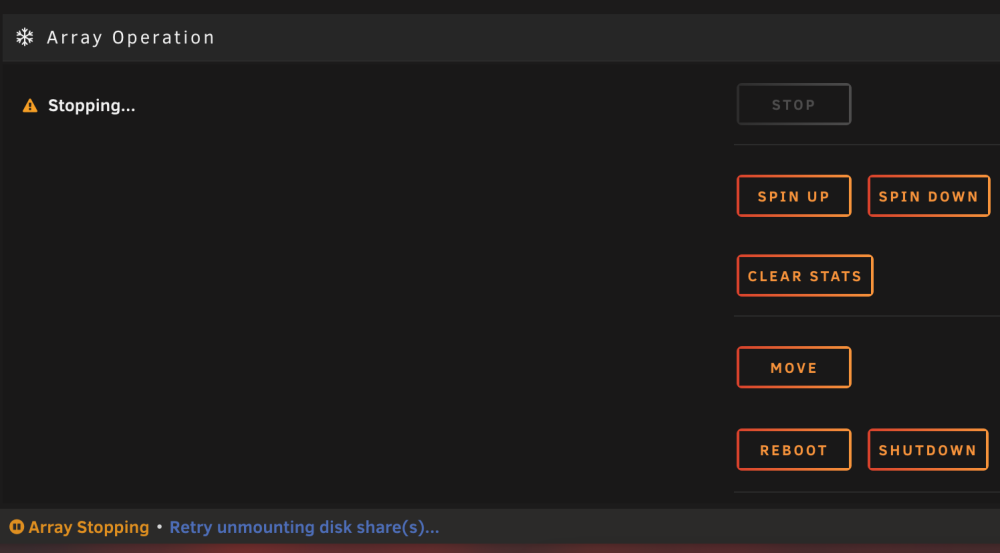
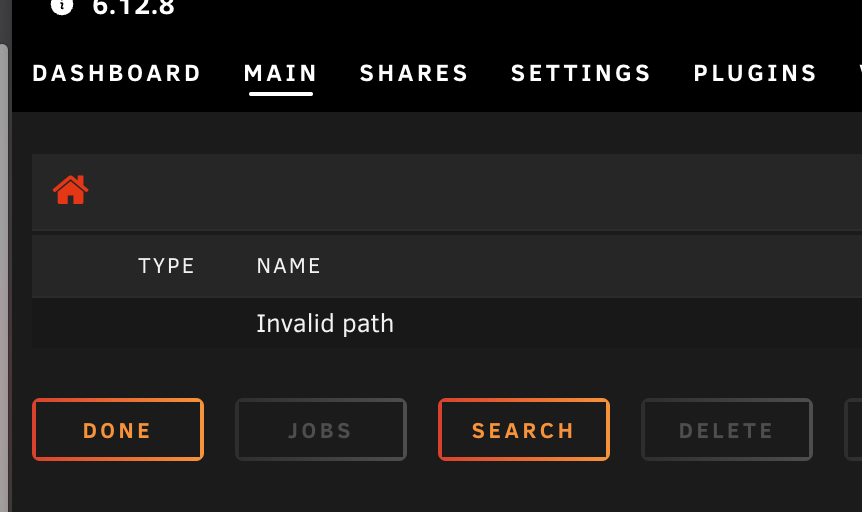
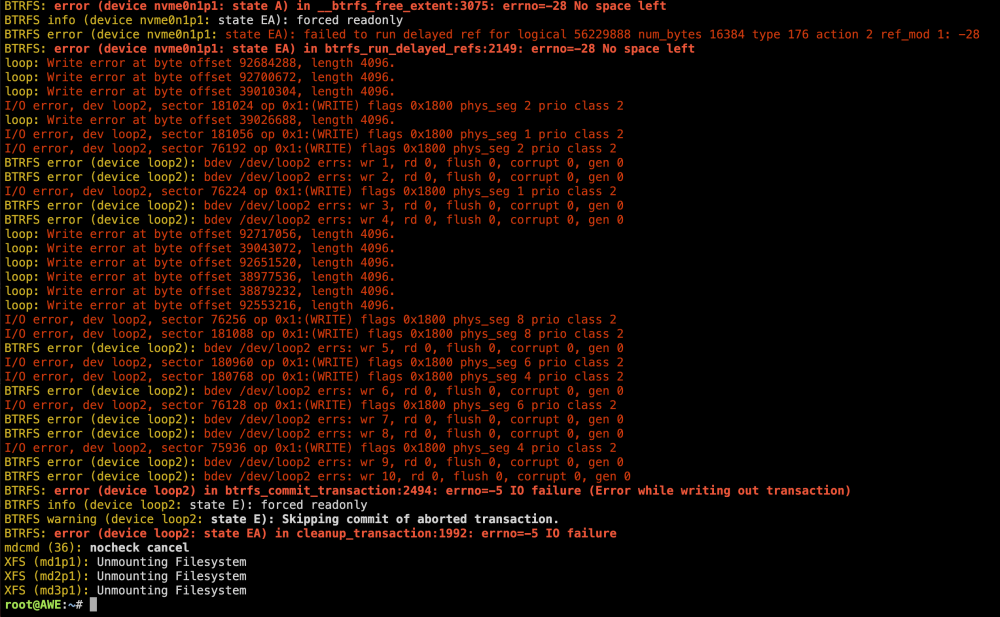
Stopped all dockers, VMS. Turned docker off in Settings. Trying to stop the array results in this: Just stays like this.... Don't know what to do... When I click on any drive or share I get this. Not sure if it's because it's "stopping" the array... dmesg -T:
-
Anyone please? I have no idea what to do...
-
Any help with the best course of action here please? And best options for the future to avoid this? If I could save appdata and make sure it's not corrupted then that'd be great otherwise I'll suck it up as I have a backup. The main thing is generating all the preview thumbnails again 😩
-
It's actually raid0 because I wanted as large a cache as possible and since I backup appdata and vm data everyday I didn't really care if any data is lost. It's just downloads anyway that eventually get moved to the array. Hence me finding it weird it's showing 2.55tb as full when it's a 2tb + 1tb nvme drives
-
Yep, makes sense. Still I wouldn't expect 2.55TB out of 3TB to be considered full? Mainly when I have preallocate disk space in qbit. Luckily I have an appdata / vms backup from this morning. So should be good in that front whatever happens.

-
Attached diagnostics! AWE Diagnostics Mar 2.zip I noticed that I can't set a minimum free space when the array is running. So I thought in shares would be enough. obviously I was wrong I don't care about recovering the files that caused this (the torrent downloads) all I care is for nothing to have broken in appdata etc !
-
Mar 2 13:50:25 AWE kernel: BTRFS: error (device nvme0n1p1: state A) in btrfs_run_delayed_refs:2149: errno=-28 No space left Mar 2 13:50:25 AWE kernel: BTRFS info (device nvme0n1p1: state EA): forced readonly Mar 2 13:50:25 AWE kernel: BTRFS warning (device nvme0n1p1: state EA): Skipping commit of aborted transaction. Mar 2 13:50:25 AWE kernel: BTRFS: error (device nvme0n1p1: state EA) in cleanup_transaction:1992: errno=-28 No space left Mar 2 13:56:04 AWE kernel: BTRFS warning (device nvme0n1p1: state EA): checksum verify failed on logical 2169117310976 mirror 1 wanted 0xb123218b found 0xb40b712a level 0 Mar 2 13:56:04 AWE kernel: BTRFS error (device nvme0n1p1: state EA): parent transid verify failed on logical 2169117310976 mirror 2 wanted 10415 found 10411 So I got a warning my cache drive was full, due to downloads. I tried running mover but didn't work. Also tried deleting all files in qbittorrent (was a large torrent) and it showed as ERRORED. So I did a delete and the files are still there. tried running "rm" in terminal and it showed files are read only. The above is the first drive disk log. No idea what to do now. I thought when it got full it would just start downloading to the array? Thought that was the logic there. Any help? No idea what to do... Thanks!
-
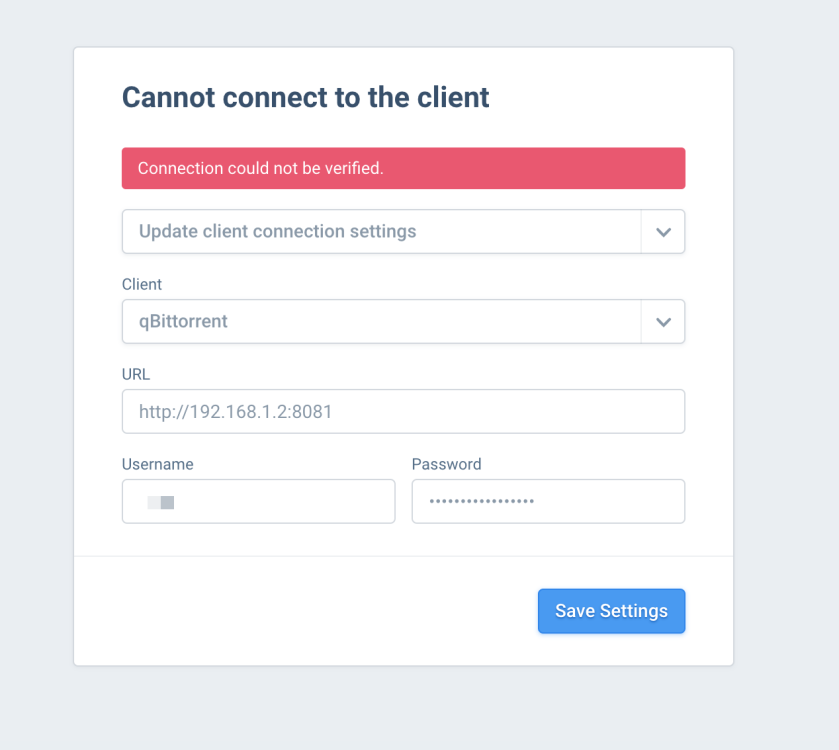
I have auth turned on. Tried restarting qbit container but no dice. Qbit is routed into Gluetun. Not sure if that makes any difference
-
It also seems to change the fan input sometimes it's 1 sometimes it's 2. This changed on reboot of course. Now I tried to do a detect, did like 5x, it slows down the fans, meaning its detecting it and goes back to 100%. So something makes it not stick sometimes
-
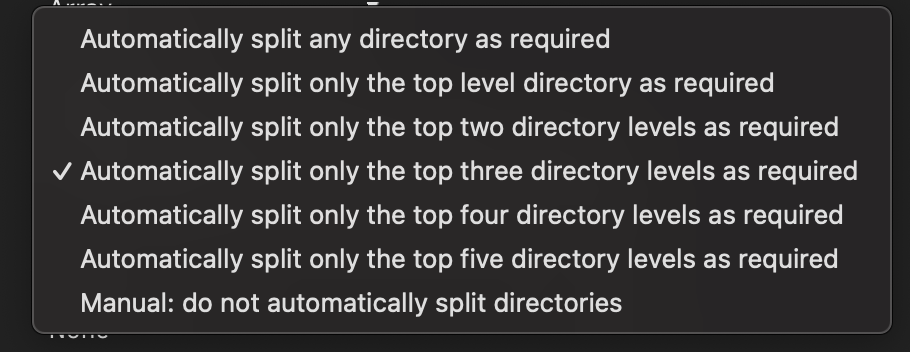
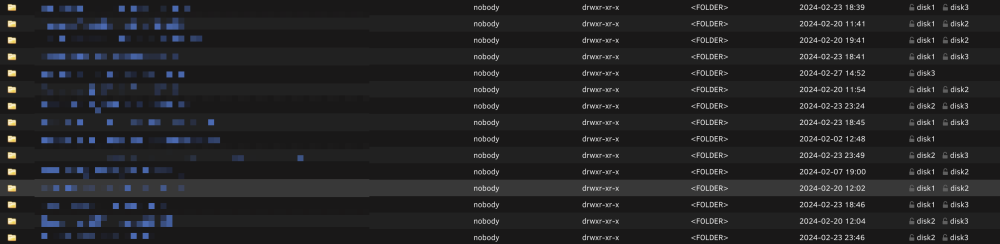
After reading around it seems that it shouild be Top 3 directories. As I want each movie folder and tv series folder to be on their own disk. My main issue is fixing this now as I have no idea what the best approach is. Only way I found was going, for example, to Main > Disk 2 > movies > select movie folder that has the folder and move to Disk 1 > movies. It merges both folders and only adds the subs but this is really really time consuming
-
My main data share is as follows: data ├── torrents ├── movies └── tv ├── usenet ├── incomplete └── complete ├── movies └── tv ├── media ├── movies └── tv I basically didnt pay attention when setting up the data share's (cache > array) Split Leveling. So left it at default, now what I have in the array is specific movie folders with the media file in disk1 and subtitles in disk3 for example. This is problematic which means spinning up different disks to play one piece of media. If I want to just split the red folders. Am I correct in thinking it should be "...Split only the top three directory levels as required"? In order to achieve all folders inside movies and tv to be split into different disks, not their contents. I'm aware this would mean seasons being forced into the same disk. I'm just slightly confused if it should be Top two or Top three directory level. I don't care about the folders inside torrents and usenet as they never survive long enough to be moved into the array obviously. And after that, is there a relatively easy way to "clean up" the files that are scattered around to "obey" the above rule? Thanks!