





bonienl
Community Developer
-
Joined
-
Last visited
Everything posted by bonienl
-
With so many peers failing at the same time, I would first check the router. Is port forwarding still correct on the router. Perhaps your Unraid server got a different IP address which breaks forwarding. Perhaps your router is using UPnP and lost the forwarding entries?
-
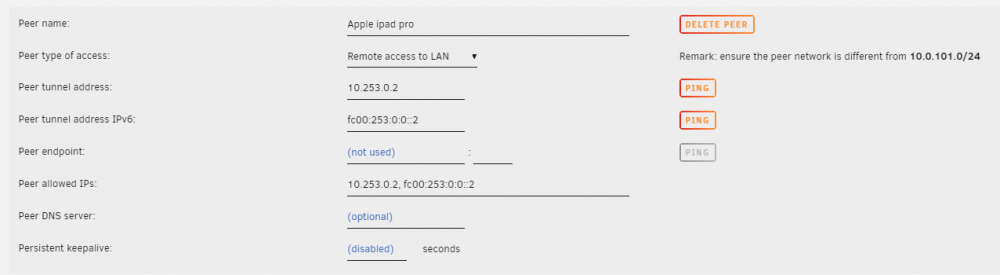
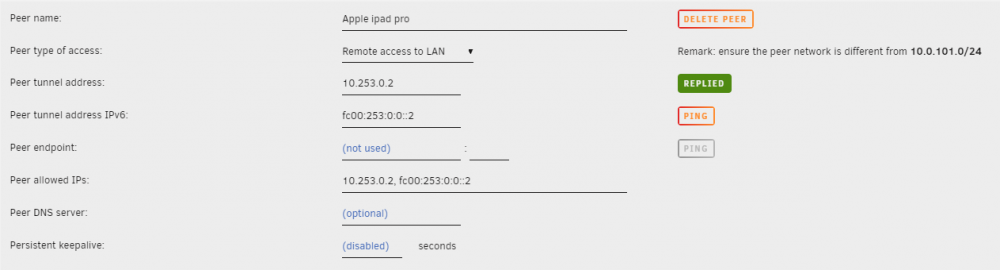
Everything is still working for me. As a test I also recreated the configs and uploaded to my peers, all fine and working. Version 2021.04.12 corrects language translation support, not directly related to WireGuard itself. Switch to advanced mode and use the PING button to test reachability to the peer (in my example I have both IPv4 and IPv6, but same principle with IPv4 only)
-
Il faut avoir tous les fichiers au format Linux (LF). Les traductions manquent lorsque le format Windows (CRLF) est utilisé.
-
Tu peux tester sur n'importe quelle version 6.9 d'Unraid
-
A possible solution is to run docker containers on a custom network (br0), this will give them a unique IP address and restrict access.
-
There are not many other ports open on Unraid, it is not a fully fledged server with many different services to run. On the management access page you can further tell what management services to open or close. Services like http/https, ssh and telnet are all protected by a login authentication.
-
The WireGuard solution is intended to give only "trusted" users access, any "outsiders" can't make access because they don't have the WG keys to establish the session. Who is accessing your Unraid server over WireGuard? It sounds like you are setting up some "public" service. Any device on your LAN which runs on its own unique IP address (this may include docker containers and VMs) can be allowed or denied access over WG (configurable in the GUI).
-
Start with reading the quickstart guide. This guide is kept up-to-date with the latest developments. Also make sure the WireGuard plugin is the latest version.
-
Correction available
-
Do you have anything installed to customize your GUI? WireGuard supports multi-language, which is not available in Unraid 6.8, though it should display all text correctly. Just made a quick test, this is a bug. Will correct it.
-
See also /config/ident.cfg on your flash device PORT="80" PORTSSL="443"
-
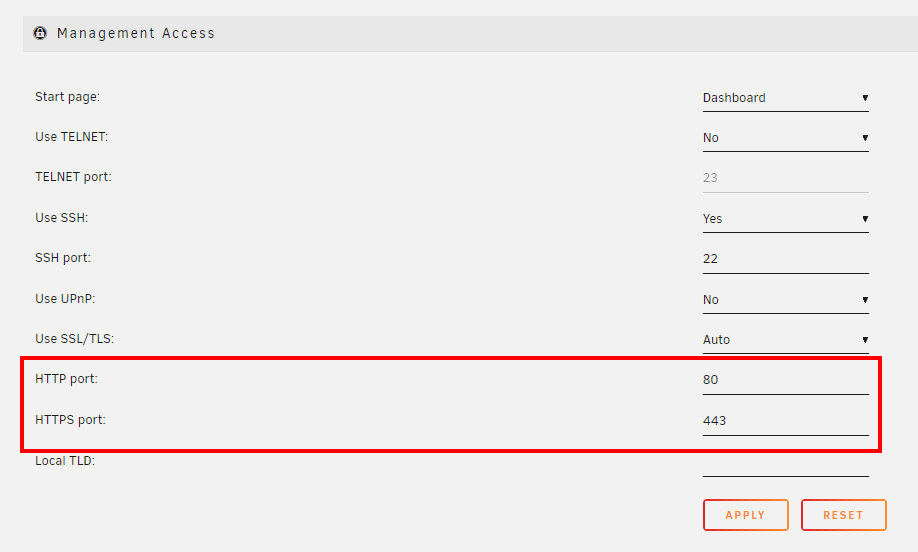
Make sure you have valid ports configured. See also /config/ident.cfg on your flash device PORT="80" PORTSSL="443"
-
Try to clear the cache of your browser.
-
I have added my observations to your bug report. I see a similar thing happening. Some regression appeared in 6.9.2
-
The specific macvlan issue is discussed here The specific kernel fix is described here, it comes down to broadcast messages were not properly handled.
-
Please open a topic under General Support, it appears you have a hardware related problem.
-
The WG configuration looks okay, for IPv6 to work everything in your network environment needs to understand IPv6 and set up properly. Start your investigation there, and no it is not a bug. IPv6 with WireGuard does work.
-
I don't know how your router interprets a metric value of zero, but from a routing perspective this should be at least 1. The WG configuration is okay.
-
I too have multiple VLAN networks, which I use for docker containers and VMs. All of these networks (both IPv4 and IPv6) are reachable over WireGuard. Couple of things I forgot to mention: WG configuration -> Local server uses NAT = No Docker configuration -> Host access to custom networks = Enabled The router needs a static route to forward the WG subnet (10.253.0.0/24) to the Unraid server (192.168.1.x) On the peer make a simplified AllowedIPs subnet, like 192.168.0.0/16 (this allows any 192.168.x.x address)
-
The GUI has no field to add the additional host networks for the peer(s). You need to do that manually on the peer itself. Delete all tunnels and start from scratch (choose Remote access to LAN for the peer), this will generate a peer config similar like Remote peer configuration [Interface] #My iPhone PrivateKey=xxxxxxxxxxxxxxxxxxxxxxxxxxxxxxxxxxxxxxxxxx= Address=10.253.0.2/32 [Peer] #My Unraid server PublicKey=xxxxxxxxxxxxxxxxxxxxxxxxxxxxxxxxxxxxxxxxxx= Endpoint=www.mysite.com:51831 AllowedIPs=10.253.0.1/32, 192.168.1.0/24 Load this config on the peer and add manually the additional networks, like 192.168.2.0/24, 192.168.3.0.24, etc to the list of AllowedIPs using the WG app on the peer (do not delete the existing entries).
-
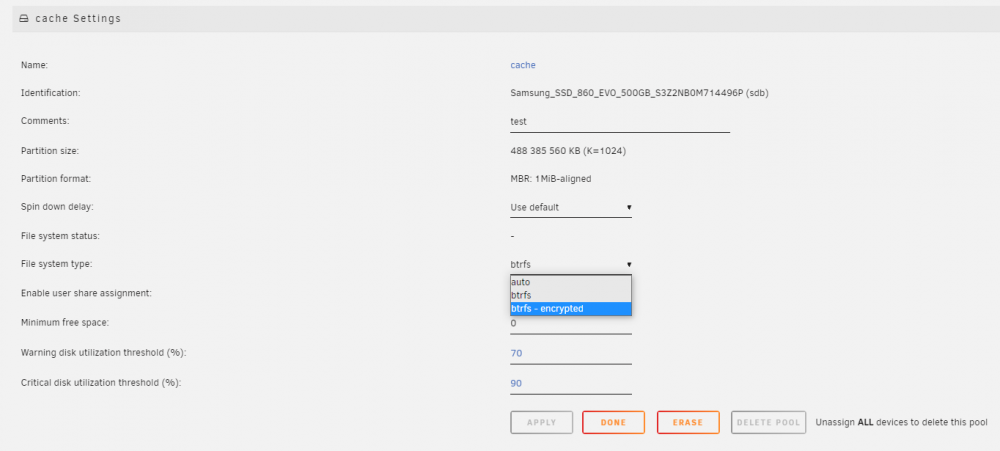
Each individual pool can have encryption or not, just like the array. Stop the array and go to the pool (cache) settings and change the file system type. Note: when a pool consists of 2 or more devices, it will always use btrfs.
-
On your phone (client) you need to have AllowedIPs to include all your additional networks too, e.g. AlloweIPs=192.168.3.0/24, 192.168.4.0/24, 192.168.5.0/24 ...
-
This setting restricts management access to interface eth0 only, still this interface needs connectivity as before to do upgrades and plugin/docker installations.
-
There is a "hidden" parameter which you need to set directly in the file /config/ident.cfg (it is not available in the GUI) BIND_MGT="yes" After setting this parameter, reboot your system and it will have all management related access (GUI, ssh, telnet) restricted to eth0 (br0).
-
Haha, I was a bit silent about this Thanks for the write up





