





hawihoney
Members
-
Joined
-
Last visited
Everything posted by hawihoney
-
Falsch. Du kombinierst (aktivierst) beide Share Arten. Du hast nach wie vor Dein Datengrab in /mnt/user/ umgehst aber für ausgewählte Werkzeuge/Arbeitsabläufe mit den Disk Shares, z.B. beim Abspielen, das kaskadierende Wecken. Aber egal. Jeder so wie es für ihn passt.
-
Ich habe gerade Deine ersten Posts geschaut und da fiel mir auf, dass alle Ordner den selben Zeitstempel haben. Wie kann das sein? Läuft da ggfs. ein Job zeitgesteuert der alle Platten anpackt? Nur so eine Frage. Zum Thema Streaming, Startup Gruppen, Plex und Konsorten: Wie ich gelesen habe nutzt Du Startup Gruppen da das nacheinander Hochfahren der Platten nervt. Deshalb nutze ich seit einem Dutzend Jahren die Disk Shares. In meinem Plex, oder Deinen Werkzeugen, kann man meist mehrere Verzeichnisse angeben. Wenn man statt mit /mnt/user/Content mit /mnt/disk1/Content, /mnt/disk2/Content, etc arbeitet, dann passiert das nicht mehr. Das Werkzeug kennt dann die exakte Platte und wird nur diese konkret ansprechen. In meinem Plex sind fast 200 Verzeichnisse hinterlegt, das kratzt Plex nicht die Bohne - und das wird bei Deinen Werkzeugen auch so sein. Wenn Du User Shares und Disk Shares gleichzeitig aktiv hast dann könntest Du z.B. auf user Schreiben und von user oder disk Lesen. Auf disk würde ich nicht Schreiben, dass kann gefährlich werden und ist zu aufwändig. Ich weiß ist OT - aber hilft ggfs. um die Startup Gruppen locker zu umschiffen.
-
The official Unraid Tailscale doc announces that some containers might not work with Tailscale. In my environment it's: Doublecommander Libreoffice Sqlitebrowser All other containers work as expect and I can reach them from my devices with their <containername>.tail* address. Is there an alternative way to get these containers to work with Tailscale?
-
Is it still a problem? I tried Tailscale many, many times and I never could get SMB to work thru the ts.net addresses. However yesterday I found that: tailscale serve --bg --tcp 445 tcp://localhost:445Now everything works here. Don't ask me what this does, I'm only a monkey copying something from the internet.
-
Thanks, that's what I wanted to hear.
-
Thanks but that's not my question. These addresses are visible to the public. Can devices outside my Tailscale Network reach these?
-
The docs show the text below. Can somebody clarify this to me? Can all Tailnet Devices connect or only my Tailscale Devices in my Tailscale network?
-
I didn't install an own firewall. Just the one that came with my router from AVM - Fritzbox.
-
Exactly. Thanks anyway. I read nearly every single article regarding Tailscale and SMB. Not one single hint worked. Seems that Tailscale has something against me 😟
-
I forgot to explain that. This is one single huge server. These Disk Shares are given to Plex. User Shares did spin up a complete backplane to find a directory/file sometimes. Has to do with caching. When using Disk Shares, this never happened or happens. The server has 128 GB memory. Not expandable. Here's what it looks like. The first pools are running thru backplane expanders (Alternative 1). Means that User Shares would spin up more than one backplane in case of low memory. https://forums.unraid.net/topic/147889-verwendung-der-expander-auf-backplanes-oder-doch-hbas/
-
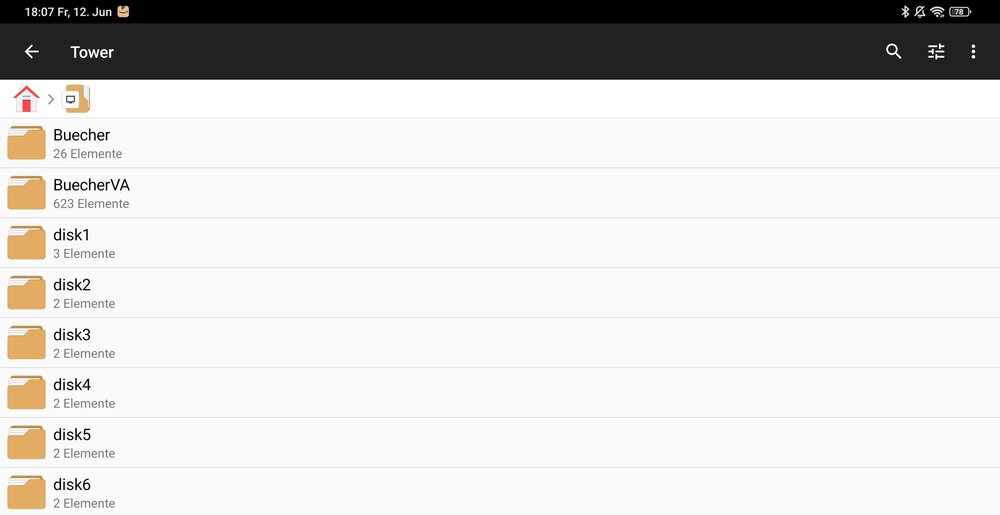
There are only my people with access. Running Unraid since 18 years like that. Nothing exposed except Plex. Remote access with VPN to the router works, I was testing Tailscale and never could access my shares. Was an example when writing my first post. The real shares are within smb-extra.cfg. Yes, that works always. No Windows at all. All using Linux and Android. Both work out of the box with the shares in smb-extra. Attached is a screenshot from Android. When using Tailscale no shares are shown.
-
@Frank1940 Diagnostics attached. Tailscale was installed and deleted at least 4 times. I never could get SMB to work. I don't use User Shares, only Disk Shares. 5 Shares are manually added thru smb-extras.cfg. These manually added shares work system-wide. They don't work within the Tailscale environment. I won't install Tailscale again without a hint what might be the reason. tower-diagnostics-20260612-0751.zip
-
As Tailscale is part of Unraid now I ask here. In the past years I tried Tailscale a couple of times and I was stuck at the same problem always. I can't get my SMB shares to work. I simply don't see them within the Tailscale environment. I've setup some SMB shares within the SMB extra configuration like that: [Docs] path=/mnt/disk1/Docs comment = browseable = yes public = yes writeable = yes vfs objects = I can see these folders everywhere but not within Tailscale. What's the secret? Thanks in advance.
-
I do have some single-disk XFS pools that I want to remove. If I stop the array and remove these pools, can I mount the contained disks later with Unassigned Devices to copy it's content? Thanks in advance.
-
I remember the days when Multiple Unraid Arrays and ZFS shared the top positions for some years. Did Multiple Unraid Arrays fell off?
-
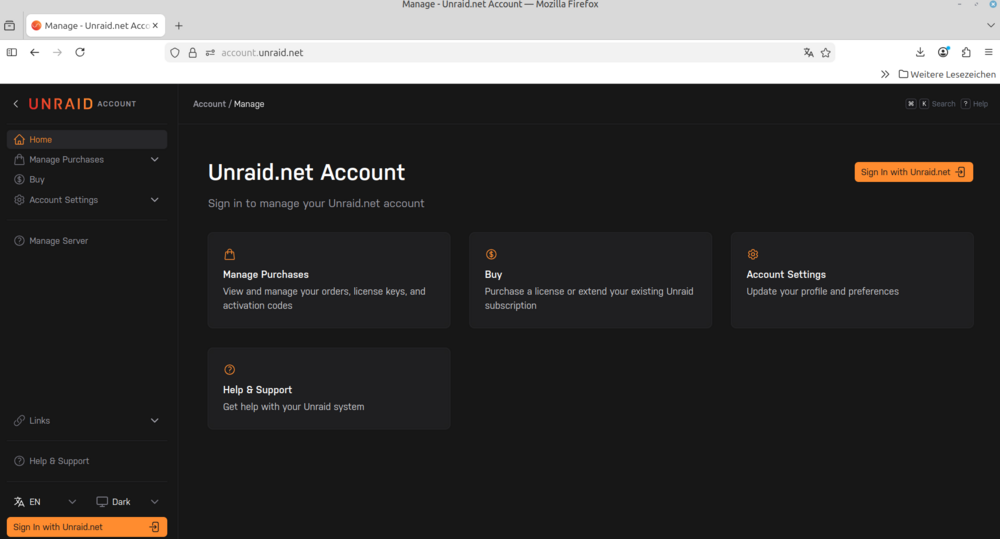
Seems that my account has huge problems with these Unraid microsites "account" and "product". This is the latest output. First try in a week to reach the product site results in that. Whatever I open I do see more and more problems. I wanted to create a bug report - I left the page unsatisfied. Somebody is telling me 18 years with Unraid (2008-2026) are enough: Linux Mint Firefox

-
Page is attached. In the meantime I found a way to make these pages readable - it's in the lower left. 99 % of all websites have menus in the upper right corner I guess. So I was looking there but could not read this. BTW, dark grey on black is the worst design I ever saw. Second: What are these micro icons in the upper right corner good for. There's no hover text. I do have fear to click on these (drop account?) Thanks.
-
It's Firefox on Linux Mint. Im on my Smartphone right now. Will Post the specific page later. It's on the account microsite.
-
I can't read such text any longer. Zoom is on 100 %. Dark grey on black - who thinks that this might be a great idea? EDIT: ... and no hover text ...

-
As written in the subject ... BTW, can somebody explain that field to me?
-
This whole API, Connect ... I don't get it. Whenever I log out from here and try to log back in, I do get a "Something went wrong message". I have to go back and Unraid asks "Do you want to sign in with hawik*". I click ok and I'm in. Today I went to the Connect Dashboard. There I found that: Clicking on My Keys I get that: Page has moved. Ok, I click on Account Management. I do get that: An authorization error. You can see that I'm logged in (lower left). Is it just me?
-
Minor display glitch on Interface tile on Dashboard: The size of the General Info dropdownlist jumps all the time with the size of the text in the next line. The next line shows In-/Outbound values. As these change all the time and jump - in my case - between 0 and 250 the dropdownlist above changes its size always. Funny to watch the arrow of the list moving around. As I wrote: Just a minor GUI problem.
-
It's not in the docs. But the magic word is "stopped". My fault. Looked in the GUI while VM was running. Thanks.
-
On this page ... https://docs.unraid.net/unraid-os/using-unraid-to/create-virtual-machines/vm-setup/ .. it says: Unraid 7.x brings significant enhancements to VMs, including: VM clones and snapshots User-created VM templates But I don't find it's documentation. Snapshots and templates are documented in detail on this page - but not cloning. Where do I find VM cloning within the Unraid GUI? Any help is highly appreciated.
-
I would like to, but I have no idea where this came from. Thanks.




