






cybrnook
Members
-
Joined
Everything posted by cybrnook
-
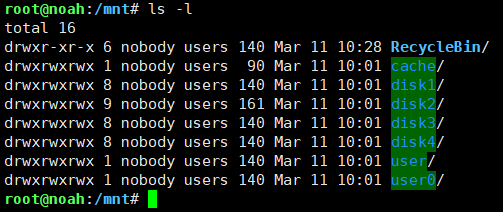
Yep, all clean after uninstall UD and UD Addon (and a reboot):
-
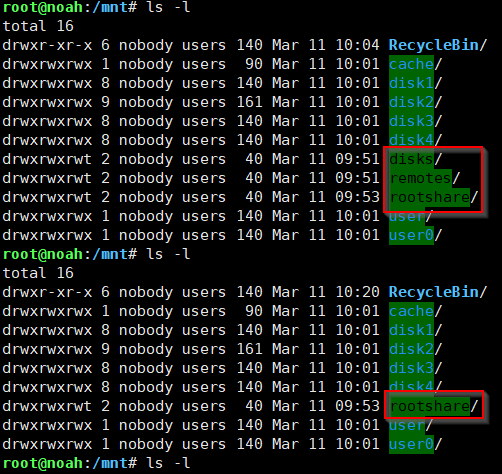
I uninstalled UD and UD Add on and noticed strange folders getting removed (before and after). I need to reboot to see now if rootshare comes back.
-
What about recycle bin?
-
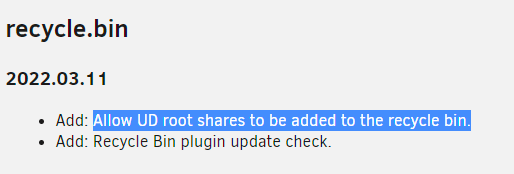
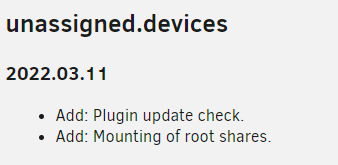
I also am getting the same warning this morning. Just upgraded to RC3, and I have UD as well as Recycle Bin installed and updated both plugins this morning. I assume you have recycle bin or UD installed? Looking at todays release notes, it specifically calls out root share: Maybe @dlandoncould take a peek? EDIT: Actually, looking at the UD page, seems it's a new functionality added. I guess it's just FCP that needs to be updated.
-
Anyone have any idea? @Squid @bonienl @limetech
-
Maybe @Squid @bonienl @limetech you guys could help point me in the right direction?
-
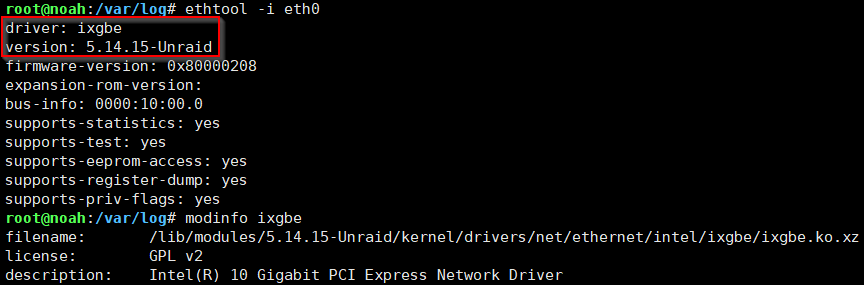
I am doing some troubleshooting with AsRock Rack and the X570D4U-2L2T and abysmal throughput performance under the latest 6.9.2 and 6.10 RC2 release. One question that is of course being asked is what driver am I using, and the basics I know are we are using the in-tree driver for what seems to be the 5.14.15 kernel. The board has built in dual Intel X550 NIC's, which I have disabled for the time being and am using an older X520 add-on card which works perfect (same driver). How can I tell what version of igxbe is actually installed and loaded? I did some basic digging in syslog and didn't see anything other than calls outs to ixgbe driver being loaded, but no version. This is the closest I have come, and it's still not what I need since there is no actual version number:
-
What is AutoBackupVM? I use my own script to backup VM's. Seems the script is exiting with status 2, so something is not happy. When you run it by hand, after it completes what does "echo $?" return
-
I have a cron I run in Ubuntu that is for the first Saturday of every month. My syntax is: 0 0 * * 6 [ $(date +\%d) -le 07 ] && /script/path/follows/here.sh
-
New BIOS (1.70) posted as of today: https://www.asrockrack.com/general/productdetail.asp?Model=X399D8A-2T#Download @deadmeatgames sounds like memory would be my first spot to check.
-
@ich777 Hope all is well! Noticing a small wrinkle on boot with the latest version from today. On boot, I am watching the boot log, and just prior to SMB starting and all at the very end of the boot process, when the system is installing all the addon packages, I am noticing that this new version is showing some error/warnings: /bin/bash: line 285: check_package: command not found /bin/bash: line 286: install_package: command not found Then the system goes on to say that it's subbing /bin/bash with /bin/sh Took me a little while to figure it out, but I rolled back the Nvidia plugin to the previous version and rebooted, and these messages went away.
-
https://1drv.ms/u/s!AlHg8pmWgJJ_gr9mLid6muLTIMOddA?e=KbfHe2
-
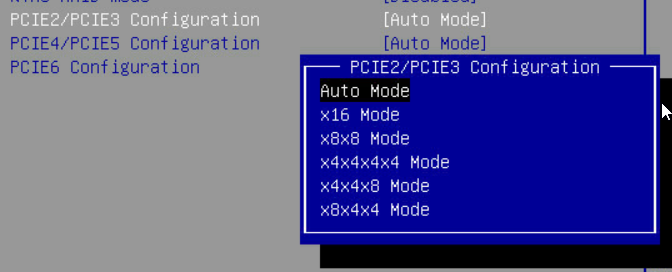
They are grouped, yes, but options other than "Auto" let you specify what each slot is at. For example, for PCIE2/3 here I can set it to x8 x8 or x8 and then x4x4, or x4x4 and x8, for example. Before you could only choose x8x8 or x4x4x4x4 and that would be assigned to both slots. I hope that makes sense. Anyways, looks fine and good luck, enjoy the board.
-
Bifurcation was supported in BIOSes already prior to 1.37. What 1.37 gave me, and is what I asked for, is PER SLOT bifurcation options. Prior to 1.37 bifurcation worked in groupings.
-
https://1drv.ms/u/s!AlHg8pmWgJJ_gr9mLid6muLTIMOddA?e=KbfHe2
-
You right you right 🙂
-
Wouldn't your cron schedule go like this? : 0 4 * * 3
-
I see, so you're going folder by folder based on the old package and then copying the "new" files and replacing, then re-tarring?
-
Thanks for this, I followed on a Ubuntu VM, but can't seem to find where the output *.txz package is written to?
-
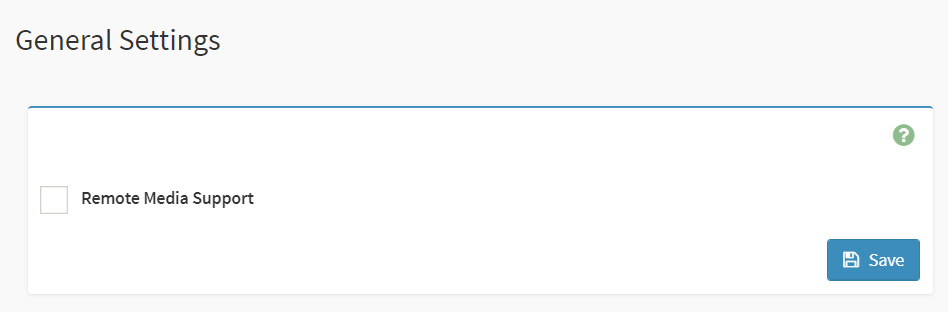
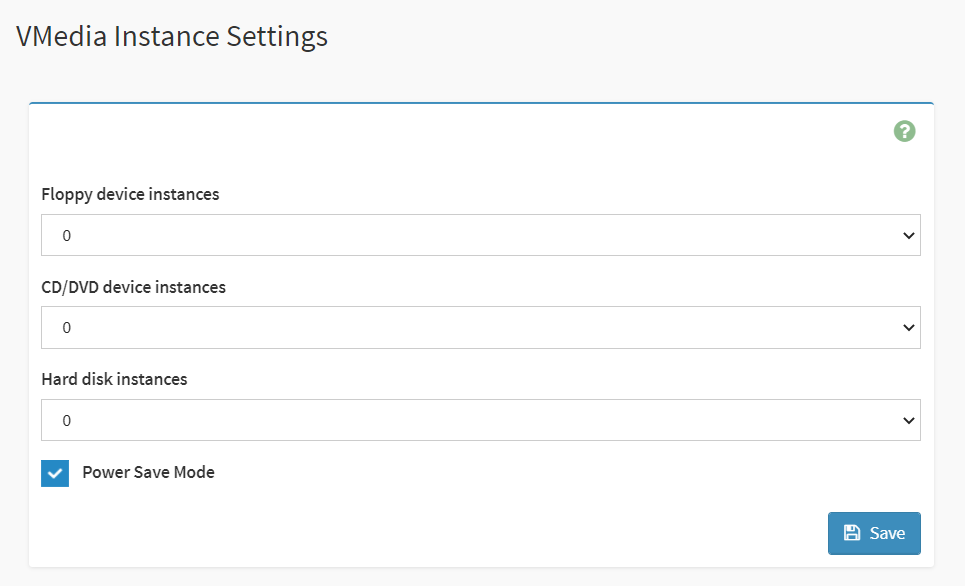
There are a few things you may need to consider (nothing really specific to the board itself, but overall). Not sure what your current USB drive is, but you would want to make sure it's formatted for UEFI boot vs Legacy boot (that also means renaming the -EFI file to EFI on the unraid USB). Then in the BIOS of the board, you will need to make sure your boot options are setup correctly. My server is in the middle of it's monthly parity check, so I am not going to reboot it now, but if you want, I can send you a screenshot of my boot options the next time I reboot so you can see what I am using. High level I disabled all boot options for things I didn't need, like PCIe boot, booting from network etc. Now that I think about it, the AsRock rack boards come with a lot of virtual devices enabled in the BMC, you will have to disable that for your USB drive to be listed as a bootable device. If you don't, then the boot options menu in the bios are just flooded with virtual devices. Disable in General: Set all devices to 0 in VMedia Instance: EDIT: Also, you said Make sure that you are NOT using the same IP for BMC as you are for your UnRaid server, they need to be different IP's. On top of that, the board has a dedicated NIC for BMC, I assume that's what you have plugged in. You will need to use one of (or both) of the 10Gb nic's for your UnRaid server. So that means you will need to make sure the MAC address and NIC device are set accordingly in your existing unraid install, since that's likely setup for your old system. An easy way to get around that is to rename your existing network.cfg file and replace it with a stock one from the vanilla unraid install media and then boot. Once it's up and running with DHCP, you can log in and reconfigure your network.

-
"The advantage of using this setup is that you benefit from Cloudflare fast DNS resolution and add an extra layer of security by hiding your server identity while ensuring that all the connections pass through Cloudflare. This prevents any malicious requests from reaching the server." https://support.cloudways.com/configure-cloudflare-origin-certificate-with-your-application/ In a nutshell it let's CF field all the nasties on the web for you, while hiding your server and it's point of origin behind it's WAF. Good way to mitigate attempts against your port forwarded server sitting on the web.
-
Thanks for this! I asked back in December if the Swag container supported this in the LInuxserver.io groups Discord and @Roxedus said it did not support it and I should instead use a VPN basically. So I ended up going a different direction with the whole thing, but I AM pleased to hear you got it going. Means I could shift back to it if I come back to Swag 🙂
-
Also curious +1
-
@Djoss looks like 8.5.0.2-r0 is available: http://dl-cdn.alpinelinux.org/alpine/edge/community/x86_64/
-
@ich777 @Getn67 Did this develop into anything? I also have a FusionIO 6.4TB drive I could help test with if needed.




