






cybrnook
Members
-
Joined
Everything posted by cybrnook
-
Figured I would share: https://www.tomshardware.com/news/intel-amd-mitigations-performance-impact,39381.html https://www.phoronix.com/scan.php?page=article&item=mds-zombieload-mit&num=10
-
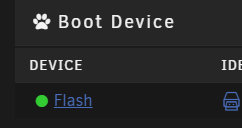
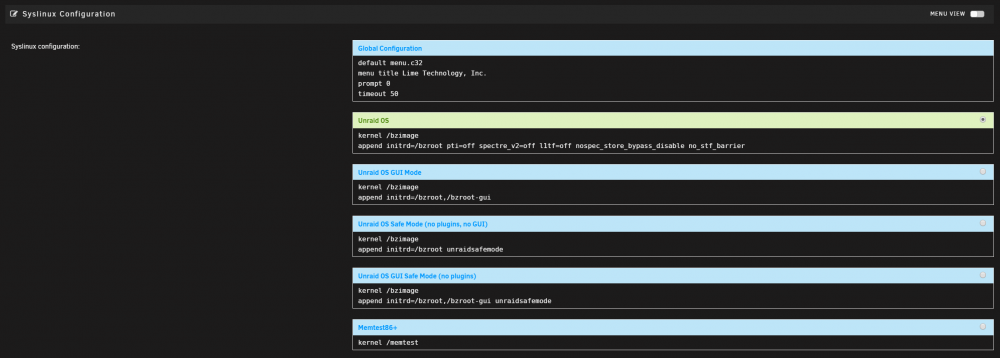
On your "Main" tab, click on your "Flash" drive" Then scroll down:
-
@limetech Thread posted:
-
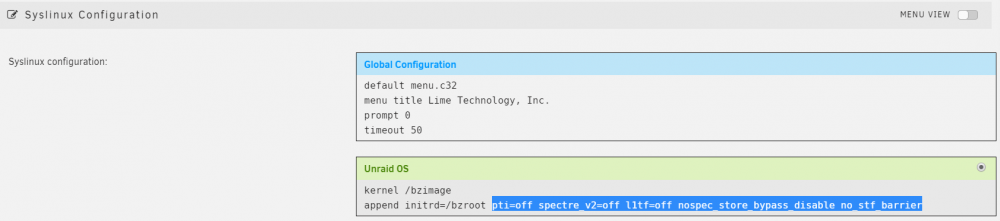
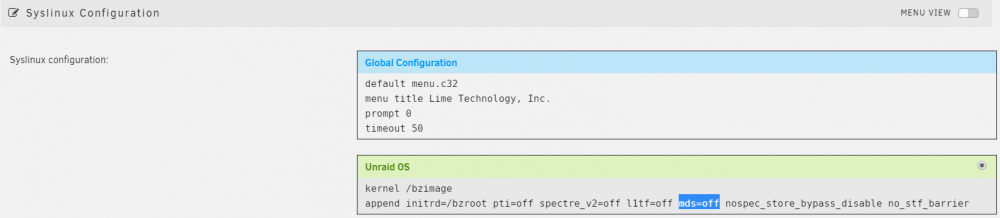
UPDATE (010/11/2019) PLUGIN Updated for 6.8.0 RC1 + @Squid was awesome again in keeping with the newer kernel update, and the more simplified syntax now of "mitigations=off". If you already installed the plugin on a lower release and enabled it, nothing is needed prior to upgrading. Squid thought of and accounted for that and the plugin will handle it during boot. UPDATE (06/03/2019) PLUGIN AVAILABLE!!! @Squid was awesome enough to take this work and put it into a plugin, as many have asked for. It's a great start, and covers the basics out of the gate for everyone at the moment. Once the kernel starts rolling higher, we can change the current long string to a shorter variation, but I think that will be later in the future, post 6.8.0+..... Original Post: As many are aware, Intel has had some serious security vulnerabilities released over the past year. "Spectre", "Meltdown", and now one of the strongest dubbed "Zombieload" aka MDS. Intel seems to be having some skeletons coming out of the closet, which saw a CEO resign, and market share loss now to AMD. The mitigation's to these vulnerabilities have all individually come with a performance cost, Spectre/Meltdown in the range of ~%15, and now MDS rumored to need Hyperthreading disabled altogether to mitigate, costing upwards of %30-%40 (sources are based on the internet, so take with a grain of salt). So add them all together, and that's a pretty hefty penalty for users who may not even be a target for this kind of attack. Personally, I have nothing that sensitive at my home running in individual dockers or VM's that I would worry enough about if someone from one area could read data from the other. As well, my local users are myself and my wife 🙂 , so she could just TAKE the money from the bank in person 🙂 Not a threat to me. I don't care if someone is watching me play games on a vm, or is watching that I am encoding or decrypting a movie, big deal, not much going on at my house anyone would work hard enough to watch....... and if someone did make it that far to target me, I got bigger problems than speculative execution, like checking my firewall rules!! So, with that said, this is ALL AT YOUR OWN RISK, I or the community do not assume any responsibility of damage due to the disablement of these mitigation's. As of 6.7.0, we have kernel level 4.19.41 which marks the last kernel to NOT mitigate against MDS. To disable Spectre/Meltdown for release 6.7.0, adjust your syslinux.cfg file as follows (and reboot): pti=off spectre_v2=off l1tf=off nospec_store_bypass_disable no_stf_barrier As of 6.7.1 RC1, we have kernel level 4.19.43 which marks the first kernel TO mitigate against Spectre/Meltdown AND MDS. To disable Spectre/Meltdown/MDS for release 6.7.1 RC1+, adjust your syslinux.cfg as follows (and reboot): pti=off spectre_v2=off l1tf=off mds=off nospec_store_bypass_disable no_stf_barrier You can validate the mitigation's on the OS before/after by: cat /sys/devices/system/cpu/vulnerabilities/* BEFORE: Should look similar to (notice the Mitigation's): Mitigation: PTE Inversion; VMX: conditional cache flushes, SMT vulnerable Mitigation: Clear CPU buffers; SMT vulnerable Mitigation: PTI Mitigation: Speculative Store Bypass disabled via prctl and seccomp Mitigation: __user pointer sanitization Mitigation: Full generic retpoline, IBPB: conditional, IBRS_FW, STIBP: conditional, RSB filling AFTER: Should look similar to (notice the Vulnerable): Mitigation: PTE Inversion; VMX: vulnerable Vulnerable; SMT vulnerable Vulnerable Vulnerable Mitigation: __user pointer sanitization Vulnerable, IBPB: disabled, STIBP: disabled
-
Will do, thanks! I will work on working it up a bit nicer and then post once it's super clear.
-
Updated my post @BRiT and @glennv , got it working
-
@limetech Okay, so I did a bit a googling, and to build up, this is what I found based on Kernel level and availability (Leaving zombieload off the table for now since latest release does not yet mitigate it, that will be next): Kernel 4.15 Spectre v2 (CVE-2017-5715) - "nospectre_v2" Kernel 4.17 Spectre v4 (CVE-2018-3639) - "nospec_store_bypass_disable" Kernel 4.19 PR_SPEC_DISABLE_NOEXEC - During compilation Spectre v1 (CVE-2017-5753) - "nospectre_v1" Spectre v2 (CVE-2017-5715) - "nospectre_v2" Spectre v4 (CVE-2018-3639) - "nospec_store_bypass_disable" So checking uname on the latest 6.7.0 (non RC1), I can see we are at 4.19.41, so all three should be available nospectre_v1,v2, and store_bypass_disable. Of course seems there is a flag that can be set during compile, but that's not even worth getting into since that will never happen understandably. Then I found a phoronix forum thread that went back and forth, and I ultimately came out with this: pti=off spectre_v2=off l1tf=off nospec_store_bypass_disable no_stf_barrier Where would be the best place to do this in Unraid during boot? Would it simple be an append in the syslinux file? append pti=off spectre_v2=off l1tf=off nospec_store_bypass_disable no_stf_barrier EDIT: Seems zombieload (aka MDS) will be mds=off EDIT2: I am testing adding this to my unraid backup servers syslinux.cfg files boot section, like this: default menu.c32 menu title Lime Technology, Inc. prompt 0 timeout 50 label Unraid OS menu default kernel /bzimage append initrd=/bzroot pti=off spectre_v2=off l1tf=off nospec_store_bypass_disable no_stf_barrier label Unraid OS GUI Mode kernel /bzimage append initrd=/bzroot,/bzroot-gui label Unraid OS Safe Mode (no plugins, no GUI) kernel /bzimage append initrd=/bzroot unraidsafemode label Unraid OS GUI Safe Mode (no plugins) kernel /bzimage append initrd=/bzroot,/bzroot-gui unraidsafemode label Memtest86+ kernel /memtest So far I have rebooted with the change, and boot was successful. I am working now to validate these are actually disabled. EDIT3: Okay, it worked. Here is my before and after: BEFORE: cat /sys/devices/system/cpu/vulnerabilities/* Mitigation: PTE Inversion; VMX: conditional cache flushes, SMT vulnerable Mitigation: PTI Mitigation: Speculative Store Bypass disabled via prctl and seccomp Mitigation: __user pointer sanitization Mitigation: Full generic retpoline, IBPB: conditional, IBRS_FW, STIBP: conditional, RSB filling AFTER: cat /sys/devices/system/cpu/vulnerabilities/* Mitigation: PTE Inversion; VMX: vulnerable Vulnerable Vulnerable Mitigation: __user pointer sanitization Vulnerable, IBPB: disabled, STIBP: disabled You will notice "conditional cache flushes", "SMT vulnerable", "PTI", "Speculative Store Bypass disabled via prctl and seccomp", "Full generic retpoline"* are all disabled now. 😁😁😁😁😁😁😁😁😁😁😁😁😁😁😁😁😁😁😁😁😁😁 I don't know about you, but I don't care if someone is watching me play games on a vm, or is watching that I am encoding or decrypting a movie, big deal, not much going on at my house anyone would work hard enough to watch....... and if someone did make it that far to target me, I got bigger problems than speculative execution, like checking my firewall rules!! I will post this in another thread for better visibility if you all agree?
-
I would also love to disable these as well. I got bigger fish to fry than cloud hosted VM vulnerabilities for my little home servers🙂 Much more important is my vm with pass through performance, Plex, and handbrake type conversions.
-
No problems on 6.7.0, great work everyone!
-
Maybe an on / off switch for all these Intel MC updates 🙂 ? By the time this thing is done, all my intel boxes will be ~20+% less in performance for my home systems.
-
And if I understand it correctly, at least for this Zombie attack now, the system would already have to be compromised and the exploit itself would have to run locally to harvest any data. So, in order to use it, you've already been compromised.
-
How to setup NUT as a server and client: Server Mode: On the Unraid host that has the UPS plugged into it, setup your "Server" as follows: -Set UPS mode to Netserver -Name your UPS, and remember the name as you will need it for client setup -Use "detect" or choose your connection type. Mine was easy since it's USB. -In the Config Editor and the bottom of the page, edit your upsd.conf file to reflect two LISTEN entries. Localhost and your unraid IP. I don't think this is needed -Again in the config editor, you can view the default creds in the upsd.users file. Continue to use these or set your own. You will need these again on the Client setup. -Once done, set "Start Network UPS Tools service" to "Yes" and your service should start, and UPS info should be detected and appear. -Header at top of page with UPS summary Client Mode: On the Unraid host that you want to use as a "client", monitoring your server, configure as follows: -Set UPS mode to Slave -Set the IP of your Primary Unraid server hosting the UPS -Set the name of the UPS you chose before (Must match case and everything) -Validate your UN/PW are correct (use the upsd.users file if needed) *I have slave in there as well, but in actuality, the client defaults to using the Monitor user, not the slave. I believe we could change this by editing the file upsmon.conf directly. But that changes how this guide is written, and make it less easy to follow since it involves setting the client to manual mode only and configuring by hand.* -Once done, set "Start Network UPS Tools service" to "Yes" and your service should start, and UPS info should be detected and appear. -Header at top of page with UPS summary A hint you should keep in mind. Since you may be having multiple devices check into your server, it would be wise to set your servers shutdown timeout to a value that is the largest of all your client devices. That way if your UPS goes to battery mode, the server is there to respond to your clients to shut down. I will be setting my clients to somewhere in the range of 2 min on battery, while my server will be 5 min (even though it appears in the summary page the driver.parameter.pollfreq is set to 30, which I assume is seconds).
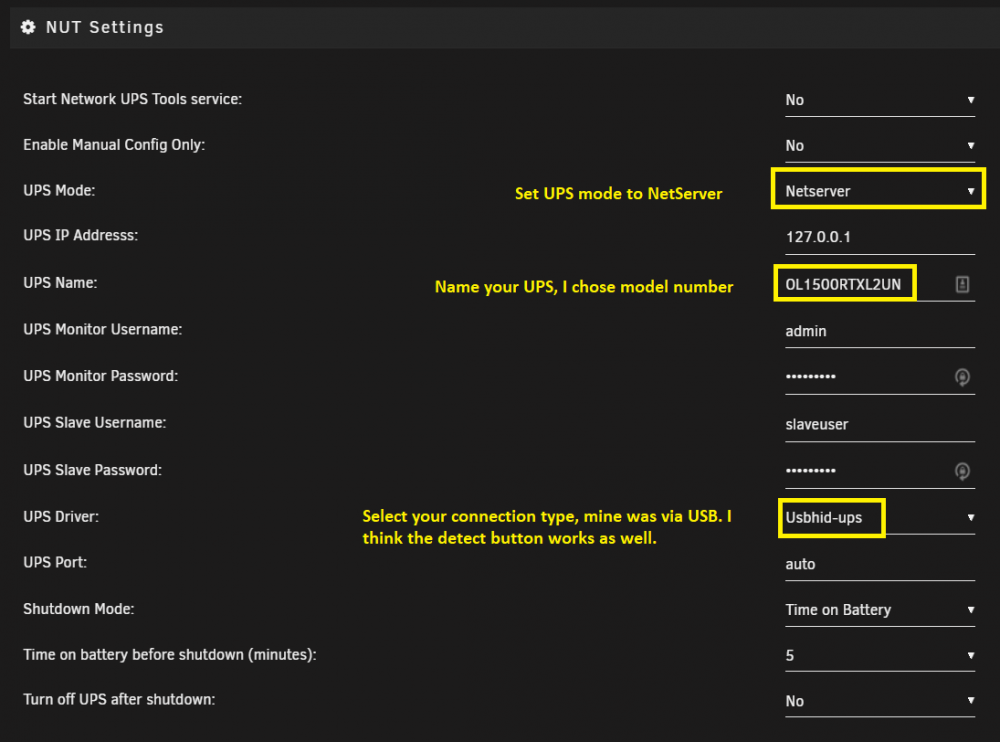
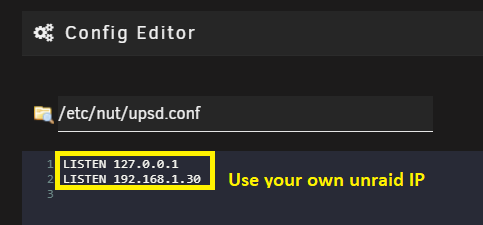
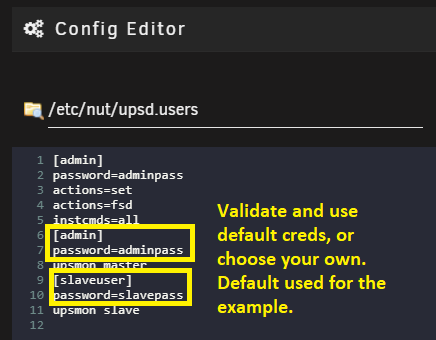
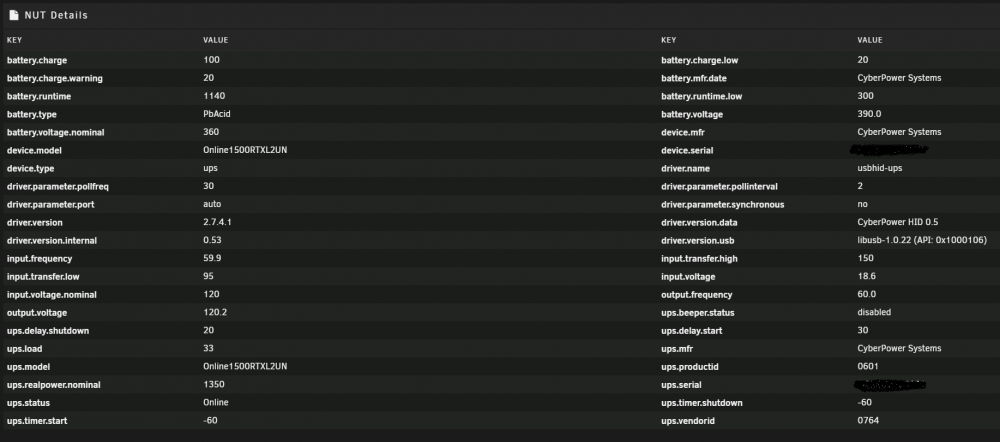

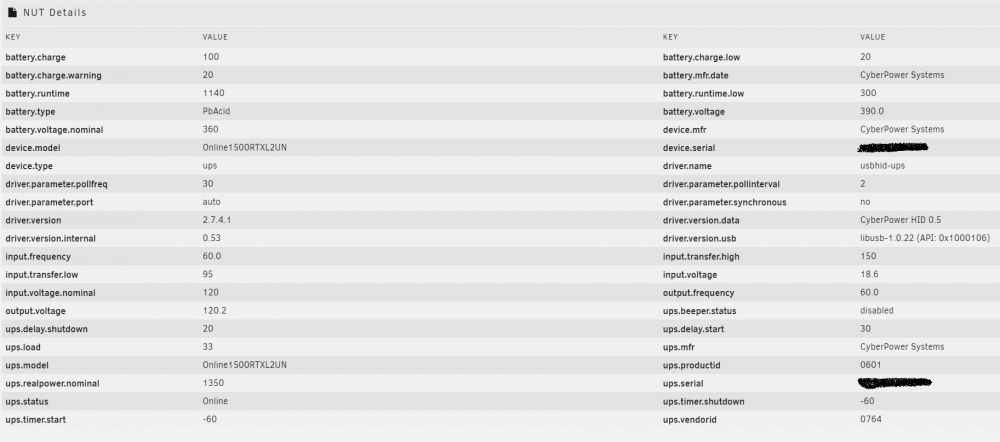

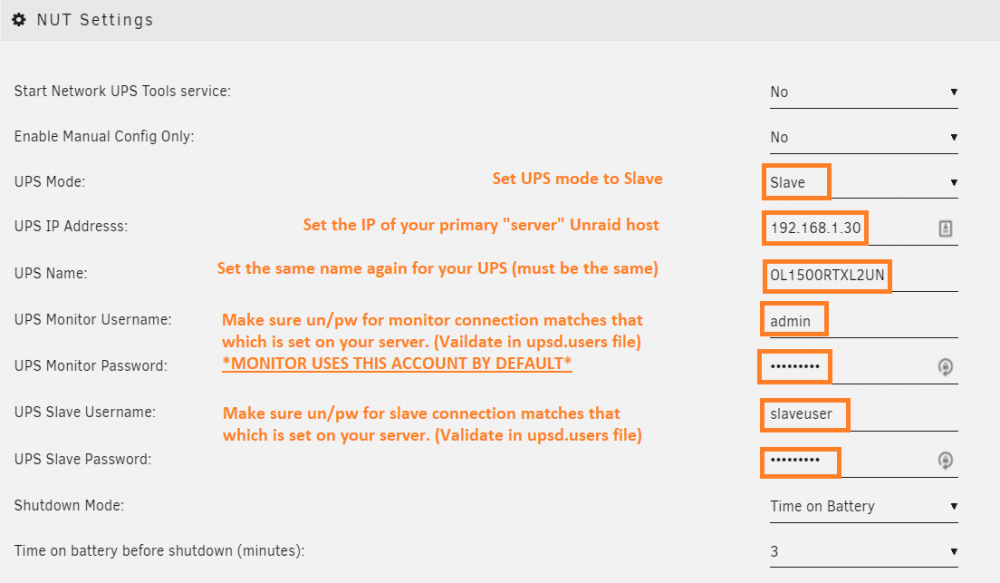
-
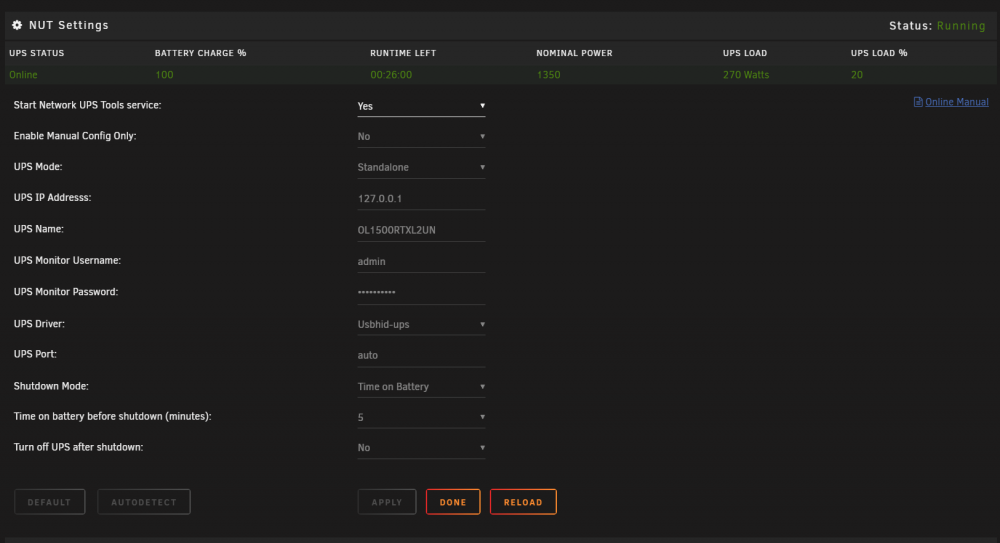
For the USB connected device system, make you actually input/create a UN/PW for your server. This is what my working setup looks like: EDIT: I am working on setting up the server now, something I have been meaning to do for a while now. I already have the process running in server mode, just going through the steps to setup a client. Will update later this weekend. EDIT 2: Actually got it working! Wasn't too bad at all. I will write up a guide later and post it for all, thanks.
-
If you read the release notes of rc8, you will see a patch to work with SM controller NVME's was reverted in favor of another method: https://bugzilla.kernel.org/show_bug.cgi?id=202055#c42 I assume you didn't follow the new method?
-
Also excited to be joining. Board I already have, 2950x (Budget just couldn't swing the 2990) and RAM are on their way. Hopefully this weekend I can start.
-
You guys are free to use my script. It's just my personal one, but makes a good backup of the three main areas you need for a solid VM backup, which is XML, NVRAM (for UEFI OVMF BIOS) and of course the vdisk image. I am not concerned with things like pruning old backups, so no logic for it. But it does check to see if VM is running, and if it is, it shuts it down first, backs it up, then starts it up again. If it was already shut down, it backs it up and keeps on going. The logic just scans for names in the /mnt/user/domains/ , so any VM you have it will back them up one by one. I use it with @Squid 's excellent user scripts plugin, and it works great. Anyways, have at it if you wish, just set where you want your backup dir to be first: "backuplocation" #!/bin/bash #VM Backup #Change the below to your specific values backuplocation="/mnt/user/Backups/VM-Backup" #Static Variables datestamp=" - "`date '+%Y_%m_%d_%I_%M_%p'` #Execution #Set temporary IFS var to handle spaces in name SAVEIFS=$IFS IFS=$(echo -en "\n\b") #For loop to discover folders in domains folder, then backup for D in `ls /mnt/user/domains` ; do if [ ! -d "$backuplocation"/"$D$datestamp" ] ; then echo "making folder for todays date "$datestamp"" mkdir -vp "$backuplocation"/"$D$datestamp" else echo ""$backuplocation"/"$D$datestamp" exists, continuing." fi #Actual execution of backup, stopping VM first if it's running if [ `virsh domstate "$D"` == "running" ] ; then echo "VM "$D" running, shutting down now" virsh shutdown "$D" echo "Waiting 20 seconds for "$D" to shutdown gracefully" ; sleep 20 echo "Saving "$D" xml file" rsync -a /etc/libvirt/qemu/"$D".xml "$backuplocation"/"$D$datestamp"/xml/ if [ -d "/etc/libvirt/qemu/nvram" ] ; then echo "Found OVMF nvram directory, blindly backing up (verify with XML)" rsync -a /etc/libvirt/qemu/nvram/* "$backuplocation"/"$D$datestamp"/nvram/ fi echo "Saving "$D" vdisk image file" zip -jr "$backuplocation"/"$D$datestamp"/vdisk.zip /mnt/user/domains/"$D"/* chmod -R 777 "$backuplocation"/"$D$datestamp" echo "Starting "$D"" virsh start "$D" else echo ""$D" was already stopped, backing up anyway" echo "Saving "$D" xml file" rsync -a /etc/libvirt/qemu/"$D".xml "$backuplocation"/"$D$datestamp"/xml/ if [ -d "/etc/libvirt/qemu/nvram" ] ; then echo "Found OVMF nvram directory, blindly backing up (verify with XML)" rsync -a /etc/libvirt/qemu/nvram/* "$backuplocation"/"$D$datestamp"/nvram/ fi echo "Saving "$D" vdisk image file" zip -jr "$backuplocation"/"$D$datestamp"/vdisk.zip /mnt/user/domains/"$D"/* chmod -R 777 "$backuplocation"/"$D$datestamp" fi done #Restore IFS to original value IFS=$SAVEIFS echo "Backups are complete" exit
-
What do you have in there now, and are you getting rid of it? (CPU wise)
-
Does this mean any VM that has this style nvme passed through to it should limit the allocated cpu cores to 15 or less?
-
I am on the latest 6.7.0 RC7, but this behavior has existed since the redesign of the GUI. With VM's (and I assume Dockers would be the same), any item with a longer name is not properly truncated or word wrapped, so there is a lot of overlap. I am not using any zoom settings on my display or browser, and the behavior is consistent across chrome and firefox.
-
Time for upgrade? Memory is cheap right now 🙂
-
This still true?
-
Thanks for this, about to head down a similar road. So when passing through a GPU in the secondary slot, do you have anything at all plugged into the Primary, or just a single GPU?
-
Could you not add a chmod and chown in your script to clean up after the mkdir and mv's?
-
Checked it out as well. That neckbeard is getting strong @jonp 🙂 I laughed and wondered what the user active view count went from/to after you left.
-
Might be of use? https://github.com/phusion/baseimage-docker/issues/451









