




.jpg.adf8def3431e0aa8e590900f82752d7a.jpg)

wgstarks
Members
-
Joined
-
Last visited
Everything posted by wgstarks
-
This is likely your issue. Possibly a typo when you configured the port. I would double check it since it isn’t configured correctly.
-
The template you have for this container is newer than the instructions in the FAQ. You didn’t need to add any port mappings since they already exist in the template. You just need to edit the existing mapping. WebUI port just needs to match the host and container port numbers in Port: Web Interface. If it’s still not working attach your docker run command and supervisord log to your next post. Be sure to redact users/passwords.
-
If you’re not changing anything you can leave them all as default 8080. If you want to change it from the default you’ll need to change all of them to still have access to the webUI.
-
Those aren’t two variables. In your screenshot “Variable: WebUI_Port” is the only variable. “Port: Web Inteface;” is a port assignment. If you click edit for the variable you’ll see that it only has a single field for the port number. If you click edit fort the port assignment you’ll see a field for container port, a second for host port and a third for connection type (which should be tcp). There are also optional sections for naming and description. You probably already know this but just in case, which docker the qbit app is running inside a container. Giving a number to the webUI variable will set the app to use that port but its inside the container so can’t be reached by anyone outside the container. The port assignment connects the host port (outside the container) to the container port (inside the container). These should only need to be changed if you want to change from the default and 8081 was just an example. You could use any available port. Hope this makes sense now.
-
If you need to change the webUI port to 8081 (for example) you would set webUI to 8081 and set the port mapping to host=8081 and container=8081.
-
One is a variable the others is a port mapping. They are both needed in the event that you might want to change the webUI port to avoid conflicts with other containers.
-
Looks like PIA has changed their DNS naming but you can edit your ovpn or wg0 file to reflect the new naming.
-
Waiting for update to the arch version I suspect. I believe this is the build that’s used- https://aur.archlinux.org/packages?O=0&K=Radarr
-
7.2.4
-
I guess I just needed to let this app sit a while. It’s working now although I didn’t make any changes??? I can’t see any way to manage my server though. Looks like I can start and stop docker containers but there aren’t any controls for the server (array start, array stop, server reboot, etc). Maybe the app still isn’t working properly?
-
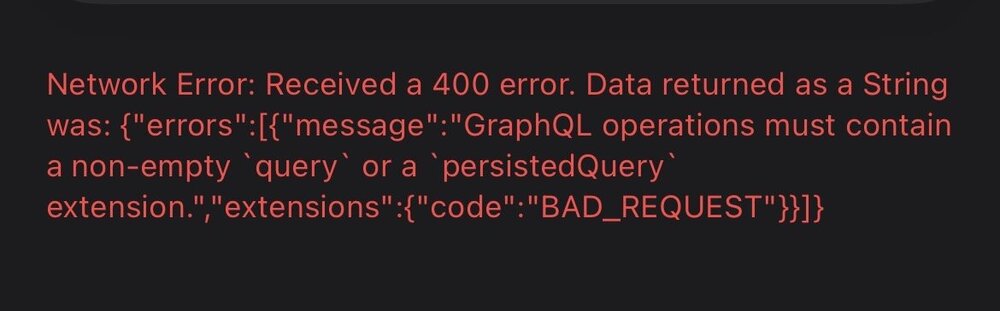
Been trying to add my server. Got many errors but have resolved most of them. Just this one left that I have no idea what it means or how to resolve it.
-
Seems to be an issue with ExpressVPN. I’ve seen several similar posts in other forums with the same verification error. You should probably contact their customer service.
-
I’ve been seeing quite a few comments in various threads regarding possible issues booting from NVMe/SSD drives related to expected failures. I’m just wondering why a partition on a traditional spinner can’t be used for booting or why it wouldn’t be a good idea?
-
Looks like you changed your webui port perhaps? I see that you have a port mapping 8080:8081. I’m not sure why you have that unless it’s a mistake. https://github.com/binhex/documentation/blob/master/docker/faq/qbittorrentvpn.md In Q4 the process to change the webui port is outlined. Step 5 adds the mapping for the new port. Container and host ports should both be 8081.
-
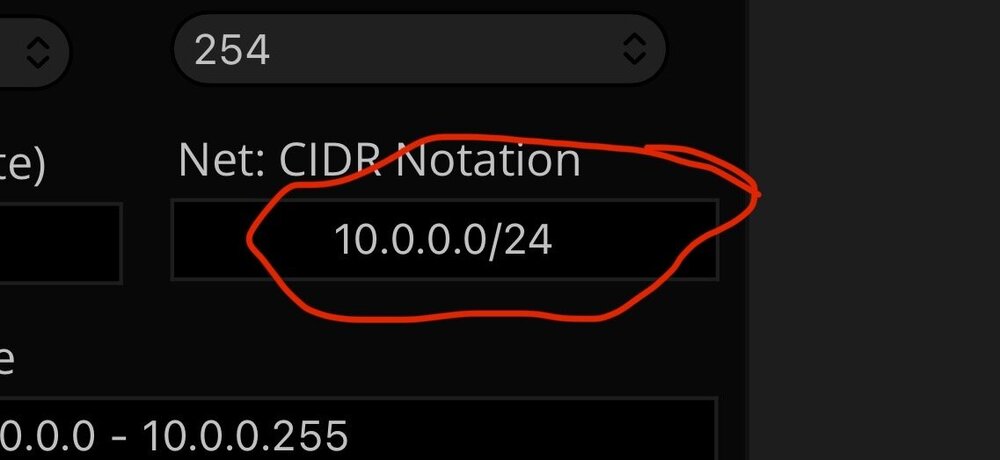
When I enter those values into the calculator I get 10.0.0.0/24 which isn’t what you have set in your previous post.
-
What IP Address and Subnet Mask are you using for the calculation?
-
It appears that you have LAN_NETWORK set wrong. https://github.com/binhex/documentation/blob/master/docker/faq/vpn.md Scroll down to Q4.
-
I don’t use Proton so perhaps someone who does could give you better info but this jumped out at me from your log- [info] ProtonVPN username 'unused' does not contain the suffix '+pmp' and therefore is not enabled for port forwarding, skipping port forward assignment... If you have force port forwarding set and it fails then the qbit app doesn’t start IIRC.
-
Check the supervisord log and see if it contains a temporary user/password.
-
Glad to help.
-
Looks like Sonarr and Radarr are using a container path of /data but Sab doesn’t have this container path so when Sonarr or Radarr look for the file in /data they don’t find it. These settings must be exactly the same in all three dockers on the container side and the host side. Try changing the container path in Sab to /data instead of /downloads and then make any necessary changes for download location settings in the Sab app.
-
Thanks. My Unraid server doesn’t really have the cores or ram for VM’s but looks like unifi offers a macOS version of their OS. I might give that a shot.
-
Any advice for migrating to the LSIO version and MongoDB?
-
I don’t believe that’s the correct setting. https://github.com/binhex/documentation/blob/master/docker/faq/vpn.md Scroll down to Q4.
-
Are you accessing the webUI from LAN? Attach your supervisord log and docker run command to your next post. Be sure to redact any users/passwords.



