.jpg.adf8def3431e0aa8e590900f82752d7a.jpg)

wgstarks
Members
-
Joined
-
Last visited
Everything posted by wgstarks
-
This is dependent on which allocation method you have set in your share settings. It’s probably “high water” which will determine how much space is available on each drive and write to that drive until half the available space is used (minimizes unnecessary spin-up of other drives). You can go to the share settings page for one of your shares and click the question mark to see a description of all settings. With one parity disk you have protection for one failed disk. At the risk of over simplifying, the parity disk stores the sum of each bit for all data drives (odd or even). If a disk fails the system will check sum of each bit for the remaining disks and calculate whether the missing bit was a one or zero. This allows the missing drive to be rebuilt one bit at a time. All space is always used on parity. Unraid is not raid. The total storage space will be the sum of all data drives.
-
Not sure what you mean by “hangs”. Your log shows a successful startup. To control qBittorrent, access the WebUI at: http://localhost:8080 The WebUI administrator username is: admin The WebUI administrator password was not set. A temporary password is provided for this session: ZsQ2egABs You should set your own password in program preferences. 2026-05-03 11:31:46,349 DEBG 'watchdog-script' stdout output: [info] qBittorrent process listening on port 8080 Are you using the temp user and password shown in the log? The qBittorrent devs require their use and setting of a new password on first launch.
-
Does it still start if you revert to the previous OS?
-
Tools>Downgrade OS
-
Have you tried reverting to the prior OS?
-
I had a similar error after the update but resolved it by re-applying the settings. Make a change to any setting and then revert it and click “apply”. I think I picked a setting at random, typed in a space and then deleted it so nothing was actually changed but it will trigger the “apply” button to appear. After re-applying the same settings everything worked.
-
There are many reasons why you wouldn’t be able to connect with VPN enabled and presumably can connect with VPN disabled (since you say you have the same issue). If you need help with this you’ll need to attach your docker run command and full supervisord log to your next post. Be sure to redact users/passwords.
-
I've put down a deposit for one of the new unraid X15 servers and am researching the process to move everything to the new server. I plan to just swap in all my HDDs to the new server using the same config so presumably that'll take care of moving the stored data but I'm wondering how to migrate everything else (shares, dockers, plugins, etc)? I'm guessing this would be accomplished by syncing the boot drives, caches and iso's but not sure how to do this? Maybe @SpaceInvaderOne has a youtube video for this?
-
Looks like 7.2.5 (just released) includes a patch for this CVE.
-
Yes. Dedicated management port (MLAN).
-
Will both ports work in an x4 slot? Or does that kill one port?
-
Sorry, I’m not understanding “eBay card”??? So even though the specs say x8 I can run this card in an x4 slot? Will only be using one port.
-
The X15 comes with an Intel x550-T2 dual port card so wouldn’t really be cheaper to buy another one and I don’t really want to use my pcie x8 slot for this. I just need a transceiver for the MikroTik switch.
-
I’m about to pull the plug on a newly announced Unraid/45Drives X15 server (if they actually get produced 🤞) and since the new server comes with a Intel X550 - Dual 10G nic I plan to upgrade my network connection. I use a MikroTik CSS326-24G-2S+ switch which has 2 SFP+ ports so all I need is the transceiver to plugin to the switch. I see this one is highly recommended on Reddit- https://a.co/d/03j3FK63 Wanted to post here and get some recommendations from other Unraid users as well. Note: I know they all get hot and with spinning drives I’ll never achieve 10G speeds but I’m hoping to improve network performance with multiple in/out connections.
-
Could you please post the results of your investigation once you determine if this will be possible or not?
-
Is local pickup an option for shipping?
-
Must be the one marked MLAN. When I look up MLAN on Google I get “Music Local Area Network”. What???? The M is likely for “Management” I guess.
-
Went back and looked at the pics. They’re so dark I can’t really see much but maybe the x4 slot is being used for one of the dual nics?
-
I’m looking at the specs for that motherboard. They only show one 10G Ethernet port and one 2.5G port. No IPMI port at all. https://www.gigabyte.com/Enterprise/Server-Motherboard/MW34-SP0-rev-11 Is this the wrong one?
-
I bet my current IPMI Fan Control plugin isn’t going to work with this board.??? https://forums.unraid.net/topic/135823-plugin-ipmi-for-611/
-
Thanks. I must be blind. 😁
-
What motherboard is being used in this build?
-
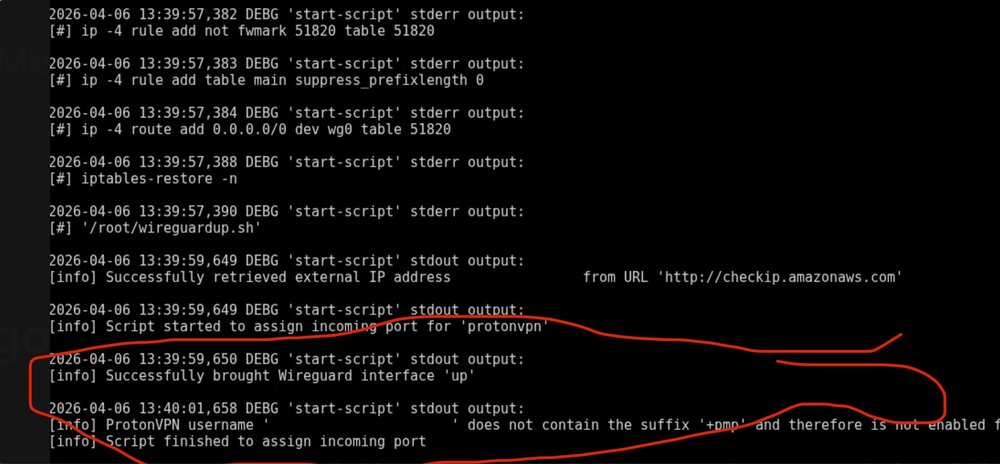
There is one problem in the little log snippet you posted- You don’t have your user name appended properly to use ProtonVPN. There may be other issues but you’ll need to attach your entire supervisord.log file from appdata to let others review it (not just a screenshot of a snippet). Also, I believe Step 3 is referring to any container port 8080 assignment regardless of the name (which is user definable).
-
Yes. Grab a screenshot of the edit pane and then delete it and add a new port mapping with the correct numbers.
-
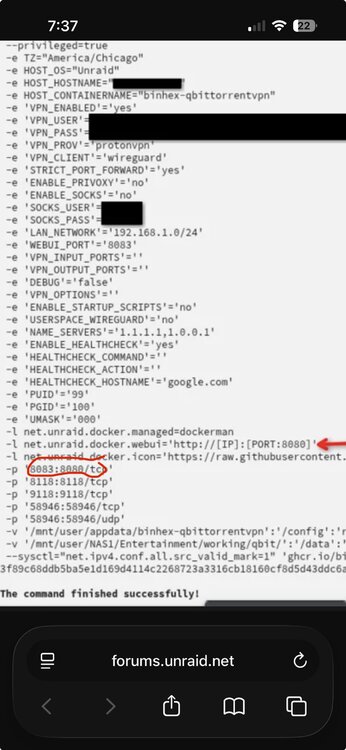
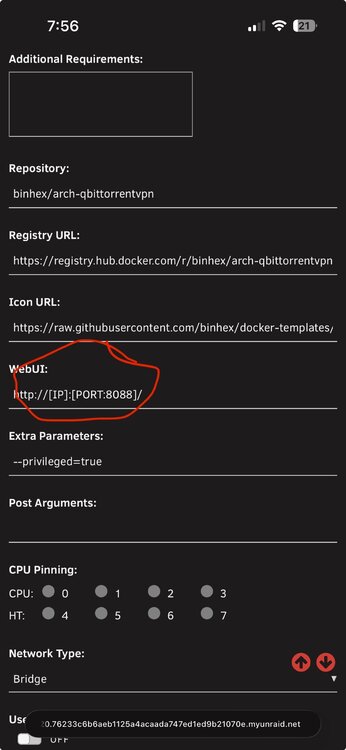
To be clearer (I hope 😁), the problem is that the Port: Web Interface has container set to 8083 but the host port is still 8080. Click edit next to this setting and switch both to 8083. The setting you marked in your screenshot is for the link to the webUI from the docker tab. You can change it by going to the Unraid docker tab, opening the configuration for this docker and then switch from basic to advanced view (upper right). Near the top of the page you’ll see another webUI entry (here is mine)- Change the port number in that entry to 8083 for yours.