




.jpg.adf8def3431e0aa8e590900f82752d7a.jpg)

wgstarks
Members
-
Joined
-
Last visited
Everything posted by wgstarks
-
Nope. I’m working on unfollowing everything and then following but not really hopeful. Pretty sure I tried that same thing the last time this happened.
-
Thanks. Guess that didn’t work. No notification.
-
LT is trying to fix my email notifications and I need to test and see if they’re working now. Hopefully someone will reply so I can see if I get an email. Thanks.
-
See https://github.com/binhex/documentation/blob/master/docker/faq/vpn.md Q2
-
Not sure why you’re not seeing the webUI link but I would think the easiest way to access it would be to just type the IP and port number into your browser separated by a colon.
-
I think you are saying you can’t access just from this one machine. I suspect it isn’t connected to the same LAN network. Perhaps the MacBook is connected to a guest WiFi network?
-
Try connecting to a different PIA server.
-
Or just a problem with the server.
-
Not an issue. Just a request.Thanks. Perhaps consider a request. I know you want to evaluate new versions before implementing. I agree with that. Perhaps a new tag system though. “stable”, “old_stable” and “old_old_stable” just as an example. This would allow everyone to update in their preferred branch without having to change the tag every time. Just an idea. I have no idea if it could be implemented or not.I’m a little confused??? Is the tag “Stable” or is it “11notes/unifi:9.0.108-unraid”?That doesn’t seem to work (at least not for me). I’ve installed several times over the past few days, rebooted several times, uninstalled the mover tuning plugin and rebooted. The patch tool still shows that I have a patch to install and sends me email notifications for this. Hopefully this will get fixed shortly. Wouldn’t mind if it wasn’t for the emails.Problems with mover tuning plugin and Unraid patch plugin. Mover patch fails to install with mover tuning plugin installed due to the fact that this plugin renames mover. I uninstalled this plugin so that I could install the patch. Rebooted my server and then re-installed this plugin. SERVER CRASHED. I have rebooted and again uninstalled this plugin since I’m not sure of the exact cause of the crash. Is this plugin incompatible with Unraid 7.0 and the patch plugin? Once the automated parity check finishes I may try installing the plugin again but would rather not be a guinea pig.😁I think that’s why they are looking into making changes.Worked. Thx for the info.It’s not really separate networks. The binhex-shared network is being routed through binhex-privoxyvpn which is also on 10.0.1.20. Sonarr and Radarr both connect just fine in Prowlarr with the same configuration except for port numbers.Prowlarr is running on the binhex-shared network IIRC.Trying to add the Readarr docker in Settings>Apps but when I test it just times out. Not sure what I'm missing? Using the same setup as I used for Sonarr/Radarr.
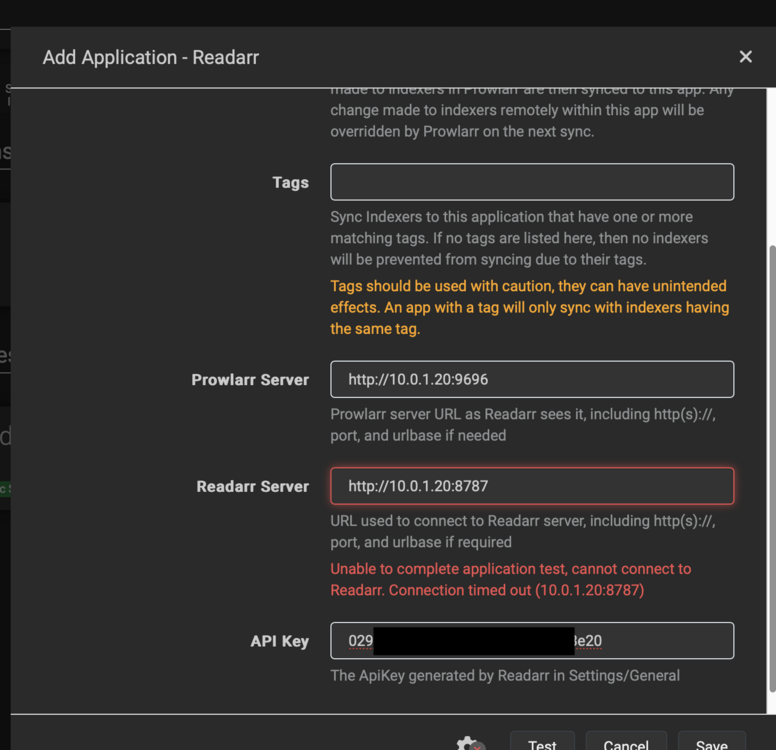 Will the patch tool continue to try and fail to install this patch when there are other patches to install?Yes, I’m sure I won’t be the only one to see this issue.But when you disable the vpn the page loads properly? That suggests the LAN Network isn’t set correctly.Have you tried clearing the cache? Or a different browser?Patch install fails. brunnhilde-diagnostics-20250129-1844.zip




