




.jpg.adf8def3431e0aa8e590900f82752d7a.jpg)

wgstarks
Members
-
Joined
-
Last visited
Everything posted by wgstarks
-
Is there a /mnt/user/PlexMedias/usenet/tv directory?
-
With your settings Sab will notify Radarr that a file has completed downloading and is located in /data/usenet/complete. Radarr will look in /data/usenet/complete and hopefully see the file. Depending on your settings for Radarr>Settings>Media Management the file will get moved, hardlinked, renamed, etc. It sounds like you may have Radarr settings misconfigured. Post the errors you are seeing in Radarr.
-
What path do you have set for Sab to store the completed downloads in the Sab settings?
-
If you search the forum you can find posts that people have successfully passed through an iGPU but seems the general suggestion is to use a dedicated GPU instead (I haven’t done either since I’m not a fan of all-in-one machines). The rest of your requirements can easily be meet with a few dockers.
-
I haven’t used it in years so it probably does a lot of things I don’t know about. 😁
-
IIRC Unbalance doesn’t copy. It moves.
-
If I'm understanding what you intend you'll want to add that drive to the array without any changes. After adding you'll format the drive with your preferred file system and then transfer data from the smaller drive. If you format the drive before adding it to the array the cleared signature will be erased. Here is a rather lengthy discussion on the topic. It's dated but I think still valid. https://forums.unraid.net/topic/35815-re-format-xfs-on-replacement-drive-convert-from-rfs-to-xfs-discussion-only/
-
Shortened the alpha numeric password to 8 characters and was able to mount the share. Not sure but might be reverting to SMBv1 to connect.
-
macOS 15 prioritizes SMBv3 and will revert to v2 or v1 if necessary. I’ll shorten the password just to test but don’t really think that’s the issue.
-
I setup a new user on the Mac with a password without any special characters- user name = brunnhilde password = wTbDxWdmdb6akdLPv7Yx This also failed.
-
2024.12.27 # & It doesn't always. Maybe 25% of my attempts.
-
Sorry, forgot diagnostics. brunnhilde-diagnostics-20250108-1014.zip
-
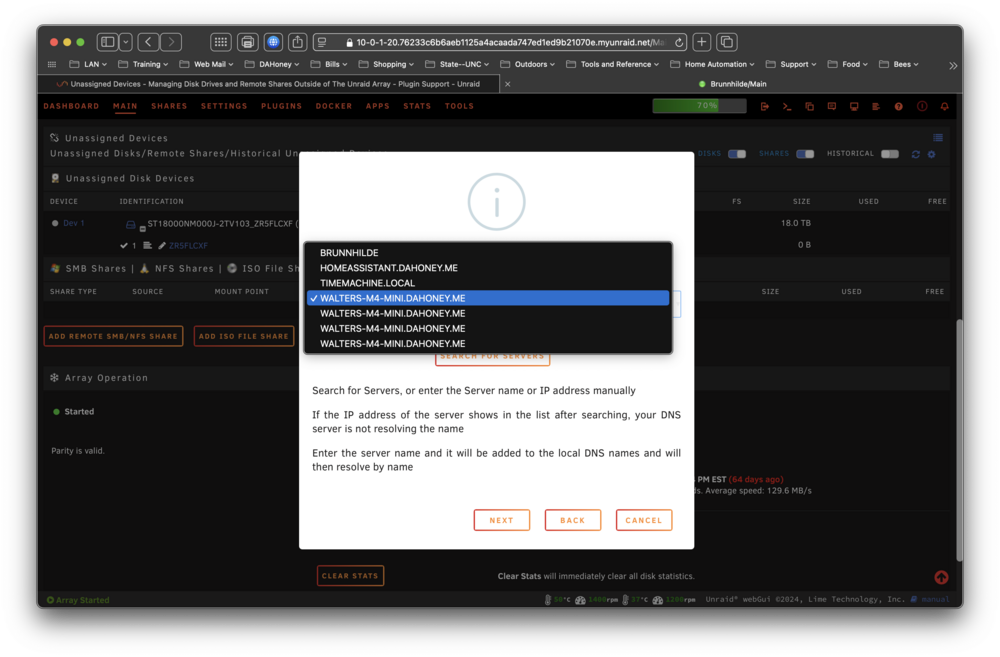
For some reason I am having issues getting an external SMB share to mount. I can access it from other computers on my LAN so I know the share is working but when I configure it in UD the mount fails with this error. Jan 8 09:43:58 Brunnhilde unassigned.devices: Mounting Remote Share '//WALTERS-M4-MINI/brunnhilde'... Jan 8 09:43:58 Brunnhilde unassigned.devices: Mount SMB share '//WALTERS-M4-MINI.DAHONEY.ME/brunnhilde' using SMB default protocol. Jan 8 09:43:58 Brunnhilde unassigned.devices: Mount SMB command: /sbin/mount -t 'cifs' -o rw,hard,relatime,noserverino,nounix,iocharset=utf8,file_mode=0777,dir_mode=0777,uid=99,gid=100,,actimeo=10,rsize=1048576,wsize=1048576,closetimeo=30,credentials='/tmp/unassigned.devices/credentials_WALTERS-M4-MINI_brunnhilde' '//WALTERS-M4-MINI.DAHONEY.ME/brunnhilde' '/mnt/remotes/WALTERS-M4-MINI_brunnhilde' Jan 8 09:43:58 Brunnhilde kernel: CIFS: enabling forceuid mount option implicitly because uid= option is specified Jan 8 09:43:58 Brunnhilde kernel: CIFS: enabling forcegid mount option implicitly because gid= option is specified Jan 8 09:43:58 Brunnhilde kernel: CIFS: Attempting to mount \\WALTERS-M4-MINI.DAHONEY.ME\brunnhilde Jan 8 09:43:58 Brunnhilde kernel: CIFS: Status code returned 0xc000006d STATUS_LOGON_FAILURE Jan 8 09:43:58 Brunnhilde kernel: CIFS: VFS: \\WALTERS-M4-MINI.DAHONEY.ME Send error in SessSetup = -13 Jan 8 09:43:58 Brunnhilde kernel: CIFS: VFS: cifs_mount failed w/return code = -13 Jan 8 09:43:58 Brunnhilde unassigned.devices: Remote Share '//WALTERS-M4-MINI.DAHONEY.ME/brunnhilde' failed to mount. I can select the SMB server- Not sure why UD is listing it four times though. I have left the domain entry blank since it's already a part of the server selected (actually I've tried it multiple times with and without a domain entry). Credentials are entered correctly using copy/paste to avoid typos. On the final setup screen no shared folders are listed. If I manually enter one I get a success screen but can't mount the share. I have also tried just entering the IP as 10.0.1.80 rather than selecting a server. Same result.
-
I’m not aware of anything like this.
-
No. This is for setting CLI options for OpenVPN.
-
To start I would revert the /data container path back to /data on both dockers just to simplify things. I’m not familiar with Sab’s settings inside the app but I’m guessing you can set download locations to something like /data/complete inside the app. This should make Radarr look in /data/complete.
-
I don’t use sab. Do you have it set to save downloads to /data/usenet/complete/movies?
-
Yes. You need to have the /data host path and container path exactly the same. Your host paths do not match. One is /mnt/user/appdata/data and the other is /mnt/user/PlexMedias/usenet. You may not want Sab downloading everything to the appdata share.
-
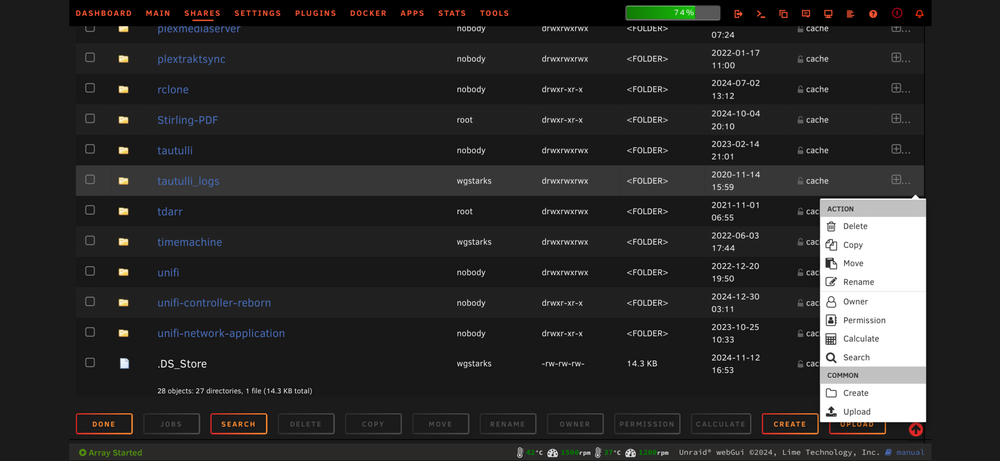
The bulk actions menu on the bottom as well as the actions menu on the right (click the + sign).
-
I don’t use nordvpn so not sure how they make the configuration available. This looks like the docker isn’t parsing the file correctly. Maybe @binhex can take a look.
-
This is your problem. The endpoint line tells WireGuard where to connect to. You should probably download a new file from NordVPN.
-
This appears to be the case. After a short wait and re-enabling the warning it doesn’t show on a rescan.
-
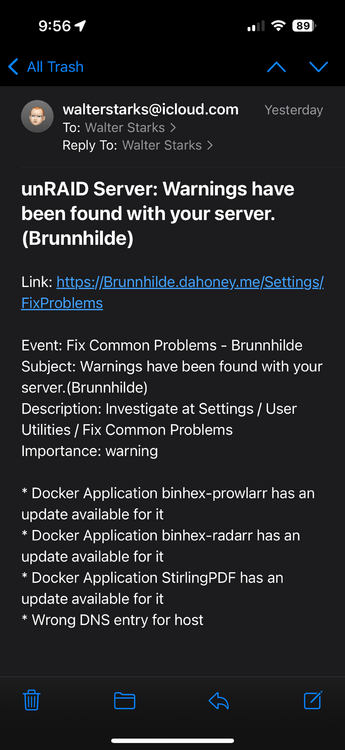
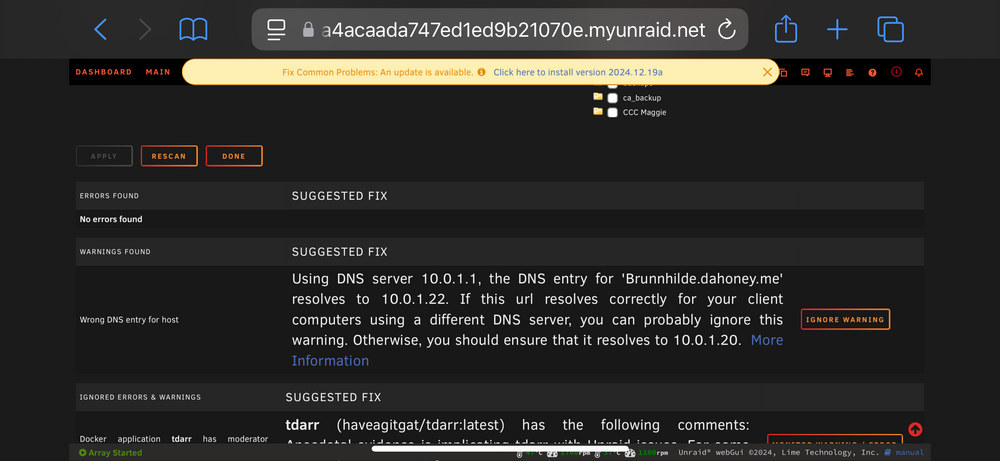
brunnhilde-diagnostics-20241223-0957.zip I was wrong that the warning didn’t appear in settings (2nd screenshot). Not sure how I missed it.😳 It is false though. All the machines on my local network use my pfsense router for primary DNS. If I browse to Brunnhilde.dahoney.me from any machine on my local network I get the Unraid login screen rather than the IPMI login which is at 10.0.1.22. I’ll just ignore the warning for now. I did tweek the DHCP reservations in pfsense. Maybe it takes a while for FCP to see the changes?
-
I would recommend posting in the support thread for whatever qbittorrent docker you are using. Click the docker icon on the docker tab and select “support”.
-
I keep getting a notification for “wrong DNS entry” which is a false positive but I don’t see anywhere in Settings/FCP to ignore this error. The warning isn’t shown there at all.




