




.jpg.adf8def3431e0aa8e590900f82752d7a.jpg)

wgstarks
Members
-
Joined
-
Last visited
Everything posted by wgstarks
-
Macs will connect to networks in the order set in the network settings on the Mac. If wifi has priority over ethernet you can drag them into a different order. If Ethernet already has priority then this would suggest that your Mac is experiencing issues connecting to your network via Ethernet and is reverting to wifi instead. Possibly a bad cable or port.
-
Did you also get the correct LAN network setting?
-
Correct. If you have the schedule set at hourly and the percentage at 75% then once an hour the mover will check to see if the cache is above 75% and start moving if it is.
-
Did you try the online calculator? Honestly I’m not sure this has anything to do with your error. Just a misconfigured setting. Have you also tried rebooting?
-
I can see one error right off- This is not correct. https://github.com/binhex/documentation/blob/master/docker/faq/vpn.md Scroll down to Q4.
-
You need to update unRAID to at least 6.12.0 to be able to continue to update CA. I would suggest updating to the latest stable unRAID version.
-
You could try one of the other settings for version.
-
What version of Plex is currently installed?
-
I don’t see anything out of the ordinary there except for the custom network. Not sure if that might be a cause or not???
-
This is assuming you are using the default location for appdata. If not you’ll need to adjust the path.
-
/mnt/user/appdata/binhex-qbittorrentvpn/qBittorent/config Scroll down to [preferences].
-
Post your docker run command. Be sure to redact any sensitive info.
-
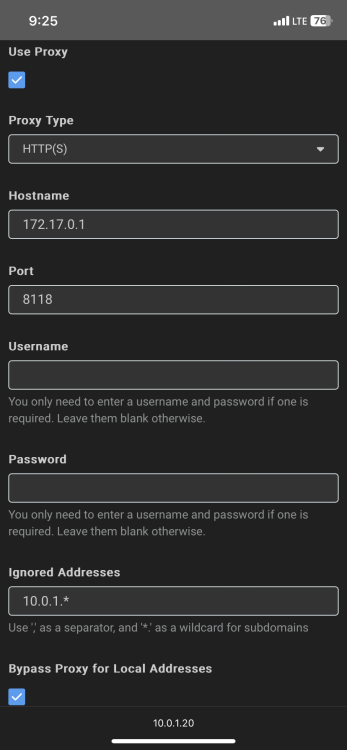
The privoxy server builtin to this container is provided so that you can connect Radarr and Sonarr to this container and their searches will be using the vpn used by this container via the privoxy server. Here is a screenshot from the appropriate settings in Radarr.
 I’m not the best person to respond to this. Maybe you’ll get some response here but better to post this in the hardware section of the forum. More people will see it there.Post your parts list in the forum before you purchase. Might save you from headaches down the road.I think you misunderstand. If they remove the original update tool then anyone not using Connect will have no ability to update.Anyone not using Connect will only have one update tool.You don't actually need to stop the docker. You can just change the repository field and click "Apply".I would. And if you use Sonarr, Radarr, etc you’ll probably need to update them as well.The qbit devs have decided that the app must now have a secure user/password. If you read the pinned post in this thread (2nd from top) it has a link to a work around that will give you access and allow you to set the proper secure user/password.Also, if you’re not using subcategories (movies/drama, movies/comedy, tv/sitcom, etc) you can uncheck that.You have default torrent management mode set to manual. You’ll need to set it to automatic to have qbit move the torrents for you.Or perhaps you have not setup "Categories"?Typically your incomplete downloads would go to one folder (example: /data/incomplete) and once the download is complete they’ll be moved to another folder (example: /data/radarr). Post screenshots of your Downloads settings in qbit if you want.




