






jonp
Members
-
Joined
-
Last visited
Everything posted by jonp
-
Hi there, I am actually in the midst of doing some pretty extensive storage performance testing in the lab. We're testing with a combination of SSDs, NVMe drives, and a 10gbps network. This will take some time to test and analyze, but we are actively researching this.
-
That's correct. Once a flash device is blacklisted, it can't be used with Unraid anymore. There is definitely something amiss with the config/plugins on your old flash drive. You can try going back to that device and redoing it the same way I had you do the new device and see if that works.
-
Ok, redo your new flash drive so it's fresh and clean (no old config folder copied in there yet). Next, copy over the following files from your old config folder to the new one: super.dat disk.cfg ident.cfg passwd Plus.key smbpasswd You should also copy over the "shares" subfolder, but do not copy over any of your plugins. Then start up the flash and see if that works.
-
Hi there, One major question before we can start diagnosing the issue is in regards to this: What happened in the last few days? I'm asking because it's very unusual for a working system to all of the sudden start exhibiting this kind of behavior without any changes to the software or hardware. Did you recently update Unraid and this started occurring after that? What about updates to your router or switch? Any hardware changes on the server or network recently? Also from looking at the logs, it appears the behavior doesn't start until a little over 7 hours after you've booted it up. Does that sound right? Another thing you can try is to disable the use of eth0 and eth1 in the bonding group. Stop the array and navigate to the Network Settings page and try taking those unused devices out of the bond configuration.
-
Hi there, If this issue has been occurring since you originally went to configure Unraid, then it is likely there is something amiss with the hardware or BIOS that is causing these issues. If you had a working setup originally and then one day this started happening, we have to figure out what changed that caused this to start happening. Perhaps try formatting the flash to default settings and see if you can get Unraid to boot there. If so, then you know something is amiss in the configuration of your previous flash.
-
Hmm, I'm just not seeing anything jumping out at us as to what the issue could be. First and foremost, I would disable the use of all plugins and try booting. If that doesn't work, let's try a different flash drive.
-
Try this: navigate to the Settings > SMB page and turn on "Enhanced macOS interoperability" and see if that improves performance for you.
-
hmm, I don't see any network config files in your diagnostics. Try copying the network.cfg file I've attached here into the config folder of your flash and reboot your server. network.cfg
-
Hi there, Try deleting network.cfg and network-rules.cfg and rebooting your server. Those files are located under the 'config' folder of the flash drive. If that doesn't work, please shut down your server, remove the flash, and plug it into a PC. Run a checkdisk against it and try booting up again. Unclean shutdowns can cause corruption on flash drives which a checkdisk should resolve.
-
Squid is correct but you can also stop the array, unassign the 8TB parity disk, assign the 12TB disk to parity, and assign the 8TB disk to the next data disk slot all in one step. This is a supported operation.
-
So many things to keep track of, but yeah, that would have been a good one to bring up. I was honestly more excited to talk about what's coming next, but never fear, WireGuard will see it's day in the spotlight with us for sure soon! It was probably a good thing we had an internal call that made me have to jump of the podcast otherwise I may have spilled too many beans ;-).
-
Had a great time on the show tonight! Always a pleasure hanging out with Jim, Tony, and Mike! Looking forward to the next one!
-
Looking forward to being on the show tonight! Hope to see you all there!
-
Can't really answer that question. It's not about quantity as much as its about use-case and applications. I've never needed hugepages for any of my VMs because I'm not running databases, video encoding, etc. The benefits of hugepages are pretty app-specific. Linus saw the benefit specifically in a video he did where it featured a lot of video encoding being done and there was a pretty dramatic impact to overall performance as a result. Then your VM will give you an error upon trying to start it. What is important to remember is that to change your allocation for hugepages, you need to adjust the lines in SysLinux and reboot. There are technically methods that allow you to do this while the machine is running, but I highly advise against that as you may not get contiguous memory allocation then.
-
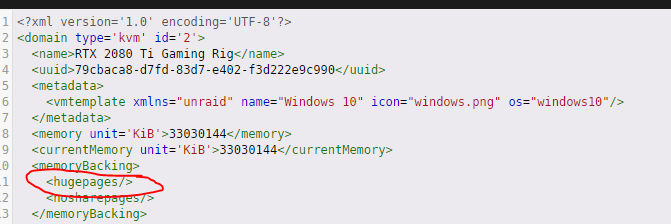
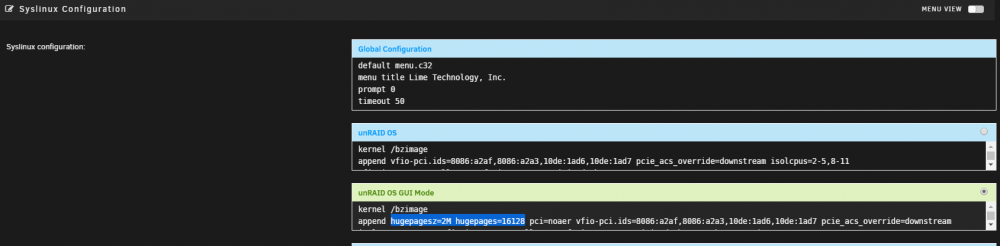
Hugepages support is built into Unraid natively, but to enable it, you must do two things: 1) Navigate to Main > Flash Device Settings (click the Flash on this page). After "append" and on the same line, add the following: hugepagesz=2M hugepages=16128 hugepagesz=2M hugepages=X Change X to represent the # of hugepages you want to allocate. Each page is 2 MB based on the first variable. So for example, if you wanted 16GB of RAM, you'd use the following: hugepagesz=2M hugepages=8064 You obviously will need to increase this for the # of VMs you wish to use this with. Here's what mine looks like as an example: 2) Edit the your VM and switch to form-based edit mode (the toggle switch in the top right on the Edit VM screen). Add <hugepages/> to the <memoryBacking> section like so: Save your VM, reboot your server and fire it up.
-
There are probably some additional files inside the docker.img or perhaps images that aren't active in use but are consuming a tiny bit of storage. I really wouldn't be concerned.
-
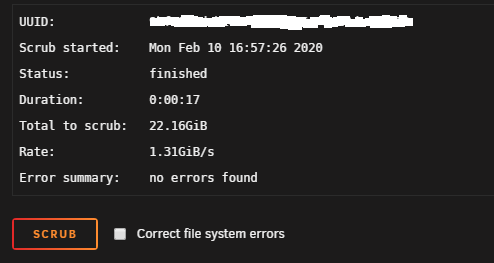
Try this: go to the Shares tab. Click on the folder icon next to the system share. Now click on the folder for Docker. What size does it report on that page for the docker image size? Also, when you scrubbed your container, did you notice the amount scrubbed was only 22GiB? If you're not familiar with how Docker, volume mappings, thin provisioning, etc. work, the du command can certainly confuse you.
-
No problem! If you do manage to figure this out before we do, please reply back and let us know what fixes it because this one does have me scratching my head a bit. Another thing to check is after starting your VMs, what does your CPU usage look like on the dashboard? Are your CPUs just pegged at 100% like their stuck doing something or does usage seem normal for VMs? You'll have to observe for a minute or two as during the initial boot sequence, maxed out CPUs are normal, but if after a few minutes it's still maxed out, something is wrong.
-
What IP address did you use for trying to connect? The IP should be that of your Unraid server and the port should be 5900 or greater (depending on which VM you're trying to connect to).
-
Ok, if they are started, then this has nothing to do with your VM configurations. A started VM is running, but if VNC is failing to connect, something else is amiss. This could be a browser issue or otherwise. I previously asked you to test something that you haven't responded to yet:
-
Ok, I still don't think you're understanding what I'm asking. There are two steps required to connect to a VM over the noVNC client. First is to start the VM, the next is to open the VNC connection. So what happens when you start the VM? Does it actually start (meaning the red square next to the icon turns to a green play symbol)?
-
So what error do you get when trying to start the VM? Click the icon for a VM, click start, what do you see?
-
Hi there, So it sounds like the main issue is that the web-based VNC client we have built into Unraid isn't working for you, but do your VMs start ok otherwise, you just can't "see" them through VNC? If so, please try downloading a VNC client such as RealVNC and see if you can connect to your VMs using that. If so, we have at least ruled out the issue of the VMs themselves. Another thing to try is a different browser to see if an ad-blocker or something else may be getting in the way. I'm going to review your diags here as well and will repost if I find more in there, but these are some good starting points to debugging the issue.
-
I've gone ahead and copied this into our bug reports forum for stable releases. I've listed it under the category of "annoyance" as it doesn't seem to affect functionality, but obviously isn't reporting the correct data. Further commenting on this should be done over there:
-
Hi there, I've passed this along to the devs to take a look. I'm guessing that this is only an appearance issue and that nothing functionally is broken (e.g. you can still assign more than 32GB of RAM to VMs and whatnot). Please confirm.





