





John_M
Members
-
Joined
-
Last visited
Everything posted by John_M
-
First edit eth1 to remove it from any bonds. Then edit eth0 to add eth1 to its bond0.
-
Suppose you have a Cache:yes User share called, say "Media". If you have an application that writes new files to /mnt/cache/Media they will be moved to the array when the Mover runs. However, if a file of the same name already exists on the array you will have a duplicate that can't be moved. The solution would be to make sure the application writes to /mnt/user/Media instead. Then, when a file with the same name as an existing one is stored the old file will be overwritten. I'm not saying that's necessarily what's happening in your case, but it would explain what you're seeing.
-
I suspect this is your problem. Unraid expects eth0 to be used for its GUI. At the bottom of the page you can set which physical port is eth0 by selecting its MAC address. I'd move your unused port to eth2 and use eth0 and eth1 in the bond.
-
There is no networking.cfg file so don't worry about not being able to find it. If you delete your network.cfg file and reboot it will be re-created with default values, which you should then be able to edit in the GUI. Perhaps your boot flash device is corrupt or failing, but you'd need local access to test it.
-
Probably not needed now but my results confirm @jungle's: root@Pusok:~# sensors amdgpu-pci-0900 -j 2>errors { "amdgpu-pci-0900":{ "Adapter": "PCI adapter", "vddgfx":{ }, "vddnb":{ }, "edge":{ "temp1_input": 36.000 } } } root@Pusok:~#
-
You're most welcome. I'm online now and will be for he next several hours. Or tomorrow, if that's more convenient for you. PM me and I'll give you the TeamViewer details.
-
Changing the 0a00 to match my 0900, I get root@Pusok:~# sensors amdgpu-pci-0900 -j { "amdgpu-pci-0900":{ "Adapter": "PCI adapter", "vddgfx":{ ERROR: Can't get value of subfeature in0_input: Can't read }, "vddnb":{ ERROR: Can't get value of subfeature in1_input: Can't read }, "edge":{ "temp1_input": 38.000 } } }
-
Thanks. At your convenience, please open a terminal window or ssh session into your server and type sensors and in the output look for the lines that look like mine: amdgpu-pci-0900 Adapter: PCI adapter vddgfx: N/A vddnb: N/A edge: +37.0°C and post here. I suspect they will look very similar (different PCI address though - 0a00, if I remember your earlier posts correctly).
-
I'm hoping that @jungle and @soulskill might be able to help with that.
-
I'm glad it worked for you. I think Jellyfin was just trying to clear out unwanted files from its transcoding workspace and couldn't because of the permissions of the files in the top level /tmp directory. It's usually very good at tidying up after itself but with the /tmp directory you have to respect the files of other users and there's a sticky permissions bit to enforce that. The safest solution is simply to create a new subfolder that it can use as it wishes and that's what you now have.
-
You have to have something misconfigured because the path /transcode/plugins/community.applications.plg simply doesn't make sense. Please post your docker run command or a screenshot of your mappings. Looking inside my running Jellyfin container I see no /transcode directory. Transcoding it done to the /config/transcodes directory where /config is mapped to external path /mnt/user/appdata/Jellyfin. I assume your aim is to transcode to the RAM-based /tmp directory but haven't got it quite right? So, in the Jellyfin Server Settings, under Playback - Transcoding you must have set a custom Transcode path of /transcode and added a custom mapping for the container (/transcode <--> /tmp) and that how it's seeing the plugins subfolder and the totally unrelated community.apps.plg file. Try setting the mapping as (/transcode <--> /tmp/transcode) instead.
-
It may not be necessary to query the Nuvoton chip. I have a Raven Ridge APU and the temperature can be read by the amdgpu module: root@Pusok:~# sensors amdgpu-pci-0900 Adapter: PCI adapter vddgfx: N/A vddnb: N/A edge: +38.0°C ... @jungle has a Picasso APU and @soulskill has a discrete AMD GPU. But we're all using the same amdgpu driver so it would be interesting to compare what it reports to sensors.
-
In Unraid 6.9 there's an official way of enabling GPU drivers that doesn't need entries in the go file. If there's a problem with the actual driver module, this won't help, of course, but after waiting for it to be implemented for so long it works fine for my AMD APU. https://wiki.unraid.net/Unraid_OS_6.9.0#GPU_Driver_Integration
-
That's fast work! I'll wait for it to appear in Community Apps.
-
Cool! I'm happy to help with any testing.
-
That looks horrible. There's something weird going on there with the rendering. I don't think it's a problem with the font size, as such. It looks much better on my standard resolution screen (1280x800 13-inch laptop display) and it's positively glorious on a high resolution Retina display.
-
What I'm missing now is the AMD equivalent of Intel GPU top, namely radeontop. Could it be installed via a plugin, in the same way?
-
Not personally, but a number of people seem to have the same problem. See this thread:
-
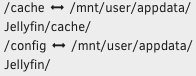
I have my Cache path set to a directory within the appdata. I think it would not be a good idea to leave it unset because it would then cache the pictures inside the container itself, taking up space within the docker.img file.
-
I understand about not deleting them but shouldn't they be moved into the /boot/config/ssh/root directory, which is where /root/.ssh is symlinked? I can't see how they can even by accessed in their current location. I'm thinking they're left over from an earlier method of preserving keys across a reboot, where they were copied into the /root/.ssh directory by a line in the go file.
-
Still using -rc2? 6.9.1 is the current version.
-
It isn't generated, it's simply downloaded. Everyone gets the same script, not one that's customised for each particular setup.
-
If it really is the same issue, and you're getting the same error message, then my advice is the same as I gave to @t-mac_003 :
-
Or in another pool (in the case of Unraid 6.9). If there are appdata files that are neither in the "cache" pool, nor on the array, but are present in some other pool, then they would be seen via the /mnt/user path but not via the /mnt/cache path.
-
It's one thing emulating an ARM CPU but a Raspberry Pi incorporates proprietary hardware in the form of the (almost completely undocumented) GPU integrated into the Broadcom SoC, which plays a crucial role in booting the device. Is this supported by QEMU?



