





Paul_Ber
Members
-
Joined
-
Last visited
Everything posted by Paul_Ber
-
Ok I updated my Docker to catch up to Binhex Oct 16 last commit and the complaint about OpenVPN and ipv6 is gone.
-
Getting this weird Openvpn error about ipV6 on my flexget version of DelugeCPN. Sat Nov 30 22:16:47 2019 WARNING: OpenVPN was configured to add an IPv6 route over tun0. However, no IPv6 has been configured for this interface, therefore the route installation may fail or may not work as expected. I am on a RC of unraid. The only thing I changed lately was to thru terminal update flexget. And maybe a few days ago upgraded to a new version of unraid RC. I tried downgrading to older version of Flexget, no difference. I guess I will downgrade to older version of unraid and see if it goes away.
-
[6.7.3-rc2] Pass Thru GPU not reset back to original config when restart or shutdown VM. The only time the VM will work is on a fresh boot of Unraid. I had this same problem in 6.7.2. unraid-diagnostics-20190802-0811.zip
-
VM only shows up on passed GPU if Unraid has a fresh boot Linux Mint 19.2 A reboot of VM causes the VM not to show up on pass thru GPU screen. Unraid 6.7.2 I never had a problem with passing this GPU GT240 before. Have not tried the current VM on a different version of Unraid to see if problem goes away. I installed it fresh after I upgraded to Unraid 6.7.2. Am going to try a different Linux to see if I have the same problem. On another note I got my other Windows PC to work with Barrier and the VM to use just one mouse and keyboard. VM XML and diag file in her along with log. I tried ElementaryOS, it did the same thing once it installed and then wanted to reboot. See the Unraid log during this: Jul 27 15:57:57 UNRAID kernel: handlers: Jul 27 15:57:57 UNRAID kernel: [<000000008309db2f>] vfio_intx_handler Jul 27 15:57:57 UNRAID kernel: Disabling IRQ #16 Jul 27 15:57:58 UNRAID kernel: usb 8-2: reset full-speed USB device number 2 using xhci_hcd Jul 27 15:57:58 UNRAID kernel: usb 8-2: reset full-speed USB device number 2 using xhci_hcd Jul 27 15:57:59 UNRAID kernel: irq 16: nobody cared (try booting with the "irqpoll" option) Jul 27 15:57:59 UNRAID kernel: CPU: 5 PID: 0 Comm: swapper/5 Not tainted 4.19.56-Unraid #1 Jul 27 15:57:59 UNRAID kernel: Hardware name: To be filled by O.E.M. To be filled by O.E.M./M5A97 R2.0, BIOS 2603 06/26/2015 Jul 27 15:57:59 UNRAID kernel: Call Trace: Jul 27 15:57:59 UNRAID kernel: <IRQ> Jul 27 15:57:59 UNRAID kernel: dump_stack+0x5d/0x79 Jul 27 15:57:59 UNRAID kernel: __report_bad_irq+0x32/0xac Jul 27 15:57:59 UNRAID kernel: note_interrupt+0x1d3/0x224 Jul 27 15:57:59 UNRAID kernel: handle_irq_event_percpu+0x4c/0x6a Jul 27 15:57:59 UNRAID kernel: handle_irq_event+0x33/0x51 Jul 27 15:57:59 UNRAID kernel: handle_fasteoi_irq+0x92/0x102 Jul 27 15:57:59 UNRAID kernel: handle_irq+0x1c/0x1f Jul 27 15:57:59 UNRAID kernel: do_IRQ+0x43/0xc7 Jul 27 15:57:59 UNRAID kernel: common_interrupt+0xf/0xf Jul 27 15:57:59 UNRAID kernel: </IRQ> Jul 27 15:57:59 UNRAID kernel: RIP: 0010:native_safe_halt+0xe/0xf Jul 27 15:57:59 UNRAID kernel: Code: 60 02 df f0 83 44 24 fc 00 48 8b 00 a8 08 74 0b 65 81 25 a7 fc 9b 7e ff ff ff 7f c3 e9 07 00 00 00 0f 00 2d ac 14 5b 00 fb f4 <c3> e9 07 00 00 00 0f 00 2d 9d 14 5b 00 f4 c3 e8 bb 36 a4 ff 65 8b Jul 27 15:57:59 UNRAID kernel: RSP: 0018:ffffc900031bfe48 EFLAGS: 00000246 ORIG_RAX: ffffffffffffffdb Jul 27 15:57:59 UNRAID kernel: RAX: 0000000080000000 RBX: ffff88882bbfa064 RCX: 000000000000001f Jul 27 15:57:59 UNRAID kernel: RDX: ffff88882fb40000 RSI: ffffffff81e5cf40 RDI: ffff88882bbfa064 Jul 27 15:57:59 UNRAID kernel: RBP: 0000000000000001 R08: 0000000000000002 R09: 00000000000203c0 Jul 27 15:57:59 UNRAID kernel: R10: 0000000000000000 R11: 000004ae8c810dc6 R12: ffff88882bbfa000 Jul 27 15:57:59 UNRAID kernel: R13: 0000000000000001 R14: ffffffff81e5cfb8 R15: 0000000000000000 Jul 27 15:57:59 UNRAID kernel: acpi_safe_halt+0x15/0x1f Jul 27 15:57:59 UNRAID kernel: acpi_idle_enter+0x1dd/0x21b Jul 27 15:57:59 UNRAID kernel: cpuidle_enter_state+0xa1/0x141 Jul 27 15:57:59 UNRAID kernel: do_idle+0x192/0x20e Jul 27 15:57:59 UNRAID kernel: cpu_startup_entry+0x6a/0x6c Jul 27 15:57:59 UNRAID kernel: start_secondary+0x197/0x1b2 Jul 27 15:57:59 UNRAID kernel: secondary_startup_64+0xa4/0xb0 Jul 27 15:57:59 UNRAID kernel: handlers: Jul 27 15:57:59 UNRAID kernel: [<000000008309db2f>] vfio_intx_handler Jul 27 15:57:59 UNRAID kernel: Disabling IRQ #16 Jul 27 15:58:47 UNRAID kernel: usb 8-2: reset full-speed USB device number 2 using xhci_hcd Jul 27 15:58:47 UNRAID kernel: usb 8-2: device firmware changed Jul 27 15:58:47 UNRAID kernel: usb 8-2: USB disconnect, device number 2 Jul 27 15:58:47 UNRAID kernel: usb 8-2: new full-speed USB device number 3 using xhci_hcd Jul 27 15:58:48 UNRAID kernel: logitech-djreceiver 0003:046D:C52B.0011: hiddev98,hidraw4: USB HID v1.11 Device [Logitech USB Receiver] on usb-0000:03:00.0-2/input2 Jul 27 15:58:50 UNRAID kernel: input: Logitech M215 2nd Gen as /devices/pci0000:00/0000:00:05.0/0000:03:00.0/usb8/8-2/8-2:1.2/0003:046D:C52B.0011/0003:046D:401B.0012/input/input20 Jul 27 15:58:50 UNRAID kernel: logitech-hidpp-device 0003:046D:401B.0012: input,hidraw5: USB HID v1.11 Mouse [Logitech M215 2nd Gen] on usb-0000:03:00.0-2:1 Jul 27 15:58:51 UNRAID kernel: input: Logitech K330 as /devices/pci0000:00/0000:00:05.0/0000:03:00.0/usb8/8-2/8-2:1.2/0003:046D:C52B.0011/0003:046D:4016.0013/input/input21 Jul 27 15:58:51 UNRAID kernel: logitech-hidpp-device 0003:046D:4016.0013: input,hidraw6: USB HID v1.11 Keyboard [Logitech K330] on usb-0000:03:00.0-2:2 Jul 27 16:00:21 UNRAID avahi-daemon[2987]: Interface vnet0.IPv6 no longer relevant for mDNS. Jul 27 16:00:21 UNRAID avahi-daemon[2987]: Leaving mDNS multicast group on interface vnet0.IPv6 with address fe80::fc54:ff:fe4d:2674. Jul 27 16:00:21 UNRAID kernel: br0: port 2(vnet0) entered disabled state Jul 27 16:00:21 UNRAID kernel: device vnet0 left promiscuous mode Jul 27 16:00:21 UNRAID kernel: br0: port 2(vnet0) entered disabled state Jul 27 16:00:21 UNRAID avahi-daemon[2987]: Withdrawing address record for fe80::fc54:ff:fe4d:2674 on vnet0. Jul 27 16:00:21 UNRAID kernel: vfio-pci 0000:01:00.0: vgaarb: changed VGA decodes: olddecodes=io+mem,decodes=io+mem:owns=io+mem Jul 27 16:00:32 UNRAID kernel: vfio-pci 0000:01:00.0: vgaarb: changed VGA decodes: olddecodes=io+mem,decodes=io+mem:owns=io+mem Jul 27 16:00:32 UNRAID kernel: br0: port 2(vnet0) entered blocking state Jul 27 16:00:32 UNRAID kernel: br0: port 2(vnet0) entered disabled state Jul 27 16:00:32 UNRAID kernel: device vnet0 entered promiscuous mode Jul 27 16:00:32 UNRAID kernel: br0: port 2(vnet0) entered blocking state Jul 27 16:00:32 UNRAID kernel: br0: port 2(vnet0) entered forwarding state Jul 27 16:00:34 UNRAID avahi-daemon[2987]: Joining mDNS multicast group on interface vnet0.IPv6 with address fe80::fc54:ff:fe4d:2674. Jul 27 16:00:34 UNRAID avahi-daemon[2987]: New relevant interface vnet0.IPv6 for mDNS. Jul 27 16:00:34 UNRAID avahi-daemon[2987]: Registering new address record for fe80::fc54:ff:fe4d:2674 on vnet0.*. Jul 27 16:00:34 UNRAID kernel: vfio-pci 0000:00:14.2: enabling device (0000 -> 0002) Jul 27 16:00:34 UNRAID acpid: input device has been disconnected, fd 9 Jul 27 16:00:34 UNRAID kernel: usb 8-2: reset full-speed USB device number 3 using xhci_hcd Jul 27 16:00:35 UNRAID kernel: usb 8-2: reset full-speed USB device number 3 using xhci_hcd Jul 27 16:01:10 UNRAID avahi-daemon[2987]: Interface vnet0.IPv6 no longer relevant for mDNS. Jul 27 16:01:10 UNRAID avahi-daemon[2987]: Leaving mDNS multicast group on interface vnet0.IPv6 with address fe80::fc54:ff:fe4d:2674. Jul 27 16:01:10 UNRAID kernel: br0: port 2(vnet0) entered disabled state Jul 27 16:01:10 UNRAID kernel: device vnet0 left promiscuous mode Jul 27 16:01:10 UNRAID kernel: br0: port 2(vnet0) entered disabled state Jul 27 16:01:10 UNRAID avahi-daemon[2987]: Withdrawing address record for fe80::fc54:ff:fe4d:2674 on vnet0. Jul 27 16:01:10 UNRAID kernel: logitech-djreceiver 0003:046D:C52B.0016: hiddev98,hidraw4: USB HID v1.11 Device [Logitech USB Receiver] on usb-0000:03:00.0-2/input2 Jul 27 16:01:11 UNRAID kernel: input: Logitech M215 2nd Gen as /devices/pci0000:00/0000:00:05.0/0000:03:00.0/usb8/8-2/8-2:1.2/0003:046D:C52B.0016/0003:046D:401B.0017/input/input22 Jul 27 16:01:11 UNRAID kernel: logitech-hidpp-device 0003:046D:401B.0017: input,hidraw5: USB HID v1.11 Mouse [Logitech M215 2nd Gen] on usb-0000:03:00.0-2:1 Jul 27 16:01:11 UNRAID kernel: vfio-pci 0000:01:00.0: vgaarb: changed VGA decodes: olddecodes=io+mem,decodes=io+mem:owns=io+mem Jul 27 16:01:12 UNRAID kernel: input: Logitech K330 as /devices/pci0000:00/0000:00:05.0/0000:03:00.0/usb8/8-2/8-2:1.2/0003:046D:C52B.0016/0003:046D:4016.0018/input/input23 Jul 27 16:01:12 UNRAID kernel: logitech-hidpp-device 0003:046D:4016.0018: input,hidraw6: USB HID v1.11 Keyboard [Logitech K330] on usb-0000:03:00.0-2:2 Jul 27 16:01:57 UNRAID kernel: vfio-pci 0000:01:00.0: vgaarb: changed VGA decodes: olddecodes=io+mem,decodes=io+mem:owns=io+mem Jul 27 16:01:57 UNRAID kernel: br0: port 2(vnet0) entered blocking state Jul 27 16:01:57 UNRAID kernel: br0: port 2(vnet0) entered disabled state Jul 27 16:01:57 UNRAID kernel: device vnet0 entered promiscuous mode Jul 27 16:01:57 UNRAID kernel: br0: port 2(vnet0) entered blocking state Jul 27 16:01:57 UNRAID kernel: br0: port 2(vnet0) entered forwarding state Jul 27 16:01:57 UNRAID kernel: br0: port 2(vnet0) entered disabled state Jul 27 16:01:57 UNRAID kernel: device vnet0 left promiscuous mode Jul 27 16:01:57 UNRAID kernel: br0: port 2(vnet0) entered disabled state Jul 27 16:01:58 UNRAID kernel: vfio-pci 0000:01:00.0: vgaarb: changed VGA decodes: olddecodes=io+mem,decodes=io+mem:owns=io+mem Jul 27 16:02:10 UNRAID kernel: vfio-pci 0000:01:00.0: vgaarb: changed VGA decodes: olddecodes=io+mem,decodes=io+mem:owns=io+mem Jul 27 16:02:10 UNRAID kernel: br0: port 2(vnet0) entered blocking state Jul 27 16:02:10 UNRAID kernel: br0: port 2(vnet0) entered disabled state Jul 27 16:02:10 UNRAID kernel: device vnet0 entered promiscuous mode Jul 27 16:02:10 UNRAID kernel: br0: port 2(vnet0) entered blocking state Jul 27 16:02:10 UNRAID kernel: br0: port 2(vnet0) entered forwarding state Jul 27 16:02:10 UNRAID dhcpcd[1679]: vnet0: new hardware address: fe:54:00:4d:26:74 Jul 27 16:02:11 UNRAID avahi-daemon[2987]: Joining mDNS multicast group on interface vnet0.IPv6 with address fe80::fc54:ff:fe4d:2674. Jul 27 16:02:11 UNRAID avahi-daemon[2987]: New relevant interface vnet0.IPv6 for mDNS. Jul 27 16:02:11 UNRAID avahi-daemon[2987]: Registering new address record for fe80::fc54:ff:fe4d:2674 on vnet0.*. Jul 27 16:02:12 UNRAID kernel: vfio-pci 0000:00:14.2: enabling device (0000 -> 0002) Jul 27 16:02:12 UNRAID acpid: input device has been disconnected, fd 9 Jul 27 16:02:12 UNRAID kernel: usb 8-2: reset full-speed USB device number 3 using xhci_hcd Jul 27 16:02:13 UNRAID kernel: usb 8-2: reset full-speed USB device number 3 using xhci_hcd unraid-diagnostics-20190727-2305.zip
-
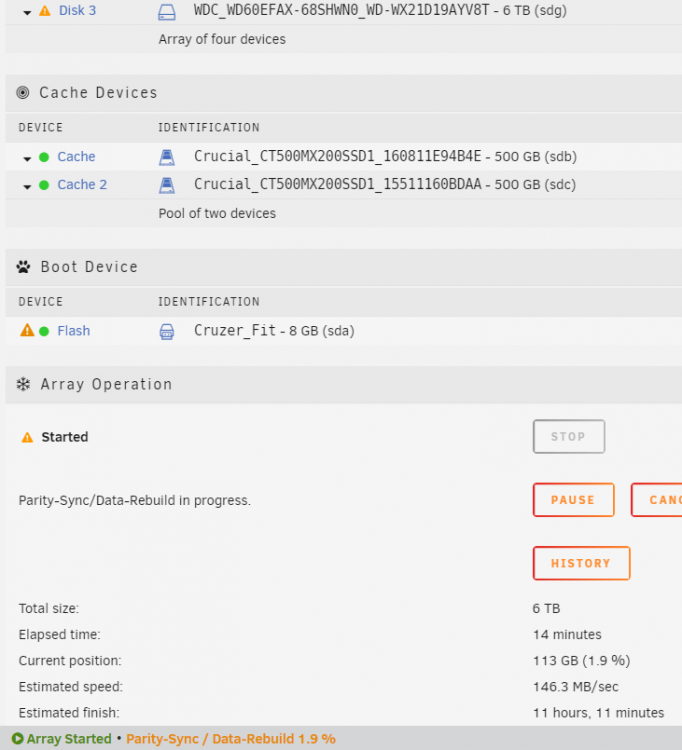
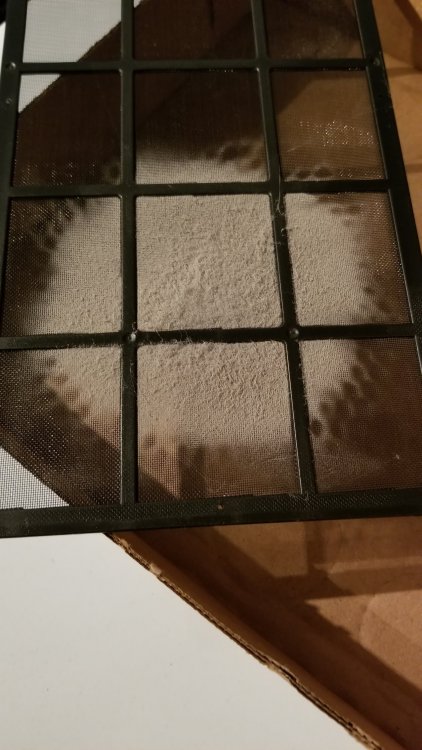
Swapped the drive, changed the SATA cable just incase. Oh that orange triangle on the Flash Drive, I fixed that, must of shared at one time, now no share. Some dust on the bottom intake filter.
-
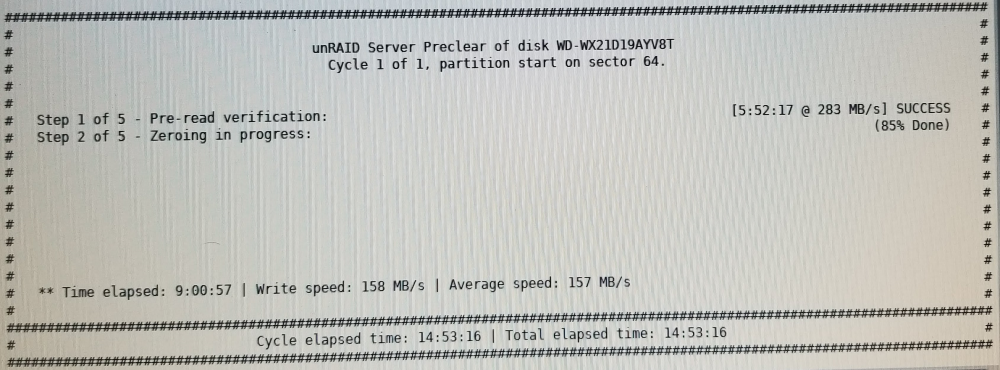
Was I supposed to Format the Drive 1st? I did a preclear on a Disk in another PC, on a new Disk, to put in my main system to replace a Disk. "cat: /tmp/.preclear/sdf/smart_error: No such file or directory --> RESULT: Preclear Finished Successfully!." ############################################################################################################################ # # # unRAID Server Preclear of disk WD-WX21D19AYV8T # # Cycle 1 of 1, partition start on sector 64. # # # # # # Step 1 of 5 - Pre-read verification: [5:52:17 @ 283 MB/s] SUCCESS # # Step 2 of 5 - Zeroing the disk: [11:33:22 @ 144 MB/s] SUCCESS # # Step 3 of 5 - Writing unRAID's Preclear signature: SUCCESS # # Step 4 of 5 - Verifying unRAID's Preclear signature: SUCCESS # # Step 5 of 5 - Post-Read verification: [11:16:49 @ 147 MB/s] SUCCESS # # # # # # # # # # # # # # # ############################################################################################################################ # Cycle elapsed time: 28:42:38 | Total elapsed time: 28:42:38 # ############################################################################################################################ cat: /tmp/.preclear/sdf/smart_error: No such file or directory --> RESULT: Preclear Finished Successfully!. Attachments area
-
"potential oxidation on the hot-swap SATA backplanes in my Norcotek enclosure. Half of the 20 drive bays have never had anything installed in them until recently" Too bad when the drive bays were new, there wasn't a dummy blank you could left plugged in so that the connections couldn't oxidize? That is like the old game cartridges from the 1980s that the card edge would need an eraser every now and then.
-
Are you saying you do the Preclear 3 times?
-
When I made the usb stick to use as a trial on the old PC, I picked the 6.6.6 version. 6hrs on step 1 11.5hrs on step 2 In step 5 now, 21.5hrs so far all together for 6TB This PC is so old, the BIOS is from 2010 running an AMD 1090T
-
It is being done in a really old PC with the Motherboard being 9 or more years old. Bios 2010. No other tasks on that old PC just Unraid and Preclear.
-
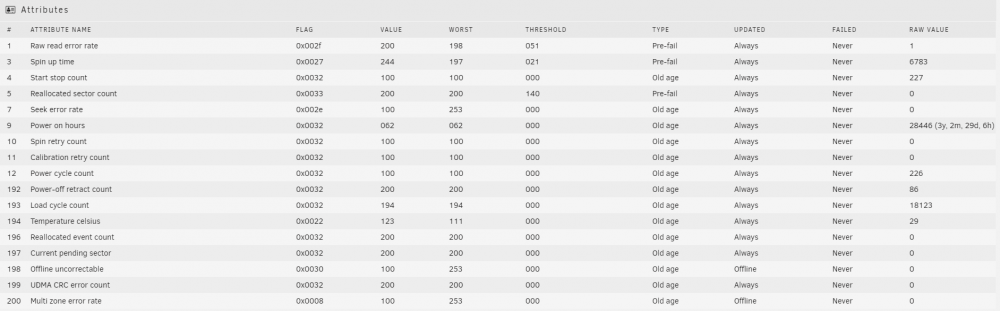
It is at 88% for step 2 of 5. How long does steps 3,4,5 take? Same cable for more than 4 years and haven't opened the case in a long time to mess with anything. Pastebin Disk error log. https://pastebin.com/sfMTZuhb
-
A new 6TB EFAX WD Red Nas. I have a 5TB WD Red Nas starting to get errors, last week 336 errors and yesterday that went up to 10000 errors. Doing the preclear in an old unused PC.
-
If I preclear in another PC, how will Unraid know it was Precleared if there is no file system?
-
I came back hours later, browser wasn't frozen but the animation was still going. After upgrade no freezing. Should the animation be over top the App you are pin/unpinning.
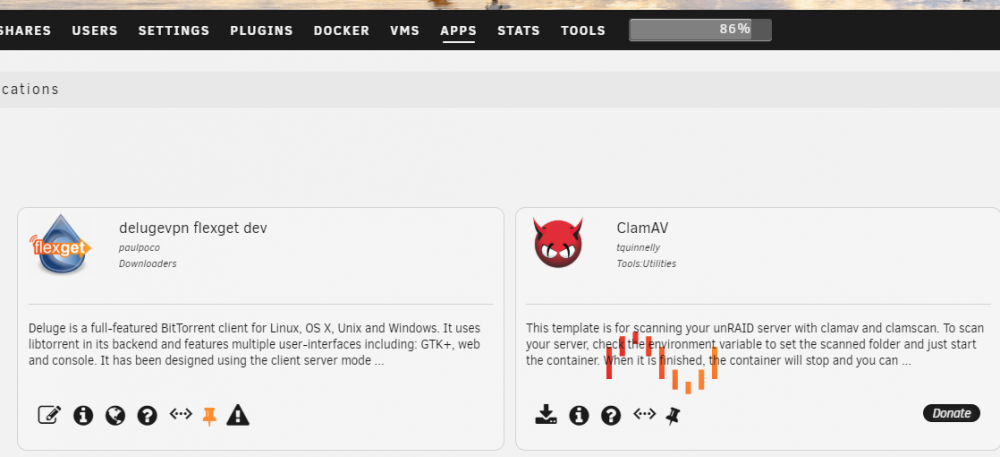
-
Windows 10 64bit Chrome 75.0.3770.100 14 pinned tabs plus usual 6 or more. I am CPU/GPU mining on this PC, maybe that animation uses lots of CPU/GPU. I never have an issue browsing, even fine playing a YouTube video.
-
Bug Report: APPS tab --> Pin/Unpin ---> whole website freezes while the Unraid animation occurs.
-
Used it the day, works great.
-
I actually deleted to old DockerHub image that had a tag of 'dev'. And when I setup a new tag on DockerHub of 'Dev' and did a build to bring it up to date, I didn't realize the old build had the tag of 'dev'. So then I had to change it to Dev in the Docker-templates.
-
I am not using Pi-hole, and my recently updated Docker-template without changing the app icon location, has turn the app icon into a question mark on the Community apps screen. https://github.com/paulpoco/docker-templates/blob/master/paulpoco/delugevpn-flexget-dev.xml

-
I know on my Docker I build the app icon turned into the question mark icon when the raw image url hasn't changed.
-
@Binhex deluge-client, what is that? My Flexget complained deluge-client wasn't installed and to use `pip install deluge-client` to install. I did put that in my github files but I guess it was at the wrong place. Is deluge-client also available with pacman? Edit: https://aur.archlinux.org/packages/python-deluge-client/ Which also needs python-setuptools. If I add these 2 with Pacman during the build, will I be able to do a pip upgrade to get new versions?
-
The download is really slow
-
This is the unRAID GUI only.
-
How do I swap the mouse buttons in unRAID GUI? Is there a setting in the menus? A file to change on the USB stick? I.e. Left handed mouse
-
Yes I made Dropbox data it's own share and disk only.



