





tjb_altf4
Members
-
Joined
-
Last visited
Everything posted by tjb_altf4
-
For those interested in this, you might want to watch Craft Computing's video. Also goes into some of the background of why Nvidia unlocked virtualization for consumers, tldr it was enabled to get a new hyper-v feature over the line.
-
~500 plots (0 XCH), stopping for now as I wait for more storage and I'll probably wait on pools. Hopefully the incremental rewards from pools will offer financial incentive to keep growing, as I do enjoy the setup, management and optimization aspects of chia farming.
-
IMO once pooling protocol kicks off it will be better, lack of an incremental reward at minimum is killing it for those not highly scaled. Still its a nice learning period, no doubt netspace will go off when pools start up.
-
Cloud based backup provided by LimeTech, instead of local backup like this plugin provides.
-
Nope. This seems to be a perpetuated myth. I got my single plot times down from 9.5 hrs to 1 hr using NVME storage alone.
-
Note I only have 64GB of RAM on my server, so this was a "normal" plot on nvme drives
-
Just gave madmax a go... wow. (note: this seems legit, with few vectors for issues and lots of eyesballs on code, but please DYOR) So on the original chia plotter, with an over zealous 12C/6G allocation, it still took 9.5 hrs to plot. Throwing 24C at madmax plotter got this down to 1hr + 6min ! Lots of interesting optimizations to experiment with around lower core count and parallel jobs! Unfortunately I've run out of storage so more plotting will have to wait a little while.
-
Apparently a docker build on the way, only ~5% performance drop compared to bare metal. Sounds like a good deal to me. K32 will be dead far sooner than devs anticipated, and certainly the final nail in the coffin will be the coming GPU acceleration from the mad max guys. If you're replotting for pools, I'd think twice about K32, just my 2c.
-
Array is currently at 90TB + 1P, but 5TB of nvme and 6TB of UD bumps me over the 100TB mark! Looking to expand further, just need to work out an appropriate solution to house all the disks 🤣
-
https://github.com/Chia-Network/chia-blockchain/releases/tag/1.1.7 nice to see fixes flowing quickly!
-
I see there's a new docker version, digging into the change history it looks like there are two great QOL changes specific to docker: TZ environmental var is now supported, logs can now be show with local timestamps! I'm 99% sure Unraid adds this already based on your Unraid settings, so no action should be needed to get this to work /chia-blockchain/venv/bin/ added to PATH environment, this should mean you can use "chia" instead of "venv/bin/chia"
-
This is the official container, @Partition Pixel just made an unraid template for it. You can confirm by comparing the image name + registry in the template with the official one listed on their github. I've previously done what your asking, but the other way around, where I had a windows VM that had read only access via SMB to my unraid chia share. This works great for farming, but I wouldn't plot/harvest over SMB though. Of course you could just setup a docker on the remote unraid system as a harvester only and point it to your fullnode on the local unraid machine, but this is a little more effort to setup, but would be much more efficient when getting to larger farm sizes. Efficiency is good on larger farms, you don't want to miss out on challenges!
-
I have them on my array, though if multi-array support comes along I would move into a separate array. I would note that in this scenario you would want to be plotting outside of the array, and preferably not writing the final destination as the array... I find jobs can backup on the final transfer. If you are no longer plotting, none of that is of any consequence
-
I found 1hr staggers are a good start point, I had good results from that. Once I got it down to 30min, but I had to build in a job cap of around 12 to keep the system happy (its still a NAS and app server for everything else!)
-
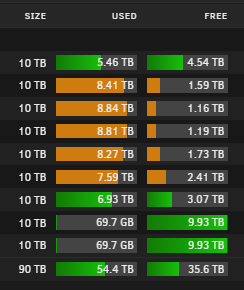
Some more friends arrived
-
I've found someone who says they can help!

-
I would also note even if you had no XCH taken, that PS script likely got access to your private keys which means future earning could be stolen.
-
I think I've cracked it!
-
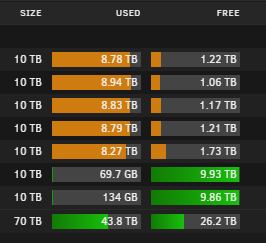
Drives successfully precleared and absorbed into the array, just in time!
-
Also in the new house now, but the network needs some work, so sticking with wifi bridge for now. Unifi NanoHDs are still doing a great job with coverage and reliability. New house is on HFC (fiber), so was able to get on a 1Gbps plan, and while I'm not currently able to utilize it fully over the wifi bridge, I'm still getting +400Mbps.
-
Finally got around to adding my LSI 9211-8i (H310) to the system, as I've been at capacity with onboard sata ports since last year. Luckily no issues with the HBA, I know some had issues when X399 was first released, I assumed later bios releases fixed that issue. Once the HBA was in, I added a couple more 10TB drives for good measure, which are currently preclearing, once done it will take the array (alone) up to 70TB. I hope to push past 100TB in the next few months, although if multi-array is not released soon, I might build a separate storage only machine with my spare unraid license.
-
1.1.6 docker update fixed my wallet sync issues (and I'm no longer in a double NAT situation). Good times!
-
There was a new client released that moves to a dns based introducer, that should fix many sync issues. Official docker build has hit a few roadblocks, so its not released yet, but the new windows client seems to be running really well for sync.
-
The container build is already in progress. on code that was released only a few hours ago, you guys need to chill haha
-
Its a shim network created when you enable Docker > Host access to custom networks This allows containers to communicate with the host, which is normally blocked as a security measure for docker




