





tjb_altf4
Members
-
Joined
-
Last visited
Everything posted by tjb_altf4
-
I've been loving this plugin, but any chance you can add the ability to label the fans, and for this label to be also reflected in the dashboard (instead of FAN 0, FAN 1) so we can more easily identify the fans/fan-groups? i.e. CPU FAN, HDD FAN, FRONT FAN, REAR FAN etc. This would greatly improve managing the configs and monitoring.
-
I see the same issue as @ionred, also specifically only on main.


-
That container is one that was created without a name. This can sometimes occur when docker containers partially fail when being created, or manually created dockers and name was not specified. The other alternative is that your system has been compromised and its a mining application (or something otherwise nefarious). Does CPU usage look excessive ?
-
I think @ich777 has a plugin coming for this looking at the release notes for his Intel GPU TOP plugin
-
Did some more work on the server yesterday, clearly procrastinating instead of doing uni 🤣 I nuked and rebuilt my Guacamole setup, and using dmacias's WOL & VM WOL plugins I've added wake on LAN to their Guacamole profiles. This is a nice time saver and handy for getting access to different machines on my network through a central portal. Also decided to try the Dynamix Auto Fan, and for my setup it works super well, with my fan walls that cool the HDDs now adjusting their speed based on HDD temps. The only config tweak was to exclude nvme drives, and change the thresholds down to 30/40C to increase the baseline airflow through the case. For the most part this now means its using less power and creates less noise, while keeping the HDDs in their happy zone
-
Take a look at Binhex's PrivoxyVPN
-
The "Passed Through" flag in UD should resolve this
-
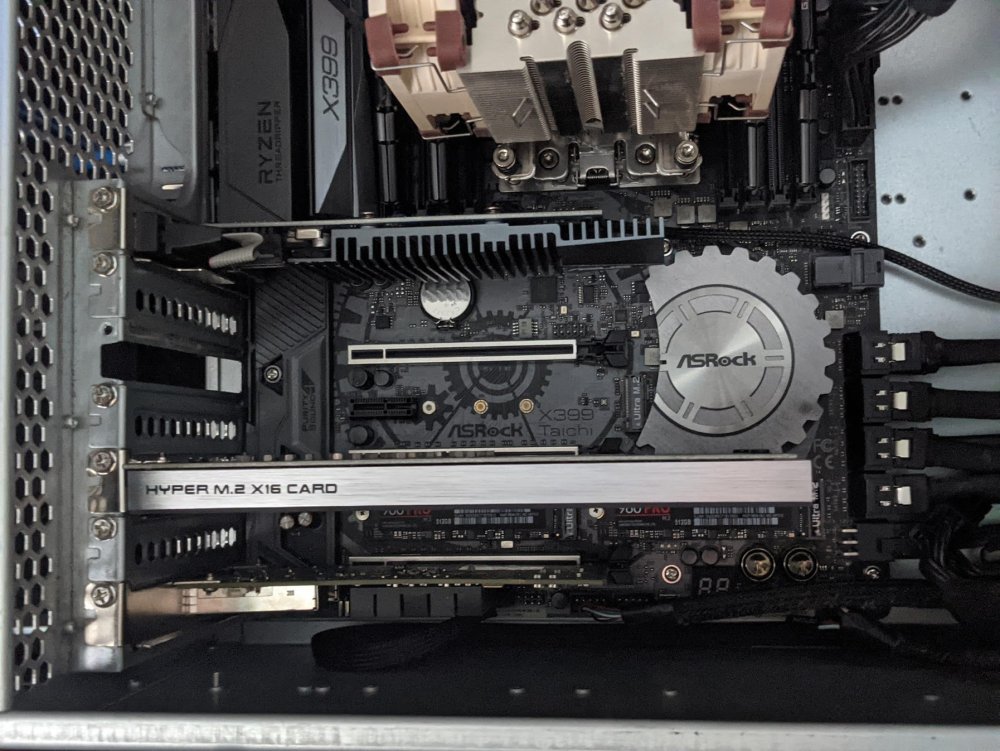
Found some time to work on the server this afternoon and added some more storage. Asus M.2 Hyper 2x 2TB of Samsung 970 Evo Plus Before this upgrade, I had 2x 960 Pros in RAID0, great for performance of VM and dockers that I can replace, not so great for long term data that I want to be fast AND protected. Enter the upgrade, 970s in RAID1 in a new pool for actual data, old pool will be re-commisioned for applications (docker, VMs etc) only. I had planned to replace my remaining 4TB drive with a 10TB, but suffers from the 3.3V affliction, so I'll have to do that another time. Currently in final semester of uni, working full time and getting ready to move houses again., so you could say things are busy... but it was nice to take some time out and work on my Unraid server
-
I'm guessing because CA pulls dockerhub stats (not just unraid) and FoxxMD is using the official image.
-
Off topic slightly, but wow if accurate https://www.tomshardware.com/news/nvidia-gpu-virtualization-unlocked-on-client-gpus
-
They didn't lock it, they just refused to fix a bug (hardware reset) that made pass-through unusable. As soon as the community started to build working fixes, AMD's next generation didn't have these issues, but the fixes weren't backported to previous gen. I should also note these hardware reset problems have never appeared in AMD's professional GPU lineup (Quadro competitors), funny that.
-
The option now needs to be enabled in CA settings to be visible, however using the "Add container" button on the docker screen is actually an easier method (that I later discovered).
-
Switch to Advanced View using the View toggle in the top right
-
Can this be setup as an isolated network without breaking anything? i.e. does this network still need internet access for UnraidOS, docker & plugin (github) updates?
-
Hopefully this opens up the possibility of SR-IOV at a later date
-
You shouldn't need a proxy address if you have the vpn enabled. In my system, proxy setting is set to none The reason it no longer works is due to tightening of networking rules in the docker for better security, I would look at the stickied FAQ post if you want to retain the proxy.
-
Great plugin! this will be very useful
-
Expected as mentioned in the release notes that 6.9.0+ would result in reset SMART configuration settings, This should be a one off reset, and was needed to allow management of SMART configurations for multi-pool and UD disks. https://wiki.unraid.net/Unraid_OS_6.9.0#SMART_handling_and_Storage_Threshold_Warnings
-
The expand icon (highlighted below) seem to no longer do anything, the previous functionality was that it would show an expanded list of mappings (where applicable). I haven't used it for a while, so not sure how new this issue is. Applies to both Port Mapping, and Volume Mapping columns, in both advanced and basic views. Haven't tested in safe mode yet, so it's always possible there is a plugin impacting this functionality.
-
Patch panel itself doesn't do anything, but at the same time it won't hinder a PoE switch or PoE injector's operation either.
-
Have a look at patch panels with keystones, rather than punchdown, this might suit your usage better. For PoE, either your switch will pass through the PoE current, or I suppose you could use PoE injectors with your patch panel.
-
Mine worked without it also, but I believe this setting is needed for routing traffic from other containers though this one.
-
Refer to instructions at A.23 there is a toggle for unraid users. You will also need to add --sysctl="net.ipv4.conf.all.src_valid_mark=1" as per A.23
-
Last week I setup a new Windows Server 2019 (1809) VM and took a while to get SMB up and running, thought this would be applicable for Win10 installs also. Most of these tips are on here so I won't go into great detail about how to do them, but I thought I'd post my summary of "from scratch" changes that got me from fresh install to connected to unraid via SMB. - Needed for guest access GPO: Computer Configuration\Administrative Templates\Network\Lanman Workstation > “Enable insecure guest logons" = Enabled - Needed for secure/private access... guest access to same server will block secure/private server access As my username was different to SMB configured usernames, I added the record into Credential Manager (Windows) - Needed to 'find' server Networking: Ensure Network profile is Private Turn on network discovery, if setting won't save ensure these services are running (in services.msc) · DNS Client · Function Discovery Resource Publication · SSDP Discovery · UPnP Device Host Not sure if it matters, but my VM was also configured on br0 rather than virtbr0
-
Try and upgrade the plugin prior to updating Unraid, worst case scenario is it will fail to install after reboot in new Unraid version and you will need to reinstall the plugin. I upgraded prior to the plugin update being ready, so I had to do the latter.




