





Everything posted by tjb_altf4
-
Backed my config up from interface in SickRage, restored the same profile in SickChill and restarted the service. Docker itself was the same settings, with just a tweak to the port number until I kill off SR completely. Seems to have been a painless exercise, everything working as it should.
-
I’m not intimate with the XML schema, but does the config on line 99 need updating also?
-
Can any Asrock X399 users confirm the latest BIOS update (3.30) has the AGESA 1.1.0.1A update? AGESA 1.1.0.1 seems to leave a few things broken from what I've seen and the 'A' update addresses these issues.
-
Really liking Airsonic, seems very solid. I've changed over the back end from the internal hsqldb to MariaDB. Probably not needed in terms of performance, but a nice to have for backing up library and user profiles etc as part of a centralised db.
-
The template still needs an update, I installed Airsonic for the first time and ran into the 'too small initial heap' error. Updating the JAVA_OPTS values with m after numbers as noted earlier resolved the issue.
-
It's because by default the 1950x will be running in UMA mode which will tricks the OS into thinking it's a single node. Change to NUMA in BIOS and you 'should' get a different result. Great vid recently from L1tech that goes into detail on the topic.
-
Probably not at this stage as I'm not aware of any fixes or feature updates for gen1 TR in this bios, seems to exist purely for gen2 TR compatibility. If it ain't broke don't fix it
-
No, that picture was a single GPU setup when I first setup the server after upgrading, the bottom card was an m.2 card which was my cache drive in my previous setup (now using the 960 pros) unRAID uses what is set to be primary GPU in bios, if you pass that GPU it loses the card and I'm not aware of a way to reinitialize it (that would be handy!). However if your not using the GUI boot mode, it's probably not a major issue. note: some bios have the ability to allocate a different primary gpu, but it's not common and I've not seen it on the ASRock bios. You don't need to extract the rom, there are ways around that and they have worked for me (spaceinvader has a good youtube video on the topic). Even if you do extract, it only needs to be done once then you can remove the other card.
-
I have run various configs which all worked including single card which was then passed to VM. Current config is gpu for unraid and gpu for VM due to being a little simpler to implement and also having the spare slot + gpu at the moment. Just stick to vendor recommended RAM and you'll be fine. However higher speed RAM has noticeable performance improvement on ryzen/tr and b-die is known to be more stable at these higher speeds (for which they are rated). No, wasn't needed for my purposes, but may be needed if you want to pass some of the onboard devices
-
So I was seeing some stabllity issues with a VM I imported from Server 2016 VMware that looked like c-state issue, so I've now enabled zenstates and the problem seems to have gone. That said my other Server 2016 I created never had issues so I think it can be dialled out in power settings in Windows, and none of my other Win10 or linux vms I created have had issues. Anyway, I had a request for my IOMMU groupings, so I've dumped here. Note that ACS override is enabled in the BIOS. IOMMU group 0: [1022:1452] 00:01.0 Host bridge: Advanced Micro Devices, Inc. [AMD] Family 17h (Models 00h-0fh) PCIe Dummy Host Bridge IOMMU group 1: [1022:1453] 00:01.1 PCI bridge: Advanced Micro Devices, Inc. [AMD] Family 17h (Models 00h-0fh) PCIe GPP Bridge IOMMU group 2: [1022:1453] 00:01.2 PCI bridge: Advanced Micro Devices, Inc. [AMD] Family 17h (Models 00h-0fh) PCIe GPP Bridge IOMMU group 3: [1022:1452] 00:02.0 Host bridge: Advanced Micro Devices, Inc. [AMD] Family 17h (Models 00h-0fh) PCIe Dummy Host Bridge IOMMU group 4: [1022:1452] 00:03.0 Host bridge: Advanced Micro Devices, Inc. [AMD] Family 17h (Models 00h-0fh) PCIe Dummy Host Bridge IOMMU group 5: [1022:1452] 00:04.0 Host bridge: Advanced Micro Devices, Inc. [AMD] Family 17h (Models 00h-0fh) PCIe Dummy Host Bridge IOMMU group 6: [1022:1452] 00:07.0 Host bridge: Advanced Micro Devices, Inc. [AMD] Family 17h (Models 00h-0fh) PCIe Dummy Host Bridge IOMMU group 7: [1022:1454] 00:07.1 PCI bridge: Advanced Micro Devices, Inc. [AMD] Family 17h (Models 00h-0fh) Internal PCIe GPP Bridge 0 to Bus B IOMMU group 8: [1022:1452] 00:08.0 Host bridge: Advanced Micro Devices, Inc. [AMD] Family 17h (Models 00h-0fh) PCIe Dummy Host Bridge IOMMU group 9: [1022:1454] 00:08.1 PCI bridge: Advanced Micro Devices, Inc. [AMD] Family 17h (Models 00h-0fh) Internal PCIe GPP Bridge 0 to Bus B IOMMU group 10: [1022:790b] 00:14.0 SMBus: Advanced Micro Devices, Inc. [AMD] FCH SMBus Controller (rev 59) [1022:790e] 00:14.3 ISA bridge: Advanced Micro Devices, Inc. [AMD] FCH LPC Bridge (rev 51) IOMMU group 11: [1022:1460] 00:18.0 Host bridge: Advanced Micro Devices, Inc. [AMD] Family 17h (Models 00h-0fh) Data Fabric: Device 18h; Function 0 [1022:1461] 00:18.1 Host bridge: Advanced Micro Devices, Inc. [AMD] Family 17h (Models 00h-0fh) Data Fabric: Device 18h; Function 1 [1022:1462] 00:18.2 Host bridge: Advanced Micro Devices, Inc. [AMD] Family 17h (Models 00h-0fh) Data Fabric: Device 18h; Function 2 [1022:1463] 00:18.3 Host bridge: Advanced Micro Devices, Inc. [AMD] Family 17h (Models 00h-0fh) Data Fabric: Device 18h; Function 3 [1022:1464] 00:18.4 Host bridge: Advanced Micro Devices, Inc. [AMD] Family 17h (Models 00h-0fh) Data Fabric: Device 18h; Function 4 [1022:1465] 00:18.5 Host bridge: Advanced Micro Devices, Inc. [AMD] Family 17h (Models 00h-0fh) Data Fabric: Device 18h; Function 5 [1022:1466] 00:18.6 Host bridge: Advanced Micro Devices, Inc. [AMD] Family 17h (Models 00h-0fh) Data Fabric: Device 18h; Function 6 [1022:1467] 00:18.7 Host bridge: Advanced Micro Devices, Inc. [AMD] Family 17h (Models 00h-0fh) Data Fabric: Device 18h; Function 7 IOMMU group 12: [1022:1460] 00:19.0 Host bridge: Advanced Micro Devices, Inc. [AMD] Family 17h (Models 00h-0fh) Data Fabric: Device 18h; Function 0 [1022:1461] 00:19.1 Host bridge: Advanced Micro Devices, Inc. [AMD] Family 17h (Models 00h-0fh) Data Fabric: Device 18h; Function 1 [1022:1462] 00:19.2 Host bridge: Advanced Micro Devices, Inc. [AMD] Family 17h (Models 00h-0fh) Data Fabric: Device 18h; Function 2 [1022:1463] 00:19.3 Host bridge: Advanced Micro Devices, Inc. [AMD] Family 17h (Models 00h-0fh) Data Fabric: Device 18h; Function 3 [1022:1464] 00:19.4 Host bridge: Advanced Micro Devices, Inc. [AMD] Family 17h (Models 00h-0fh) Data Fabric: Device 18h; Function 4 [1022:1465] 00:19.5 Host bridge: Advanced Micro Devices, Inc. [AMD] Family 17h (Models 00h-0fh) Data Fabric: Device 18h; Function 5 [1022:1466] 00:19.6 Host bridge: Advanced Micro Devices, Inc. [AMD] Family 17h (Models 00h-0fh) Data Fabric: Device 18h; Function 6 [1022:1467] 00:19.7 Host bridge: Advanced Micro Devices, Inc. [AMD] Family 17h (Models 00h-0fh) Data Fabric: Device 18h; Function 7 IOMMU group 13: [1022:43ba] 01:00.0 USB controller: Advanced Micro Devices, Inc. [AMD] X399 Series Chipset USB 3.1 xHCI Controller (rev 02) [1022:43b6] 01:00.1 SATA controller: Advanced Micro Devices, Inc. [AMD] X399 Series Chipset SATA Controller (rev 02) [1022:43b1] 01:00.2 PCI bridge: Advanced Micro Devices, Inc. [AMD] X399 Series Chipset PCIe Bridge (rev 02) [1022:43b4] 02:00.0 PCI bridge: Advanced Micro Devices, Inc. [AMD] 300 Series Chipset PCIe Port (rev 02) [1022:43b4] 02:04.0 PCI bridge: Advanced Micro Devices, Inc. [AMD] 300 Series Chipset PCIe Port (rev 02) [1022:43b4] 02:05.0 PCI bridge: Advanced Micro Devices, Inc. [AMD] 300 Series Chipset PCIe Port (rev 02) [1022:43b4] 02:06.0 PCI bridge: Advanced Micro Devices, Inc. [AMD] 300 Series Chipset PCIe Port (rev 02) [1022:43b4] 02:07.0 PCI bridge: Advanced Micro Devices, Inc. [AMD] 300 Series Chipset PCIe Port (rev 02) [8086:1539] 04:00.0 Ethernet controller: Intel Corporation I211 Gigabit Network Connection (rev 03) [8086:24fb] 05:00.0 Network controller: Intel Corporation Dual Band Wireless-AC 3168NGW [Stone Peak] (rev 10) [8086:1539] 06:00.0 Ethernet controller: Intel Corporation I211 Gigabit Network Connection (rev 03) IOMMU group 14: [144d:a804] 08:00.0 Non-Volatile memory controller: Samsung Electronics Co Ltd NVMe SSD Controller SM961/PM961 IOMMU group 15: [1022:145a] 09:00.0 Non-Essential Instrumentation [1300]: Advanced Micro Devices, Inc. [AMD] Device 145a [1022:1456] 09:00.2 Encryption controller: Advanced Micro Devices, Inc. [AMD] Family 17h (Models 00h-0fh) Platform Security Processor [1022:145c] 09:00.3 USB controller: Advanced Micro Devices, Inc. [AMD] Family 17h (Models 00h-0fh) USB 3.0 Host Controller IOMMU group 16: [1022:1455] 0a:00.0 Non-Essential Instrumentation [1300]: Advanced Micro Devices, Inc. [AMD] Device 1455 [1022:7901] 0a:00.2 SATA controller: Advanced Micro Devices, Inc. [AMD] FCH SATA Controller [AHCI mode] (rev 51) [1022:1457] 0a:00.3 Audio device: Advanced Micro Devices, Inc. [AMD] Family 17h (Models 00h-0fh) HD Audio Controller IOMMU group 17: [1022:1452] 40:01.0 Host bridge: Advanced Micro Devices, Inc. [AMD] Family 17h (Models 00h-0fh) PCIe Dummy Host Bridge IOMMU group 18: [1022:1453] 40:01.2 PCI bridge: Advanced Micro Devices, Inc. [AMD] Family 17h (Models 00h-0fh) PCIe GPP Bridge IOMMU group 19: [1022:1453] 40:01.3 PCI bridge: Advanced Micro Devices, Inc. [AMD] Family 17h (Models 00h-0fh) PCIe GPP Bridge IOMMU group 20: [1022:1452] 40:02.0 Host bridge: Advanced Micro Devices, Inc. [AMD] Family 17h (Models 00h-0fh) PCIe Dummy Host Bridge IOMMU group 21: [1022:1452] 40:03.0 Host bridge: Advanced Micro Devices, Inc. [AMD] Family 17h (Models 00h-0fh) PCIe Dummy Host Bridge IOMMU group 22: [1022:1453] 40:03.1 PCI bridge: Advanced Micro Devices, Inc. [AMD] Family 17h (Models 00h-0fh) PCIe GPP Bridge IOMMU group 23: [1022:1452] 40:04.0 Host bridge: Advanced Micro Devices, Inc. [AMD] Family 17h (Models 00h-0fh) PCIe Dummy Host Bridge IOMMU group 24: [1022:1452] 40:07.0 Host bridge: Advanced Micro Devices, Inc. [AMD] Family 17h (Models 00h-0fh) PCIe Dummy Host Bridge IOMMU group 25: [1022:1454] 40:07.1 PCI bridge: Advanced Micro Devices, Inc. [AMD] Family 17h (Models 00h-0fh) Internal PCIe GPP Bridge 0 to Bus B IOMMU group 26: [1022:1452] 40:08.0 Host bridge: Advanced Micro Devices, Inc. [AMD] Family 17h (Models 00h-0fh) PCIe Dummy Host Bridge IOMMU group 27: [1022:1454] 40:08.1 PCI bridge: Advanced Micro Devices, Inc. [AMD] Family 17h (Models 00h-0fh) Internal PCIe GPP Bridge 0 to Bus B IOMMU group 28: [144d:a804] 41:00.0 Non-Volatile memory controller: Samsung Electronics Co Ltd NVMe SSD Controller SM961/PM961 IOMMU group 29: [10de:1c03] 42:00.0 VGA compatible controller: NVIDIA Corporation GP106 [GeForce GTX 1060 6GB] (rev a1) [10de:10f1] 42:00.1 Audio device: NVIDIA Corporation GP106 High Definition Audio Controller (rev a1) IOMMU group 30: [1002:68f9] 43:00.0 VGA compatible controller: Advanced Micro Devices, Inc. [AMD/ATI] Cedar [Radeon HD 5000/6000/7350/8350 Series] [1002:aa68] 43:00.1 Audio device: Advanced Micro Devices, Inc. [AMD/ATI] Cedar HDMI Audio [Radeon HD 5400/6300/7300 Series] IOMMU group 31: [1022:145a] 44:00.0 Non-Essential Instrumentation [1300]: Advanced Micro Devices, Inc. [AMD] Device 145a [1022:1456] 44:00.2 Encryption controller: Advanced Micro Devices, Inc. [AMD] Family 17h (Models 00h-0fh) Platform Security Processor [1022:145c] 44:00.3 USB controller: Advanced Micro Devices, Inc. [AMD] Family 17h (Models 00h-0fh) USB 3.0 Host Controller IOMMU group 32: [1022:1455] 45:00.0 Non-Essential Instrumentation [1300]: Advanced Micro Devices, Inc. [AMD] Device 1455 [1022:7901] 45:00.2 SATA controller: Advanced Micro Devices, Inc. [AMD] FCH SATA Controller [AHCI mode] (rev 51)
-
Thanks for the docker! I got stuck on RDP configuration for a while, but in my case I just needed to disable certificates and I was good to go
-
The link in unRAID Docker template Edit mode Help for "Privileged" option has a broken link due to changes in documentation pages on docker.com
-
I have it happen more often than I'd like. I tend to be able to reduce it by doing a few tasks ahead of time: running mover (and finishing) shutdown all dockers shutdown all vms then I usually run fuser -km /mnt/user as the hail mary if it still happens.
-
Any chance for an option to disable test logs in system log and rely on results history tab instead? Speedtest tends to flood my system log (due to regular testing).
-
Not currently no, but it's something on the cards.
-
Yes, you can change colour, or do patterns such as pulsing, breathing etc, I played around with it for a while. I chose to leave it on white to help with visibility when troubleshooting in the case, 99% sure you can turn it off completely if desired.
-
Reserved
-
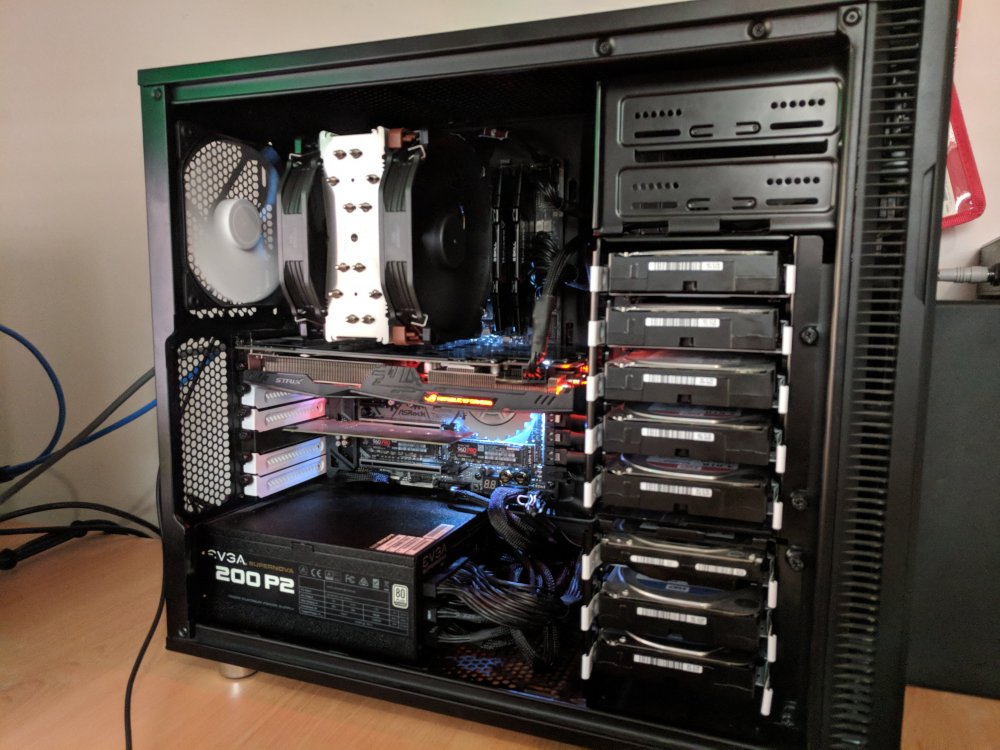
fortytwo: the answer to the meaning of life, the universe, and everything. OS: unRAID 6.5.3 Plus CPU: AMD Threadripper 1950x Motherboard: ASRock X399 Taichi RAM: 64GB @ 3200MHz G.Skill DDR4 Ram - F4-3200C14Q-64GVK Case: Fractal Define R5 (non-window) Power Supply: EVGA SuperNova 1200W P2 GPU: AMD HD5450 (OS) link, Nvidia GTX1060 CPU Cooling: Noctua U14S TR4-SP3 (changed to chromax black and additional U14 fan) Fans: Fractal Define 2x 140mm in front, 1x 140mm rear, 1x140mm side Parity Drive: 4TB WD Black Data Drives: 5x WD Red 4TB link (Array) WD Blue 2TB link, WD Blue 4TB (Unassigned disks) Cache Drive: 2x Samsung 960PRO 512GB SSD Cache Pool (RAID 0) Total Drive Capacity: 27TB Total Capacity - 20TB Array Storage This is a major upgrade from my first revision unRAID build which was an x58 running a x5670 6 core (+HT) which has been running for a year. That system consolidated hardware from 2-3 cheapo pcs and gave me my first taste of what I could do with unRAID and my data. It was a great system and has actually been retired to HTPC duties (will do a build thread on that once I move back to unRAID from it's current baremetal LibreELEC). The purpose of moving to TR was to further consolidate hardware, create a suitable homelab/testing environment for work & uni as well get up and running with VMs dedicate to a task rather that the current all in one gaming/development/study box... bit of a jack of all trades, so it was specced as such and hasn't let me down. unRAID 6.4.0 was a big turning point for Zen based processors, as it was the first stable version to include a kernel version with the necessary fixes in place. Seeing the pieces fall together, I pulled the trigger on this build and spent a fortnight running stability testing etc. After hearing previous stories of the difficulties faced by TR users, the only system changes I made was: Update to latest BIOS (2.00) Enabled virtualisation settings in BIOS Boot order/devices Fan profiles (nice and quiet.. system runs cool) Enabled XMP 3200MHz profile ACS Override Note: I do not have zenstates enabled in unRAID and have had no stability issues 3 months and counting, but your mileage may vary. I'm yet to fully migrate my desktop and components of the the unRAID build, mostly as I have been busy with work and part-time studies kicking back in... so updates still to come. Eventually I'd like to move to a larger case with support for drive caddies, possibly also (avert your eyes children!) water cooling. At this stage CaseLabs is the lead contender (price is ouch in Australia), I'm also considering a custom solution.
-
Sounds like a configuration problem. CP isn't perfect, but I've never seen the behaviour you describe.
-
Still broken, ejurgensen has closed issue in github due to no feedback.
-
I think that it would be very handy if the templates could handle predefined value options somehow in a drop down format. A simple application of this would be in the handbrake docker where you can set it up with a predefined quality profile names that from the application. You could possibly still allow manual entry: "vDisk Location:" in VM templates is a good example of how I'm picturing the functionality would work.
-
Unfortunately not. I bought a second key for this purpose and to be honest quite happy to do so to help support the LT team and the product's ongoing development.
-
Ok have it working now, had to do the following (with extra info for anyone else that comes across the same issue): Change unRAID to SSL = No (from Auto) (Settings > Identification > Management Access > Use SSL/TLS) Restart the ControlR service (set to No, then Yes again). (Settings > ControlR > Enable ControlR Server) I did a few uninstall/re-installs of the plugin and removing/adding server from ControlR along the way, but I think the above was all that was needed. Cheers!
-
No SSL in use, I haven't set it up on the server yet, it's set to unRAID default value of 'auto'. In any case I tried connecting as SSL and that fails. To be clear, logs aren't available on either device running ControlR, and the plugin webgui is not accessible. I can access everything else in ControlR as normal. Is it possible that ControlR has detected an unRAID provisioned SSL certificate and even though it is not in use, ControlR has determined that a SSL connection method should be used?
-
Have been using the android version for a while and decide to splash out on an iOS iPad version too. extra screen real estate is great However I did notice the logs are no longer accessible and I can’t get to the webgui for controlr, everything else works as expected. I don’t think I’ve checked for logs since before 6.3.5, I’m currently on 6.5.0 I have tried uninstalling and reinstalling the plugin, enabling/disabling the service.



