






TechMed
Members
-
Joined
-
Last visited
Everything posted by TechMed
-
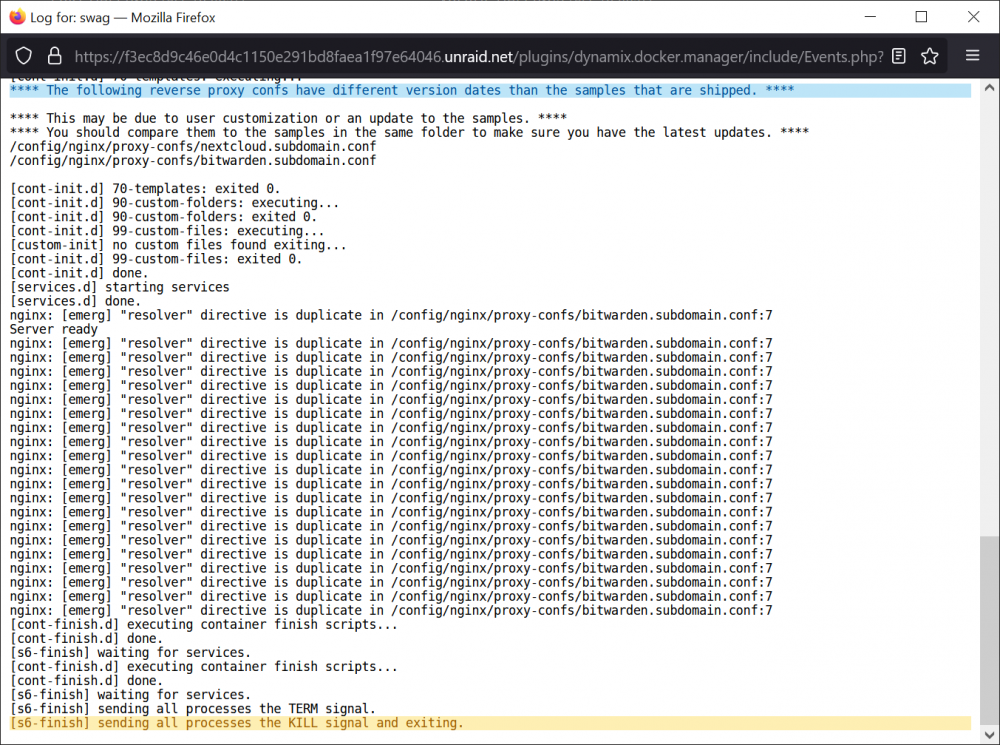
Hi All, Finally getting around to switching over from Let'sEncrypt to Swag. Curious if anyone has any ideas how to stop this from happening? If I let this go, it will just keep adding the same line (to infinity and beyond!) Followed Ed's guide to the letter. Thank in advance!

-
Hi @dgs2001, Your last post indicates I have read this thread from start to finish; but I am still a bit confused and am wondering if you would clarify? I currently have PIA (via script) running tunneled directly to PIA; other than complaints about stability, it works well. That said, I want to switch over to NordVPN. So, if install the Nord Docker am I going to be able to tunnel the entire server via WireGuard? How's about we leave it here for the moment and I'll ask additional questions as they arise. What I hope to accomplish is something similar to the post for setting up and using the PIA script for WireGuard. The entire purpose being so that others can read it (ala Ed, aka SpaceInvaderOne -best videos ever!) and use Nord, with WireGuard, and be tunneled. Thanks in advance!
-
@ptchernegovski, I greatly appreciate the info! I am going to work with it today. Thanks again!!!
-
Hello @ptchernegovski, Trying to get Readarr setup and I am almost there except for the "Root Folder" when adding a new (my first) author. Any chance you would be willing to share your config for this? I think I have SABnzbd setup correctly; I can probably puzzle that out on my own if I run into a problem there. I just do not understand what Readarr is looking for with the whole Root Folder thing. Any help would be greatly appreciated!!!
-
Hi @binhex, Cleared all of the cookies as suggested, but still kept getting the error. So I uninstalled and removed everything, even in appdata, and reinstalled. Works like a champ again! As always your work and assistance are greatly appreciated!!!! (Beers 🍻 to come at Christmas ) As a quick aside, who would be the best to hit up regarding server networking? ALL I want to do is get the default (eth0) onto a new 10Gbe card I have installed, and keep the onboards as extras (?failovers?). Thanks! J
-
Hi @ljm42, I am flattered you would suggest I help with my own thread about the PIA tunneled access! 🤓 If I had the time I would (assuming I had anything to offer), but I am afraid I would upset more folks than help. My reply could be weeks out and I am still what I consider to be a noob. I will however, do what I can when I have to come here and hang out! (Note: I just have not gotten around to changing LE over to Swag yet) Having said that, I have a question for you. I have been trying to get LetsEncrypt to work under this Wireguard application. I can ping from the cli of the server AND LetsEncrypt. However, I cannot get Nextcloud to work. If I disable the VPN, everything works perfect. As soon as I spin-up the VPN, everything on the 'user-created' Network fails. So, do you know if Wireguard and LetsEncrypt can work together? Thanks again for the assist with PIA tunnel 👍
-
Hi @Apil, The ONLY way I could get PIA to work is to use their custom install script (located here). If you read back through my posts here you will see I tried a number of other things, which did not work. The script is VERY easy to use. Watch the video and readme.md All that said, I have what (I think) you are to accomplish working well. I did have to use the PIA script though. I have a static VPN from my one server to theirs and am still able to access everything locally, just as if I did not have the tunnel running. One thing I did notice in your post is that you have a "PEER" and do not need (and should not have) setup. The PIA script makes the connection in the background and ALL you need to do is create the "TUNNEL" i.e. "wg0"... and turn it on (NOTE: you may need to turn it off and on twice to get the GUI to refresh with PIA assignment). Additionally, create the "TUNNEL", under SETTINGS > VPN MANGER first before running the PIA script. Lastly, if you restart/shutdown (or stop the array), you MUST rerun the PIA script again. All I have to share. Once I/we (the Community) figured it out, it just works! I work a LOT right now and have limited time to get here and have some fun, so if you post a question back, it could be some time until I can reply... sorry. I have faith you can make this work fellow 'Raider'!
-
Hi All, (@ljm42) Just confirming that PIA will work with unRAID. I have had it up and running for over a week now; not one issue. As directed, I have been verifying via the jlesage/Firefox Docker. While not for the faint of heart (nor as easy as Jorgen, ICDeadPpl, and ljm42 have made it by simply installing a provider config) this link to a PIA support page will get you set up. Follow the instructions though!!! Actually read the readme.md file as there's important info in there. Lastly, make sure you are using the "manual-connections-2.0.0" setup zip/tar. As always, thanks to the GREAT community here for making all of this possible!
-
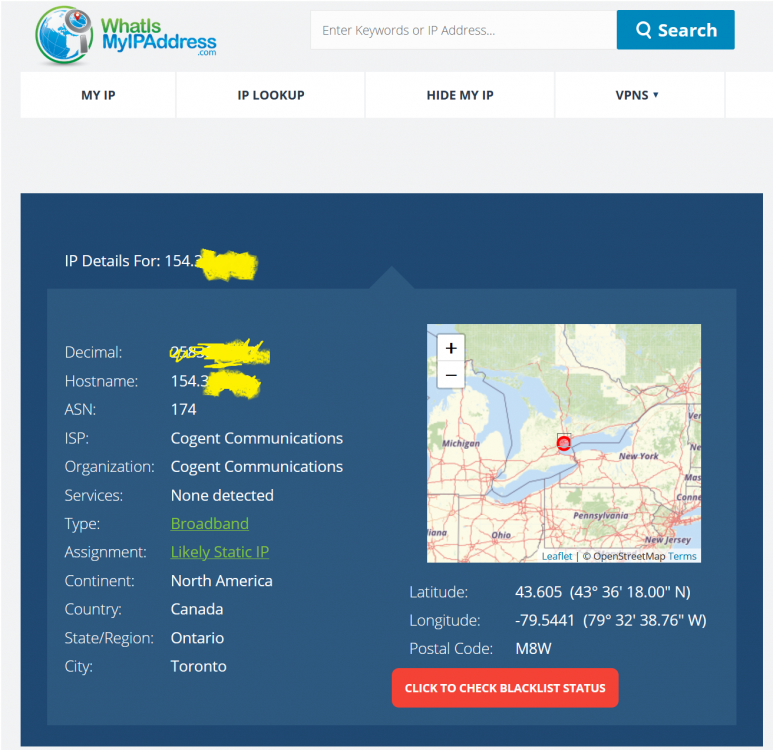
@Jorgen @ICDeadPpl @ljm42 Sometimes I swear I am getting senile!!!! The PIA script DOES WORK!!!! IF YOU USE THE CORRECT D@*#ED PASSWORD!!! ARRRGGGGGG! Thank you everyone for your time and patience. We have a great team here and hopefully this fiasco will help someone else! Be safe everyone!
-
😉 No worries! So did that (the Win10 script) install it on the unRAID server?? I am also going to try Jorgen's suggestion as I do have everything (the xxxrr's) running through Binhex's container(s) for years now without a hitch!
-
HI @Jorgen No I did not. I will dig into that now. I am determined to get this working! On the surface, based on the configuration code I've seen so far, this should be rather easy. I guess that's why I'm getting frustrated with PIA. It is a shame too as I like the service...
-
Sorry, I am not well versed in Linux. Where do these files go; (path(es)). /xxxx and on the flash, cache or both? I can do this, just need the pointers. Thanks again!
-
Hi @ICDeadPpl and @Jorgen, We have been very busy with some of C-19 variant cases. Fortunately, they are responding, albeit slowly, to the standard treatments; 99% were not vaccinated. Just saying... Anyway... This is the first chance I have had to relax and try this. ICDeadPpl... I read the README.md and it appears I do not have the required dependencies. When I tried the first line of the instructions, I got 'apt:' command not found. It does not seem to be in NerdPack either. So, if either of you would be willing to help me get these dependencies installed on unRAID, I am pretty sure I can do the rest on my own. BTW, thanks for the simplified fork, and perhaps this is why I couldn't get the 'official PIA' script to complete.? Thanks in advance!
-
HI @Jorgen and @ICDeadPpl, I tried the script linked below, but it would get most all the way to the end and error out. It would be great if I could get it to work! Just got home and I have another 12 to do so I have to put this off until tomorrow or Saturday. I am more than happy to try again. I will post a screen shot of the error. Maybe someone can help me figure out what I am doing wrong? 😉 Stay safe and thanks for the feedback!!! I truly do appreciate it! Talk soon!
-
Hi @ljm42 & @bonienl, I received an "escalated" reply from PIA and... "I understand that you needed a Wireguard configuration file. Please let know that PIA only has a configuration file available for OpenVPN. Wireguard can only be used using the PIA client app." So I guess I'll be switching over to Mullvad. And @Jorgen... thanks for the suggestion I do use, almost exclusively, Binhex's containers. I just want that particular server to be completely in the blind; just makes it easier for me. But, thanks again for the suggestion! Take care everyone. And please, follow the mask and handwashing protocols for just a while longer. Our case numbers are slowly declining almost every day at the hospital where I work. Hang in there... PLEASE and thank you!
-
Thank you @ljm42 for getting back to me. While PIA does provide a 'script', it fails at the end when attempting to get the certificate from them. I tried working with their support, but we've just been running in circles. So, I am looking for a new, functional provider. (I've been reviewing the first posts suggestions) May I ask you for a recommendation please. I would rather go with something that is recommended by someone here, than guessing for myself. Evidenced based information is far better than simply going on faith or guessing. I have been reading over Mullvad and TorGuard, contacted their support, but before I pull the trigger, I'd really like some knowledgeable feedback from our team here. Thanks again for the assist; it always appreciated !!!
-
Thank you @ljm42, I did read extensively here to try to find a good solution. Might I ask which provider you use? Maybe @bonienl as well? PIA does not work, so I am looking for a new provider that truly works. Thanks!!!
-
Has anyone gotten VPN Tunneled Access working? If so, with what provider? Thank you.
-
Hi - can anyone (maybe @bonienl/ @ljm42 ?) help or tell me if there is a PIA config file? At this point ALL I want is ALL the traffic to go through PIA. a.k.a. "VPN Tunneled Access" I had it working fine with the "Remote Access to LAN" and now I want to change it. Any and all help will be greatly appreciated! Thanks! PS. If there is a better option for a VPN provider, I'm all ears for that too!
-
Greetings - read every post here and found nothing regarding PIA. Since I have a good bit of time left with them I would really like to get it setup with them. However, I am open to other providers if there is more secure option! Finally, @ljm42 posted: This may answer my second question. I am fine with all my traffic from this particular Unraid server (server01) going through PIA VPN. I would like to be able to remote IN to my LAN though. Do I just install WireGuard on another server (server02) for that Peer Connection? As always, all feedback/directions are greatly appreciated!
-
Hi @binhex, ( Wireguard and PIA) I just installed WireGuard and it is working nicely. I did this because I really want the access to my network to be secure, but also so that my SabNzbd traffic would flow through it. That does not appear to be the case. I am using your version of SabNzbd and it has worked flawlessly for years; thanks for that! So, if I install your "binhex - SABnzbdVPN", setup my PIA account info within the container, does that mean my NZBD traffic will go through both Wireguard and PIA? Or does Wireguard simply become my replacement for OpenVPN?
-
Thanks for the quick reply! They are and I did change it, but I will try again quick... (15 minute time lapse) I'll be dipped in dog excrement!!! I KNOW I changed it like a week or so ago and it didn't work. Well all I can say is, this is why we do consults!!! Thank you sir, I greatly appreciate your making me look twice. Happy (insert upcoming holiday(s)) 😊
-
Two weeks behind ☹ Hi All, I have read back about six pages, tried all of the suggestions, but since my last container upgrade (see post name), I have not been able to connect with PIA. I have tried the browser interface too, but still no joy. PIA app connects just fine from the desktop thought. Tried both Toronto and Montreal. Attaching what appears to be the most relevant container info as requested in other posts. All help greatly appreciated!!! D-OPVN_Logs.txt
-
no worries... glad you found it!
-
Go back about two pages...



