





AnnabellaRenee87
Members
-
Joined
-
Last visited
Everything posted by AnnabellaRenee87
-
Any idea why I would be getting the 500 server error with these? supervisord.log
-
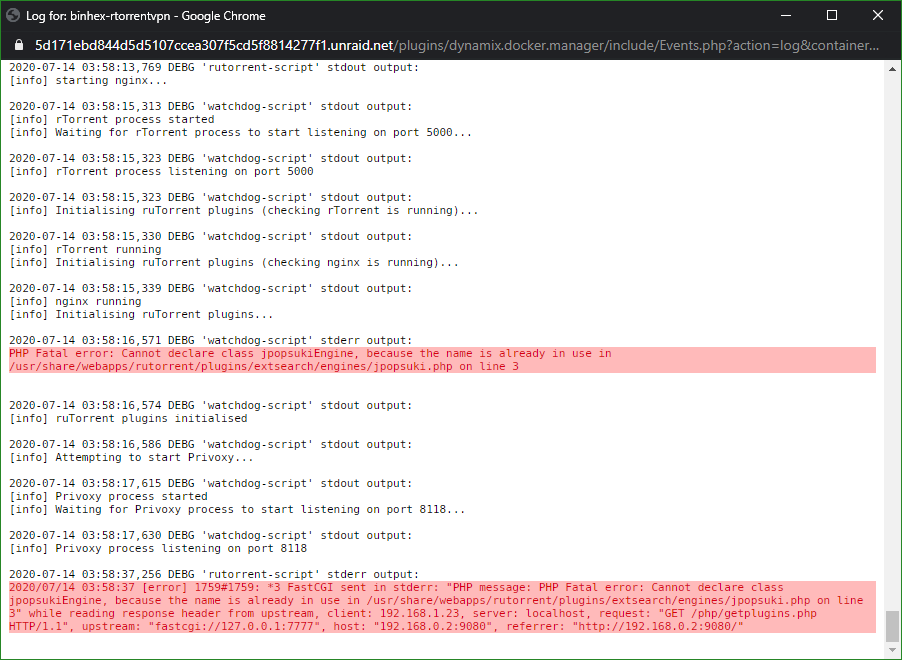
For some reason I'm not able to get in to the WebUI. I'm getting this in the logs.
-
Home Assistant renamed the tab (hass.io) to "Supervisor". As for a reverse proxy, I had to edit it to point to the IP vs. the Container name to get it to work. Any add-ons you install with Home Assistant you will have to proxy them too as they have different port mappings.
-
Is there a way to have the hassio_supervisor just start up normally without having to edit the template each time?
-
Anyone know why this Docker may be taking so much CPU recently?
-
Toranto Canada. It can max my internet speeds out. I'm on PIA.
-
Just a heads up for those that rolled back, make sure you do a "force update", it didn't just work for me after reverting back to the latest option in the repository.
-
Okay, not just me, thanks for the update. Others wanting to know how to downgrade until it's fixed, in the template change the Repository to this "binhex/arch-sabnzbdvpn:2.3.9-1-05"
-
UnRaid 6.7 RC 8 Plugin that I think will stand out for this is Preclear, it looks like it installs the same version of utempter but it still says it's got an update. It's more of an OCD thing really, something on the server I can't update. (I'm the type that, as a nervous tick I'll check for and install all the updates I can find, in everything, yeah, I get crap at work for it lol). Sent from my SM-G975U using Tapatalk
-
So utempter keeps saying that there's an update available but when I run the update but says it's already up to date. I tried removing it and reinstalling but it always says it has an update available, am I doing something wrong?
-
Strange issue started today. I can't log in to Nextcloud using Chrome or Firefox but if I try it in Edge then it will work fine? I have tried incognito and private tabs, cleared cookies and cache, even tried other systems, idk..... EDIT, Nevermind, it was a caching issue with Cloudflair, dumped the cache and now things are working.
-
I've been comparing the files between versions and I just lack the skills to know what I'm fully doing. I think nginx is the same version or at the very least very similar. (on the rutorrent container). If I disable the proxying through cloudflare it works..... If I role back to 1.1.r38.gd52abd2-1-05 it works with the proxying turned back on (after the DNS has had time to refresh) For now since I don't see any functionality differences I'll just role back.............
-
That fixed it but I don't feel great leaving it like that, Guess there is an issue with the current version of ruTorrent/rTorrent that doesn't like being proxyed through a DNS resolver like Cloudflair.
-
Okay then, thanks for your time Sent from my SM-G975U using Tapatalk
-
Is there any other logs I can give you to help with this? The main server longs maybe?
-
I do SubDomains too, my URL is rutorrent.blah.me (blah replacing my actual domain)
-
So I use the letsencrypt plugin from Linux Server. For some reason if I access my HTTPS ruTorrent page now it just sits at the Loading Screen with a spinner for like 5 minutes then finally loads. If I go to the local address:port then it loads fine. This just started within the last 24 hours, I haven't changed anything. I tried to remove the docker and re-add it, change settings on Lets Encrypt and even changed the TLS version with Cloud Flair, I'm stumped. EDIT; Seen this in the log for the Docker. 2019/04/17 19:08:51 [error] 893#893: *54 open() "/usr/share/webapps/rutorrent/favicon.ico" failed (2: No such file or directory), client: 172.17.0.1, server: localhost, request: "GET /favicon.ico HTTP/1.1", host: "blah blah, my url:443", referrer: "blah blah, my url/plugins/httprpc/action.php" EDIT2; Copied the file from the images folder in to that directory and that error went away but the site is still sitting at loading forever. EDIT3........; The error is there again.......
-
So when I hot plug/added new SAS drives to my server they would show up fine in Unassigned Devices, the power went out and the UPS didn't have enough power to keep the server up (I'm working in getting a better UPS). After booting back up the SAS drives are not showing up in UD. I pulled some of them and put them back in as their not assigned anywhere and found that only one of them are showing up now. Am I doing anything wrong? server-diagnostics-20190121-1838.zip
-
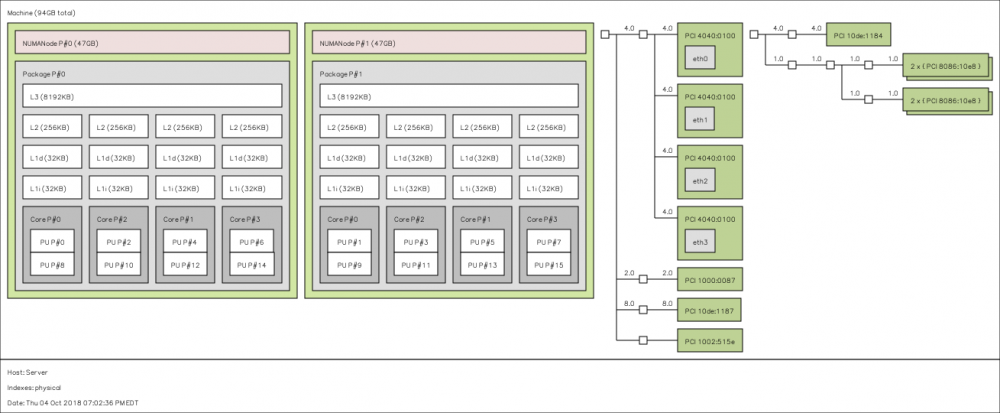
So I did this on my ProLiant DL370 G6 and got this back, whats up with these thread numberings?
-
May want to make sure the MSI interrupts are turned on too. Sent from my SM-G955U using Tapatalk
-
Thanks for the info, does this have to be done each boot? Also anyone that finds this latter, spparm can be installed from the Nerd Pack Plugin. @limetech Can this been fixed/added in the Options Menu under Disk Settings? @Squid Maybe add this in to the Turbowrite Plugin?
-
I for the life of me can't get UD to mount or connect to a SMB network share on my network, I hit "Search servers in WORKGROUP" select the system the share is on, go down and put in the username and password and hit "Load Share" but nothing ever happens. I can access the share on other systems in the house, Any Ideas? So update..... I made a new user account on the system I'm working with and gave it admin rights, went to the folder I was wanting to share in Windows and added that new user, gave it full read write access to said folder and now it works..... the button still doesn't show the folders on the system tho. server-diagnostics-20180705-1900.zip
-
Hey @binhex just checking, should I do anything to the port settings inside Deluge or is it translating things for me already?
-
Dumb question, sorry if its been answered somewhere else. When using the flag "STRICT_PORT_FORWARD" is there a way for me to get what the Port its using? Is it using the ones I defined in Deluge itself or is it getting a random port from PIA?
-
Since going to the latest 6.5.3 release I have been having random system locks/freezes. From this thread; https://lime-technology.com/forums/topic/60394-important-diagnosing-hard-crashes/ I entered the command; tail /var/log/syslog -f In to the server directly and got this when it locked up on me. I don't know what's going on. :'(. server-diagnostics-20180630-0028.zip



