






Greygoose
Members
-
Joined
-
Last visited
Everything posted by Greygoose
-
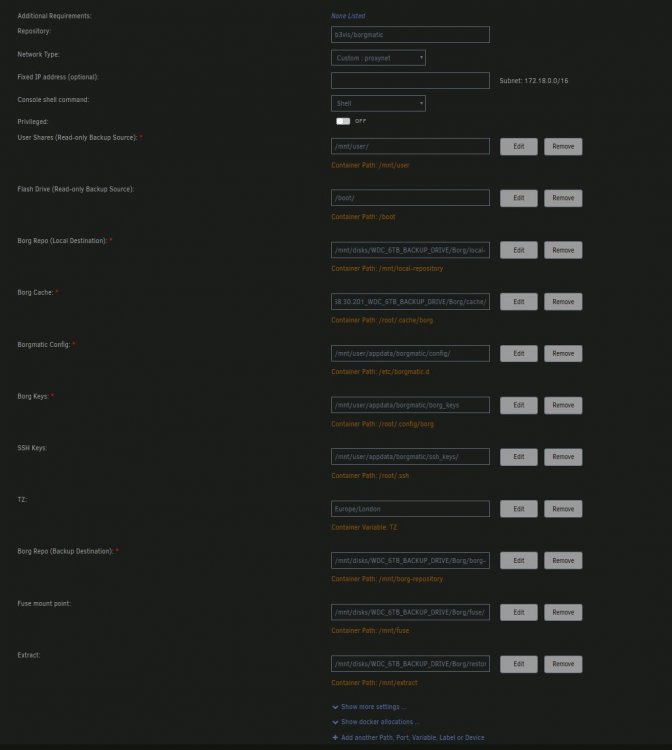
I have changed my docker config and posisitioned most the folders on the backup drive. Is there anything wrong or anything else prefered over this?
-
This happened to me when upgrading to RC2. I reverted to RC1 and all ok again.
-
Thats great news, it would definatly be a needed feature. So far so good, very impressed with the progress of this project. If I can help in any way message me or post here and I will help where i can.
-
advplyr, Testing today I noticed that the app is not able to work with android auto when plugged into my cars headset. Other apps such as spotify, poweramp work with android Auto. Is this something that can be implimented as I expect it will be a very useful feature for those who listen to audiobooks when in their vehicle.?
-
Hey, I tried doing the same process and it's working fine now. It was definitely a cover issue as the web browser version showed invalid cover. The issue was the android app would crash instantly, not allowing me to change the cover in the app. Once changed in the browser version the android app worked fine again. I'll be using the app extensively next few days so will report back anything. Oh and thank you for your commitment to this project, I had been looking for a dedicated audiobook self hosting option for ages. I've tried several other options in the past, this is by far the best 👍 Maybe one of unraids amazing YouTubers could do a short guide on the setup and feature set, it would help give the project a wider audience.
-
I've noticed a bug with the android app I had everything working great. So I put a jpg of a book cover I wanted to use ln the folder. It seemed to work at first. Then the Android app crashed. I kept trying to open the app but it would crash instantly. So I logged into auidobookshelf using my web browser and I could see the image of the book I tried to change showed as invalid. I deleted the image on the book and it revert back to the default book cover. So I opened the android app and it worked as normal again.
-
If anyone is trying to get this working with SWAG i managed to get it working with the following config. I adapted the one on the socket.io website to listen on 443 as SWAG wouldnt allow the HTTP set with the socket.io template. Make sure to put your unraid IP address where i have put in caps below. Also make sure you name your file as below and put in your SWAG proxy-confs folder audiobookshelf.subdomain.conf server { listen 443 ssl; listen [::]:443 ssl; server_name audiobookshelf.*; include /config/nginx/ssl.conf; location / { proxy_set_header X-Forwarded-For $proxy_add_x_forwarded_for; proxy_set_header Host $host; proxy_pass http://YOURUNRAIDIPADDRESS:13378; proxy_http_version 1.1; proxy_set_header Upgrade $http_upgrade; proxy_set_header Connection "upgrade"; } }
-
Thank you, I never realised there was another setting in nextcloud admin panel I now have it working great.
-
It looks like your trying to do the same as me. Allow nextxloud to share another path on the unpaid system using the external storage plugin for nextcloud. Did you get this working?
-
Does anyone know how to get WebDav working please?
-
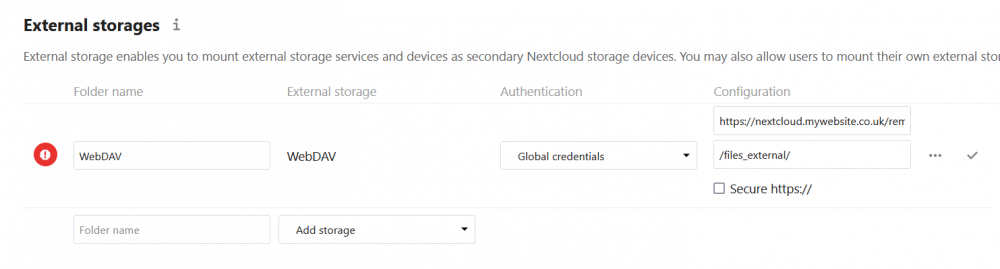
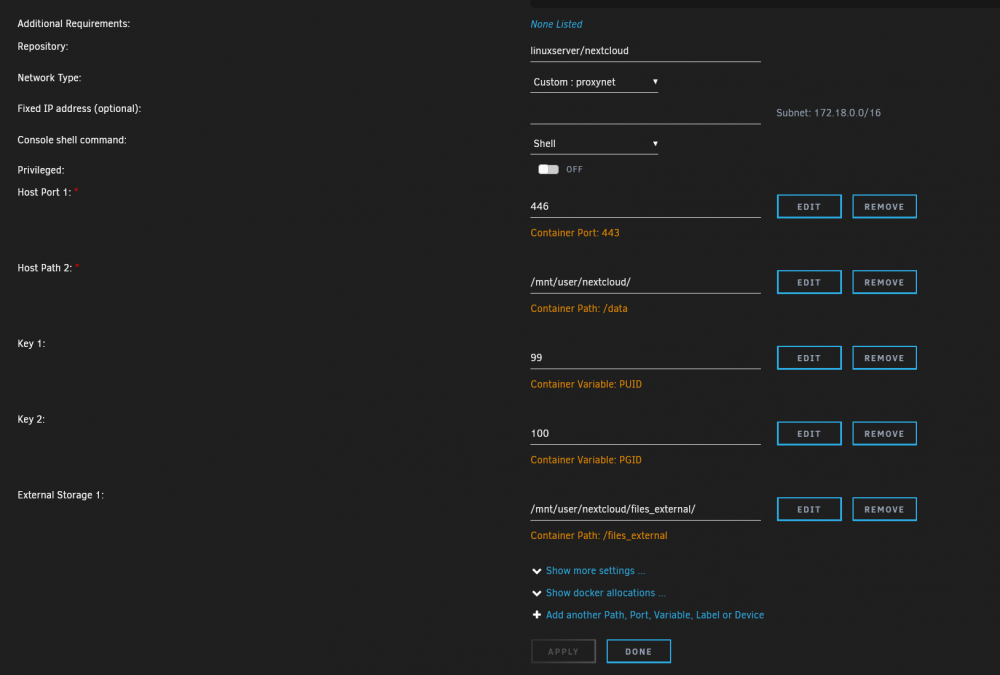
Help please Im trying to create an external strorage mount for paperless-ng using the app in nextcloud 1. I have installed the external storage app in nextcloud 2. I am trying to make a storage path in the docker template but the docker wont start when I add this field Obviosuly im doing something wrong, even read the help pages and im still stuck, Id appreciate your help.
-
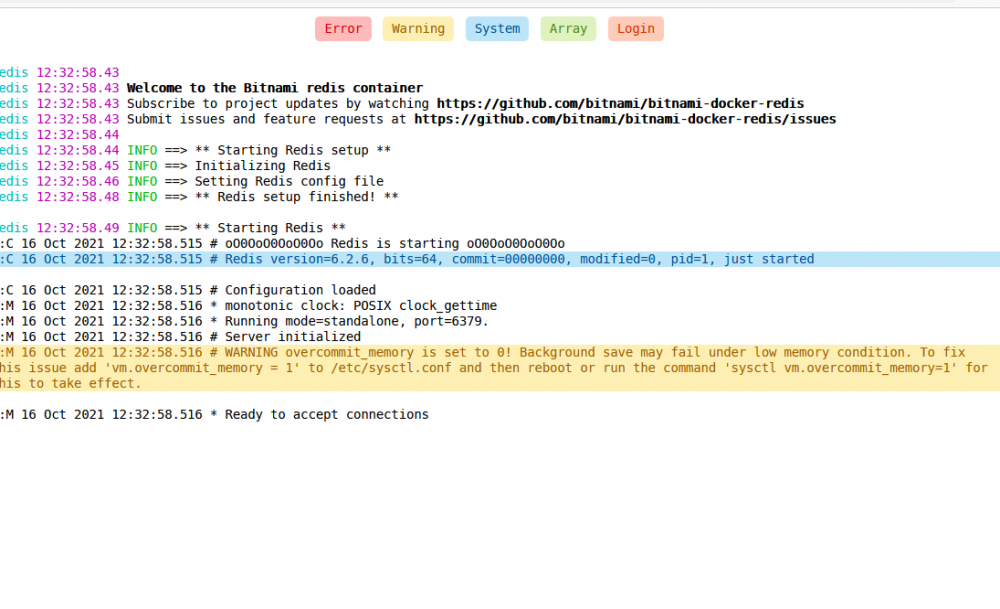
Just setup both redis and paperless-ng. Seems to be working fine except redis shows this error? Is this normal?
-
This is very useful, thank you Squid. I use it to note what all my Cache drives are doing in each of their own pool. This is better for me as it allows me to label each cache, cache 1, cache 2 etc then add a description of whats on each cache in the notes
-
Well that is one handy little plugin Installed and using, perfect. Thank you
-
Is it possible to add a description to each cache pool? We have the device ID and drive identification but I was hoping to add a description somewhere on that page. This way I know cache 1 has my nextcloud and appdata, cache 2 is used for downloads etc
-
Is this card compatible with Unraid and would I need to flash it into IT mode? LSI Logic Controller Card 05-25699-00 9305-24i 24-Port SAS 12Gb/s pci-e 3.0
-
Thank you, I now have it working because of you help. Much appreciated.
-
I am trying to set my maxmind key in the docker by adding a variable. Its not working I would be most grateful for some advice. Config Type: Variable Name: Maxmind Key: my Maxmind key Value: MAXMINDDB_LICENSE_KEY= Default value: -e What wrong with the above please.
-
Thanks Saarg, Is there a way to enable editing of documents using what comes with nextcloud app store?
-
I have an issue, not sure if this is common. I was using the openoffice docker to edit my nextcloud documents within nextcloud. It has not stopped, saying the docker 30day licenses has expired. How to I resolve this issue please? I stopped the docker and now i get this issues. Is there a new method to setup only office or any other way to edit documents within nextcloud?
-
Hi Rick, Thats great. When running the borgmatic command i dont believe this shows in the logs. However when your cron scedule runs this will show in the docker log (click the docker icon and click logs). I recommend using the heathchecks.io function, this allows push notifications/emails on backup up times. It can be set to alert you if the backup fails. I also recommend borgbase for online backups, their website is full of borg and borgmatic information.
-
@Rick_Sanchez To follow on from your post. Borgmatic will read the crontab.txt automatically, this is part of the docker setup. When you change the commands in crontab.txt you will need to restart the docker to load the changes. If you console into your borgmatic docker you can test your config files by simply typing borgmatic. borgmatic will read the .yaml files in the order they are list "alphabetically". I have 2 .yaml files, nextcloud.yaml and personal.yaml Both of these run two different backups. I typically use the following command in console to see if everything is running smoothly borgmatic --verbosity 2 Also this to list my archives borgmatic --list Please let me know how you get on with everything, any further questions please ask.
-
@Rick_Sanchez You only need to change the cron schedule, Please see my schedule below, the first line has been changed so that it runs twice daily at 1am and 1pm. The second line is as per the original post and set to run weekly at 6am. The path does not need to be changed, this is the configuration within the docker and borgmatic. Please also see this link for further details on the cron setup, please let me know how it goes. https://linuxize.com/post/scheduling-cron-jobs-with-crontab/
-
Extracting archives Just in case anyone else has this issue, when extracting archives using the borgmatic command (make sure you in the extract folder) - I created another mount point in the borgmatic docker to /mnt/extract borgmatic extract --archive myarchivename bormatic will look into the config.yaml files, I had my config to back up folder 1 to borgbase repo first then locally. I wanted to restore from the local backup, however the command above kicked up issues as I had the config file set to back up to the borgbase repo first before the local location. When I change the order in the config file it restores.
-
I had a similar situation. 1. Console into the docker 2. cd/config/www/nextcloud 3. sudo -u abc php7 occ (type command) This is what i used, but not sure is entirly what you need. sudo -u abc php /config/www/nextcloud/occ db:add-missing-indices






