






NewDisplayName
Members
-
Joined
-
Last visited
Everything posted by NewDisplayName
-
To give you an example, the new update process, is exactly what i mean, this sort of step by step guide i meant. Now just carry it over for everything...
-
But, cant you simply test which part of the linux kernel or driver makes the problem and just keep it old till its fixed...?
-
Interesting... i didnt tried macvlan in 6.12.4, did you? Why is it so hard to find out what changed after these complaints startet with macvlan?
-
I find it hard to understand that you suggest there is an error in vm docker plugin or hardware when its working perfectly fine in ipvlan or even in macvlan (before that update 6.10 or something) Is there something i can like downgrade to test? Some sort of network driver or what ever? Or can i enable "more logs"? Like debug or something? Because its very likly to happen atleast once every 2 days, so that wouldnt be that much of log probably.
-
Btw ive got a new error i normally dont see: Jan 19 01:00:01 Unraid-Server kernel: mdcmd (60): set md_write_method 1 Jan 19 01:00:01 Unraid-Server kernel: mdcmd (61): set md_write_method auto Jan 19 01:11:48 Unraid-Server kernel: traps: lsof[31000] general protection fault ip:1546c44a4c6e sp:2221140b89765036 error:0 in libc-2.37.so[1546c448c000+169000] Jan 19 02:00:01 Unraid-Server kernel: mdcmd (62): set md_write_method 1
-
Does that look correct?
-
Okay, can you tell me which commands i can run to see in ssh if its using macvlan correct? does that help?
-
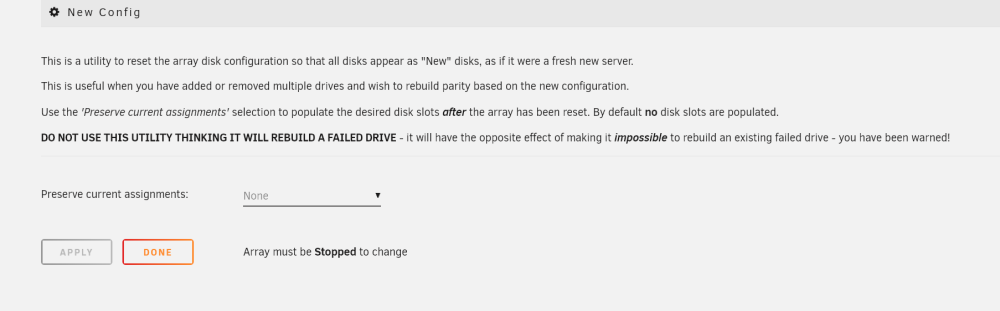
I dont understand why you tell me this. "Reducing the number of drives in the array." If i have a failed drive and i cant replace it immediatly i can (and want) simple remove that drive. Thats exactly what im doing. Im reducin the number of drives in the array...? I can do that without rebuilding parity. "Not sure why you want this as 0000 new drives it a lot less stress on the system. If you do it via the UD plugin then when you get around to adding it to the array it adds immediately so downtime is minimal." Thats exactly what unraid does if you start the array with new drives, lol? And yeah i even used the UD plugin to format it beforehand. I translate it to you: Instead of waiting 19h to 0000 all new drives, i just take 24h to rebuild parity. Do you understand? I have the feeling you dont understand me. Why are we even talki ng about that? BTW: that documentation sucks ps: after reading this, there is no indication that it will remove all changes i have made under "settings/disksettings". What do you not understand? What do i not understand? Is that not correct?
-
Its running along time without any crash ever (before multiple poeple startet to have issues with macvlan, like years, multiple versions), it just startet after updating. It also is running very long without any crashes in ipvlan. ONLY in macvlan is it crashing, but it was working fine for years. And just in macvlan it will crash 95% every day, but it just startet after that update, like 6.10 or something? i just want to make sure you guys understand the problem. So you tell me that there might be a docker, vm or hardware issue EVEN when this only happens after these macvlan issues startet to occour to multiple people at the same time?
-
???? I already posted the log AFTER crash and BEFORE crash.
-
r u sure? because thats what i added on my own... what about the crash? I dont really want to wait again weeks for a response because the server keeps crashing every 1-2 days which isnt that good for the drives and i dont have parity... I have no problem in helping finding the issue, but i need input on what to try.
-
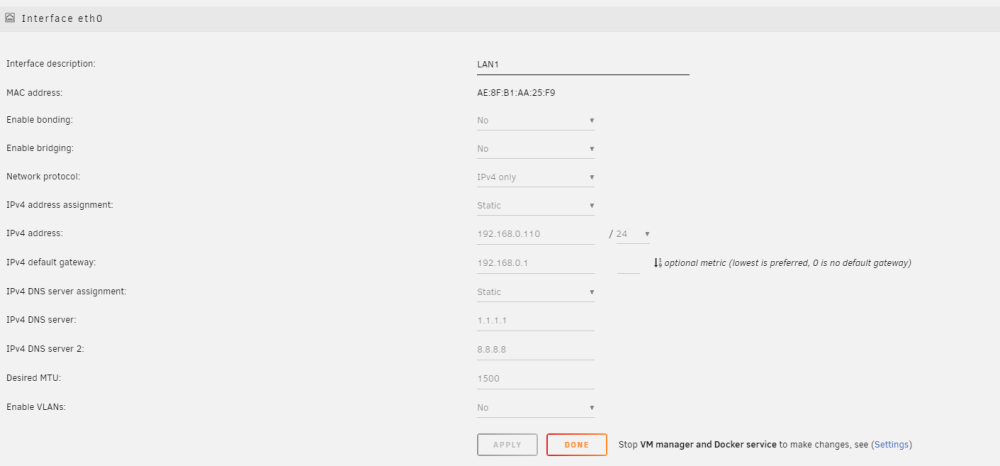
While were at it thats my network.cfg # Generated settings: IFNAME[0]="eth0" DESCRIPTION[0]="LAN1" PROTOCOL[0]="ipv4" USE_DHCP[0]="no" IPADDR[0]="192.168.0.110" NETMASK[0]="255.255.255.0" GATEWAY[0]="192.168.0.1" DNS_SERVER1="1.1.1.1" DNS_SERVER2="8.8.8.8" USE_DHCP6[0]="no" MTU[0]="1500" HWADDR[0]=AE:8F:B1:AA:25:F9 SYSNICS="1" HWADDR=AE:8F:B1:AA:25:F9 what is the correct syntax for hwaddr? With [0] or without?
-
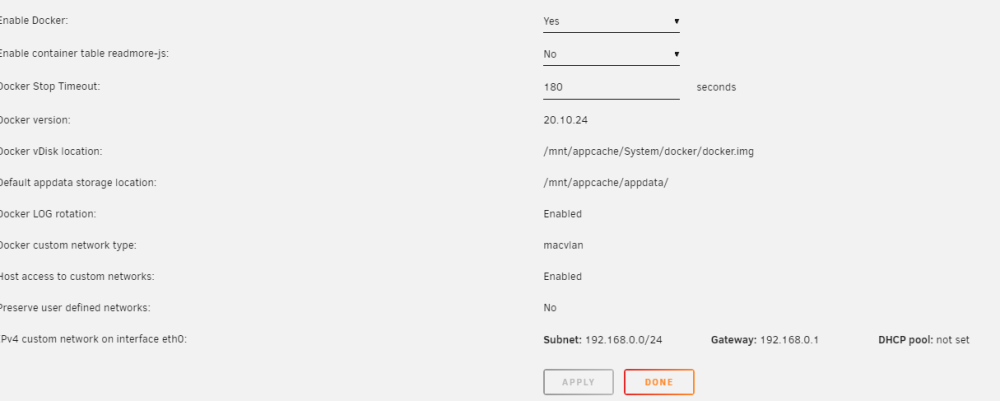
Here it is. Nothing in logs and as far as i can tell ive set it up like u said. unraid-server-diagnostics-20240118-1400.zipsyslog-previous
-
Im currently at work and dont have any diagnostics, but ill add them asap. (i mirrored syslog also, so i can add that too) Im one of the customers who have problem with the macvlan issue. I tried ipvlan, but i have a fritzbox, and this company dont care to support ipvlan. I cant redirect any ports and thats an issue. So ive switched yesterday (while updating to 6.12.6) to macvlan following this "tutorial": https://docs.unraid.net/unraid-os/release-notes/6.12.4/ For those users, we have a new method that reworks networking to avoid issues with macvlan. Tweak a few settings and your Docker containers, VMs, and WireGuard tunnels should automatically adjust to use them: Settings > Network Settings > eth0 > Enable Bonding = Yes or No, either work with this solution Settings > Network Settings > eth0 > Enable Bridging = No (this will automatically enable macvlan) Settings > Docker > Host access to custom networks = Enabled Is there anything other i should have done? Most dockers are in bridge, some are in br1, i have a VM (which wasnt turned on) Server was doing parity sync (because i added new drives)
-
Is that wrong?
-
Because i want to recreate parity instead of 0000 the new drives....? Also, when im removing drives, i also use it. (e.g. one fails, then i transfer all out to a different disk, new config, remove drive, start, without parity rebuild
-
okay, i dont. Anyway, i cant think of a reason that would make sense? Im creating a new config to add a drive, why should i want to add it WRONG (and thats whats happening) to the array? (if i set it to standard XFS encrypted e.g.)
-
If its by design, it should be changed. Why should it clean the settings there? that doesnt make sense? Its clearly sayin This is a utility to reset the array disk configuration so that all disks appear as "New" disks, as if it were a fresh new server. 1.) remove that bug OR 2.) add to the text that you also default (remove) your settings/disksettings OR 3.) add another [ ] box for "keep settings/disksettings" I wonder what else is affected...?
-
I found the bug! /Settings/DiskSettings gets reset to default when you use "new config", since that is NOWHERE written, thats a bug?! I thought it was the update because i changed drives AND updated both times. @limetech@itimpi
-
When you check your /Settings/DiskSettings, are they default? (i assume youre on latest?) bc usually u just notice when you add new drives...
-
It is usb 2, one of the suggested models i dont really see the reason to remove that stick, because i had a drive fail, and then u notice while running
-
The stick isnt that old and never had any problems with it. Years without losing any config, but immediatly after a update? - Multiple times! Some idea how to test the stick? Btw i restartet multiple times (2-3?) while adding drives and didnt losing any settings..., only this time, after updating. unraid-server-diagnostics-20240115-1232.zip
-
So, now i know why my drives were addded wrong, its because of unraid. The last time I didn't understand the connection. But now its 100% because of that update. 6.12.4 -> 6.12.6 I just did a update to latest version and i saw the array didnt auto start. Then i checked settings and sure, all my settings are gone - AGAIN! Things like default spindown, default file system... WTF? Why? Is that a bug? PS: Is there an easy way to go from xfs to xfs encrypted? 2 out of my 12 HDDs are not encrypted... because of that bug. (without deleting data or moving data)
-
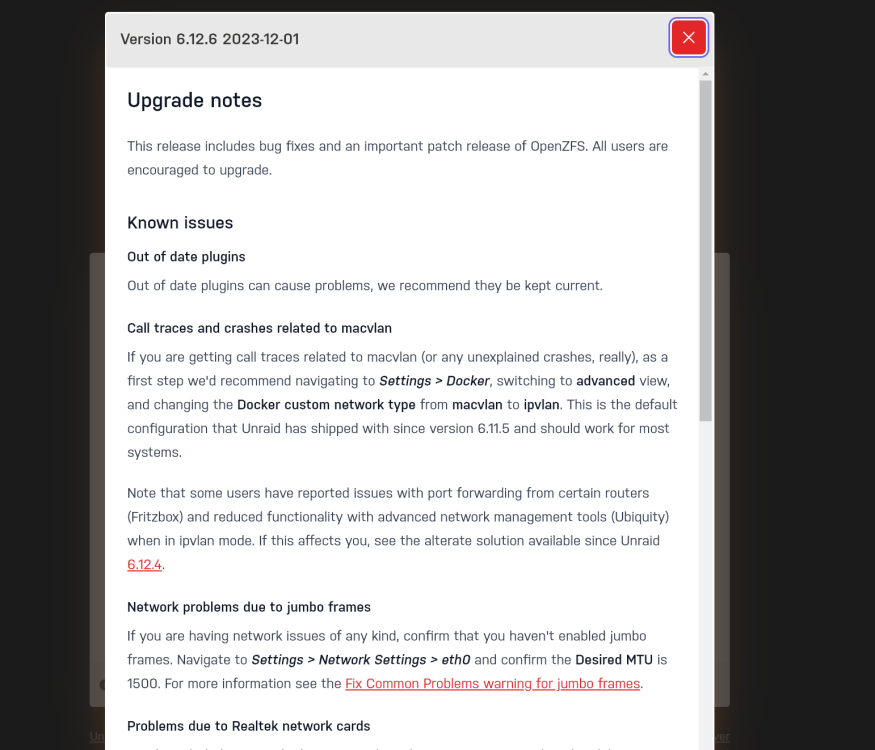
So if i try to click the link, it doesnt work, other links seem to work. "Note that some users have reported issues with port forwarding from certain routers (Fritzbox) and reduced functionality with advanced network management tools (Ubiquity) when in ipvlan mode. If this affects you, see the alterate solution available since Unraid 6.12.4." <--- this
-
ah i just followed the link... (btw forum smileys are broken)


