






NewDisplayName
Members
-
Joined
-
Last visited
Everything posted by NewDisplayName
-
could u post it here? So it can help others?
-
I think the problem is that its not correctly handled on unraids side, so that would be probably a very easy fix if "already unmounted" = dont try to unmount...
-
I didnt heared anything from limetech. I couldnt do anything just hard reset. maybe @limetech can bring some light in the shadow...
-
get frigate, its horror config, but rock solid
-
Hey, so ive got the standard "cant restart because something blablablablabla". I killed all associated processes (mergefs and rclone). Still not working, so i tired to unmount it myself which worked flawlessly. root@Unraid-Server:~# fusermount -uz /mnt/cache/ now im getting Sep 30 10:48:40 Unraid-Server emhttpd: Retry unmounting disk share(s)... Sep 30 10:48:45 Unraid-Server emhttpd: Unmounting disks... Sep 30 10:48:45 Unraid-Server emhttpd: shcmd (329): umount /mnt/cache Sep 30 10:48:45 Unraid-Server root: umount: /mnt/cache: not mounted. Sep 30 10:48:45 Unraid-Server emhttpd: shcmd (329): exit status: 32 Sep 30 10:48:45 Unraid-Server emhttpd: Retry unmounting disk share(s)... Sep 30 10:48:50 Unraid-Server emhttpd: Unmounting disks... Sep 30 10:48:50 Unraid-Server emhttpd: shcmd (330): umount /mnt/cache Sep 30 10:48:50 Unraid-Server root: umount: /mnt/cache: not mounted. Sep 30 10:48:50 Unraid-Server emhttpd: shcmd (330): exit status: 32 Sep 30 10:48:50 Unraid-Server emhttpd: Retry unmounting disk share(s)... So does that mean it doesnt go on because its already unmounted? A little bit stupid if u ask me? Or is there something it does which i cant see? My guess is "not mounted" is the same error code like "cant unmount"? If that is so, that should be changed. Bestes thing is, i cant change settings (i would like to disable auto start...) while this whole crap is happening, so i have to hard restart and have the same problem again lol
-
Dont tell how you resolved it, it might help the next soul.
-
trape came up with a better version it installs it in usr local bin , im not quite sure if that makes a difference or not, but ill test with next restart. anyway my approch should be definitly working (but not so elegant)
-
I came up with
-
hey, thanks for your fast support. I would use it, if i knew how. 😁 U say u fixed it yesterday, but why i get these errors when building it NOW?
-
am i the only one where the mergefs is no longer working? edit: thanks for the fix, that is working now again... -E TAG worked. https://github.com/trapexit/mergerfs/issues/1246 edit2: I came up with cd /tmp wget https://github.com/trapexit/mergerfs/releases/download/2.36.0/mergerfs-static-linux_amd64.tar.gz tar -xzvf mergerfs-static-linux_amd64.tar.gz mv /tmp/usr/local/bin/mergerfs /bin rm -r /tmp/usr/ sleep 10 edit3: trape came up with a better version VER=2.36.0 wget -qO- https://github.com/trapexit/mergerfs/releases/download/${VER}/mergerfs-static-linux_amd64.tar.gz | \ tar xvz -C / it installs it in usr local bin , im not quite sure if that makes a difference or not, but ill test with next restart. anyway my approch should be definitly working (but not so elegant)
-
Am i the only one with Was running fine for years...? #!/bin/bash rm /bin/mergerfs sleep 10 docker run -v /mnt/user/appdata/other/mergerfs:/build --rm trapexit/mergerfs-static-build mv /mnt/user/appdata/other/mergerfs/mergerfs /bin there was a update 1 day ago maybe it broke it?
-
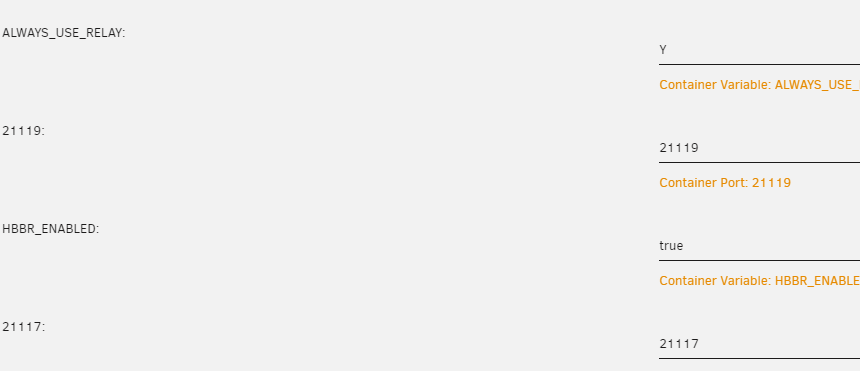
So i found a problem. we have some differnt places connected via vpn (ipsec) via fritzbox. lets call it 192.168.0.0 main (where server is) 192.168.1.0 A 192.168.2.0 B 192.168.3.0 C Usually im at main and can connect perfectly to all locations. Currently im in A and couldnt connect to B. But i can ping ip adresses in B. Everywhere the ID SERVER is set to main. Should that work? edit: i think i found the problem. A cant connect to B or C. Cant the server relay the connection? I tried -e 'ALWAYS_USE_RELAY'='Y' -e 'RELAY_SERVERS'='192.168.0.22:21116' (which port is the correct?) TO clarify i want 192.168.1.1 to connect to 192.168.0.22 to connect to 192.168.2.1 because 1.1 cant direct contact 2.1, is that possible? I thought thats what relay are for? edit2: nvm, i found it, this works, sadly i need to set always use relay
-
You should post this genereall tutorials inside your first post. Why answer these questions over and over again? Also you could use my tut i wrote there.
-
Thats when it cant boot from cd / file maybe try other iso? btw you dont try to install windows 10 on 30gb right?
-
Wouldnt change it there. Install user scripts plugin and make a script run ONLY once at startup A guide for what? Just change all directories (of temp files) which normally would go to appdata to dev shm.
-
yea ofc, its just a simple google search away https://www.google.com/search?q=bigger+dev+shm&oq=bigger+dev+shm&gs_lcrp=EgZjaHJvbWUyBggAEEUYOTIHCAEQIRigATIHCAIQIRigATIHCAMQIRigAdIBCDE2NjNqMGo3qAIAsAIA&sourceid=chrome&ie=UTF-8 I have all my dockers on dev shm and made it nearly full ram ("only" have 64gb)
-
Thats all you need. \\serverip (depending on your network you can also use servername)\sharename You really want to be sure what you expose to the outside world. Ill only do plex. (in a docker) But best would be VPN depending on your scenario.
-
It doesnt really matter. You shouldnt point unraid to outside anyway. Under shares you must set export to yes to see it. (its per share)
-
Hi, after the disaster with 6.12 i came now back to the RC (i know theres a newer one but i wait some time for that). Again my server crashed (im not quite sure if really, because i saw the shell on monitor still - but couldnt interact with it)... I didnt have logs, but ill enabled them for now, so we get a log file after next crash (or what ever happens). I noticed this: It says eth0 macvlan? As far as i know i disabled macvlan in docker. Thats my network config (i tried to do it as descriped in the RC18 post) So whats wrong, how do i get eth0 to ipvlan?
-
Also ich bin mir ziemlich sicher das es das schon mal gab, aber ist auch egal jetzt. Wie es funktionieren sollte ist mir schon klar.
-
aha https://forums.unraid.net/bug-reports/prereleases/unraid-os-version-6124-rc18-available-r2643/ dort wurde zb vermutlich im nachhinein ein rls geändert... klingt jedenfalls für mich so.
-
wäre nicht das erste mal das sie eine änderung in ein bereits veröffentlichtes release packen^^
-
Dann muss ich mich auf Facebook irgendwie verguckt haben... dachte die haben das in stable übernommen.... aber gut zu wissen, dann update ich noch mal auf next.
-
Es sollte jetzt in 6.12.3 sein?
-
https://www.google.com/search?q=tmpfs+2gb


