





Maticks
Members
-
Joined
-
Last visited
Everything posted by Maticks
-
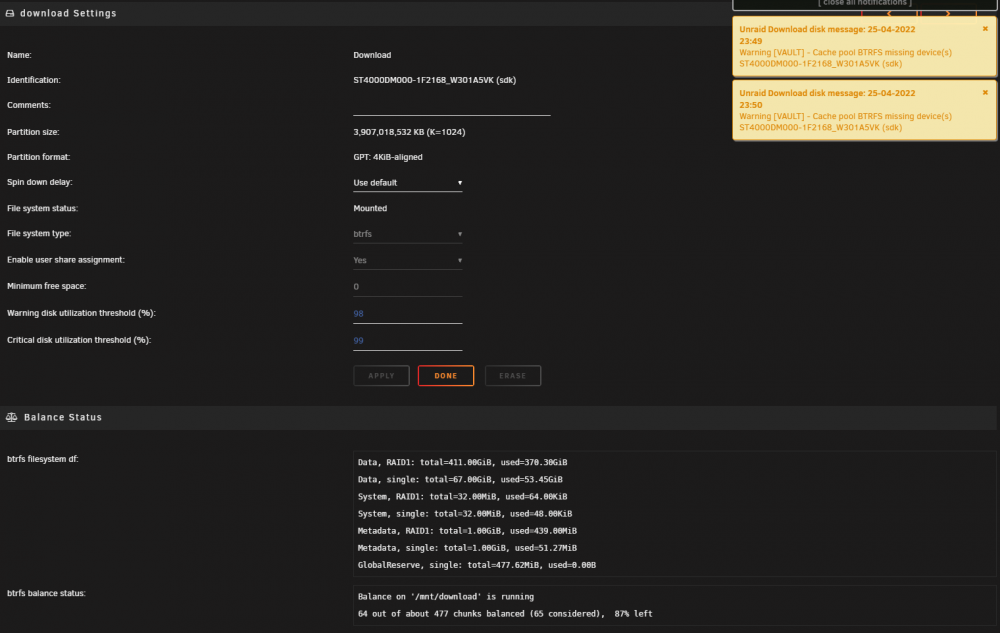
I am having a strange problem with BTRFS. I have lost one of my two mirror drives in the array. a balance is running at the moment but the disk that remains is the one the system is saying is missing? I have a replacement disk to add to the BTRFS but i assume i wait for the Balance to finish running then i stop the array and add the new drive to the BTRFS pool?
-
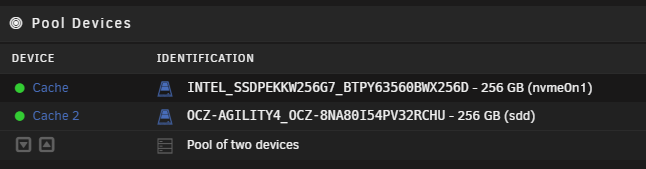
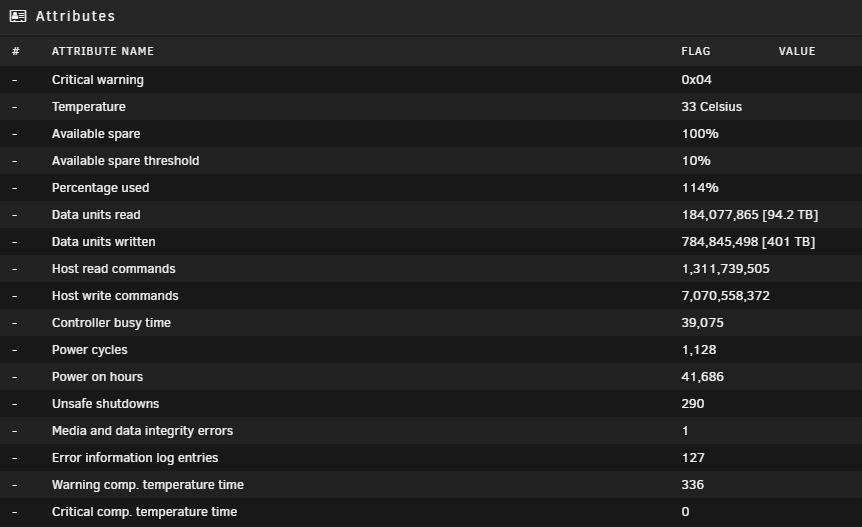
Should i replace an NVME Cache Drive based on wear or let it die? I have two disks the one that the longest in here is the Intel SSDPEKKW256G7 lifetime writes for the drive are 140TB. Smart has marked the Drive as failed based on its wear indicator. As you can see it has done a bit more than 140TB. Not had a disk fail in a BTRFS before is it better to replace it before it dies?
-
Also worth noting you need to shutdown the server with the disk in it, the disk has to lose power and boot back up. rebooting the server doesn't kill power to the drive. Mine still had issues till i shutdown the server and powered it back on.
-
Static pressure fans might be needed, unsure if anyone has done testing with SP fans and non SP fans. which one pulls more air through.
-
A few people around make these, you rip out the fan wall of 80mm, put in quiet 120mm fans instead. https://www.etsy.com/au/listing/857444203/supermicro-sc846-cse846-120mm-fan-array?gpla=1&gao=1& 3d printing will be your friend you need to still get a seal to pull the air threw the hard drives.
-
Anyone used this 4U 24 Bay Chassis before? Curious what it actually looks like, can only find a few pictures online but they've started appearing in a few spots on the internet. Even with 3 Fans on the front and 3 fans behind the drives i don't see much spacing if any between the drives.
.thumb.jpg.a8d0cb112759833c965c6bc1eda71782.jpg)
.thumb.jpg.0c4b21711f38bc941d7eeae969654636.jpg)
-
Thank you i thought i'd explore if there was an option, but thats ok moving data around on Unraid isn't the worst thing in the world.
-
I have a second Cache pool setup with a single disk on XFS. Is there a way to convert the disk to BTRFS then add a second disk to the Pool so they are mirrored? At the moment it looks like the only option is to copy the data off format the disk to BTRFS and copy the data back? is there a way to do this without needing to format?
-
I was only experiencing read errors, randomly it would go a day or two wihout an issue then read errors. once it completely marked the drive dead. I have RMA'd the disk twice before seeing this post. My Parity Drives are set to spin down after 2 hours but there is usually some activity on my array from Plex that keeps them spinning. I have never seen my parity drives not spinning. 24 hours and stable so far.
-
ok i completely powered my server down and pulled the power from it. will see if that is good now.
-
i issued both commands EPC disable and the lowcurrentspinup. on my ST8000VN004 rebooted, but after a spin down event i got errors again a few days later. If there another setting that needs to be disabled, i have forced the drive to stay spun up for the time being. But i do operate a system with 3xLSI 9211-8i Controllers. Not had any issues with my other disks. I do have 2xST8000VN004 additional drives but they are Parity Drives so never spin down. Any suggestions?
-
If you have more than one Lsi card in the system you can’t have the boot bios on the cards. They fight with each other and what you are describing happens. You don’t need the boot bios unless you are booting Off a hard drive on the lsi controller. But you’re booting from USB so that is never required. You simply erase the bios from each card. If you have one lsi card in the system it’s fine but this behaviour happens with more than one. Sometimes the system can run for an hour before having a heap of issues read errors on drives and slow transfer speeds.
-
Weirdly it happened again to me, i did reboot after issueing both the EPC disable and the lowcurrentspinup. The errors happened when the drive spun up again. i did a system reboot, do i need to power the whole system down for it to take effect ?
-
this makes sense my parity drives are seagate 8TB disks but are always spinning. i am not going crazy.. thanks JorgeB applied the changes to the 3 drives and rebooted. see how it goes.
-
I keep having this weird problem with read errors on a data disk. I have RMA'd one and my second unit same problem, but it preclears fine. I tried a different SATA cable that doesn't seem to have helped. I am not sure if its got something to do with the type of disk i don't operate any other 8TB drives. Extended Smart finished with no errors. its strange. Anyone else know what is happening here, do i just ignore it ? vault-smart-20210712-2307.zip vault-diagnostics-20210712-2307.zip
-
There are reports on the plugin page follow here. The plugin device has a big report lodged. https://forums.unraid.net/topic/97351-plugin-spin-down-sas-drives/page/9/
-
I can press the manual move button for a week that's fine
-
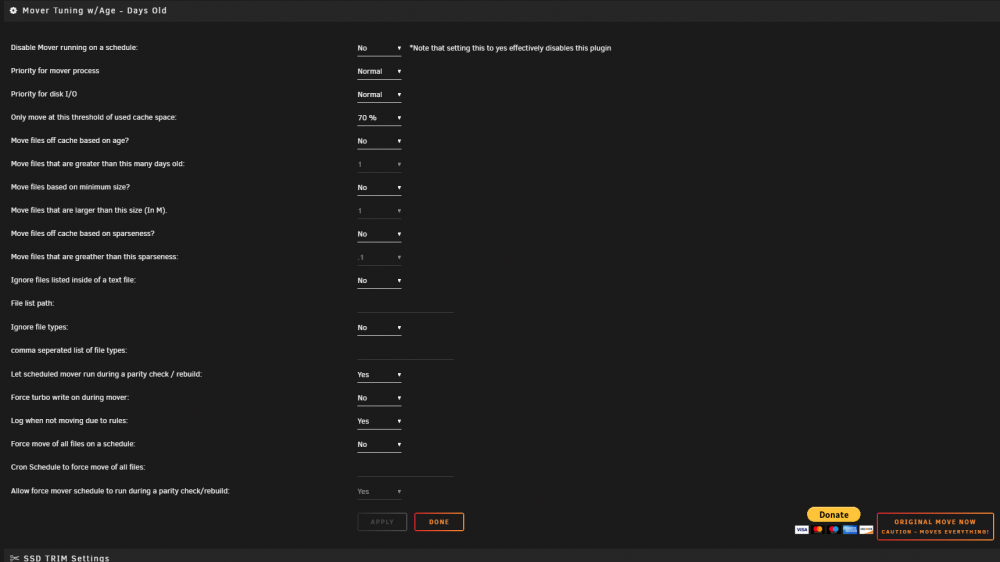
But since updating the plugin it seems to be completely broken usually, mover moves my items if the cache hits 70% or more. sometimes i hit the manual mover button in the Main page. But i noticed it didn't do anything when i hit the manual Move button. Then my cache went over 70% and it did nothing, but the "Original Move Now - Caution moves everything" does work appears to be the only thing that does work for mover. i pressed it after it went to 90%. My cache filled with files within a 12 hour period, but i have age set to no.
-
i've only seen this with smart testing, where the disk shows spun down but smart is still running. activity can look like this but if you haven't started a smart test then the cause is something else. cache dir's polling, there are 3 disks i can see that don't flash is there something on those disks a share or something like that that they have in common. Then trace from there what is configured not against those disks. Your top left disk never flashes, your second row disk second from the bottom never flashes. What is on those disks that unique share or something that is not configured on those?
-
if they are spun down thats a nice-looking effect.
-
I have my Cache pressure of directories on system set to 1. not had an issue with memory running away. Apart from that my settings are the same i have limit the memory available set to 0 which was default. When Plex for example does a scan over my TV Folder when a new show is added it doesn't make the disks spin up because the files are in cache. But when Plex runs its Maintenace daily it always spins the disks up not sure if thats because it's doing more than just looking at files in a scan. It's more a Plex issue than a cache dirs issue.
-
XFS "just works" its an old FS but its been around a long time.. it's pretty resistant to being corrupted from being turned off or a disk on its way out. BTRFS is newer it seems pretty stable, but when things go wrong the repair utils seem to be what lets it down. I've tried using BTRFS, always run into some kind of issue and end up back at XFS not just on Unraid other systems as well. It was not that great on my laptop. There is no real performance advantage when using XFS vs BTRFS, the snapshot stuff is nice to have. but if you want that i'd more go to ZFS on Unraid. If you want to keep it simple XFS, Dual Parity, if file corruption is of concern then run Dynamix File Integrity. Thats the cheapest way to get the most space with protection and stablity. I would go the whole hog of ZFS if you want the Protection and Snapshots with great utils to repair the filesystem in the event of an issue, but you will be bound to the rules of ZFS Pool system. You can load the ZFS Plugin in Unraid and off you go, Youtube ZFS Unraid and you will see a few videos on how to set it up.
-
When VM's are running on BR0 traffic will not follow across the default gateway out of the unraid server. From the local LAN ran it works fine. It also breaks any Dockers running on BR0 from working on the LAN at all. When you stop all the VM's running on BR0 the Dockers running on BR0 all return to normal.
-
the only way i managed to fix my issue is rolling back to before 6.7.x and everything is working smooth again. I tried dropping my Mover Priority whatever is causing it seems to be more than just a priority setting.
-
So.. the docker updates, upgrade the docker itself it doesn't perform the upgrade on Nextcloud. You can do it through the webui but i find the wheels fall off that sometimes and it becomes a pain. I prefer doing mine through the CLI its also easier to fix if something goes wrong if your in the CLI. Open a console on the docker image. cd /config/www/nextcloud/updater/ root@bd32ce1bcd66:/config/www/nextcloud/updater# sudo -u abc php updater.phar This will launch the CLI upgrade tool which will tell you what version you are and you can do the upgrade. Nextcloud Updater - version: v14.0.2RC2-7-g57268cb Current version is 15.0.5. Update to Nextcloud 16.0.3 available. (channel: "stable") Following file will be downloaded automatically: https://download.nextcloud.com/server/releases/nextcloud-16.0.3.zip Steps that will be executed: [ ] Check for expected files [ ] Check for write permissions [ ] Create backup [ ] Downloading [ ] Verify integrity [ ] Extracting [ ] Enable maintenance mode [ ] Replace entry points [ ] Delete old files [ ] Move new files in place [ ] Done Start update? [y/N] y Info: Pressing Ctrl-C will finish the currently running step and then stops the updater. [✔] Check for expected files [✔] Check for write permissions [✔] Create backup [✔] Downloading [✔] Verify integrity [✔] Extracting [✔] Enable maintenance mode [✔] Replace entry points [✔] Delete old files [✔] Move new files in place [✔] Done Update of code successful. Should the "occ upgrade" command be executed? [Y/n] Y sit back, drink a coffee and wait for it to finish. it can take a while before there is any output here. And then say No here Keep maintenance mode active? [y/N] N If you say yes you need to run another command to disable maintenance mode and get Nextcloud back up and running. This is for if you want to do other things after the upgrade before making Nextcloud live again. First connect to the webui you will need to do a quick start upgrade button but it just does a DB check and starts.


.jpg.b34d57b53815d28a12a845e2914aa39e.jpg)
.jpg.67899ddc80ed56430b1878d08b047a86.jpg)


