MowMdown
Members
-
Joined
-
Last visited
Everything posted by MowMdown
-
This was directly on my server with the disk /dev/nvme2n1p1 directly mounted to /mnt/disks/test But yes, gave I/O error on read unless I used the rescue mount option
-
@JorgeB Unless you know a way for me to bypass btrfs safety measures so I can mount the disk and not get I/O errors? I can only "read" the file if I mount the disk using -o ro,rescue modes otherwise btrfs gives an I/O error on file read. Edit: also go back one page and see my repair result
-
Here is the corrupted file scrub results. I however am not able to repair the file on disk due to btrfs stopping me (safety measures I assume) unless I copy the file off the disk, then repair it, then copy it back wiring a new file which obviously updates the checksum with the new file, rendering this test moot. The repair was successful kernel: BTRFS error (device nvme2n1p1): scrub: unable to fixup (regular) error at logical 298844160 on dev /dev/nvme2n1p1 physical 575668224 kernel: BTRFS warning (device nvme2n1p1): scrub: checksum error at logical 298844160 on dev /dev/nvme2n1p1, physical 575668224 root 5 inode 257 offset 0 length 4096 links 1 (path: file.bin) kernel: BTRFS error (device nvme2n1p1): bdev /dev/nvme2n1p1 errs: wr 0, rd 0, flush 0, corrupt 1, gen 0 /mnt/disks# btrfs scrub start -B test/ Starting scrub on devid 1 scrub done for 256dbb31-31d5-46ce-8daf-608925b5fc91 Scrub started: Fri Aug 7 13:27:38 2026 Status: finished Duration: 0:00:14 Total to scrub: 11.52GiB Rate: 842.96MiB/s Error summary: csum=1 Corrected: 0 Uncorrectable: 1 Unverified: 0 ERROR: there are 1 uncorrectable errors# par2 repair backup.par.par2 Loading "backup.par.par2". Loaded 4 new packets Loading "backup.par.par2". No new packets found Loading "backup.par.vol015+016.par2". Loaded 16 new packets including 16 recovery blocks Loading "backup.par.vol000+001.par2". Loaded 1 new packets including 1 recovery blocks Loading "backup.par.vol127+128.par2". Loaded 128 new packets including 128 recovery blocks Loading "backup.par.vol255+045.par2". Loaded 45 new packets including 45 recovery blocks Loading "backup.par.vol063+064.par2". Loaded 64 new packets including 64 recovery blocks Loading "backup.par.vol007+008.par2". Loaded 8 new packets including 8 recovery blocks Loading "backup.par.vol003+004.par2". Loaded 4 new packets including 4 recovery blocks Loading "backup.par.vol031+032.par2". Loaded 32 new packets including 32 recovery blocks Loading "backup.par.vol001+002.par2". Loaded 2 new packets including 2 recovery blocks There are 1 recoverable files and 0 other files. The block size used was 5368712 bytes. There are a total of 2000 data blocks. The total size of the data files is 10737418240 bytes. Verifying source files: Opening: "file.bin" Target: "file.bin" - damaged. Found 2000 of 2000 data blocks. Scanning extra files: Repair is required. 1 file(s) exist but are damaged. You have 2000 out of 2000 data blocks available. You have 300 recovery blocks available. Repair is possible. You have an excess of 300 recovery blocks. None of the recovery blocks will be used for the repair. Wrote 10737418240 bytes to disk Verifying repaired files: Opening: "file.bin" Target: "file.bin" - found. Repair complete.
-
Yeah, writing to the block device should in theory bypass the filesystem layer which btrfs would not have a record of a file being written too since it's the block device. If my assumption is correct based on what you are saying. This should be enough for me to test on. save a file, dd the block device to "corrupt" it and then use my par2 parity file to restore it, then validate with a btrfs scrub to ensure it clean matches.
-
Considering everything including the OS is running from RAM, yes. Everything from crashes to data corruption happens because of bad RAM.
-
Please enable the persistent syslog server and then grab diagnostics next time it occurs. There are no logs in the last diagnostics you uploaded and the first one has nothing I can see wrong.
-
Oh yeah I missed that you were doing Disk1 -> Disk4 copy/move. That will be slow due to parity and the fact that unraid has to read and write to the same disk both times and parity at the same time which will always happen.
-
Disable the integration in HA, if it stops, then that's it.
-
That's highly unfortunate. RAM no good. If you have multiple sticks, test each stick (can do it in a different machine) and continue to use the good stick if one is still viable.
-
Please post diagnostics
-
I would recreate the boot pool/disk. Boot from usb, erase the internal boot drive, remove the boot pool, and re-run the wizard
-
Instability basically - unstable ram
-
I’d start by posting your diagnostics
-
that’s the plan
-
Oh im going to I have a spare disk Im going to isolate,write a test file, corrupt it, and attempt a repair bonus points if I can trick the FS to thinking the file has bitrot
-
Not yet. But I should test it, maybe if I can find time this weekend I will force an error and attempt a repair.
-
I personally run btrfs on my array disks because I like having the ability to "scrub" the disk which checks the checksums to validate if the data has been altered and I run a par2 plugin that creates parity data for the files themselves in the event a btrfs scrub detects corruption. I can then attempt to repair the corrupted file even though btrfs cannot do it. With btrfs though you want to leave about 10% space unused on the disk. with XFS you can fill it up 100% no problem as the reserved space has already been accounted for up front. there is a tradeoff with what I am doing.
-
If these are in the unraid array slots, stay on XFS unless you know better. If you want to POOL them in an unraid pool you can run ZFS RAIDZ1 (or RAIDZ2) but this introduce more risk if the disks are older (2 (or 3) disks fail and you lose the whole pool worth of data versus the individual disks in the unraid array)
-
XFS filesystem reserves about 2% of the disk for metadata/etc. Yes it's normal.
-
that would do it
-
post your diagnostics when booted from the internal drive
-
You can get back to the template by clicking the "Add Container" button on the docker page, and then selecting the template from the drop down menu. But yes you are entering something incorrectly thus it cannot build/run and gets orphaned. You should also tick the "advanced view" toggle on the docker page and make sure you dont have a bunch of orphaned containers taking up space. If you do, click on them and remove them.
-
One other suggestion is writing a user script and executing it hourly a simple mover start in the script would be all you need.
-
I would suggest tuning your ingest flow on how much new data is being written to the cache pool vs the array. Otherwise the only other solution is getting more pool storage. It would be one thing if those files are like weeks/months old and not being moved but I have no way of knowing.
-
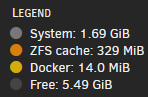
ZFS caches reads in memory, the OS is loaded once, ZFS will not use the RAM for ARC after that or very minimally <1GB Here is my backup NAS running only btrfs disks with a boot pool, ZFS is using 329MiB of RAM, thats it.