





MowMdown
Members
-
Joined
-
Last visited
Everything posted by MowMdown
-
Yes
-
Start the array in maintenance mode, click on disk18 and click on "check filesystem" and see if it reports anything. Note this setting is separate from each share's own minimum free space setting
-
You have a minimum cache floor of "0" per your pool settings. diskFsType="btrfs" diskUUID="9d37e93b-b771-4d59-aa3b-23aaab01d2ab" diskAutotrim="on" diskCompression="off" diskWarning="" diskCritical="" diskExpansion="" diskShareEnabled="yes" diskShareFloor="0" <--- This should be higher than 0 bytes, I personally do 10% minimim pool size diskBootSize="0" diskComment="" diskExport="-" diskFruit="no" diskSecurity="public" diskReadList="" diskWriteList="" diskVolsizelimit="" diskCaseSensitive="auto" diskExportNFS="-" diskExportNFSFsid="0" diskSecurityNFS="public" diskHostListNFS="" diskSpindownDelay="-1" diskSpinupGroup="" diskFsProfile="raid1" diskFsWidth="2" diskFsGroups="1" diskId="WD_BLACK_SN770_1TB_24036G801555" diskIdSlot="-" diskSize="976761560" diskId.1="WD_BLACK_SN770_1TB_24141V801429" diskIdSlot.1="-" diskSize.1="976761560"
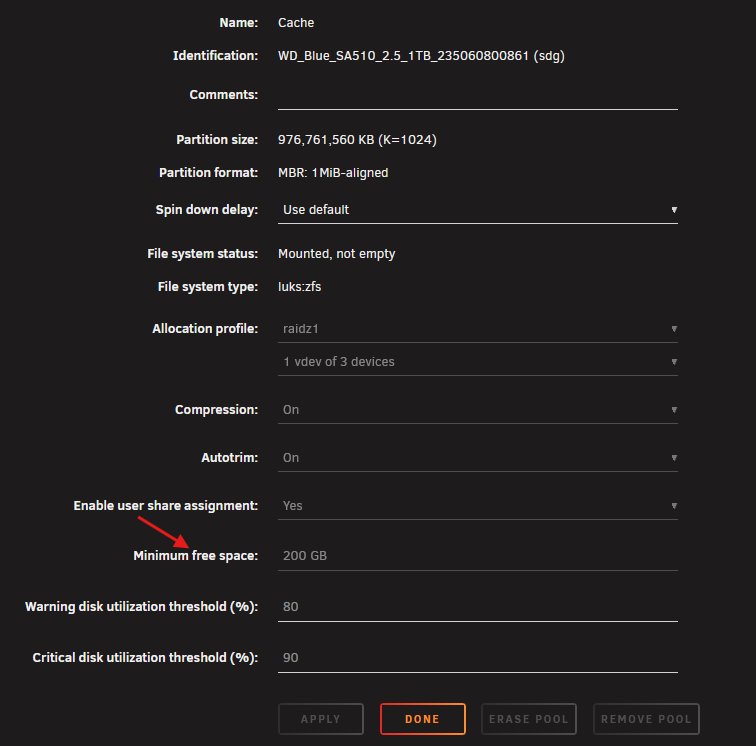
-
Your cache drive is full and likely caused a host of problems since data could not write to it and also might want to check the filesystem of disk 18.
-
Yes that is how you re-import a zfs pool
-
You just put them somewhere you can execute them, how you get them onto your system is up to you.
-
Usually it's CPU related from what I understand. Sometimes they get corrected and there is nothing to do. I would personally just keep and eye on the syslog and see if more appear. Ill be honest I usually see one MCE event logged per boot. Usually says "Corrected no further action required." I would only concern myself with them if they become frequent. Also note that Fix Common Problems will keep alerting you of the MCE every time it scans your logs. Dont take this as a sign of more, you will want to verify the count yourself.
-
you might have to manually go into /boot/config/shares and delete the docker.cfg or Docker.cfg Docker.cfg didnt even have share settings, so I suspect this tried to create itself and failed. Probably easier to delete both and reboot and then correct the settings.
-
Often times not much you can do about them, if they're severe enough the only fix is changing hardware.
-
What I suspect happened is you have Docker and docker, linux is case-sensitive, FAT32 is not case-sensitive. Unraid is randomly picking one and applying it's settings. Docker.cfg is set to cache and docker.cfg is set to cache or something of that nature. In fact Docker.cfg doesnt even have proper share settings where docker.cfg does. This issue isnt the source of your problems BUT you should address it by clicking on "Clean up" from the shares tab/page. Then clicking on the docker share and validating the settings, hitting save on your way out to properly apply them. disk2 also contains docker folders so you should do some housekeeping to make sure youre using the right docker stuff.
-
You're on a super old/outdated version of unraid. Consider updating. There have been loads of bugfixes from 7.0.0 RC to 7.3.2, I would start with the latest update your license supports. Run unraid in safemode for an extended period with no plugins and see if crashes still occur. Consider running a 24 hour minimum memtest from the boot menu to rule out bad ram
-
Can you post diagnostics? this may include relevant information
-
Something else you can try is delete the network.cfg and network-extra.cfg from the /boot/config folder and rebooting unraid to see if that clears this up.
-
disable bonding for now reboot your router, it seems like the IP address you assigned it is in use by another device or being assigned twice. Jul 13 22:55:15 Khazad-dum dhcpcd[1968]: br0: 10 second defence failed for 192.168.0.100 Jul 13 22:55:15 Khazad-dum dhcpcd[1968]: br0: deleting route to 192.168.0.0/24 Jul 13 22:55:15 Khazad-dum dhcpcd[1968]: br0: deleting default route via 192.168.0.1 Jul 13 22:55:15 Khazad-dum dhcpcd[1968]: br0: rebinding lease of 192.168.0.100 Jul 13 22:55:15 Khazad-dum dhcpcd[1968]: br0: probing address 192.168.0.100/24 Jul 13 22:55:19 Khazad-dum reload_services: execute queued job 27 Jul 13 22:55:21 Khazad-dum dhcpcd[1968]: br0: leased 192.168.0.100 for infinity Jul 13 22:55:21 Khazad-dum dhcpcd[1968]: br0: adding route to 192.168.0.0/24 Jul 13 22:55:21 Khazad-dum dhcpcd[1968]: br0: adding default route via 192.168.0.1 Jul 13 22:55:21 Khazad-dum dhcpcd-run-hooks: interface=br0, reason=BOUND, protocol=dhcp
-
Are you using a docker folder instaed of docker.img vdisk? If you are using a docker folder, your docker folder disk is 86% full and is likely filling up crashing the system. also it appears you have two shares named "docker" but one of them uses a capital D and if that is the case your /mnt/user/Docker share is running on disk2 and not your cache pool d----r shareUseCache="only" # Share does not exist D----r shareUseCache="no" # Share exists on disk2 Cant say for sure this is the cause of the crashes, but I would start here and get my system in order if this was not the intended destination. Typically when a disk or ram fills up where system services run, it's bad news. Edit, nvm I see you did move it to your disk2 on purpose, in that case you might want to check the cache drive health and/or check to see that you are not filling the cache drive/pool completely which can crash the docker service and/or corrupt the docker stuff.
-
Go into settings > docker and set it to disabled. Then while still in the settings, go to VM Manager and also set it to disabled. Then click on the "Shares" tab and click on the system share, when the share setings appear, assign the secondary storage to the drive you want to move the data to. Right below that should be mover direction, set mover from Cache -> Apps. Back on the Main tab, at the bottom, click mover and wait. Open the system log by pressing the >_ looking icon in the upper right corner, when mover is done it will say "Mover Finished" After that, browse the app drive and validate the files now exist on that drive and not the other. Then you can go back and start up those services again. Do note: If you hardcoded /mnt/cache anywhere on either the docker settings or vm manager settings, it will write new files to the cache drive again. make sure these paths say /mnt/user/system/...
-
No thanks, your AI summary posts are less than helpful. Often incorrect and not relevant to the topic at hand.
-
In addition to posting diagnostics, please share your emby docker container template.
-
Generally there isnt need for much else. The big things that will often cause problems are: Custom changes you made outside of urnaid like for example, editing the "go" file Outdated or otherwise deprecated plugins that you might be using and unaware are broken on future updates (folderview, folderview 2, theme engine, etc.) Nvidia GPU driver plugin auto-selecting a driver version incompatible with your GPU (if youre using an GTX model gpu, drivers newer than 580 will not work for you) As long as you make a backup of your USB, rolling back to the "previous" install should get you back into a working state. I always suggest doing a reboot BEFORE running the system update. A lot of times people who run into issues after doing the update is that they find their system has issues. 9 times out of 10, those issues were already present and the reboot is just exposing them. If they just looked at their logs they would have seen their system throwing up all kinds of signals stuff was just running broken long before they updated.
-
OP was able to find more recent system diagnostics which had the smart reports, serials, and disk#'s so we at least got the drive order correct after the initial parity re-assignment.
-
Email unraid support/open a support ticket
-
I suggest running a memtest from the boot screen for 24 hours to rule out the potential for bad ram.
-
Please post diagnostics
-
sounds like you have something mapped using /mnt/cache which would have wrote to RAM since you dont actually have a pool named cache and lost upon a reboot. This would be simply due to a pre-defined path in a container template most likely. the real PSA is always check your paths.
-
@SimonF This is your dept.



