





MowMdown
Members
-
Joined
-
Last visited
Everything posted by MowMdown
-
Do you still have time-machine enabled on the share? try disabling it and then see if you can remove them
-
I cant really offer any advice other than I do not exhibit those symptoms (it's a JBM585 in nvme form factor)

-
you have to wait for those .fuse_hidden files to go away. those arent typical files, that's something at the FUSE level not letting go. they typically resolve themselves after a while
-
I will say, those settings are mostly subjective and should be tailored to the workload. For plex and immich, it wont really make a difference as that data is wrote once and read many times.
-
It sounds like you know what you want already. Im not sure what further information I can provide based on what you've come up with in your write up.
-
BTRFS info (device loop2): bdev /dev/loop2 errs: wr 0, rd 0, flush 0, corrupt 1, gen 0 I would consider running an extended memtest from the boot menu over night. something is causing metadata corruption to appear inside the docker.img which unfortunately is caused by bad ram most of the time. Also you have an SSD in your array, that is not recommended due to no trim support, you will likely prematurely kill the SSD. Another recommendation is to move that to a dedicated pool by itself.
-
There is actually a benefit to mover only operating on shares that are assigned both storages. I do something weird where I have certain data to only be read from on my array BUT, I also have the same share exist on a pool where other data can be read/wrote too without ever moving anywhere. I do this because the "archival" data wont fit on my pool and I dont want a lot of small things move to the array but I want to be able to read from ALL the data across the entire system through a single entry point.
-
I did but I dont really think that level of micro-micro-management is necessary for a basic media server. (a raidz2 pool already being extremely overkill) Especially for data that is "wrote once and read many times" I trust unraid/limetech to apply pretty sane defaults. I personally don't think you will gain any appreciable benefit and could very much make things a lot worse especially if you're new to zfs.
-
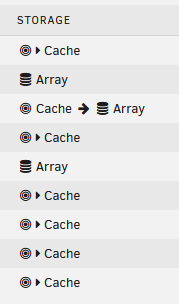
No mover only operates on shares where both primary and secondary storage options are set. (my shares) None of these shares will move except the 3rd one from the top, you can see it's "Cache -> Array" and mover will only work on that specific one
-
What were the most recent list of events leading up to this discovery of the data "going missing"?
-
Yup you gotta stop the array to make the change.
-
My guess is one of your plugins you've installed. I see one called "Scrubber" which might be the source of this. It could also be one of your user-scripts.
-
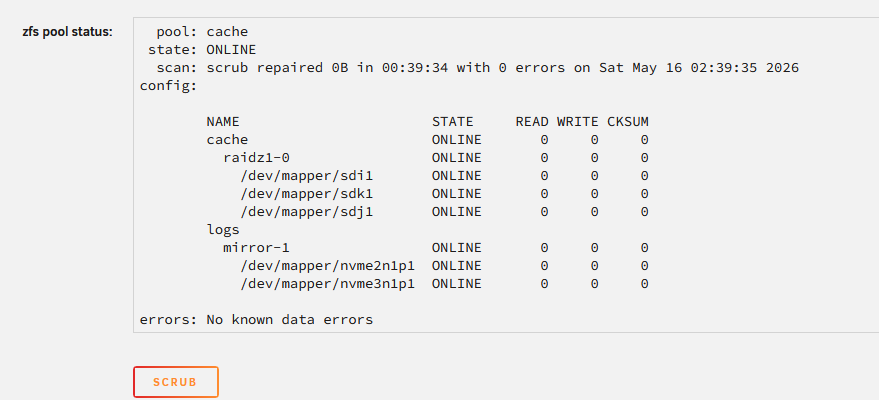
click on "disk2" and pause the scrub, you ideally do not want to run a zfs pool scrub at the same time as a parity check/sync
-
Does this behavior occur when you start the system in "Safe Mode" from the boot menu? Edit: It appears you have a zfs scrub running on disk2, this reads from the entire disk similar to how a parity check works. sr/sbin/zpool status -P disk2 2>&1 Jun 5 12:04:29 koaly-tower emhttpd: pool: disk2 Jun 5 12:04:29 koaly-tower emhttpd: state: ONLINE Jun 5 12:04:29 koaly-tower emhttpd: scan: scrub in progress since Mon Jun 1 00:00:10 2026 Jun 5 12:04:29 koaly-tower emhttpd: 7.34T / 9.10T scanned at 21.9G/s, 6.87T / 9.10T issued Jun 5 12:04:29 koaly-tower emhttpd: 0B repaired, 75.55% done, no estimated completion time
-
Plex really only benefits putting the plex metadata (appdata) on an ssd. Media playback is unaffected by disk I/O on an HDD. A single working drive can read anywhere between 80MB/s and 250MB/s (640Mbps to 2000Mbps) a typical 4K media file peaks at about 100Mbps or 12.5MB/s And those are 4K source copies. Most people I'd wager dont have full non-reencoded source copies media. Where something like zfs does excel in is if youre video editing raw 4k/8k content over the network but even then you would want a full zfs setup using flash storage as even HDDs in a raidz pool would become a bottleneck for that workload. The setup otherwise is fine, I mean there's nothing inherently wrong with what you're doing it just makes unraid an odd choice given that what I consider it's main selling point it's "array"
-
Please post diagnostics
-
With all that said, some of your btrfs disks do have metadata corruption, disks 3, 5, 8, 11, 16, 17, 18, 19, 22, 23, 24, and 25. Most are relatively small values <50 except for disk 3 which is ~5000 I would suggest running a memtest to rule out bad ram. Unfortunately since these are single disks and not a full on btrfs pool repairing this is not an option without restoring data from a good backup. I would suggest running a btrfs scrub on the affected disks as well for verification.
-
What is the plan for the switch from RAIDZ1 to RAIDZ2? Is this going to be a brand new RAIDZ2 pool with all brand new disks or are you adding 4 new disks to an existing RAIDZ1 pool? Why zfs pool and not just use the unraid array? Media playback certainly does not benefit from a raidz-pool at least not from a speed point of view. If the plan was to add 4 new disks to the existing raidz1 array, you cant convert it to raidz2, you can only add another raidz1 vdev which makes the pool 2 vdevs wide. To move to 1vdev of RAIDZ2 you will need to format the pool and start clean.
-
You can try and ignore the missing GUID message, and manually recreate the flash drive.
-
From what I can gather amazon does not offer a public API to manually retrieve the photos which might be why you cant seem to find anything on it. They want you to be locked in which IMO is a terrible thing for the consumer due to having your photos being held hostage like what you described.
-
Ill be honest, you're the only person Ive ever come across that has even mentioned amazon having photo hosting... With that said it's not clear what you mean. Are you trying to backup photos to amazon photos or are you trying to migrate existing photos from amazon photos elsewhere? And if it's the latter of the two what was your plan where are you going to store them?
-
It's supposed to be that simple yes. But like ConnorVT said, the docker containers must also support the GPU which I know for a fact plex does. They recently added B-series GPU support.
-
You wont have enough disks in the array to assign parity. The pools have self-contained parity separate from the unraid array. Modern CPUs have no issue calculating parity, the limiting factor is raw disk read speed. I gave you the most optimal setup. Assign the SSDs to a pool, set it up as RAIDZ1(zfs) and then assign the single HDD to the Disk1 slot in the array. You do not have enough disks to really do anything else with. The reason you should not assign ssds to the array are due to it breaks trim and your ssds will degrade much faster without garbage collection.
-
Drivers are baked into the kernel, nothing extra needs to be installed for intel/amd gpus to function on unraid/linux. It works the same as any intel Arc GPU, just have to pass it through to the containers. Add the extra parameter --device=/dev/dri
-
SSD should not be used in the unraid array, these should only be used in pools. You’d be better off making a raidz pool with your 4x 1TB SSDs. The 256GB ssd for a boot drive + cache partition is fine. You may consider putting the HDD in the array as disk1 I don’t see why it needs to be kept as an unassigned drive. Also in the future since you have a basic license you are grandfathered into being able to still upgrade to the Plus and Pro tier legacy licenses should you choose to expand later.



