





MowMdown
Members
-
Joined
-
Last visited
Everything posted by MowMdown
-
To clarify, are you currently running unraid on proxmox or just simply migrating from proxmox to unraid? If you are coming to unraid from proxmox: Unraid should be able to import your zpool but you will need to export it from proxmox first. Just be aware that any/all top level folders/subvolumes/datasets will be converted into unraid users shares if you allow the zpool to participate in user shares. What you will need to do is create an unraid pool of the same name your zpool currently is, add the disks to the disk slots for the pool, leave the filesystem set to AUTO, and simply let unraid import it.
-
Click on the share name, check the split level setting, same place you set minumum free space on each share.
-
It's probably your split levels, if theyre too restrictive unraid wont write files to new disks even if minimum free space is surpassed since split level takes precedence.
-
This is docker service, you can ignore it unless it never ends, which could indicate a container boot looping.
-
Yeah 1M is too small, I see that now. Thanks for the catch. I just knew it existed somewhere.
-
4 partitions would be correct for a disk formatted for internal boot. Partitions 3 and 4 are the boot partition and data partition respectively. Partition 1 is the EFI which is separate from the boot partition. I cant remember what the 2nd partition is but it's small. My boot disk: NAME MAJ:MIN RM SIZE RO TYPE MOUNTPOINTS nvme0n1 259:0 0 13.4G 0 disk ├─nvme0n1p1 259:2 0 1M 0 part (Legacy/BIOS) ├─nvme0n1p2 259:3 0 510M 0 part (EFI) ├─nvme0n1p3 259:4 0 12.9G 0 part (BOOT) └─nvme0n1p4 259:5 0 1007.5K 0 part (DATA)
-
I totally forgot ReBar is required for intel GPUs... I honestly didn't realize it was necessary for an unraid use-case. I figured it had more to do with gaming than just using the card in general.
-
I don't see any apparent issues in the logs, but the one thing I did notice is you have your "system" share on multiple disks, Cache, disk1, and disk7 I believe. You might want to confirm that your docker.img file is located on your cache pool. I'm not really sure this is the source for the issue, but you should address it regardless.
-
When running a memtest, it often needs to run many cycles (recommended to run minimum 24 hours) to rule out if it's bad. Obviously if it doesnt boot with a specific stick I would say that also is a definitive answer.
-
Please post diagnostics.
-
Disk2 is having read errors, if the screenshot is disk2, you should consider replacing it. It does appear you have a parity disk so as long as it's in sync, you wont lose any data unless a 2nd disk has issues. The sign to watch for is if those numbers for reallocated and uncorrectable continue to increase, if they do, the disk is going to die soon. If the numbers stabilize where they are, you can continue to get more life out of it BUT i would suggest having another disk ready to replace it. It could last a few days, weeks, months or just die later today.
-
I dont really see anything wrong or any errors logged. Everything looks fine from what I see. The only two critiques I have are you have appdata and system shares on some of your array HDDs instead of being cache only, Consider addressing this: appdata shareUseCache="prefer" # Share exists on cache, disk12, disk13 system shareUseCache="prefer" # Share exists on cache, disk9
-
Please post diagnostics
-
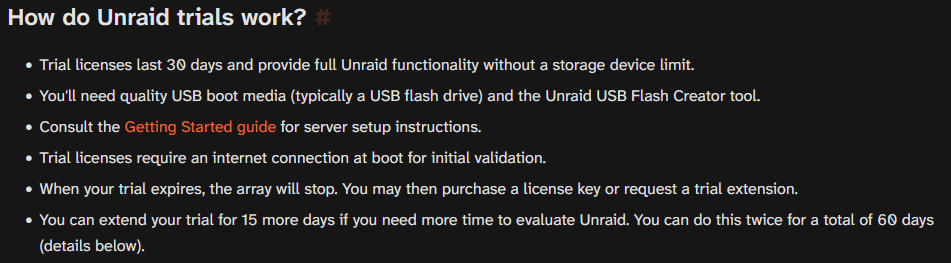
I just want to clear some misconceptions up. Reddit are a bunch of bone-heads. Ignore them. Taking advice from reddit is the same as shooting one's self in the foot. Yes 30 days + two 15 day trial extensions. (total of 60 days worth of trial) (first and last bullet points) link One does not need to know terminal commands to use unraid. You will certainly benefit from knowing but it's not required what so ever. Without more context about what you were doing, all I can say is this is not true but is highly dependent on the situation. Moving files within the disk itself, they are atomic. Instant moves. Files moving between disks, yes the file will be copied to the target disk first and then removed from the source disk. The only "suggestion" is to not use a SMR disk for a parity drive on unraid, you can, but it will inevitably slow down array write operations. You will suffer slow speeds mixing these two technologies in any setting. The SMR will always slow you down. Id wager it would be even worse in a RAID type setup. Yeah it pretty much is nearly plug and play. You boot it up, install some HDDs into the array slots, and hit "Start Array". It doesnt get any less complicated. As with anything, there is a learning curve. Keep in mind your learning something new for the first time, there are going to be bumps along the way. It's also ok to not like unraid, some people are better off with something like a synology, qnap, ugreen.
-
See if you can avoid a reboot until after you've collected the diagnostics if you are able too, otherwise the relevant information is lost.
-
You seem to also have a docker container bootlooping, this could be causing issues too. And there also seems to have been issues with SMB in the previous-syslog. Jun 6 04:45:02 Neith smbd[1668657]: [2026/06/06 04:45:02.036713, 0] ../../lib/util/util.c:580(dump_data) Jun 6 04:45:02 Neith smbd[1668657]: [0000] 6E EE 66 D2 7F 73 B2 1E D0 7D 62 71 43 6F B6 EC n.f..s.. .}bqCo.. Jun 6 04:45:02 Neith smbd[1668657]: [2026/06/06 04:45:02.036729, 0] ../../lib/util/util.c:580(dump_data) Jun 6 04:45:02 Neith smbd[1668657]: [0000] FF E3 00 E9 2E 5D C7 BC 90 D4 67 32 D9 01 9D 03 .....].. ..g2.... Jun 6 04:45:02 Neith smbd[1668657]: [2026/06/06 04:45:02.036930, 0] ../../libcli/smb/smb2_signing.c:646(smb2_signing_check_pdu) Jun 6 04:45:02 Neith smbd[1668657]: Bad SMB2 (sign_algo_id=1) signature for messageIm not sure what this means, but it's basically the entire log which might explain the poor performance?
-
If a container writes to a share that is configured as "primary cache" OR /mnt/cache/sharename it will create a new folder on the cache pool. posting diagnostics will give everyone a better idea what you have setup
-
next time you run a transfer open an ssh session and type in top and look for the wa: stat in the middle, if this number goes above 30.0 you have IO Wait issues.
-
Did you remove the empty share folder from the pool device? Do you have a docker container or plugin creating a top level folder on the cache pool with an erroneous path saved somewhere?
-
To answer your question, no, unraid licenses cannot be transferred.
-
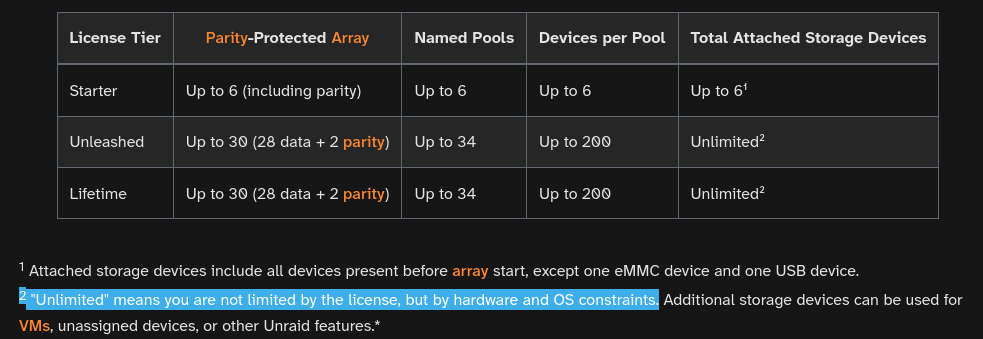
It is unlimited. You can have 6,830 HDDs on a single unraid system. Your hardware has to support it All of your issues are basically "user error", you didn't take the time to evaluate the product beyond getting frustrated. I'd personally be more inclined to agree with your complains/concenrs IF you took the full 60 days to properly evaluate unraid but not doing a trial and then complaining about something you have no experience using is not fair.
-
You can install a handful at a time, say do 5 plugins, and wait, if anything happens start removing them 1 by one, if nothing happens install another 5 and repeat.
-
Then it’s a plugin or docker container reading your disks most likely
-
I would comb over your container logs to see if any other maintenance occurred. Unraid doesnt/cant delete data so either you have a script/plugin that pruned it OR a container did it. And you're absolutely sure that you didnt open any ports to any services to the internet NOT through tailscale?
-
Yeah That's on me, I saw it in the diags but didnt note that it was unassigned. Its ultimately your call but a memtest overnight would rule out faulty ram a lot quicker than running it for a week and potentially suffering silent corruption elsewhere in other data.


