





3dee
Members
-
Joined
-
Last visited
Everything posted by 3dee
-
Issue could not be retraced. Deleting the containers appdata folder (containers /config) fixed it.
-
Deleting the container with image and running docker system prune -a --volumes did not help Same issue with OpenVPN I just don't understand why it stops working after a while, debug logging continues to check IP as if it was continuing to work. Is it possible to enable some advanced debugging?
-
Hello, may you assist me? The container started at 9:40 and the web interface became unavailable at 9:41. qbittorrent works for like 10-15 minutes after starting it up and then suddenly stops working. Thanks!
-
Hello, after updating unraid OS from 7.2.3 to 7.2.6 I have noticed qBittorrent stops working after (almost exactly) 15 minutes. I am now running latest unraid 7.3.1 but the issues persists. I'm using PIA with Wireguard. The debug logs and the qBittorrent logs do not show any error. The watchdog keeps checking port and IP. The web interface just becomes unavailable. Can you help me where I should start investigating? Container logs: 2026-06-01 09:39:13,560 DEBG 'watchdog-script' stdout output: [debug] Waiting for iptables chain policies to be in place... 2026-06-01 09:39:13,570 DEBG 'watchdog-script' stdout output: [debug] iptables chain policies are in place 2026-06-01 09:39:13,578 DEBG 'watchdog-script' stdout output: [debug] VPN incoming port is (same port) [debug] qBittorrent incoming port is (same port) [debug] VPN IP is (same public IP) [debug] qBittorrent IP is (same public IP) 2026-06-01 09:39:43,586 DEBG 'watchdog-script' stdout output: [debug] Checking we can resolve name 'www.google.com' to address... 2026-06-01 09:39:43,621 DEBG 'watchdog-script' stdout output: [debug] DNS operational, we can resolve name 'www.google.com' to address '142.251.153.119 142.251.152.119 142.251.156.119 142.251.157.119 142.251.155.119 142.251.150.119 142.251.151.119 142.251.154.119' 2026-06-01 09:39:43,622 DEBG 'watchdog-script' stdout output: [debug] Waiting for iptables chain policies to be in place... 2026-06-01 09:39:43,631 DEBG 'watchdog-script' stdout output: [debug] iptables chain policies are in place 2026-06-01 09:39:43,639 DEBG 'watchdog-script' stdout output: [debug] VPN incoming port is (same port) [debug] qBittorrent incoming port is (same port) [debug] VPN IP is (same public IP) [debug] qBittorrent IP is (same public IP) 2026-06-01 09:40:13,647 DEBG 'watchdog-script' stdout output: [debug] Checking we can resolve name 'www.google.com' to address... 2026-06-01 09:40:13,682 DEBG 'watchdog-script' stdout output: [debug] DNS operational, we can resolve name 'www.google.com' to address '142.251.156.119 142.251.150.119 142.251.151.119 142.251.152.119 142.251.155.119 142.251.157.119 142.251.154.119 142.251.153.119' 2026-06-01 09:40:13,683 DEBG 'watchdog-script' stdout output: [debug] Waiting for iptables chain policies to be in place... 2026-06-01 09:40:13,692 DEBG 'watchdog-script' stdout output: [debug] iptables chain policies are in place 2026-06-01 09:40:13,700 DEBG 'watchdog-script' stdout output: [debug] VPN incoming port is (same port) [debug] qBittorrent incoming port is (same port) [debug] VPN IP is (same public IP) 2026-06-01 09:40:13,700 DEBG 'watchdog-script' stdout output: [debug] qBittorrent IP is (same public IP) Thanks!! binhex-qbittorrentvpn.xml
-
Hello, if your AMP instances won't start after upgrade to unRAID 7 it is likely due to the license not working anymore. It was logged to my instances log: [16:53:22] [Core Warning/1] : Expected licence feature RunAMP is not present. [16:53:22] [Core Error/1] : No valid AMP licence was found. Please open a shell as the 'amp' user and run `ampinstmgr reactivate myinstance01` to reactivate this instance. [16:53:22] [Core Info/1] : Available features: ) [16:53:22] [Core Info/1] : Active Licences: The reason for this is a bug with the --mac-address extra parameters: I noticed this because of my router showing a new device and the old device with the old mac didn't come online after the day of the unRAID 7 upgrade. How to fix: run docker inspect AMP from your unRAID shell There will be two MacAddresses (your old one from the --mac-address extra parameter and a new one) Copy the new one and overwrite your old one in the --mac-address extra parameter of the AMP Docker template and update container Maybe confirm the MAC again with command, both MacAddresses should be the same now docker inspect AMP When AMP is back up running, open a shell, switch to AMP user and reactivate your license(s) (find your license key in your AMP Docker Template) su -l amp ampinstmgr reactivateall
-
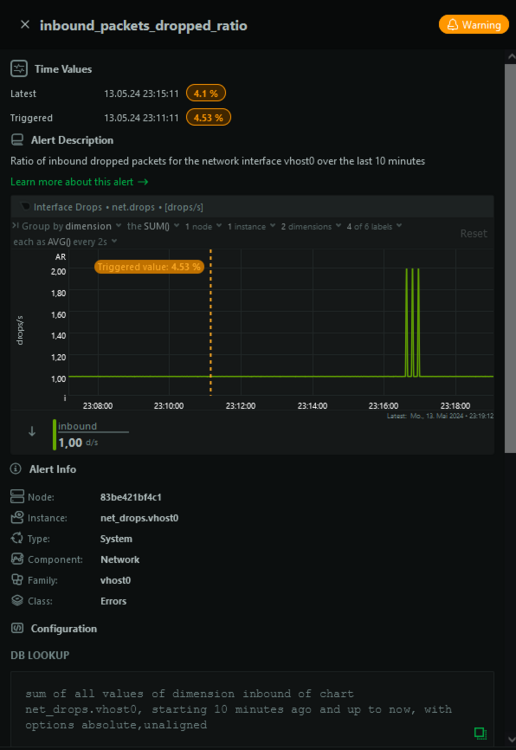
Hello, I am affected too: vhost0: flags=4163<UP,BROADCAST,RUNNING,MULTICAST> mtu 1500 inet 192.168.1.10 netmask 255.255.255.0 broadcast 0.0.0.0 ether 02:33:dc:xx:xx:xx txqueuelen 500 (Ethernet) RX packets 235962 bytes 215191610 (205.2 MiB) RX errors 0 dropped 27168 overruns 0 frame 0 TX packets 41404 bytes 21627297 (20.6 MiB) TX errors 0 dropped 0 overruns 0 carrier 0 collisions 0 I had an alert in netdata inbound_packets_dropped_ratio on vhost0:
-
Danke für den Hinweis, das soll ja sogar mit Containern funktionieren Ich habe das alte Libvirt Wake On Lan Plugin runter geschmissen und die neuen WoL4Services installiert. Damit klappt es leider genauso wenig.. Nach Deaktivieren und erneutem Aktivieren der VMs (Enable VMs unter VM Manager Settings) habe ich leider auch noch das folgende Problem: root: '/mnt/user/system/libvirt/libvirt.img' is in-use, cannot mount Vielleicht hängt das miteinander zusammen. So oder so scheint es weder für das eine, als auch für das andere eine (dauerhafte) Lösung zu geben
-
Hallo, ich hab jetzt auch von 6.11.5 auf 6.12.8 geupgraded. Wegen der macvlan Probleme habe ich nach dem Upgrade folgende Änderungen vorgenommen: Das hat auch alles geklappt, Libvirt Wake On Lan hat den Status Running aber die VMs starten einfach nicht per WoL.. Die letzten Einträge in den Logs sind: Mar 10 12:32:37 ServerPC emhttpd: read SMART /dev/sdb Mar 10 12:32:41 ServerPC ool www[26518]: /usr/local/emhttp/plugins/libvirtwol/scripts/wol_start Mar 10 12:32:42 ServerPC kernel: device virbr0 entered promiscuous mode Mar 10 12:32:52 ServerPC flash_backup: adding task: /usr/local/emhttp/plugins/dynamix.my.servers/scripts/UpdateFlashBackup update Mar 10 12:36:07 ServerPC emhttpd: read SMART /dev/sdh -> Keine offensichtlichen Fehler im Log Wo kann man denn mit dem Troubleshooting anfangen? Danke!
-
/push I'm worried about upgrading and need some help.
-
Hello everyone, when I upgraded from unRAID 6.11.5 to 6.12.2 I had to experience macvlan call traces causing my server to crash. I tried with 2-nic docker segmentation method for my containers (br0 → br1) but this did not help, macvlan call traces still occurred, so I downgraded back to unRAID 6.11.5. Now I am looking for a solution to keep individual IP-addresses per Docker Container (right now it's br1) but I also would like to upgrade to the newer unRAID versions (latest stable for now is 6.12.4). Many of my containers look like that (with different IP): I am confused about the solutions on how go to use unRAID 6.12.4 without getting macvlan call traces. For me it is important that some docker containers have their own IP-Address since I can prioritize specific devices in my Fritzbox (for example the IP-address of a torrent container is low priority but the IP-address of a teamspeak is high priority). If I am understanding correctly, this does not work with ipvlan. But I also am using Docker Compose Manager with some stacks and some custom networks. I have taken a look into the release notes: https://docs.unraid.net/unraid-os/release-notes/6.12.4/#fix-for-macvlan-call-traces So when I follow these steps, will I still be able to give individual IP-addresses to my containers? After following these steps, will the IP-addresses stay the same or do I have to edit each container and setup the IP-address? Is there anything else to take care of except these steps (and the troubleshooting section)? Thanks for reading into my questions!

-
Immich is perfect for me! Info: https://immich.app/ Installation: https://immich.app/docs/install/unraid There is no free up space on phone feature yet, but they have it on the plan: https://github.com/immich-app/immich/issues/165#issuecomment-1575164317 Disclaimer ⚠️ The project is under very active development. ⚠️ Expect bugs and breaking changes. ⚠️ Do not use the app as the only way to store your photos and videos. ⚠️ Always follow 3-2-1 backup plan for your precious photos and videos!
-
A couple of hours later it happened again This time I was collecting the logs right after stopping the Array. I had issues stopping Docker Containers and stopping the Array (device busy but no lsof results). I was able to unmount manually via umount -l since -f didn't work. The mover was doing some heavy Cache Pool I/O when the first BTRFS error occurred, just like the first time when this happened. Nov 13 22:49:28 ServerPC move: file: //..g/... ### [PREVIOUS LINE REPEATED 4 TIMES] ### Nov 13 22:49:30 ServerPC move: file: //..p/... ### [PREVIOUS LINE REPEATED 6 TIMES] ### Nov 13 22:49:34 ServerPC move: skip: /mnt/nvme_pool/immich_gallery/thumbs/15c8cb25-0e87-4575-b952-a140ec2063fa/ee/16/ee169c32-9514-4527-81a8-45c1d6b1e199.jpeg Nov 13 22:49:34 ServerPC move: file: //..p/... ### [PREVIOUS LINE REPEATED 2 TIMES] ### Nov 13 22:49:35 ServerPC move: file: //..g/... Nov 13 22:49:36 ServerPC move: file: //..p/... ### [PREVIOUS LINE REPEATED 10 TIMES] ### Nov 13 22:49:41 ServerPC move: file: //..g/... Nov 13 22:49:41 ServerPC move: file: //..p/... ### [PREVIOUS LINE REPEATED 14 TIMES] ### Nov 13 22:49:48 ServerPC kernel: BTRFS error (device dm-8): parent transid verify failed on 484232986624 wanted 18446612690567976080 found 180123 ### [PREVIOUS LINE REPEATED 1 TIMES] ### Nov 13 22:49:48 ServerPC kernel: BTRFS: error (device dm-8: state A) in do_free_extent_accounting:2852: errno=-5 IO failure Nov 13 22:49:48 ServerPC kernel: BTRFS info (device dm-8: state EA): forced readonly Nov 13 22:49:48 ServerPC kernel: BTRFS: error (device dm-8: state EA) in btrfs_run_delayed_refs:2157: errno=-5 IO failure Nov 13 22:49:48 ServerPC rsyslogd: file '/mnt/user/syslog/syslog-192.168.1.10.log'[10] write error - see https://www.rsyslog.com/solving-rsyslog-write-errors/ for help OS error: Read-only file system [v8.2102.0 try https://www.rsyslog.com/e/2027 ] Nov 13 22:49:48 ServerPC rsyslogd: action 'action-3-builtin:omfile' (module 'builtin:omfile') message lost, could not be processed. Check for additional error messages before this one. [v8.2102.0 try https://www.rsyslog.com/e/2027 ] Nov 13 22:49:48 ServerPC rsyslogd: file '/mnt/user/syslog/syslog-192.168.1.10.log'[10] write error - see https://www.rsyslog.com/solving-rsyslog-write-errors/ for help OS error: Read-only file system [v8.2102.0 try https://www.rsyslog.com/e/2027 ] Nov 13 22:49:48 ServerPC rsyslogd: action 'action-3-builtin:omfile' (module 'builtin:omfile') message lost, could not be processed. Check for additional error messages before this one. [v8.2102.0 try https://www.rsyslog.com/e/2027 ] Nov 13 22:49:48 ServerPC rsyslogd: file '/mnt/user/syslog/syslog-192.168.1.10.log'[10] write error - see https://www.rsyslog.com/solving-rsyslog-write-errors/ for help OS error: Read-only file system [v8.2102.0 try https://www.rsyslog.com/e/2027 ] Nov 13 22:49:48 ServerPC rsyslogd: action 'action-3-builtin:omfile' (module 'builtin:omfile') message lost, could not be processed. Check for additional error messages before this one. [v8.2102.0 try https://www.rsyslog.com/e/2027 ] Nov 13 22:49:48 ServerPC rsyslogd: file '/mnt/user/syslog/syslog-192.168.1.10.log'[10] write error - see https://www.rsyslog.com/solving-rsyslog-write-errors/ for help OS error: Read-only file system [v8.2102.0 try https://www.rsyslog.com/e/2027 ] Nov 13 22:49:48 ServerPC rsyslogd: action 'action-3-builtin:omfile' (module 'builtin:omfile') message lost, could not be processed. Check for additional error messages before this one. [v8.2102.0 try https://www.rsyslog.com/e/2027 ] Can you help me finding out what causes this problem? New diagnostics are attached.. Edit: I will look into this: serverpc-diagnostics-20231114-0049.zip
-
I also did this for the other disk (nvme1n1p1) It worked, thank you!!! 🎉
-
Hello everyone, today during some heavy load due to some mass-uploading to Immich, my Cache Pool became read only. These were the steps I did after I realized there is something wrong: Stopped all Docker containers gracefully Disabled Docker Stopped the Array Restarted the System Started the array (Cache Pool still "Unmountable: No file system") Did some steps to recover files:mkdir /temp and mount -o rescue=all,ro /dev/mapper/nvme0n1p1 /temp worked for me cp -avr /temp /mnt/disk5/backup_unmountable Right now I'm waiting for the copy / backup of my cache drive to finish. The Cache Pool is btrfs encrypted and files are accessible for now. So far, this is what happened.. But now I have two questions: Is there a way to find out why this happened? Can I fix the filesystem without reformatting? Should I use btrfs check --repair? Diagnostics are attached. Thanks and kind regards serverpc-diagnostics-20231113-1729.zip
-
I was able to solve the issue. It looks like srcds (or AMP) doesn’t like it’s files being written to fuse.shfs, but btrfs is fine. Using paths like /mnt/user/sharename is always shfs / fuse.shfs. So basically all you need to do is change the appdata path (Container Path: /home/amp/.ampdata) from /mnt/user/appdata/amp/ to the actual appdata disk path. In my case, all the appdata is on a cache pool named "nvme_pool". My new path is /mnt/nvme_pool/appdata/amp/ and the srcds server starts up fine now.
-
Hi @Tommy90, have you been able to solve that issue? I'm having this issue with Counter Strike Source Dedicated Server. At the Cubecoders Forum is a ticket for that, with Source Dedicated Server. Since this ain't a container supported by Cubecoders, we shouldn't capture this thread tho. @CorneliousJD can you help us? AMP Log: Application State: Unable to run Thanks for help.
-
You can fix that yourself: 1. Edit your sonarr container 2. Switch from Basic View to Advanced View (top right corner) 3. Fill this in WebUI: http://[IP]:[PORT:8989]/

-
Hi guys, I'm looking for a solution with a gallery-app, which allows to browse all the synced photos as if they were on the phone. Especially to safely clear up the phone from old photos, that already are synced to the server. Easy to browse. Just like Google Photos (and also iCloud I guess?). Ideas?
-
Same for me, moving containers from br0 to br1 did not solve macvlan call traces. I'm back on 6.11.5 again. Let me know when it's safe to upgrade to 6.12.x
-
I also have traces since unRAID 6.12.2. I connected another network cable, followed the guide and changed all the docker containers from br0 to br1. Still call traces instantly after starting the array, making crash my docker containers and today even crashing the whole system. I'm going back to 6.11.5 and recommend not to upgrade to 6.12.x
-
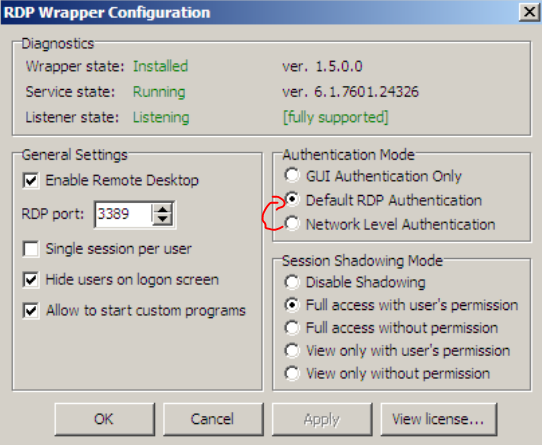
I did not find out how to force RDP to use TLS 1.0 nor 1.1. I also had no success installing the KB3080079 update (yes, I have Service Pack 1, no, the update is not installed already, yes, I used x86 for my 32 Bit install). I found out that RDP from my Windows 10 machine to the Win 7 VM already used TLS 1.2. I was able to fix my issue with "RDP Wrapper Configuration". "Authentication Mode" is set from "Network Level Authentication" to "Default RDP Authentication". Still, I'm happy that everything is working now again Thanks!!!
-
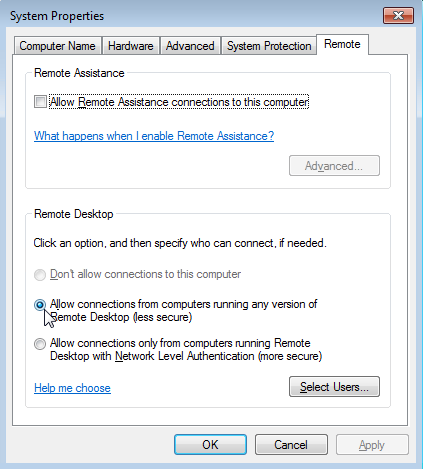
I confirmed my Windows 7 NLA disable setting online, should be fine: Still connection does not work I tried all the Guacamole encryption settings, even the empty one.. It's always RDP server closed/refused connection: SSL/TLS connection failed (untrusted/self-signed certificate?) or RDP server closed/refused connection: Server refused connection (wrong security type?)
-
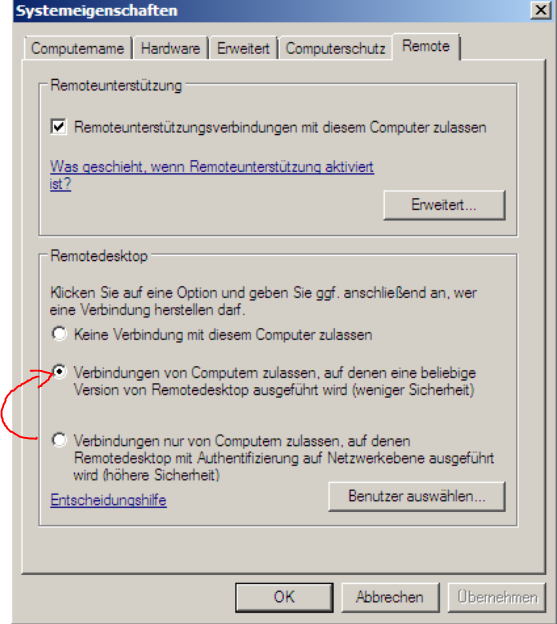
This is fine. I did this to Windows 7 RDP Settings: What settings do I need to apply to the connection profile on Apache Guacamole?
-
Yes: Yes, there is an error: Error ID 36874 - An TLS 1.2 connection request was received from a remote client application, but none of the cipher suites supported by the client application are supported by the server. The TLS connection request has failed. Debug log: usermod: no changes ---------------------- User UID: 99 User GID: 100 ---------------------- Using existing properties file. Using existing MySQL extension. Using existing TOTP extension. No permissions changes needed. Database exists. Database upgrade not needed. 2023-03-28 19:49:42,645 INFO Included extra file "/etc/supervisor/conf.d/supervisord.conf" during parsing 2023-03-28 19:49:42,645 INFO Set uid to user 0 succeeded 2023-03-28 19:49:42,657 INFO supervisord started with pid 23 2023-03-28 19:49:43,661 INFO spawned: 'guacd' with pid 24 2023-03-28 19:49:43,666 INFO spawned: 'mariadb' with pid 25 2023-03-28 19:49:43,670 INFO spawned: 'tomcat' with pid 26 guacd[24]: INFO: Guacamole proxy daemon (guacd) version 1.5.0 started guacd[24]: DEBUG: Successfully bound AF_INET socket to host 0.0.0.0, port 4822 guacd[24]: INFO: Listening on host 0.0.0.0, port 4822 2023-03-28 19:49:44,834 INFO success: guacd entered RUNNING state, process has stayed up for > than 1 seconds (startsecs) 2023-03-28 19:49:44,834 INFO success: mariadb entered RUNNING state, process has stayed up for > than 1 seconds (startsecs) 2023-03-28 19:49:44,835 INFO success: tomcat entered RUNNING state, process has stayed up for > than 1 seconds (startsecs) guacd[24]: INFO: Creating new client for protocol "rdp" guacd[24]: INFO: Connection ID is "$29971d88-dccb-4b42-bca7-f00b42602492" guacd[112]: DEBUG: Processing instruction: size guacd[112]: DEBUG: Processing instruction: audio guacd[112]: DEBUG: Processing instruction: video guacd[112]: DEBUG: Processing instruction: image guacd[112]: DEBUG: Processing instruction: timezone guacd[112]: DEBUG: Processing instruction: name guacd[112]: DEBUG: Parameter "console" omitted. Using default value of 0. guacd[112]: DEBUG: Parameter "console-audio" omitted. Using default value of 0. guacd[112]: DEBUG: Parameter "disable-auth" omitted. Using default value of 0. guacd[112]: INFO: Security mode: NLA guacd[112]: DEBUG: User resolution is 1920x955 at 96 DPI guacd[112]: DEBUG: Parameter "dpi" omitted. Using default value of 96. guacd[112]: DEBUG: Using resolution of 1920x955 at 96 DPI guacd[112]: DEBUG: Parameter "force-lossless" omitted. Using default value of 0. guacd[112]: DEBUG: Parameter "read-only" omitted. Using default value of 0. guacd[112]: DEBUG: Parameter "client-name" omitted. Using default value of "Guacamole RDP". guacd[112]: DEBUG: Parameter "enable-wallpaper" omitted. Using default value of 0. guacd[112]: DEBUG: Parameter "enable-theming" omitted. Using default value of 0. guacd[112]: DEBUG: Parameter "enable-font-smoothing" omitted. Using default value of 0. guacd[112]: DEBUG: Parameter "enable-full-window-drag" omitted. Using default value of 0. guacd[112]: DEBUG: Parameter "enable-desktop-composition" omitted. Using default value of 0. guacd[112]: DEBUG: Parameter "enable-menu-animations" omitted. Using default value of 0. guacd[112]: DEBUG: Parameter "disable-bitmap-caching" omitted. Using default value of 0. guacd[112]: DEBUG: Parameter "disable-offscreen-caching" omitted. Using default value of 0. guacd[112]: DEBUG: Parameter "color-depth" omitted. Using default value of 16. guacd[112]: DEBUG: Parameter "disable-audio" omitted. Using default value of 0. guacd[112]: DEBUG: Parameter "enable-drive" omitted. Using default value of 0. guacd[112]: DEBUG: Parameter "drive-name" omitted. Using default value of "Guacamole Filesystem". guacd[112]: DEBUG: Parameter "drive-path" omitted. Using default value of "". guacd[112]: DEBUG: Parameter "create-drive-path" omitted. Using default value of 0. guacd[112]: DEBUG: Parameter "disable-download" omitted. Using default value of 0. guacd[112]: DEBUG: Parameter "disable-upload" omitted. Using default value of 0. guacd[112]: DEBUG: Parameter "enable-sftp" omitted. Using default value of 0. guacd[112]: DEBUG: Parameter "sftp-hostname" omitted. Using default value of "xxxxxxxxxxxxx". guacd[112]: DEBUG: Parameter "sftp-port" omitted. Using default value of "22". guacd[112]: DEBUG: Parameter "sftp-username" omitted. Using default value of "xxxxxxxxxxxxx". guacd[112]: DEBUG: Parameter "sftp-password" omitted. Using default value of "". guacd[112]: DEBUG: Parameter "sftp-passphrase" omitted. Using default value of "". guacd[112]: DEBUG: Parameter "sftp-root-directory" omitted. Using default value of "/". guacd[112]: DEBUG: Parameter "sftp-server-alive-interval" omitted. Using default value of 0. guacd[112]: DEBUG: Parameter "sftp-disable-download" omitted. Using default value of 0. guacd[112]: DEBUG: Parameter "sftp-disable-upload" omitted. Using default value of 0. guacd[112]: DEBUG: Parameter "recording-name" omitted. Using default value of "recording". guacd[112]: DEBUG: Parameter "recording-exclude-output" omitted. Using default value of 0. guacd[112]: DEBUG: Parameter "recording-exclude-mouse" omitted. Using default value of 0. guacd[112]: DEBUG: Parameter "recording-exclude-touch" omitted. Using default value of 0. guacd[112]: DEBUG: Parameter "recording-include-keys" omitted. Using default value of 0. guacd[112]: DEBUG: Parameter "create-recording-path" omitted. Using default value of 0. guacd[112]: INFO: Resize method: display-update guacd[112]: DEBUG: Parameter "enable-touch" omitted. Using default value of 0. guacd[112]: DEBUG: Parameter "enable-audio-input" omitted. Using default value of 0. guacd[112]: DEBUG: Parameter "gateway-port" omitted. Using default value of 443. guacd[112]: DEBUG: Parameter "disable-copy" omitted. Using default value of 0. guacd[112]: DEBUG: Parameter "disable-paste" omitted. Using default value of 0. guacd[112]: INFO: No clipboard line-ending normalization specified. Defaulting to preserving the format of all line endings. guacd[112]: DEBUG: Parameter "wol-udp-port" omitted. Using default value of 9. guacd[112]: DEBUG: Parameter "wol-wait-time" omitted. Using default value of 0. guacd[112]: INFO: User "@ff711ba9-0d5b-4687-8252-85669b2cb3ed" joined connection "$29971d88-dccb-4b42-bca7-f00b42602492" (1 users now present) guacd[112]: DEBUG: Sending Wake-on-LAN packet, and pausing for 0 seconds. guacd[112]: DEBUG: Client is using protocol version "VERSION_1_5_0" guacd[112]: INFO: Loading keymap "base" guacd[112]: INFO: Loading keymap "de-de-qwertz" guacd[112]: DEBUG: Support for CLIPRDR (clipboard redirection) registered. Awaiting channel connection. guacd[112]: DEBUG: Support for static channel "rdpdr" loaded. guacd[112]: DEBUG: Support for static channel "rdpsnd" loaded. guacd[112]: DEBUG: Support for RAIL (RemoteApp) registered. Awaiting channel connection. guacd[112]: DEBUG: Local framebuffer format PIXEL_FORMAT_BGRX32 guacd[112]: DEBUG: Remote framebuffer format PIXEL_FORMAT_RGB16 guacd[112]: DEBUG: transport_connect_tls:freerdp_set_last_error_ex ERRCONNECT_TLS_CONNECT_FAILED [0x00020008] guacd[112]: DEBUG: SVC "rdpdr" disconnected. guacd[112]: DEBUG: SVC "rdpsnd" disconnected. guacd[112]: INFO: RDP server closed/refused connection: SSL/TLS connection failed (untrusted/self-signed certificate?) guacd[112]: INFO: User "@ff711ba9-0d5b-4687-8252-85669b2cb3ed" disconnected (0 users remain) guacd[112]: INFO: Last user of connection "$29971d88-dccb-4b42-bca7-f00b42602492" disconnected guacd[112]: DEBUG: Requesting termination of client... guacd[112]: DEBUG: Client terminated successfully. guacd[24]: INFO: Connection "$29971d88-dccb-4b42-bca7-f00b42602492" removed. Thanks for taking care so quickly!
-
Let me quote myself I tried disabling the setting and enabling again and tried restarting the container, no success so far.




