




(Small).png.20e01e54adf9a0993af949e43e312763.png)
CorneliousJD
Members
-
Joined
-
Last visited
Everything posted by CorneliousJD
-
I'm not sure on this, but this is their official docker container. They should be able to assist more in discord or via GitHub issue perhaps? Sorry I can't be of more help!
-
Yep, any docker-related files shoudl generally be on the appdata (SSD cache) for speed. You should of course have a BTRFS mirror and be backing up your appdata regularly too - You can always back it up TO the array if you would like. Thank you!!! I've fixed this on my repo, it will fix it in CA in about 2 hours.
-
Interesting, thanks for sharing your findings. I did more testing and I used a 64 character key with special characters without issue, but I did run into an issue it seems if my Redis passwords had special charcaters in it, but it straight up told me it couldn't connect to Redis at that point, so it gave the proper error on that one.
-
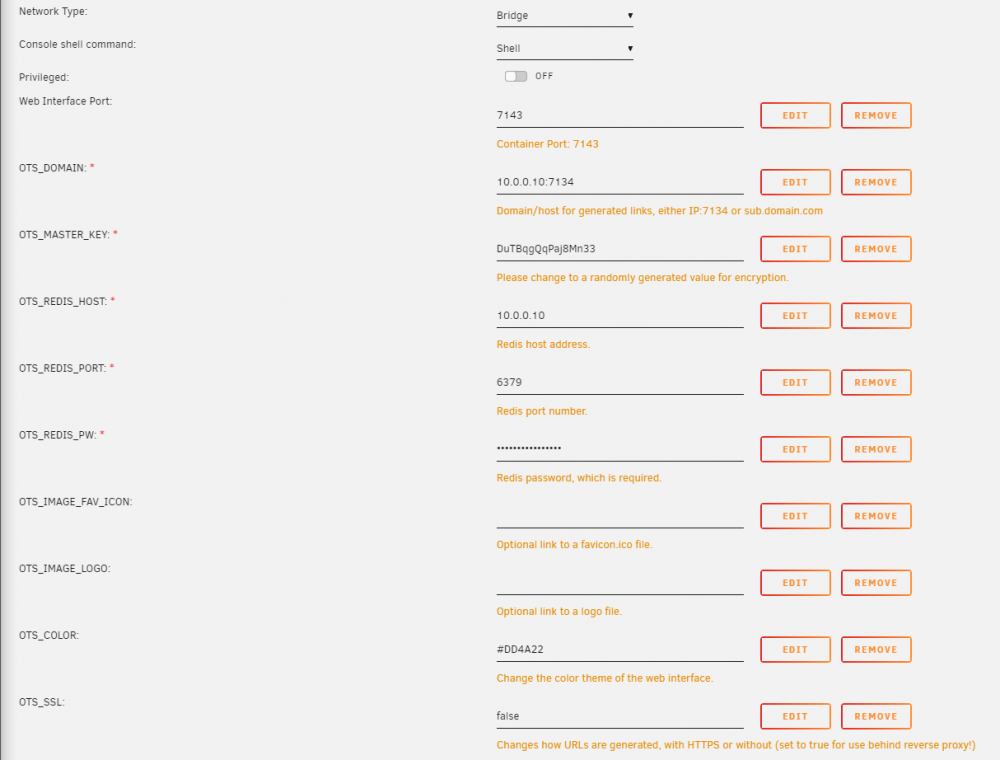
So the warnings you posted are normal, that's just how this container is, but it still works (I didn't create OneTimeSecret or this container, simply bringing it to CA as a template.) Try keeping it simple at first, try with the following settings instead, because I just spun up a new container on a test server and it's all still working for me there. It looks like you're setting privelaged to true, setting a domain, setting SSL to true, and changing ports BOTH to 5000? (Don't do this, container port needs to remain 7143 or you'll never connect...) Try not doing all that, start with a base setup with no other modifications, something like this.
-
That error shouldn't matter actually, it doesn't make a different in operation, no data is required to be stored long-term in this container. Redis persistence is the only thing you would want (and that's even a maybe, since all this data is burned so quickly anyways) PS - Sorry about leaving an image URL in there, was using that for testing, editing template now to remove it whoops!
-
Yep that's exactly it, I had edited my post right as you sent that too, sorry. I shoudl read the docs first next time.
-
Is there an easy way to setup persistent storage to appdata for Redis? I need to have something in it persist across reboots if possible. thanks!
-
Is there an easy way to map an appdata volume for the Redis container so it has some persistent storage? EDIT: Nevermind, it's all here I should read the docs first. https://hub.docker.com/r/bitnami/redis/
-
You may also be interested in another option that is being published right now to CA (should be live within 2 hours) Info on it here with a link to a demo. The container I'm publishing in CA will let you customize the color and the logo and favicon, but not the text on the page at all.
-
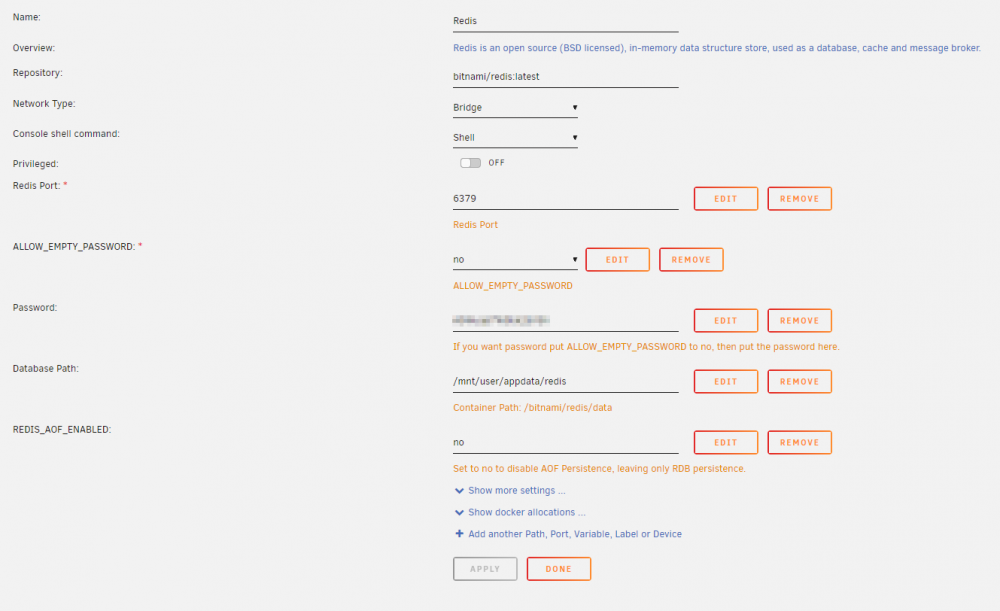
What is a One-Time Secret? A one-time secret is a link that can be viewed only one time. A single-use URI. Demo here: https://onetimesecret.com/ Note: This version does not feature sign ups or accounts, and can be customized with different logos/colors. Why would I want to use it? When you send people sensitive info like passwords and private links via email or chat, there are copies of that information stored in many places. If you use a one-time link instead, the information persists for a single viewing which means it can't be read by someone else later. This allows you to send sensitive information in a safe way knowing it's seen by one person only. Think of it like a self-destructing message. Dependencies Redis (with a password set). This can easily be achieved by installing the bitnami/redis (A75G's repository) container, and choose "No" for the "allow empty password" option, and setting a password. Note that I had issues connecting when my Redis passwords had special characters. Considerations You will probably want to enable persistent storage for Redis so that any pending links that haven't been viewed or expired yet are not lost when the Redis container is restarted/updated/etc. You can read more about persisting Redis here for the Bitnami container here: https://github.com/bitnami/bitnami-docker-redis#persisting-your-database This is my current Redis setup, which has persistence enabled from mapping the volume. I chose to disable AOF on my specific instance since it will not need to "play-back" from the log file, just a database snapshot for my purpsoes is enough. Reverse Proxy (NPM) This should just work without any extra config. Reverse Proxy (SWAG) Credit to @christ777 server { listen 443 ssl; listen [::]:443 ssl; server_name onetime.*; #change onetime.* if you use other subdomain than the standard one you. include /config/nginx/ssl.conf; client_max_body_size 0; location / { include /config/nginx/proxy.conf; resolver 127.0.0.11 valid=30s; set $upstream_app OneTimeSecret; set $upstream_port 7143; set $upstream_proto http; proxy_pass $upstream_proto://$upstream_app:$upstream_port; } }
-
Looks like someone requested this feature already - an option to toggle it on/off https://github.com/photoview/photoview/issues/253
-
Glad to bring it to CA and get more eyes on it! If the author if the actual docker container is pulling the contents of the repot when the container starts, then the CSS Files would always be wiped with what's in github every time. If NOT then it exists in the container itself and you'd have to map the contents of that folder to appdata, however I don't know the inner workings of the container itself, it seemed like an easy one to bring into CA so I did, but the only instructions for Docker from the author do *not* reference mapping a data source like this. https://github.com/pglombardo/PasswordPusher/tree/master/containerization#you-can-run-passwordpusher-in-multiple-containerized-scenarios I would actually suggest submitting an issue/feature request on GitHub asking for the mapping info to map the CSS file to an a volume so you can edit it. See if they bite. If so keep me in the loop and I'll adjust the template to include it as well Good luck, enjoy!
-
I wish I could say the same. Postgres improved performance slightly (enough to actually notice) but not as much as I had been hoping for. Irs still slow to me. I do have thousands of files syncing and some plugins doing other services too
-
This thread will server as a support thread for both the Ephemeral and PostgreSQL versions. Demo: https://pwpush.com/ Ephemeral This scenario runs the app in a single container using sqlite3 with no persistent storage (if you recreate the container the data is lost); best if you don't care too much about the data, or are just looking for quick/fast sharing, and and looking for simplicity in deployment. PostgreSQL Persistent storage for PostgreSQL is assured by using a volume on the host machine. The Database URL paramater is formatted as follows. DATABASE_URL=postgresql://pwpush_user:pwpush_passwd@postgres_server:5432/pwpush_db
-
NOTE - The dev changed the name of this from just "Recipes" to Tandoor Recipes - I've updated the template and icon to reflect the new name in CA (should be live in about 2 hours) New documentation page is here: https://docs.tandoor.dev/
-
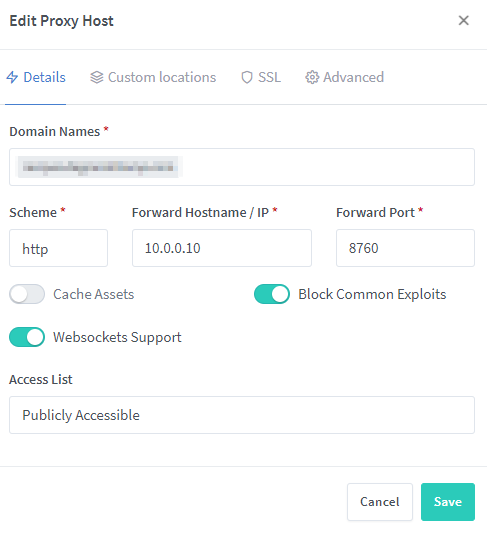
I'm using Nginx Proxy Manager and it works just fine with no extra config. I know this doesn't help with the SWAG container, but if someone has a woring SWAG config feel free to post it and i can update the first post w/ that as well.
-
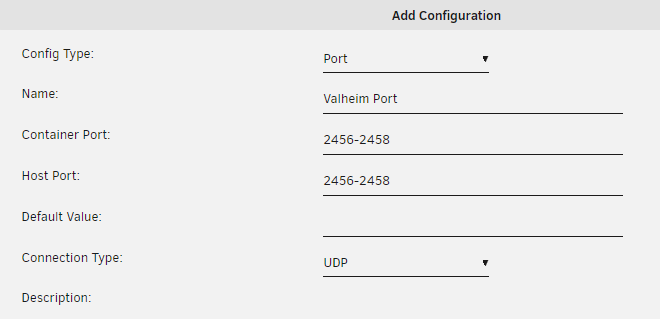
You can edit existing one, the example one there was for Minecraft. If you want to run a different game, either edit that port or add a new one. The best bet is actually going to be to create a NEW port listing. At the bottom of the container template, you'll see "Add another Path, Port, Variable, Label or Device" Click that, and then you can give it a name, and select a port (or port range), and be sure to pick if it's TCP or UDP as well, different games will be TCP and others will be UDP. For simplicity, make the container port and host port the same (advanced users can change this if needed).
-
So I had posted another thread about after a kernel panic, docker host access to custom networks doesn't work until docker is stopped/restarted on 6.9.0 After further investigation and setting up syslogging, it apperas that it may actually be that host access that's CAUSING the kernel panic? EDIT: 3/16 - I guess I needed to create a VLAN for my dockers with static IPs, so far that's working, so it's probably not HOST access causing the issue, but rather br0 static IPs being set. See following posts below. Here's my last kernel panic that thankfully got logged to syslog. It references macvlan and netfilter. I don't know enough to be super useful here, but this is my docker setup. Mar 12 03:57:07 Server kernel: ------------[ cut here ]------------ Mar 12 03:57:07 Server kernel: WARNING: CPU: 17 PID: 626 at net/netfilter/nf_nat_core.c:614 nf_nat_setup_info+0x6c/0x652 [nf_nat] Mar 12 03:57:07 Server kernel: Modules linked in: ccp macvlan xt_CHECKSUM ipt_REJECT ip6table_mangle ip6table_nat iptable_mangle vhost_net tun vhost vhost_iotlb tap veth xt_nat xt_MASQUERADE iptable_nat nf_nat xfs md_mod ip6table_filter ip6_tables iptable_filter ip_tables bonding igb i2c_algo_bit cp210x usbserial sb_edac x86_pkg_temp_thermal intel_powerclamp coretemp kvm_intel kvm crct10dif_pclmul crc32_pclmul crc32c_intel ghash_clmulni_intel aesni_intel crypto_simd cryptd ipmi_ssif isci glue_helper mpt3sas i2c_i801 rapl libsas i2c_smbus input_leds i2c_core ahci intel_cstate raid_class led_class acpi_ipmi intel_uncore libahci scsi_transport_sas wmi ipmi_si button [last unloaded: ipmi_devintf] Mar 12 03:57:07 Server kernel: CPU: 17 PID: 626 Comm: kworker/17:2 Tainted: G W 5.10.19-Unraid #1 Mar 12 03:57:07 Server kernel: Hardware name: Supermicro PIO-617R-TLN4F+-ST031/X9DRi-LN4+/X9DR3-LN4+, BIOS 3.2 03/04/2015 Mar 12 03:57:07 Server kernel: Workqueue: events macvlan_process_broadcast [macvlan] Mar 12 03:57:07 Server kernel: RIP: 0010:nf_nat_setup_info+0x6c/0x652 [nf_nat] Mar 12 03:57:07 Server kernel: Code: 89 fb 49 89 f6 41 89 d4 76 02 0f 0b 48 8b 93 80 00 00 00 89 d0 25 00 01 00 00 45 85 e4 75 07 89 d0 25 80 00 00 00 85 c0 74 07 <0f> 0b e9 1f 05 00 00 48 8b 83 90 00 00 00 4c 8d 6c 24 20 48 8d 73 Mar 12 03:57:07 Server kernel: RSP: 0018:ffffc90006778c38 EFLAGS: 00010202 Mar 12 03:57:07 Server kernel: RAX: 0000000000000080 RBX: ffff88837c8303c0 RCX: ffff88811e834880 Mar 12 03:57:07 Server kernel: RDX: 0000000000000180 RSI: ffffc90006778d14 RDI: ffff88837c8303c0 Mar 12 03:57:07 Server kernel: RBP: ffffc90006778d00 R08: 0000000000000000 R09: ffff889083c68160 Mar 12 03:57:07 Server kernel: R10: 0000000000000158 R11: ffff8881e79c1400 R12: 0000000000000000 Mar 12 03:57:07 Server kernel: R13: 0000000000000000 R14: ffffc90006778d14 R15: 0000000000000001 Mar 12 03:57:07 Server kernel: FS: 0000000000000000(0000) GS:ffff88903fc40000(0000) knlGS:0000000000000000 Mar 12 03:57:07 Server kernel: CS: 0010 DS: 0000 ES: 0000 CR0: 0000000080050033 Mar 12 03:57:07 Server kernel: CR2: 000000c000b040b8 CR3: 000000000200c005 CR4: 00000000001706e0 Mar 12 03:57:07 Server kernel: Call Trace: Mar 12 03:57:07 Server kernel: <IRQ> Mar 12 03:57:07 Server kernel: ? activate_task+0x9/0x12 Mar 12 03:57:07 Server kernel: ? resched_curr+0x3f/0x4c Mar 12 03:57:07 Server kernel: ? ipt_do_table+0x49b/0x5c0 [ip_tables] Mar 12 03:57:07 Server kernel: ? try_to_wake_up+0x1b0/0x1e5 Mar 12 03:57:07 Server kernel: nf_nat_alloc_null_binding+0x71/0x88 [nf_nat] Mar 12 03:57:07 Server kernel: nf_nat_inet_fn+0x91/0x182 [nf_nat] Mar 12 03:57:07 Server kernel: nf_hook_slow+0x39/0x8e Mar 12 03:57:07 Server kernel: nf_hook.constprop.0+0xb1/0xd8 Mar 12 03:57:07 Server kernel: ? ip_protocol_deliver_rcu+0xfe/0xfe Mar 12 03:57:07 Server kernel: ip_local_deliver+0x49/0x75 Mar 12 03:57:07 Server kernel: ip_sabotage_in+0x43/0x4d Mar 12 03:57:07 Server kernel: nf_hook_slow+0x39/0x8e Mar 12 03:57:07 Server kernel: nf_hook.constprop.0+0xb1/0xd8 Mar 12 03:57:07 Server kernel: ? l3mdev_l3_rcv.constprop.0+0x50/0x50 Mar 12 03:57:07 Server kernel: ip_rcv+0x41/0x61 Mar 12 03:57:07 Server kernel: __netif_receive_skb_one_core+0x74/0x95 Mar 12 03:57:07 Server kernel: process_backlog+0xa3/0x13b Mar 12 03:57:07 Server kernel: net_rx_action+0xf4/0x29d Mar 12 03:57:07 Server kernel: __do_softirq+0xc4/0x1c2 Mar 12 03:57:07 Server kernel: asm_call_irq_on_stack+0x12/0x20 Mar 12 03:57:07 Server kernel: </IRQ> Mar 12 03:57:07 Server kernel: do_softirq_own_stack+0x2c/0x39 Mar 12 03:57:07 Server kernel: do_softirq+0x3a/0x44 Mar 12 03:57:07 Server kernel: netif_rx_ni+0x1c/0x22 Mar 12 03:57:07 Server kernel: macvlan_broadcast+0x10e/0x13c [macvlan] Mar 12 03:57:07 Server kernel: macvlan_process_broadcast+0xf8/0x143 [macvlan] Mar 12 03:57:07 Server kernel: process_one_work+0x13c/0x1d5 Mar 12 03:57:07 Server kernel: worker_thread+0x18b/0x22f Mar 12 03:57:07 Server kernel: ? process_scheduled_works+0x27/0x27 Mar 12 03:57:07 Server kernel: kthread+0xe5/0xea Mar 12 03:57:07 Server kernel: ? __kthread_bind_mask+0x57/0x57 Mar 12 03:57:07 Server kernel: ret_from_fork+0x22/0x30 Mar 12 03:57:07 Server kernel: ---[ end trace b3ca21ac5f2c2720 ]---
-
Hmmm, it's saying the file/folder already exists. Have you tried making a new Valheim instance with a different name? This should change the name of the folder it ends up in. Worth a shot! Otherise, you could try deleting the whole folder it references /instannces/Valheim01/Valheim/ and try re-starting it after that?
-
Are you getting anything in the logs at all? Sounds like an AMP issue directly rather than a docker issue since you were able to spin up a CS server. You might get help faster in the AMP discord - but feel free to post the logs here and we can all take a look!
-
I know the Kernel Panics are a different issue. If anyone has the ability to help with that, see this thread below But after 2 different kernel panics on 6.9.0, the server comes back up and the host access on docker is still marked as enabled but doesn't work until I stop docker, and start it again, and then the communication works again. Not sure if this was present in 6.8.x as I never had Kernel Panics back then, only getting them now on 6.9.0 Again, if anyone can help with the kernel panic problem:
-
Hmm, I re-ran another manual backup and it took almost 4 hours to do the backup, I understand that verify will take just as long to check it as well? What's odd is the entire process (Backup and verify) up until now has taken about 2-3 hours total for everything. I have not added a significant amount of data or anything since last week (backups run on Sundays at 3AM) Any advice on what I can look into here to make this go faster? 8 hours of downtime is a lot. EDIT: actually the one thing I did do, is change my cache to the 1MiB partition, since they're Samsung EVO drives and were affected by the excessively high write amounts.
-
Hey Squid, I had an issue this week during my scheduled backups, it got stuck in "verifying" for 3 hours before I hit abort, then it contained to check for updates and start containers. Is there any logs I can pull to find out what happened?
-
FWIW they also have a very active discord server too and there's a #techsupport channel there. I have gotten lots of help there in the past with AMP.
-
So I honestly have no idea. I don't use sticky backups personally in my instances, but this is definately more of how AMP works rather than the docker. You might have better luck with questions on AMP itself over at their support forums. https://support.cubecoders.com/ If I knew the answer, of cousre I'd tell you here no problem! This is more-so focused on docker and unraid specific setup issues and troubles here though.
(Small).thumb.png.b884b0484e848c502a315fc27b995f59.png)



