






methanoid
Members
-
Joined
-
Last visited
Everything posted by methanoid
-
No reply from OP ☹️ @dj_sim I keep wondering why the black brackets are needed. Shuffle the drive down 10mm and the holes may well line up on the radiator bracket? Are the drives attached anywhere else or free floating? Also could the PSU not be rotated 90 degrees so its mounted on front and then giving even more space for drives etc? Considering this case and that was my thoughts as to how to build it
-
Someone says the new key was posted on MakeMKV forum but its SOOOOOOOOOOOOO slow I am dying of old age waiting for the search page to load https://forum.makemkv.com/forum/viewtopic.php?f=5&t=1053
-
Entschuldigung aber mein Deutsch ist gar nichts gut I know this is German forum but I found you need to add to the advanced template the device IDs for the DVD drive.. for me it was --device /dev/sr0 --device /dev/sg6 (Hope that helps someone).
-
Thanks, Thats what I thought... so is there anything I can do to see what before I ask if its a bug?
-
yes UD plugin installed.... I wasnt WANTING a different setting.. I was wanting ALL my HDDs to spin down after 15 mins... I suspect this is unintended behaviour as if device is NOT assigned, what is wanting to keep it awake???
-
eh? Is it possible to install a specific version now (I uninstalled)? from where? and how do I stop it auto-updating? (please!)
-
I have 5 disks in my Array and 5 disks now Unassigned (I downsized array). I have "Default spin down delay: 15m" My array has been on for days and my drives spin down when idle but I then had a look at my unAssigned devices and ALL are spun up 24/7...... Is that a design choice to NOT respect my Default Setting?
-
I miss this plugin.... 6.12.xx ... had to remove cos incompatible...
-
Thanks, worth keeping for future BUT it seems to have been some errant BIOS setting that looks like my CPU was overclocked and not stable... I put to defaults and its working fine and other unexplained issues seem to have gone. Once I have encoded another 12k videos I will be wanting to explore power saving anyway :-)
-
Oct 28 15:00:10 Uberserver kernel: mdcmd (38): nocheck cancel Oct 28 15:00:10 Uberserver kernel: md: recovery thread: exit status: -4 Oct 28 15:00:54 Uberserver kernel: pcieport 0000:00:1b.4: AER: Corrected error message received from 0000:00:1b.4 Oct 28 15:00:54 Uberserver kernel: pcieport 0000:00:1b.4: PCIe Bus Error: severity=Corrected, type=Physical Layer, (Receiver ID) Oct 28 15:00:54 Uberserver kernel: pcieport 0000:00:1b.4: device [8086:a32c] error status/mask=00000001/00002000 Just saw that in logs... The unRAID would kinda crash and reboot without rebooting the machine but each time starting a (annoying) Parity check. And some dockers were doing weird stuff (SabNZBd downloads but reports unusual errors, ngPOst fails to compact files and barfs and so on, unManic finds files it cannot compress etc). I've managed to stop ALL dockers (after about 5 attempts) and stop them autostarting so I can FINALLY get Diagnostics... Any gurus around? uberserver-diagnostics-20241028-1503.zip
-
@xompage been using this happily for many months but last time I tried this successfully was XXX and tried it last few days to post a file but every time it crashes when it does the Par creation... it crashes the container I think and KasmVNC loses connection. After a minute or two it is accessible again but nothing is posted. When it goes down it makes unRAID GUI unresponsive completely and the main share goes offline and comes back AND it starts a Parity check every time... No clue what is going on here.... EDIT: was my hardware. Somehow it got overclocked
-
Weird one this... My local unRAID webui isnt accessible... but I can access it via the internet and my tunnel.... So, 192.168.0.232 isn't accessible but domain.com/unraid is. Same with my dockers, local IPs dont work but domain.com/docker does (I also have an ongoing stability issue - I suspect its relating to encoding my video collection to H265 via unmanic docker but that's a hunch more than anything - the machine tends to become unresponsive after a few days I did also today try upgrading to latest 6.12.13 from 6.12.11 (seem to have missed 6.12.12) Diags/Logs attached. I am stumped! uberserver-diagnostics-20240926-1409.zip
-
Logs? I also started getting MCE events on AMD recently and wonder if its related to new unRAID versions (and notice a fair few similar posts!)
-
OP, what was result... I started getting MCE events on AMD recently and wonder if its related to new unRAID versions (and notice a fair few similar posts!)
-
So if we have newer unraids that DONT have the NErdTools mentioned here... what do we do (apart from seek help and post logs)
-
Thanks, I have unmanic putting my whole library in order and H265 so there will appx 60-70TB to "sort" so not gonna give my cache drive silly amounts of writes to sort it for me. I do have Split Level set but sometimes when a disk is full and a show gets "upgraded" the files end up elsewhere... and I prefer "Fill" HDDs
-
I was thinking again about the desire to have all a single TV show on same HDD and how to "logically" do it. ... was gonna ask my son (coder) to do a bash script for me but thought I'd share here in case some clever person is good at bash scripts :-) Define number of Disks (N) Define minimum HDD space in GB (SPACE) For X = 1 to N (x is HDD number) For each directory in /mnt/diskX/data/tv/DIR) Check size of directory DIR Check size of (/mnt/user/data/media/TV/DIR) [whole across all HDDs) If different then...(cos all data isnt on same HDD).... For each HDD except current... Check size of /mnt/diskY/data/tv/DIR If enough HDD space on diskX mv /mnt/diskY/data/tv/DIR to /mnt/diskX/data/tv/DIR Until done
-
Was looking at the Gather function but it doesnt seem to do what I want... My "tv shows" files are in /mnt/data/media/tv/?????. Obviously my "tv" folders are on more than one drive I want to gather all of the episodes etc of a single show into folders on the various disks. But Gather seems to be to gather all the TV shows onto a single HDD. I have 200+ shows so dont want to have to select them one at a time. Any ideas??
-
And suddenly everything "just works"... thank you. Didnt test the "ignore files" cos it worked and said "under 50% full so not doing any moving". Which is good!
-
@mgutt thank you for this guide. Inevitably I have questions 1) Is there an AMD Ryzen version of the Disable CPU Turbo? [[ -f /sys/devices/system/cpu/intel_pstate/no_turbo ]] && echo "1" > /sys/devices/system/cpu/intel_pstate/no_turbo [[ -f /sys/devices/system/cpu/cpufreq/boost ]] && echo "0" > /sys/devices/system/cpu/cpufreq/boost 2) Autosuspend for USB device - Is this advisable when the unRAID USB stick is on the bus? I think I have to disable this anyway as I pass through most of my USB controllers for VMs echo auto | tee /sys/bus/usb/devices/*/power/control
-
CA Mover Tuning version 2023.12.19 - my CA Autoupdate thinks that IS the latest version? Or did you mean unRAID version which also reports as latest Stable? I enabled Mover logging but not sure where to find the "mover.log" specifically... but found this under Logging Aug 6 19:14:27 Uberserver emhttpd: shcmd (3581410): /usr/local/sbin/mover |& logger -t move & Aug 6 19:14:27 Uberserver move: mover: started Aug 6 19:14:27 Uberserver move: file: /mnt/cache/data/backups/2024-08-04/uberserver-flash-backup-20240804-2305.zip Aug 6 19:14:29 Uberserver move: file: /mnt/cache/data/backups/2024-08-04/plex_database_backup.tar.gz Aug 6 19:14:31 Uberserver move: file: /mnt/cache/data/backups/2024-08-05/uberserver-flash-backup-20240805-2305.zip Aug 6 19:14:41 Uberserver move: file: /mnt/cache/data/backups/2024-08-05/plex_database_backup.tar.gz Aug 6 19:14:43 Uberserver move: file: /mnt/cache/data/backups/NZB_Archive.zip Aug 6 19:14:44 Uberserver emhttpd: spinning down /dev/sdk Aug 6 19:14:46 Uberserver emhttpd: spinning down /dev/sdd So it is completely ignoring my "ignore.files" content. I also added a CR at end of the last line just in case. I *thought* I had found the issue. Mover Tuning settings are fine but I have to make sure the Share Mover Tuning Settings are NOT set to Override... OK I am an idiot, I accept, but maybe might help if instructions said when enabling Tuning that you have to make sure "shares" are set appropriately? Hope thats constructive criticism? But it didnt change anything to have the Share called Data "Override Mover Tuning settings for this share:" set to No.... I'm stuck
-
Can someone tell me my stupid mistake, please?? It's still moving stuff I want to keep on my cache drive cat /mnt/cache/appdata/ignore.files /mnt/cache/data/torrents /mnt/cache/data/usenet /mnt/cache/data/nzb /mnt/cache/data/post /mnt/cache/data/backups (no CR at end of line - do I need??)
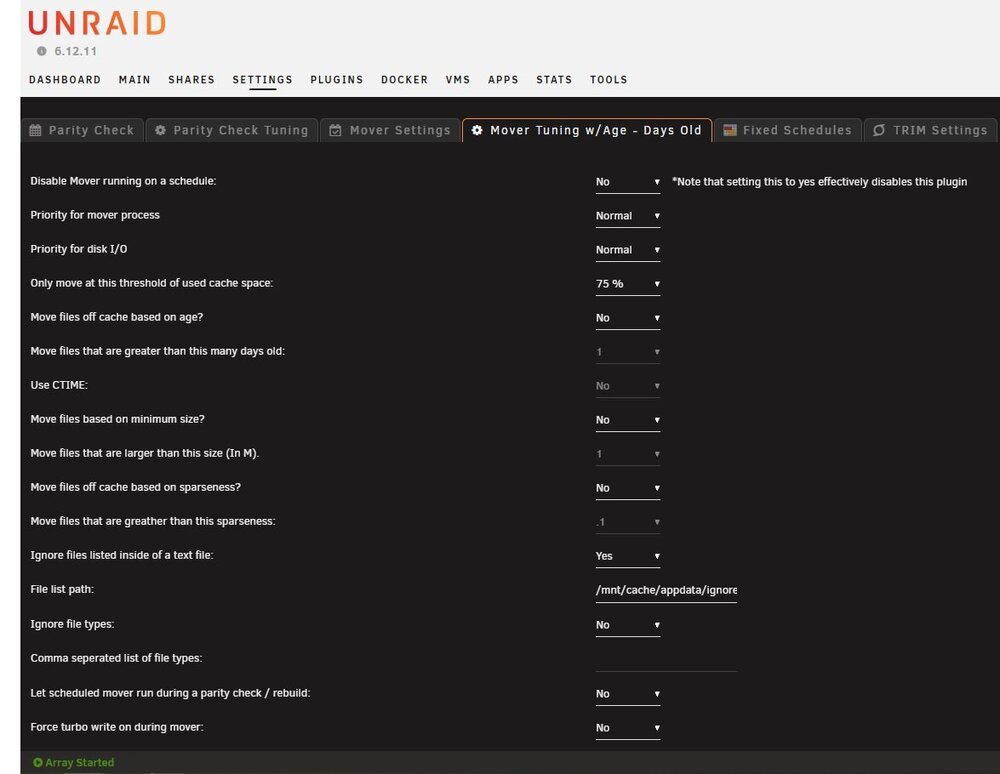
-
@landS yeah I tried passing two different cards I had but didnt work (as I stated).. Plenty other devices pass so no idea why these wont but not buying a card or tying up a slot for burner. But will put burner in another machine, update FW and then back in unRAID box for bluray ripping and then that XML method will be fine
-
This is the way :-) Or is it? I cannot update firmware on drive. And I note it says in the XML read only so not good for a burner... Tried adding a separate controller but that is causing my machine to bootloop (old ASM1061 card).
-
So, New Config and preserve all disk slots and cache slots and everything seems to be working.... (Actually it didnt but once I swapped the Cache and VM drives over it seemed to kick it into realising that nvme1n1p1 was NOT in system and was now called nvme2n2p1. But I am worried... is the NVME dying (nothing in SMART reports indicates), is BTRFS stable or even suitable for cache drive, Would it make sense to buy a 2nd identical SSD and mirror them?



