





jserio
Members
-
Joined
-
Last visited
Everything posted by jserio
-
This plugin has been working fine for my Testa P40 and Quadro but the latest update seems to be broken. I removed the plugin, rebooted and reinstalled the plugin but it force installs the v490 driver instead of the v480. This results in the Nvidia plugin page hanging (requiring a phpfpm restart). Is there a way to manually install the v480 drivers?
-
I doubt they (@Limetech) will ever fix this. They have yet to acknowledge it. I'm tempted to switch back to SMB1 just to get this to work again. It's quite frustrating that this has been going on for the last few years.
-
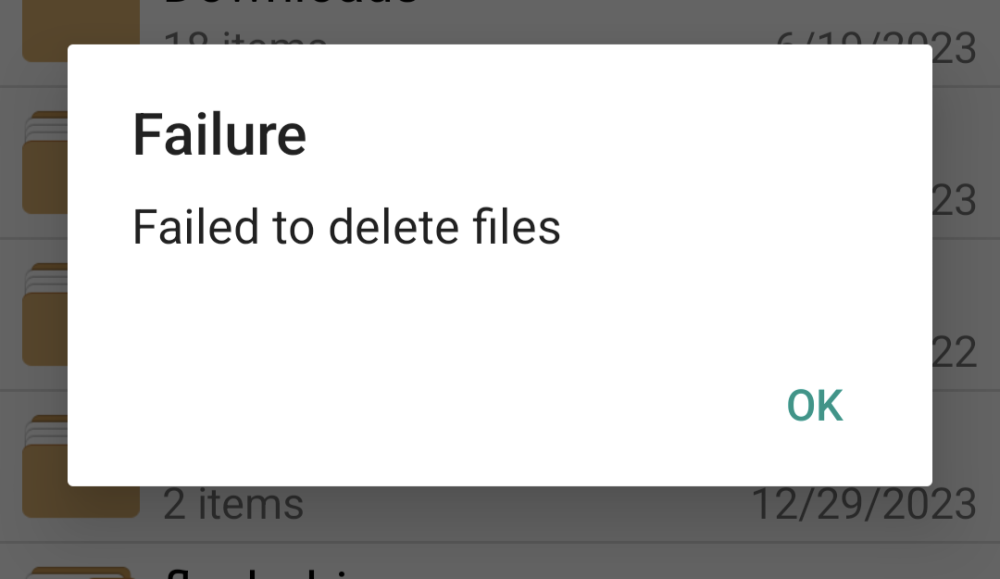
Other than pOpyraid, has anyone else got this working? Also, single file deletion and empty directories have always worked. It's deleting directories with multiple files/folders inside that result in the error.
-
I removed the Recycle Bin plug-in and duplicated your settings exactly and still get the error. Have you tried to delete a directory with files and folders inside? Deleting a single file is fine. It's the subdirectories that will give an error.
-
Unfortunately, it doesn't work for me either with the latest Solid Explorer and 7b2. Are you using the Recycle Bin plug-in? Also, would you mind sharing your SMB settings and custom parameters (if any)?
-
To answer my own question, it has nothing to do with folder caching or the recycle bin. However, if I comment out the min client directive in the Samba config (essentially enabling SMB1) and set the protocol to SMB1 in Solid Explorer, everything works. Seems to be an issue with SMB2/3 support in Unraid or the Samba version in the apps is incompatible.
-
I just tried File Manager + and received the same error. I wonder if this isn't related to Samba but perhaps the file caching or recycle bin plugins?
-
I hate to beat a dead horse, but has Lime Tech resolved this issue yet? I used to use Solid Explorer on Android all the time to manage files on my shares. Every since 6.11, I have also been experiencing failures when deleting directories with files. I've tried all of the file managers listed in this thread and none of them work. I'm sure I'm not the only one with the problem and it would be great if the devs prioritize this.
-
Hi guys. Is anyone able to get NVIDIA HW acceleration working with the Shinobi docker? I modified the template to include --nvidia=all and added the appropriate GPU ID and 'all' to the capabilities variables. However, Shinobi throws errors int he log: Unknown decoder 'h264_cuvid' Shelling into the container and running nvidia-smi shows the GPU status. However, ffmpeg does not show "--enable=nvidia" as a compiled in configuration. I searched apt for ffmpeg with nvidia but it doesn't exist and seems you need to compile it yourself. Is this correct or is there an easier way to make this work? BTW, Plex and Tdarr both work with my GPU so the issue is not Unraid or the passtrhough.
-
To answer my own question, it looks like it has something to do with "Use rich workplaces." Disabling this removes the icon.
-
I've been on v16 for some time and finally went through the multiple upgrade process to get to 18. Everything went well but my homepage shows what appears to be a spinning icon (as if it's scanning for something). The icon never goes away. Restarting the container doesn't help. This is on Firefox. Only add-on is UBlock Origin which is disabled for my Nextcloud host. Any ideas?

-
Hey guys. The latest Deemix docker seems to be broken. I noticed the port in the config still says 9666 but the documentation mentions 6595. Regardless of what I put in the configuration, I am unable to connect. Removing and adding the container doesn't seem to fix it.
-
Works great now. Thanks for the quick response.
-
Same here. AirVPN. Tried several new config files and get the "unable to resolve Google DNS error." Rolled back to 4.2.5-1-01 and all is good.
-
Hey guys. I'm having some trouble with file permissions after a transcode. Media directories are nobody:users 666 (rwrwrw). UID and PGID are 99 and 100 in the container settings for Tdarr. However, after a transcode, when Tdarr copies the new file to the original location, the file permissions are root:root 644. This causes problems when I need to write to those directories later. I have tried adding "-e UMASK_SET=0000" to the Extra Parameters section in the container and this has had no effect. I've also tried UMASK. I've also added these as variables in the container settins with no such lock. For kicks, I've tried other UMASK values and no change. Any ideas or suggestions?
-
Hey guys. Ever since I switched to this container (a few months now) it seems that almost daily it needs to be updated. Is this happening for anyone else or maybe something is wrong on my end with the CA Update plugin.
-
Same issue. Pi-Hole is using a custom IP on br0. I can access any other device on my network except the Pi-Hole IP.
-
Hey guys. I have an issue accessing the Pi-Hole docker from outside my network over Wireguard. I believe this is a known issue but I can't seem to find a definitive answer. My Unraid server is 192.168.1.110 Pi-Hole is using custom br0 192.168.1.111 No other dockers use a custom br0. When outside my network using Wireguard, I can access Unraid and all other dockers, in addition to all other devices on my LAN (router, Windows clients, etc). However, I am unable to access Pi-Hole. Can someone confirm if this is a known issue and if it will be fixed in a future release?
-
Interestingly, I went to the airvpn page to choose a few different servers and noticed this on the page (never saw it before): I suspect when the issue arises, that deluge is caching the original IP and not resolving to a new one? Any way to force a flush of the dns cache?
-
Thanks @binhex for the reply. The ovpn files does indeed use the hostname (remote us.vpn.airdns.org 443). When the issue reoccurs I'll post the logs here.
-
Hey guys. I've used AirVPN for years now but it seems that every few weeks DelugeVPN will go into a disconnect/reconnect loop every 2-3 minutes. I believe it's due to the particular server going down or having issues. Usually, when this happens I just download a new config file from AirVPN and copy it to the Deluge openvpn directory, restart the docker and all is well for a few weeks. Is it possible to copy several openvpn config files to this directory and have Deluge rotate through them if it disconnects from a server?
-
I removed then re-added CA and all works fine now. Thanks again for checking, and thanks for the great plugins!
-
It's on the main Apps page. I opened up Chrome's dev tools and see this in the console (hope this helps). The error comes after I type in "beet" (no pressing Enter).

-
Forgive my ignorance but I haven't used the beet command this way. I open the beet console and then within the container I run beet import.... Is this not the correct way? If I run the command outside of the container, then the permissions will be correct? I do know that the user inside the container appears to be 'abc'.
-
Hey guys. I've used both this docker and thetarkus version and they both exhibit this problem. When importing new files, when beets moves/copies them to the destination, the file ownership is root.root - even though the docker settings for UID/GID is 99/100. This requires me to chown/chmod after each import in able to edit the files later on. Short of writing a cron job, is there a way to fix this? Or does beets support a post-processing script (I couldn't find anything in their docs) that can call external commands? Any help would be appreciated.



