




Xaero
Members
-
Joined
-
Last visited
Everything posted by Xaero
-
The "SYSTEM" partition is unencrypted, which containers the bootloader pieces needed to do the initial handshake with either TPM or a user to manually type in the encryption key. Once the key for decryption is obtained, the volume is decrypted in-flight on read operations and encrypted in-flight on write operations. It is possible for Linux to be configured in a similar manner - but "something" has to hold the key. BitLocker suffers from the same physical security limitation as whatever Linux implementation you would use in this scenario. If an attacker has physical access to the machine, they have access to the TPM and the Boot Media. The volume is already able to be decrypted with these two pieces so it may as well be unencrypted.
-
As mentioned above - this is a chicken and egg problem. There is no universally established encryption standard for boot device encryption. The bootloader must be unencrypted out of necessity, not out of lack of security. There has to be machine code that can be executed. If we encrypted the bootloader, we would need a shim bootloader to decrypt the actual bootloader and/or boot partition(s). At some point the key(s) would need to be presented in order to facilitate boot. Somewhat of a solution is possible now with TPM2.0 and Secure Boot - but no off-the-shelf solution for integration is available presently. Suffice it to say though: If an attack has physical access to your device - you have already lost.
-
For anybody looking to authenticate docker, right now it's not exposed in the WebUI but is quite straightforward. Create an account on dockerhub. Go to the account settings and generate a read-only Personal Access Token (PAT). Copy the PAT to your clipboard. Open the terminal on Unraid. Type "docker login" Enter your username and press enter. Paste the PAT for the password and press enter. Done. Persists through reboots. PS: You can use Read-Write if you know why you would want one and actively develop containers using your server, but I doubt that would be the case.
-
I agree this probably should be addressed via the WebUI. Ideally, using Personal Access Tokens - since they won't allow login to the user's docker account, or any other accounts, if compromised.
-
I suppose this could also be considered a request - but their documentation is pretty opaque when it comes to what services you need to install/setup for a successful configuration. They mention the V1 backend requiring 13 total containers and the V2 backend now only requiring 4 but not what those 4 are. I assume it's redis, mysql, the sync server and the notes server plus optionally the web server? If anybody has this set up I would love to know how you got it going, or if anybody wants to take a whack at it it looks like an excellent notes application and running it decentralized with the freemium features out the gate would be nice.
-
Looking for options here. Been browsing the net for a while, and figured if any community had a nice concrete answer it would be this one. Authelia falls onto Duo for the PUSH side of things so it's out. Most of the self-hosted options are TOTP. Typing in a TOTP code frequently gets old, and I've come to like the MSFT authenticator I've been using at work recently but don't want to outsource my private network. It's also nice because if I'm not trying to log in and I get a push notification I know something's awry.
-
More flexibility is never a bad thing. An addendum would be to split the "sticky" or "auto-close" based on severity level. I don't want critical notifications like a disk overtemp or smart error fading, but I kind of don't care if an update happened 99% of the time.
-
I'm silly, and forget things sometimes, but you could also use the script feature of the unassigned devices plugin to handle the starting of the plex container - it has a section where you can define a script to run when a path is mounted, you could use this to start plex when the path is mounted. Both ways work, and each has their advantages and disadvantages.
-
I'll put the TL;DR up front: I need OpenGL and preferably at least h.264 transcoding acceleration in a Windows 10 VM. I need to be able to remotely access this VM and still have that acceleration. I cannot use RDP or VNC for this. I may be able to use Looking Glass - but I'm not sure as they block lots of remote access tools where I work. And the more lengthy description afterward: I've been running numerous Windows and Linux VM's on my unraid box, but haven't needed actual hardware accelerated graphics for any of them. Presently my server's configuration is this: 2x Xeon e5-2658v3 2x 1tb NVME cache pool (VM storage is here as well) 128GB RAM nvidia Quadro P2000 for transcoding My VM's are currently: - Windows 10 remote access VM - Home Assistant - OPNSense (not actually using for my home network yet, just toying with the idea) - My work VM which runs Windows 10 21H2 Enterprise provided by my company, and whose software is "fairly restricted" The last VM is the one that I suddenly need acceleration on. Until now QXL has been "sufficient" since most of my day to day is office style productivity - at least in terms of the video acceleration. I now have the need to be able to run h.264 transcodes and handle OpenGL Acceleration in my work VM, because I'm now going to additionally be recording and editing video content into the VM using hardware capture and desktop screen recording. Two of the applications I normally use to do that on my laptop at the office won't even open because I don't have OpenGL support. My server is in another room. My desktop is what I game/work on - and currently I use Spice to connect to the work VM, because it allows VNC/RDP like functionality like dynamic resolution and clipboard sharing - without me needing to run RDP (explicitly blocked by policy) or VNC (also explicitly blocked by policy). I then place this VM on one of my 3 monitors and I'm off to the races to be productive for the day. I also use USB redirection from Spice to get some meeting peripherals mapped to the VM, but that can be handled another way. Spice cannot forward the video from a secondary graphics device, since it doesn't have access to the framebuffer. There's a guest streaming agent available, but most of what I read states it is both experimental and it's Linux-only. So my options kind of seem like: - Pass thru an entire GPU, try to set up spice streaming or looking glass and see if my company fights me on it. - Figure out GPU partitioning and pass through resources from a GPU to the guest with a hybrid driver on the host so I can continue to use the P2000 for transcoding for plex as well (This seems like the best option, but I might need to upgrade from the P2000 to something beefier) Any advice here? I'm not sure how to approach this since I both need "remote" (it's just in another room) access and hardware acceleration.
-
No worries - do be sure to let me know if that worked. I don't have that type of environment so I was not able to test that script properly. Syntax and logic seem right, but you never know
-
It is perfectly valid and reasonable to disclaim that the Unraid WebUI, nor the underlying Unraid OS be exposed directly to the internet. It is not hardened or pen tested against that environment and should not be exposed to it. Even if they add 2FA, this does not change the fact that the rest of the OS, and WebUI have not been properly audited for exposure to the internet. Couple that with the OS itself only having a root user and it's just a bad idea to put it on the internet. If you want remote access to the WebUI - use VPN. VPN are designed from the ground up with the focus on providing secure remote access to machines and networks. They support 2FA. They provide peace of mind knowing that some 0-day exploit for the Unraid WebUI or one of the packages running on Unraid isn't going to compromise your storage solution. The official unraid plugin is also a good option, since it's protected with 2fa, though I cannot personally comment on it's usage.
-
There isn't a built-in way to do this. I would personally use a user script to do this using the user scripts plugin. The script itself would be quite simple: #!/bin/bash #We'll use a helper functions to keep things easy to read. isMounted(){ findmnt "$1" > /dev/null } isRunning(){ docker inspect --format '{{json .State.Running}}' "$1" } #We don't want to try and start an already running container. #Plex isn't running, let's check if it's sane to start it. if ! isRunning "plex"; then #Until the path is mounted, we sleep until isMounted "/mnt/remotes/MySambaShareName"; do sleep 5; done #Path is mounted, time to wake up and start Plex: docker start plex fi You would set that script to run at array start, and you would turn off autostart for the plex container. You'll obviously want to change the name of the container and the mount path to fit your environment.
-
The problem is any permissions you allow increase attack surface. If a user with full R/W access to a share has their PC compromised and a ransomware application uses that R/W access to encrypt the files, the vulnerability wasn't the fault of the file sharing, but the permissions given to the user. Properly segregating user access to shares is not very complicated and its totally possible to do so while mitigating the possible attack surface sufficiently. A bunch of static install media used for making bootable media or PXE boot environments? Don't exactly need R/W access to that share. But what about the logging you ask? Excellent question - by using dynamic mapping you can create a per-client read/write directory automatically. If ransomware wishes to encrypt some installer logs fine, we can just delete those and move on with our day. Similarly, you can set up per-user shares fairly easily as well, and have those be read/write. Taking active snapshots of user directories has much less impact than taking active snapshots of the entire filesystem. For example, let's take a look at some of my data sets -- I have an archive of some "gold" images for specific hardware. Each of these images is quite large, and I do have them backed up elsewhere. The total size of these images is around 10tb. By having that entire share read only for everyone except local root access, I've reduced the need/want to snapshot those images ever. I've got an off-site backup should I need it. On the flip side, I have samba set up to point each Wireguard user at a different "Personal Folder" using the IP information for the wireguard client. There's less than 100gb of data across all users in these read/write personal folders. I can afford to take incremental snapshots of these directories and rapidly recover should any of the clients get compromised. Not to mention, since the folder is per-user, only one user would be affected by such an attack.
-
Kind of a trash attitude man, he's just pointing you in the direction you are likely to get a response from. While there are employees on the forums, and they do help, this isn't exactly a direct inbox. The form on the website on the other hand, is. I'm sure they'll get you sorted out, but it's probably going to require patience, and rectifying mistakes usually does. Accidents happen, no need to fly off the handle when someone is trying to be helpful.
-
These best practices do come with a caveat, using brute force alone, a 12 character password consisting of only upper and lower case English alphabet characers would take just over two years to crack on a single RTX6000. This time more or less scales downward linearly with the number of GPUs you add. This is just brute force. Rainbow table based dictionary attacks can throw the entire English dictionary and all documented first, last, middle, and pet names at the problem in a fraction of that time, and then start concatenating them together for additional attempts. The best practices assume a well designed validation model. Per-user time delay login attempt lockouts (Too many failed attempts! Try again in 15 minutes!) increases the time to crack exponentially. 2FA also practically eliminates brute force as an attack vector. P.S. @ljm42 the site you linked would seem to suggest that cracking even just a 12 characer Upper/Lowercase password is sufficiently complex for most users. It's using some pretty outdated data that doesn't take GPU compute into account, or rainbow tables though.
-
Just to throw my idea in the ring, I would use responsive layout to show/hide breadcrumbs depending on screen width. The easiest way to approach it is making some educated assumptions as to the "most useful" breadcrumbs to display. In general that's going to be: Top Level > Direct Parent > Topic This can be expanded dynamically to include each parent nest above the direct parent until we reach the top level. In the example of these multi-language subforums the "minimum" breadcrumb ribbon would be: HOME > GERMAN > TOPIC Unfortunately, I don't think this can be achieved with pure CSS - and would likely require jquery.
-
This is worth replying to, and I noticed that nobody had yet. The concern isn't exactly that your password would be insecure against an attacker; but rather that the Unraid WebUI does not undergo regular penetration testing and security auditing, and as such should not be considered hardened against other attacks. These attacks could bypass the need for a password entirely, which is a much bigger concern. 2FA systems, when implemented correctly, would prevent this type of attack, but still would not make it safe to expose the WebUI directly to the internet. Since it isn't audited and hardened, and has endpoints that directly interact with the OS, it's likely that an attacker could easily find a surface that allows them read/write access to the filesystem as the root user, and the ability to remotely execute arbitrary code, including opening a reverse SSH tunnel to their local machine giving them full terminal access to your server without ever having to know a username or password. As far as the effort required - it's going to vary greatly, but many of these types of vulnerabilities hackers have written automated toolkits that scan and exploit these vulnerabilities for them with no interaction required on their part. TL;DR: Don't expose your WebUI to the internet. This has been stressed heavily by both Limetech and knowledgeable members of the community for a reason. Extend this further to NEVER expose a system with ONLY an administrator or system level account to the internet. P.S. If I am wrong on the regular security auditing, please do let me know and I will remove that claim from this post, but as far as I am aware and Limetech has made public knowledge there is no such testing done, which is fine for a system that does not get exposed to the internet.
-
Only if you expose those ports to the internet are they exposed - and depending on how you configure things, connecting to WireGuard doesn't expose the WebUI. That said, WireGuard is also a passive technology, there's no "listening" service that is going to reply to a request, this is of course security via obscurity, but also means that most attackers aren't going to be privy to your use of WireGuard just by traditional port scanning attacks, and even if they were, they'd have to have the correct RSA tokens to authenticate. Barring a pretty egregious error on WireGuard's part security wise, it'd be an incredibly poor attack vector even for a skilled attacker.
-
I didn't even notice this was added, but I do use a SPICE VM which is UEFI Secure Boot with BitLocker authentication on startup. I went to start the VM and noticed the Start With Console (SPICE) option and was shocked to see both the start with console option, and the spice support! Cool stuff! That said, the URL the SPICE WebClient is trying to use for the websocket connection is invalid: It's adding a `:` between the host address and the path, presumably because the client is expecting a port instead of a path there. Appreciate the effort in getting better SPICE support since it does help a lot with dynamic resolution scaling being native to the protocol. This should be a (hopefully) easy fix since it should just require deleting that `:` from the URL structure. I'm gonna try testing this at some point hopefully.
-
ELF headers belong on Linux executables and linkable libraries, though - and it's not going to be human readable, it's binary data - if you open it in a text editor it is going to be gibberish because that's not how it is meant to be processed.
-
There's so much misinformation/disinformation in your post that its hard to pick a place to start, and I'd almost think it was satire. For example, chmod, chroot, b2sum are all part of the stock unraid release. Nothing additional was downloaded for those. Tmux was the first and only tool you listed that wasn't part of unraid stock, and could have easily been downloading following tutorials that used it. Additionally, Hugepages are simply either supported by the kernel or not supported by the kernel, they don't really get "enabled or disabled" per se, but can be adjusted. 2048kb Hugepagesize is default, and the current release of unraid uses a kernel that supports hugepages. "/" is the root directory. "/root" is the root user's home directory. People mess this stuff up all the time because we use the term root and the username root a lot. To segregate it, root is the superuser ("su"), and the root directory is the base directory of the filesystem ("/"). /bin and /sbin are unique directories, unless one was linked on top of the other there probably wasn't much cause for concern. Certain objects in /sbin will just be symlinks to /bin/executablename and this is by design. Without detailed information on what the symptoms were, what the changes being made were, and log output it's kind of difficult to say if you actually had a compromised system, or just had something configured incorrectly.
-
It doesn't kill the unraid GUI, but it does latch the power state to P0 indefinitely as soon as steam starts within the docker. The only way I can get it back to a lower state is to kill everything using the card and then start a new x server (either in unraid or the docker) or by starting persistenced.
-
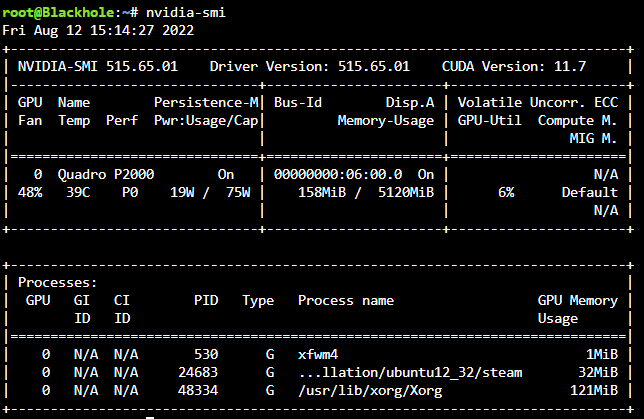
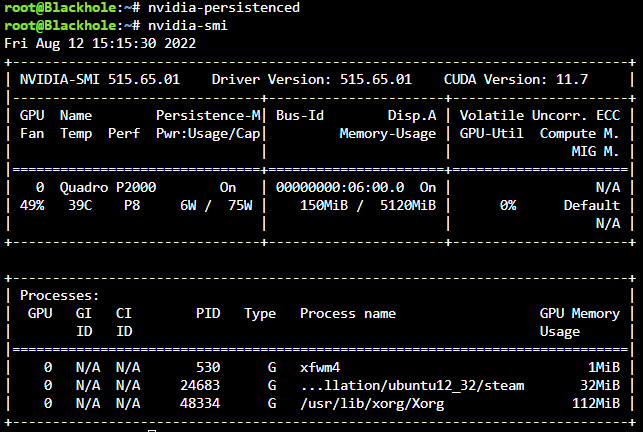
I've been toying around with steam-headless docker and the nvidia driver package for a bit. Without nvidia-persistenced started, as soon as `steam` runs within the docker the power state is P0 and never leaves it. Even after closing the docker down, the power state remains at P0, killing all handles with `fuser -kv /dev/dri/card0` also kills the unraid X server and leaves nothing to manage the power state, so it's still at P0 - at least until I `startx` which grabs the card again and shifts it back to P8. With the daemon running, steam doesn't lock it to P0 - instead the frequency scales dynamically as would be expected, initially going to P5 pulling 10w (instead of the 20w at P0 idle) and then eventually settling back down to P8 and pulling 5W or less. Before starting nvidia-persistenced: After starting nvidia-persistenced: The effect is immediate as can be seen above. Killing the persistence daemon results in the power state being locked at wherever it was left until the next application requests a higher power state. EDIT: Turns out there is one more caveat to this, and maybe an undesired effect. The nvidia-persistenced keeps the driver loaded even with no application using it (so if zero processes are using the GPU) which does keep the power consumption higher than if there were no driver loaded at all. I don't know why this also allows the power state to drop for steam however. Just what happens in practice. I'm sure others can test and either validate or invalidate my findings.
-
You would be correct in learning something new. I never even would have guessed that ".local" suffix specifically had different handling via zerconf/avahi/multicast. Neat! Yeah, don't really feel I should be breaking zeroconf by manually adding those entries to DNS. What I've got going for now works. I've next go to tackle taking my ISP's gateway out of the picture because it explicitly does not support certain things (changing the DNS and NAT loopback being the important ones for me.)
-
That's how it came set up out of the box - and it was unable to resolve hostnames. Even specifying a dns using the --dns flag in docker it would not resolve hostnames. I believe there is something missing in the br0 config for this to work outside of dns as `curl <DNS IP>` which is on my local subnet results in no route to host - which is odd since the br0 network and my local subnet are the same scope (192.168.1.x). Either way host works and all my services are reachable how I want them to be again.


