Xaero
Members
-
Joined
-
Last visited
Everything posted by Xaero
-
You may try using setgid to make the owner the group of the directory. You should chmod g+s /path/to/directory Newly created files in the directory will inherit the setgid bit. note: SetGID being used for this purpose will also require that the group have read and write permission on the directory. Files created will then also inherit this from the directory with SetGID. I'm not sure how docker interacts with this - it may defeat setgid due to the nature of containerization.
-
I believe that behavior is normal. One thing to avoid is trapping and then causing a loop by using the same signal as the trap is catching. You can unset the trap in the cleanup routine if you run into this problem. A clever bit of *nix-fu to make scripts more like actual runtime applications. Also, yes - placing it after a command is not necessary as long as you are intelligent in the cleanup routine. The one-liner for example would break if the file had not yet been created and then the script was exited. Obviously conditionals inside a cleanup function make quick work of these small problems.
-
You can also trap unexpected exits and remove that sentinel file in most cases by placing a line like this immediately following the creation of the file: trap "rm -f $temp_file" 0 Certain exits will not be caught by this (kill -9 for example, immediately terminates a process with no regard to any open handles or cleanup code) To explain, the first argument of trap (in quotes) is executed any time the signal to the right is received. 0 is EXIT. Any time SIGTERM, SIGINT etc are fired, you can catch those as well, but eventually all of those lead to EXIT also being called. So if you just need to do something before the script exits, this is sufficient. If there are additional things like wanting to print which signal is received to a log you can do that as well. You can also use this to call a cleanup function, where you could stop any running parity checks, delete the sentinel file, etc.
-
https://paste.ee/p/wcwWV It's posted twice in the last two pages.
-
You are using the version from the OP. It's broken. I posted a fixed version of the original, but note that its not as effective on Unraid 6.x as the tunables have changed.
-
I have dual e5-2658v3's. I believe they should be sufficient.
-
Indeed. I initially looked at this post for a hopeful answer to abysmal parity check times. For me, it takes just shy of 1.5 days to complete a parity check on 24 8tb drives, totalling 176TB with dual parity bringing the raw platters to 192tb. Obvioulsy I have roughly 3 times your surface area. Which should come out to around 18-20 hours of parity check time, assuming similar speeds through and through. 8TB drives are substantially faster thanks to the higher density, and various mechanial and controller improvements. I should be able to read at ~200MB/s off each drive. Thanks to a port expander bottleneck ( Math found the answer - 2 * 4 links = 8 links * 3gb/s = 24gb/s / 24 drives = 1gb/s per drive = ~125mb/s give or take maximum theoretical bi-directional. ) that is not the case. But even knowing that, my speeds are still slower than they should be - around 60mb/s for the majority of the parity check. Something else seems fishy here. Running the script yielded ~10mb/s improvement for me, so I'll take what I can get until I can afford to toss money at the real problem. And yes, the things I want to focus on are outside of the scope of this script - which is another reason I don't want to adopt it as a project. Also; the I/O scheduler has nothing to do with the actual data sent to/from the disk - just when and where that data is sent or retrieved. Unraid is currently shipped with noop as the default scheduler for all block devices. Noop is generally bad for rotational media, as it doesn't do any planning for storing the data contiguously on the platters. This would be suitable for the parity disks, since that data will largely be unorderly anyways. But for the disks storing filesystem data, it can have a negative impact on large file read performance (seeks will occur in large files) and write performance (holes will be scattered, resulting in excessive seeks for writes) over time. It seems like an odd decision on limetech's part. They haven't included any advanced schedulers in their kernel build - so for me to test I'll need lots of time. My plan is to enable DKMS so that nvidia-*-dkms packages can be leveraged (to support more than current-generation only cards) as well as trying to leverage BFQ and/or Kyber. I'll test that on a smaller, non-important box though, when I have the time.
-
Even then, this is an incomplete picture. Those are just the tunables exposed via the webui. There are more tunables available than that, even most likely. And yes, they do directly change how data is lined up to be written to the array. The latter point about mismatched hardware is why I think a different I/O scheduler could also make a pretty big impact. I believe I read in the past of people switching to CFQ to speed up write operations (currently unraid defaults to noop - which more or less is a hands-off I/O scheduler) something like BFQ could probably mask or mitigate the majority of the IO wait time for different operations. In particular, read operations would probably see a big relief. We also have a new kernel option available in 4.12+ - blk-mq and scsi-mq These are multi-queue options designed for dense multi-disk storage applications to have substantially lower access times. For example, Kyzen scheduler, which is similar in principle to BFQ, but simpler, has shown dropping SSD array times from 8ms to 1ms or lower times. That's a huge impact when there are hundreds or thousands of operations in the queue. I'd have to read more, but I believe at the kernel level, with the old (current) system, the I/O queues are each singular. That meaning, each device in the noop queue, shares the noop queue. Where in the mq implementation, each block or scsi device gets its own separate queue. Meaning increased CPU overhead for command routing, but each device getting more readily available queue handling. This would in theory mean less blocking from varying disk arrangements. A slower 16m cached disk won't be holding back a 10krpm disk with 256m of cache, for example. These sorts of implications are why testing MQ and BFQ/Kyzen are higher on my priority list. I feel like limetech should probably be looking at these options as well - but they are brand new.
-
Hello! This is also my surface findings from running the old version of the script, the increase is marginal at best - but still worth squeezing any performance out you can. I know that between 3.x and 4.x, the Linux kernel has seen some pretty insane improvements in I/O overhead to begin with, unraid gets to take advantage of that out door. It also means that for a (relatively) old Linux goon like myself, I have a lot of new learning to pick up with what kernel tunables can yield what results. We had a science. That science has changed. I'd also be curious to see how BFQ would affect unraid's performance, including that during parity checks. I can only imagine that BFQ would enable much higher total throughput, at the cost of substantially higher CPU utilization. If I had more free time, I'd play with it... which brings us to the next two points... That's a shame, as that is really what is needed to make this script compatible with 6.x. LT changed the tunables from 5.x to 6.x, and the original script needs updating to work properly with the 6.x tunables. Fixing a few obsolete code segments to make it run without errors on 6.x doesn't mean you will get usable results on 6.x. Indeed, the point was to get something from the script usable with the existing code base and logic - not to create something new. The testing automation ideology implemented isn't fundamentally broken - just the amount of flexibility is. Ideally, one would create a much more in-depth test pattern for a finalized script for 6.x and Linux kernel versions in the 4.x->5.x family. You'd need to find ideal baseline values for several tunables, and then play with those values in tandem to find a suitable combination, since some of these values will impact eachother. I think, looking at the behavior of this script in the real world, and using a bit of computer science, a lot of the "testing time" can be eliminated. For example, performance always seems to be best at direct power of two intervals. We usually see okay performance at 512, with a slight drop off at 640, trending downward until we hit 1024. Knowing this, we can make big jumps upward until we see a decline, and then make smaller jumps downward in value to reach a nominal value with less "work" Obviously this would be great for getting initial rough values quickly. Higher granularity could then be used to optimize further. There's probably some math that could be done with disk allocation logic (stripe, sector, cache size et al) for even further optimizing, but that's a pretty large amount of research that needs to be done. I actually don't know what tunables are available currently (It's not hard to dump them with mdcmd) or what their direct impact is on various workloads. That's another shame. Seems like you know what you're doing, more so than I do with regards to Linux. I'm a Windows developer, and my limited experience with Linux and Bash (that's what this script is, right?) is this script. For me to pick it up again, I have to essentially re-learn everything. I keep thinking a much stronger developer than I will pick this up someday. I'll take the compliment. I'm still ever-improving. I'm an amateur developer, but I have many, many years of experience with Linux as a platform, including building automated install suites for various distributions (though Arch is probably the most friendly for this type of application). And various performance tuning for other applications, specifically low-latency gaming applications related to rhythm-games. You'd be surprised how much it is possible to optimize each step of the chain when you really dig into it. Unfortunately, life has sucked all of my free time away from me. I want to spend more time focusing on projects like this - I just don't have that time available. Spending an hour or two while I'm sick fixing a script is affordable, spending a couple of hours a day for several weeks designing and implementing a replacement isn't an option yet. It's interesting that even though the two tunables the script currently tests are not as relevant today, there is still a fairly substantial performance improvement available using them, though. No, it won't shave hours off your parity check, but it will make the difference between saturating gigabit connections and not. In my case, I have a bottleneck upstream that caps my parity check speed around 70mb/s Once I get rid of this slow port expander...
-
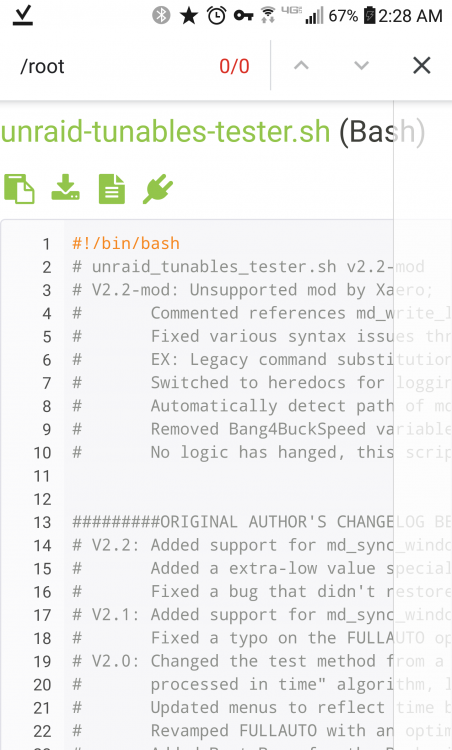
You aren't running my script. If you do a ctrl-f on my script and type "/root" you'll see there is no hard coded reference to that location. Your output is also showing: "unRAID Tunables Tester v2.2 by Pauven" I've added to the end of that and it should read: "unRAID Tunables Tester v2.2 by Pauven - MOD by Xaero" Both of these changes were intentional. One was to help differentiate, the other was because we shouldn't be using a hard coded nonstandard path like /root.
-
The forum may be mucking it up for us, let me post a link from a sane paste site. https://paste.ee/p/wcwWV Some quick notes for the curious for some decisions: Each call of echo actually eats CPU and I/O scheduler time, even the ones that only write to the screen. It's better to produce many lines of output with a single echo or cat statement generally than to use many. I left some of these in just to avoid frustration with implementing a single echo that did the same thing. In some places I've opted to use cat. This happens in two circumstances: 1.) Where there's identations. A CR escaped echo `echo "\` prints identations literally. You could use a heredoc with echo, but it can be unpredictable depending on what implementation of echo is present on the target machine. It's easier, and safer in this circumstance to use `cat` 2.) Where there's bash sentinel characters `*` for similar reasons as above, if you use a cr escaped echo to print a block that contains a bash sentinel, it will expand those sentinels. To work around this, you can temporarily turn off this processing, and then turn it back on with `set -f` and `set +f` respectively. This is 3 separate calls to do what a single cat handles with no problem. cat can be measurably slower in certain circumstances, but its generally negligible, especially since we've reduced the number of calls 3 fold. You'll also notice I use two different heredoc sentinels with cat, `<< EOF` and `<<-EOF` the former includes whitespace to the left of any text, and requires that terminating EOF sentinel to rest on the first character and be the only character on the entire line at the end of the heredoc. While the latter truncates anything whitespace located to the left of the terminating EOF sentinel, and allows whitespace to preceed the terminating EOF sentinel. In this manner I can retain identation on appropriate text blocks without including it in the resulting output. The other changes are not preferential but agreed upon by most of the industry as "proper syntax" ( `$()` for command substitution in lieu of ``, double quotes around variables to prevent globbing, etc.) I didn't bother messing with the logic as I wanted the script to retain its original functionality, and just have more longevity. Currently no errors should be output during a FULLAUTO run, from my test earlier today. If you run into an error message ping me here and I'll see what I can do for now. I don't plan on adopting this project, just don't like seeing hard work lost or error messages on my terminal windows. (I suppose I could just wrap everything with a 2>/dev/null) PS: I've been very ill, so I've made a substantial number of typographical errors in my notes and comments in the script. The script runs okay, as I had to test it - but trust me, it didn't run the first time I tried after making all of the changes. Not even close. Hopefully my brain starts to pick up speed again over the next several days.
-
Attached is a debugged version of this script modified by me. I've eliminated almost all of the extraneous echo calls. Many of the block outputs have been replaced with heredocs. All of the references to md_write_limit have either been commented out or removed outright. All legacy command substitution has been replaced with modern command substitution The script locates mdcmd on it's own. https://paste.ee/p/wcwWV
-
https://sourceforge.net/projects/avf/ I'd like to request AVFS - it allows one to mount various archive and network protocols as virtual filesystems. There are slackbuilds available for it: https://slackbuilds.org/repository/14.2/system/avfs/
-
I have a large number of gzip archives that I would like to bind mount into a directory. The contents can be read-only, but the archives have to remain gz. In the past I've used archivemount and a script for this, but archivemount doesn't seem to be available for unraid, are there any solutions for this?
-
HAHAHA I can't believe I left that in there. Originally, I was using /bin/bash -c which resulted in a bashism making the concatenation cause the script in the container to error out with "invalid codec: vp9" even though it was totally valid. Switching for sh -c fixed it but I left my concat workaround in there. Thanks for the fix EDIT: I have moved wget to the HOST side in the latest revision of the script. neither curl or wget is guaranteed to be present inside the docker, since this script was written for unraid, and unraid ships with wget stock - we're using that. I could add a pure bash download function - but that seems unnecessarily complicated.
-
Had been meaning to implement this myself. I just updated my script on gist. The new script pulls the latest version of revr3nds script and applies it. It also supports a list of codecs in a variable near the top of the script if you need to change them for any reason.
-
@Djoss Any chance of adding SSLH support for this docker? It enables SSH access on the SSL port so that you can SSH into the server using the SSL port on locked down networks. I realize a VPN works around this as well, but would be a neat addition.
-
I'm not sure but I think it's unraid that's missing the terminal info. I believe it was ncurses that is stripped down. I thought someone earlier in the thread fixed it but changing their terminal emulation. What unraid version and terminal are you using and what emulation? Slackware package for tmux come with tmux and tmux-256color terminfo: https://slackware.pkgs.org/14.2/slackware-testing-x86_64/tmux-2.2-x86_64-2.txz.html EDIT: To answer your questions though: Unraid-nvidia 6.7.0-rc7 I've tried using export and `TERM=xterm tmux` but still results in the error as tmux still tries to use it's own terminfo (which obviously doesn't exist) I've since copied over a working terminfo from my ArchLinux server for the interim, and the issue is resolved. Seeing as the official slackware packages for tmux have terminfo for it included, it makes sense to package it that way.
-
@dmacias tmux seems to be missing the terminfo for tmux, resulting in backspace being broken again. Just fyi.
-
160TB usable here (192TB raw platters). Norco RPC-4224 SuperMicro X10DRL-IO 2x 1tb intel 660p for cache 24x Shucked WD Red 8TB drives from BestBuy black friday last year (over 60% off the price of the raw reds) 64gb DDR4-2133 ECC nVidia Quadro P2000 Not exactly happy with my HBA situation. Currently have an IBM M1015 connected to an HP port expander. The IBM card reports the drives as "standby" even though they are spun up. And the port expander only negotiates 3gb/s links (24 drives through two 4 port 3gb/s links is down to 1gb/s total bandwidth per drive) Going to be upgrading that, but not a lot of controllers that support IT mode and handle 24 disks. I'd like to not use a port expander but may be forced to.
-
So, I've just realized that there are serious performance implications to running any older LSI cards in IR mode with disks passed through as JBOD. The firmware has an odd "bug" where it doesn't properly report the drive status. This confuses the kernel during any read/write operations and causes certain disk commands to kind of "hang" for a bit. Symptoms: rtorrent timing out even though it's on the NVME cache drive plex intermittently having poor transcoding performance, even with nvenc and nvdec abysmal parity check performance (note that part of this is due to my SAS Expander only negotiating 3gb/s per link) To verify your controller is old enough to have this problem (my IBM M1015/LSI 9211-8i is) Start watching the disk status with hdparm: watch -tn 0.1 hdparm -C /dev/sdw /dev/sdw: drive state is: standby Click the "Spin Up" button on that drive's page on the WebUI. If the drive state doesn't change, and the button is still there, your controller isn't reporting the drive status properly. From my understanding (have not been able to test yet) flashing the controller to IT mode *should* rectify this problem. I am upgrading my card to a 9750-24I4E with no expander to free up a PCI-E slot and get rid of the 3gb/s bottleneck. I'll be flashing that card to IT mode when I install it, but will try to flash my existing card to IT mode as well. I'm sure someone else has run into this, but I figured I should share anyways. I know that flashing to IT mode is "the usual" but also know that a lot of LSI users don't since the IR mode does JBOD disks as well.
-
The raid controller has a total of 8 channels on two 4 channel ports. The port expander has a total of 32 channels across a total of 8 ports. By connecting BOTH of the raid controller's ports to two of the ports on the expander for backhaul, you get a total of 8 channels of bandwidth between the controller and the expander, leaving 6 ports and 24 channels for disks. Effectively, you *should* be able to saturate 24Gb/s or 1Gb/s of bandwidth on all 24 disks simultaneously with this setup. This bandwidth is split between read and write operations since the backhaul connections have to do bidirectional data transfer. Sadly, that works out to some pretty dismal performance for parity checks: Duration: 1 day, 8 hours, 36 minutes, 8 seconds. Average speed: 68.2 MB/sec 68.2MB/s * 8 (byte -> bit) = 545.6Mb/s * 2 (read and write) = 1091.2Mb/s which is just over 1Gb/s of bandwidth. I imagine this is thanks to some optimization in the backhaul links, but it's not substantial enough to make any real world difference. I'll eventually upgrade to one of the single slot SAS-12 cards that won't require a port expander. With that solution, the limit would then be on the PCI-E lanes, and I doubt you could hit that with spinning platters. Effectively, each channel is a SATA link, the lowest supported speed of the devices is used as the link speed for each channel. Since the HP Expander only negotiates SATA at 3gb/s we should assume that it's backhaul is negotiating at 3gb/s as well (which is proven by the speeds we see when using all channels simultaneously. In theory, even a card like the Adaptec ASR-52445 would be faster than my current setup, even though its a 3gb/s controller - because all the ports would be on the same card, and not restricted to the 8 channels available for backhual on my current setup. I'd rather upgrade though and be less worried about limitations as solid state media slowly takes over the market lol
-
HP 487738-001 / 468405-001 (they are the same part) There are some 24 port HBAs on the market now that are just a tad pricey, but the allure of only utilizing a single slot is quite nice. There are also a couple that have 2x external ports as well, which would be nice as eventually I'll add a disk shelf to expand (many years away, I hope)
-
Strange, it seems to be encode bottlenecked from any probing I do. Disk read speed according to iotop for the process toggles between ~200kb/s to ~1.5mb/s with the main page unable to even show which disk is being hit (though I know which disk it is by finding it on the disk.) IO Tests on the disk show it capable of reading at ~150-200mb/s sequential, and no other activity is on that disk. So that should mean the Disk, and interface is good. The transcode directory is in tmpfs so DDR4-2133 shouldn't be the bottleneck either. The connection *is* slow, but I am streaming using a preset that works on other video files (720p 2mb/s) I'll have to dig at logs some more to see if I can find a "real reason" for it to not transcode this just fine, as it should be able to according to the specs on paper.
-
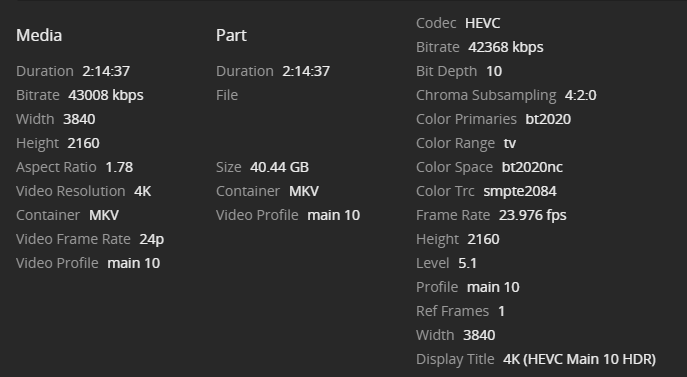
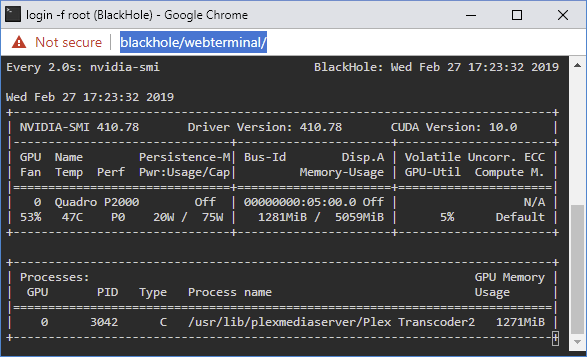
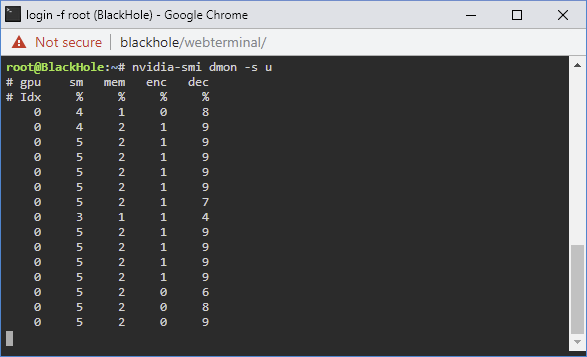
I need some assistance troubleshooting poor transcoding performance. I've been struggling with this since I built my new server late last year. I figured the issue was a lack of understanding on the capabilities of the components I selected for the server. Plex was an afterthought, so I wasn't too upset with making a mistake with component selection. Server specs are as follows: SuperMicro X10DRL-IO 2x Xeon E5-2658v3 64gb DDR4-2133 Fully Buffered ECC quad channel (4x16gb sticks - in the correct slots, board reports quad channel) 1x nvidia Quadro P2000 added recently for transcoding via the new nvidia plugin. 24x8TB Western Digital RED drives connected to an HP SAS Expander at 3gb/s (not 6gb/s, limitation of this strange SAS Expander) Raid controller is a 9211-8i 2xIntel 1tb 660p NVME SSD for cache Since this is a dual socket system, paying attention to CPU/PCI-E Lane associations is important. Thankfully this board only has ONE slot on CPU2. Slot arrangement is as follows: 660p SSD's are on a carrier card in the TOP PCI-E x8 slot, which is CPU1 Slot 6 Port Expander is in the lowest x8 slot which is a PCI-E 2.0x4 slot, on the chipset (not on either CPU) - but should only be pulling power from the slot. Raid Controller is in the slot above that, which is PCI-E 3.0x8 and is CPU1 Slot 2 Graphics card is in the only x16 slot on the board which is CPU1 Slot 5 Any time I go to transcode certain 4k files to any resolution the client reports that the server is not powerful enough to transcode for smooth playback. This seems bonkers since I have 48 CPU Threads and a dedicated GPU for transcoding. I figured originally since the CPU has no QuickSync Video that this was the problem, and that I'd need some sort of extra acceleration to get things done. So I threw the P2000 in, tossed unraid-nvidia in it, configured the container to use the new GPU and also added the nvdec parameter to the Plex Transcoder so that I could use the GPU for decoding and encoding. Video files are stored on the rotational media, fwiw though it shouldn't matter at this bitrate even. I get 15 seconds in to this file: And then it starts buffering and says the server isn't powerful enough. Checking nvidia-smi shows that the card is being used for encoding: And checking further shows that it is also being used for decoding: CPU Usage in this circumstance is quite low, suggesting that the audio stream shouldn't be bottlenecking. The video quality also suffers substantially, colors are washed out and there is significant banding. I'm at a loss for what to try to solve this. The target transcode is 720p, for reference, though streaming 1080p at 1080p works just fine on this same machine, even before adding the GPU for transcoding.