





Joly0
Members
-
Joined
-
Last visited
Everything posted by Joly0
-
@AmaneI really think something is bugged with the "Run in background" option. I have another very simple script that looks like this: #!/bin/bash # Define the target folder for the files target_folder="/mnt/user/filme" # Define the desired owner of the copied files desired_owner="99" # Add the paths to the files to be copied here file_paths=( ) rsync -zvvP --bwlimit=300 --partial-dir="$target_folder/.rsync-partial" --chown="$desired_owner" "${file_paths[@]}" "$target_folder" And when i run that in background and abort it, the rsync process just keeps running. So how am i supposed to stop it then?
-
Hey, thanks for the recommendation. I thought so aswell and tried that already, but as you can see in the screenshot, it doesnt work. If i abort the script, the command in the container is still bein executed:

-
If you havent found a solution yet, i would advice adding a volume from the containers /tmp directory to somewhere on your host
-
Hey guys, i have some issues running a script. The script connects to a docker container using docker exec and runs a command in it. But the problem is, that these commands take a very long time to run and i want the ability to stop them when needed. So i was able to rewrite it, so i can run it in foreground mode and it stops, when i X the window. But as soon as i run it in background mode and abort the script, the commands just keep running forever. Maybe someone knows why this is and here is the current version of the script: #!/bin/bash # Variables CONTAINER_NAME="LANCache-Prefill" # Function to clean up child processes cleanup() { echo "Cleaning up..." pkill -P $$ pkill -f "docker exec -u prefill $CONTAINER_NAME" kill `ps aux | grep "prefill --force" | awk '{print $2}'` exit 1 } # Trap termination signals to trigger cleanup trap cleanup SIGINT SIGTERM # Execute commands in Docker container sequentially docker exec -u prefill $CONTAINER_NAME /bin/bash -c "cd /lancacheprefill && ./SteamPrefill/SteamPrefill prefill --force" & PID=$! wait $PID docker exec -u prefill $CONTAINER_NAME /bin/bash -c "cd /lancacheprefill && ./EpicPrefill/EpicPrefill prefill --force" & PID=$! wait $PID docker exec -u prefill $CONTAINER_NAME /bin/bash -c "cd /lancacheprefill && ./BattleNetPrefill/BattleNetPrefill prefill --force" & PID=$! wait $PID # Clean up if the script finishes cleanup
-
Hey guys, how are the excluded folders working? I have this in my custom folders for exclusion ".Recycle.Bin, .filerun.thumbnails" (without the quotes) but today i got this in my logs Apr 3 11:49:42 Tower bunker: error: BLAKE3 hash key mismatch, /mnt/disk3/backup/.Recycle.Bin/Chuwi_Backup/ab_20240318_000001/my-Pihole-DoT-DoH.xml is corrupted Apr 3 11:49:42 Tower bunker: error: BLAKE3 hash key mismatch, /mnt/disk3/backup/.Recycle.Bin/Chuwi_Backup/ab_20240318_000001/my-homeassistant.xml is corrupted Apr 3 11:49:42 Tower bunker: error: BLAKE3 hash key mismatch, /mnt/disk3/backup/.Recycle.Bin/Chuwi_Backup/ab_20240318_000001/my-AMP-Controller.xml is corrupted Apr 3 11:49:42 Tower bunker: error: BLAKE3 hash key mismatch, /mnt/disk3/backup/.Recycle.Bin/Chuwi_Backup/ab_20240318_000001/backup.log is corrupted Apr 3 11:49:42 Tower bunker: error: BLAKE3 hash key mismatch, /mnt/disk3/backup/.Recycle.Bin/Chuwi_Backup/ab_20240318_000001/my-AMP.xml is corrupted Apr 3 11:49:42 Tower bunker: error: BLAKE3 hash key mismatch, /mnt/disk3/backup/.Recycle.Bin/Chuwi_Backup/ab_20240318_000001/chuwi1-flash-backup-20240318-0000.zip is corrupted Apr 3 11:49:42 Tower bunker: error: BLAKE3 hash key mismatch, /mnt/disk3/backup/.Recycle.Bin/Chuwi_Backup/ab_20240318_000001/AMP-Controller.tar.zst is corrupted Apr 3 11:49:42 Tower bunker: error: BLAKE3 hash key mismatch, /mnt/disk3/backup/.Recycle.Bin/Chuwi_Backup/ab_20240318_000001/Pihole-DoT-DoH.tar.zst is corrupted Apr 3 11:49:42 Tower bunker: error: BLAKE3 hash key mismatch, /mnt/disk3/backup/.Recycle.Bin/Chuwi_Backup/ab_20240318_000001/config.json is corrupted Why are those files being checked? Shouldnt they be excluded?
-
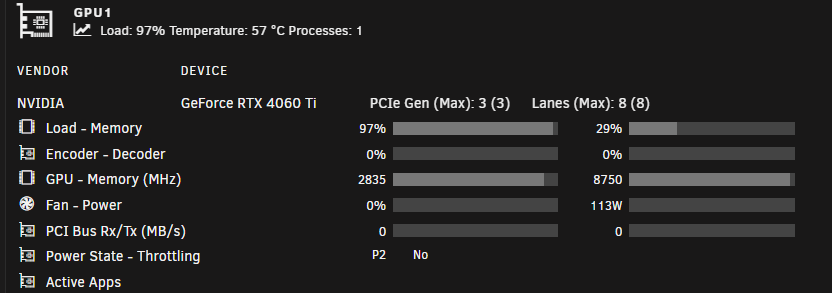
Hey guys, could you try going into advanced mode while editing the container, remove both variables for nvidia devices and replace the argument in "extra paramters" with this "--gpus=all" That worked for me. If you guys get it to work aswell, i will update the template Atleast with these settings my gpu is used Also when i created that template, the settings where working, so looks like ollama changed something
-
Hey, guys, i am referencing here as i have the same problem but for me it happened randomly and had nothing to do with any dying usb sticks. Randomly after updating containers, it might happen, that one does not update properly and i can see an error that looks like this: After that the container cannot be removed, updated or started anymore. I already tried to search further and found this bug report https://github.com/moby/moby/issues/40132 over at the moby github repo and it looks related. I tried every possible solution posted there, but none were successful. I have a few containers, that are now stuck in this state. I dont want to switch back to image, as folder imo works just way better than folder, even though i have these isues now. Some guys over on github said that switching to the overlayfs storage driver instead of zfs for the docker folder, but as that option is only available in openzfs 2.2.0 i am out of luck, but maybe for future updates there might be a way to configure this setting. The issue probably would be fixed, if i delete my docker folder and recreate it, but that doesnt solve the root cause of this issue. This problem occurs so randomly, i cant provide any logs now. In 100 docker container updates, it might only happen for one container, or it might not happen at all. But as i said, i have a few containers now in this state and i cant use them anymore
-
You might be right, adding and testing all those webui´s is a hasle, but at the same time, not everyone can write a bash script. Also i think just a few here know, this method using the custom scripts exist or that your repo with custom scripts exist. Might be a good idea to add some kind of testing environment, so the scripts can be tested more or less automatically after a new release/commit
-
I have it in my fork already. I am quite close to creating a pr which adds webui-forge and also running all of the webui´s with amd gpus. If you want to test my fork, you can text me and test, if forge works
-
If someone wants to test my fork with amd support, pls text me. I am still changing alot of things so be prepared to redownload the docker image and the venv´s a few times, but most things should be working already
-
Btw, not sure if many people here care, but i am very close on getting this to work on amd gpu´s aswell
-
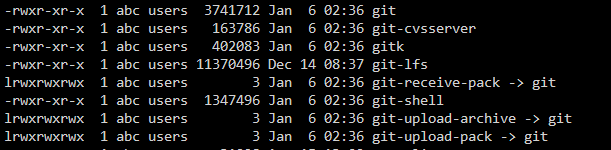
Ok @superboki @FoxxMD @Holaf I have found a serious issue with this container. So the problem is thill the error above. I came across the same issue with comfyui, when i try to install nodes or extension using comfyui-manager. What i found out so far is, that there is a git-https command, that is used everytime you use a "git clone https://xyz" command, which is basically everytime you want to use comfyui-manager or in the example above in stable diffusion the model downloader for certain things. I have checked and on the docker itself, git is correctly installed with git-https, though, and this is interesting now: git-https is missing in the conda enviroment. The executables for comfyui for example are located under "/config/05-comfy-ui/env/bin". This is all that is installed regarding git in the conda environment (git-lfs btw is also recommended, had to install that manually using "conda install -c conda-forge git-lfs -y"). So obviously git cant use https for git clone commands, therefore comfyui-manager cant install anything, i constantly get error messages. I have also checked all the channels that i could find, if any of them has git with git-https as a package available for installing through conda install. Though none have it. So we have an issue here. I am not really familiar with conda and all the environment stuff, so i have no further idea, i am just trial and error atm to find a solution. Maybe someone of you has a solution in their mind, but this is what i found. Imo this is a serious issue, so this should get fixed asap
-
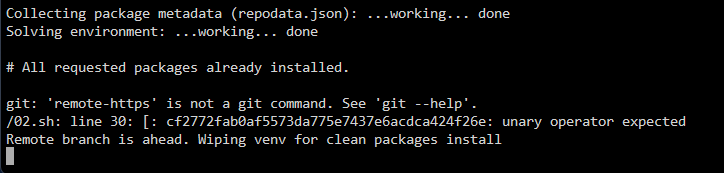
Also this might be a bug
-
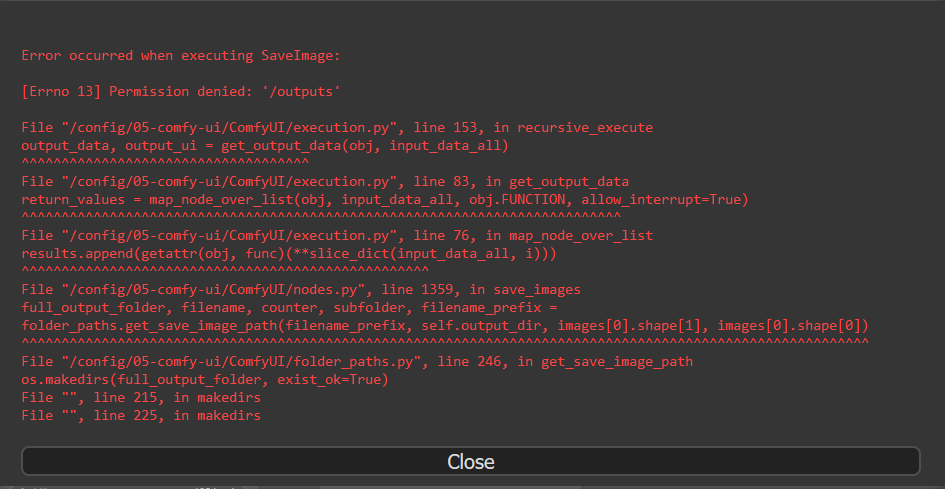
Hey guys, something wrong with the output directory? I keep getting this in comfyui: EDIT: I found out, that the parameters txt file was wrong and still had the old path. Maybe this should be added as a migration step into the container
-
Nice. I am currently working on getting this to work with amd cards and rocm. Will see how good this will go. So if we both succeed, this project will have a big jump
-
This looks very great. Any chances you make a pr with your changes to holafs official repo now that it is released. Would like to see it using lsio as a base image, rather than normal ubuntu. Also the memory leak fix might be useful for everyone
-
@HolafCan you please take a look into putting the code of your docker to github or somewhere? I would like to see if i can adjust it maybe for amd cards with rocm, but i need the code. If you need any help, plase message me, i can help you set it up. Its very easy once you have set it up
-
Btw, i have found a bug with StableSwarmUI. Using the built-in comfyui the saved images are not in the outputs folder. I have looked through the folder structure of the container, but cant find the image anywhere. So either i am missing something, or there is a bug EDIT: Found the folder, its here "/opt/stable-diffusion/07-StableSwarm/StableSwarmUI/dlbackend/ComfyUI/output" inside the container. I guess there needs to be an additional "ln -s" for that one
-
Ok, nvm, i cant install anything. Somewhere it hangs every time and i cant figure out why Edit: I got it working again, had to delete everything in appdata except models and output folders and recreated the docker container
-
Btw guys, is stableswarm working for you? Its been downloading torch for over 1h now? It normally does this in like 5-10 minutes
-
Hey guys, i might have found 2 bugs with the recent 6.12.5-rc1 update regarding ipv6. First, in the boot screen in the terrminal, it should show the ipv4 and the ipv6 address. The ipv4 is correct, but for me it shows "IPv6 address: 1" The second bug is, that i an ping my unraid server with its static ipv6 address, but i cannot access the webui with the address and port. I always get the error message: "Error: Connection failed"
-
Thx for the info. So its safe to start the array now and the add the new ssd without any issues tomorrow?
-
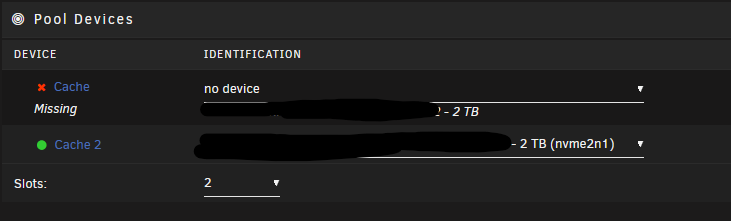
Hey guys, i have a pool with 2 ssd´s in a zfs mirror. Now one of my ssd´s died and was no longer recognized after a reboot. I have already ordered a new ssd which hopefully maybe arrives tomorrow, though i am unsure about what i should/could do now? It would be great, if i could just start the array with the pools and still access my data on the drive that is left in the pool, so i can safely make a backup, before i try to replace the missing drive. So is it possible to just start the array and the pools and still access the data? And what about adding the replacement drive later? Can i just stop the array then and add the second drive safely? Or should i leave it turned off, wait for the second drive and just select that as the missing drive? Does it correctly and safely mirror my data to the new drive? My backups are a bit older, so there is still valuable data on that pool, which i really dont want to loose. Would be great, if someone could give me some information
-
Github is quite easy to use, just the first start is rough. If you need help, you can message me
-
Hey @Holaf would it be possible, to get the code for the dockerfile and scripts that you used to build this container on github, gitlab or anywhere so people can look at it and maybe improve it? Also, is it possible to get a change log. You said you pushed a big update, but i would like to know what changed? Having a changelog and having the source code would help to better understand what changed



