





FreakyBigFoot
Members
-
Joined
-
Last visited
Everything posted by FreakyBigFoot
-
Most definitely! I came to the forums because I ran into the same thing and I found this temporarily solved it for me. Thought I would share.
-
@zer0ish Try selecting a Sort By option and you'll see results
-
Also something I noticed.. If you try to search for something in the CA store, then select a Sort By option it starts to work for me.. I'm able to then have results returned.
-
I have the same error happening. CA-Logging-20250111-1512.zip
-
Fixed by running this in my container: /opt/certbot/bin/pip install six
-
I updated tonight and I'm getting an error when I try to login: Bad Gateway Also this is in my logs: [10/11/2024] [2:12:12 AM] [Certbot ] › ☒ complete Installed gandi [10/11/2024] [2:12:12 AM] [Certbot ] › ▶ start Installing cloudflare... [10/11/2024] [2:12:12 AM] [Global ] › ⬤ debug CMD: . /opt/certbot/bin/activate && pip install --no-cache-dir cloudflare==2.19.* acme==$(certbot --version | grep -Eo '[0-9](\.[0-9]+)+') certbot-dns-cloudflare==$(certbot --version | grep -Eo '[0-9](\.[0-9]+)+') && deactivate [10/11/2024] [2:12:13 AM] [Certbot ] › ✖ error The 'certbot_plugin_gandi.main' plugin errored while loading: No module named 'six'. You may need to remove or update this plugin. The Certbot log will contain the full error details and this should be reported to the plugin developer. Ask for help or search for solutions at https://community.letsencrypt.org. See the logfile /tmp/certbot-log-hztui4oh/log or re-run Certbot with -v for more details. The 'certbot_plugin_gandi.main' plugin errored while loading: No module named 'six'. You may need to remove or update this plugin. The Certbot log will contain the full error details and this should be reported to the plugin developer. Ask for help or search for solutions at https://community.letsencrypt.org. See the logfile /tmp/certbot-log-ks5dw_td/log or re-run Certbot with -v for more details. ERROR: Invalid requirement: 'acme==': Expected end or semicolon (after name and no valid version specifier) acme== ^
-
Hey @GoobarooI'm also wondering if this could be updated to include the new 1.21.
-
I’ve tested it with memtest86. Let it run for hours. Also purchased more RAM and did the same.
-
Here is all I have: Mar 30 00:00:05 Tower emhttpd: read SMART /dev/sde Mar 30 00:00:21 Tower apcupsd[3370]: Communications with UPS lost. Mar 30 00:10:33 Tower apcupsd[3370]: Communications with UPS lost. Mar 30 00:15:07 Tower emhttpd: spinning down /dev/sde Mar 30 00:20:45 Tower apcupsd[3370]: Communications with UPS lost. Mar 30 00:30:57 Tower apcupsd[3370]: Communications with UPS lost. Mar 30 00:41:09 Tower apcupsd[3370]: Communications with UPS lost. Mar 30 00:51:21 Tower apcupsd[3370]: Communications with UPS lost. Mar 30 01:01:33 Tower apcupsd[3370]: Communications with UPS lost. Mar 30 01:11:45 Tower apcupsd[3370]: Communications with UPS lost. Mar 30 01:21:57 Tower apcupsd[3370]: Communications with UPS lost. Mar 30 01:32:09 Tower apcupsd[3370]: Communications with UPS lost. Mar 30 01:42:21 Tower apcupsd[3370]: Communications with UPS lost. Mar 30 01:52:32 Tower apcupsd[3370]: Communications with UPS lost. Mar 30 02:00:03 Tower emhttpd: read SMART /dev/sdd Mar 30 02:00:11 Tower emhttpd: read SMART /dev/sdc Mar 30 02:01:51 Tower root: /etc/libvirt: 71.2 MiB (74670080 bytes) trimmed on /dev/loop3 Mar 30 02:01:51 Tower root: /var/lib/docker: 1.7 GiB (1846673408 bytes) trimmed on /dev/loop2 Mar 30 02:01:51 Tower root: /mnt/cache: 28 GiB (30114258944 bytes) trimmed on /dev/nvme0n1p1 Mar 30 02:02:31 Tower emhttpd: read SMART /dev/sdh Mar 30 02:02:44 Tower apcupsd[3370]: Communications with UPS lost. Mar 30 02:02:51 Tower emhttpd: read SMART /dev/sde Mar 30 02:12:55 Tower apcupsd[3370]: Communications with UPS lost. Mar 30 02:22:51 Tower emhttpd: spinning down /dev/sdc Mar 30 02:23:06 Tower apcupsd[3370]: Communications with UPS lost. Mar 30 02:33:18 Tower apcupsd[3370]: Communications with UPS lost. Mar 30 02:43:30 Tower apcupsd[3370]: Communications with UPS lost. Mar 30 02:53:42 Tower apcupsd[3370]: Communications with UPS lost. Mar 30 03:03:54 Tower apcupsd[3370]: Communications with UPS lost. Mar 30 03:14:06 Tower apcupsd[3370]: Communications with UPS lost. Mar 30 03:24:19 Tower apcupsd[3370]: Communications with UPS lost. Mar 30 03:34:31 Tower apcupsd[3370]: Communications with UPS lost. Mar 30 03:44:43 Tower apcupsd[3370]: Communications with UPS lost. Mar 30 03:54:55 Tower apcupsd[3370]: Communications with UPS lost. Mar 30 04:05:07 Tower apcupsd[3370]: Communications with UPS lost. Mar 30 04:10:09 Tower emhttpd: spinning down /dev/sde Mar 30 04:10:10 Tower emhttpd: spinning down /dev/sdg Mar 30 04:15:20 Tower apcupsd[3370]: Communications with UPS lost. Mar 30 04:25:32 Tower apcupsd[3370]: Communications with UPS lost. Mar 30 04:32:25 Tower emhttpd: spinning down /dev/sdd Mar 30 04:35:44 Tower apcupsd[3370]: Communications with UPS lost. Mar 30 04:40:01 Tower root: Fix Common Problems Version 2024.03.09 Mar 30 04:40:02 Tower root: Fix Common Problems: Warning: Plugin fix.common.problems.plg is not up to date Mar 30 04:40:02 Tower root: Fix Common Problems: Warning: Plugin user.scripts.plg is not up to date Mar 30 04:40:02 Tower root: Fix Common Problems: Warning: Docker Application transmission has an update available for it Mar 30 04:40:09 Tower root: Fix Common Problems: Warning: Syslog mirrored to flash Mar 30 04:40:09 Tower root: Fix Common Problems: Warning: Wrong DNS entry for host ** Ignored Mar 30 04:40:20 Tower emhttpd: read SMART /dev/sdc Mar 30 04:40:21 Tower emhttpd: read SMART /dev/sdg Mar 30 04:40:21 Tower emhttpd: read SMART /dev/sde Mar 30 04:40:21 Tower emhttpd: read SMART /dev/sdf Mar 30 04:40:31 Tower emhttpd: read SMART /dev/sdd Mar 30 04:45:56 Tower apcupsd[3370]: Communications with UPS lost. Mar 30 04:56:09 Tower apcupsd[3370]: Communications with UPS lost. Mar 30 04:56:44 Tower emhttpd: spinning down /dev/sde Mar 30 04:56:45 Tower emhttpd: spinning down /dev/sdg Mar 30 04:56:45 Tower emhttpd: spinning down /dev/sdf Mar 30 04:56:55 Tower emhttpd: spinning down /dev/sdd Mar 30 04:56:55 Tower emhttpd: spinning down /dev/sdc Mar 30 05:06:21 Tower apcupsd[3370]: Communications with UPS lost. Mar 30 05:16:13 Tower emhttpd: spinning down /dev/sdi Mar 30 05:16:34 Tower apcupsd[3370]: Communications with UPS lost. Mar 30 05:24:50 Tower emhttpd: spinning down /dev/sdh Mar 30 05:26:47 Tower apcupsd[3370]: Communications with UPS lost. Mar 30 05:37:01 Tower apcupsd[3370]: Communications with UPS lost. Mar 30 05:47:13 Tower apcupsd[3370]: Communications with UPS lost. Mar 30 05:57:26 Tower apcupsd[3370]: Communications with UPS lost. Mar 30 06:07:39 Tower apcupsd[3370]: Communications with UPS lost. Mar 30 06:17:52 Tower apcupsd[3370]: Communications with UPS lost. Mar 30 06:28:05 Tower apcupsd[3370]: Communications with UPS lost. Mar 30 06:38:17 Tower apcupsd[3370]: Communications with UPS lost. Mar 30 06:48:30 Tower apcupsd[3370]: Communications with UPS lost. Mar 30 06:58:44 Tower apcupsd[3370]: Communications with UPS lost. Mar 30 07:08:58 Tower apcupsd[3370]: Communications with UPS lost. Mar 30 07:19:10 Tower apcupsd[3370]: Communications with UPS lost. Mar 30 07:29:24 Tower apcupsd[3370]: Communications with UPS lost. Mar 30 07:39:37 Tower apcupsd[3370]: Communications with UPS lost. Mar 30 07:49:50 Tower apcupsd[3370]: Communications with UPS lost. Mar 30 08:00:04 Tower apcupsd[3370]: Communications with UPS lost. Mar 30 08:10:18 Tower apcupsd[3370]: Communications with UPS lost. Mar 30 08:20:30 Tower apcupsd[3370]: Communications with UPS lost. Mar 30 08:30:43 Tower apcupsd[3370]: Communications with UPS lost. I uplugged the UPS on purpose because I have been trying to see if it runs better with certain things unplugged. It was crashing before & after I unplugged it so I know it's not the issue. Nothing indicating an issue here it seems. It just straight crashes
-
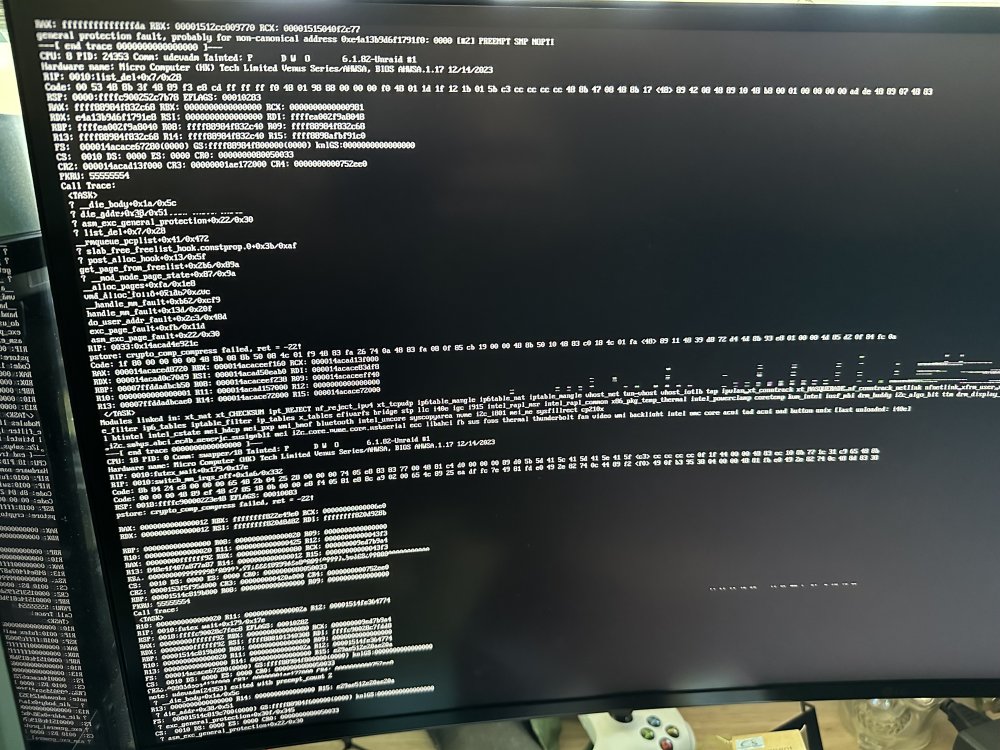
I got this today. Still no logs.. I’m starting to think my CPU is bad.
-
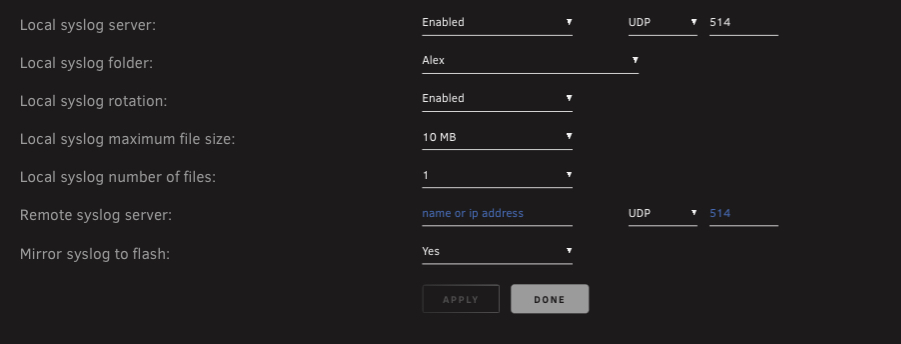
I’m also using Datadog to gather logs. I have zero logs around the time it crashes. It crashed about an hour ago and same thing. Absolutely nothing. My fans kick on high and unraid just crashes.
-
No, that's the thing. I'm not getting any logs. I'll wake up and it's 'on' but nothing is responsive. I have to hold the power button..
-
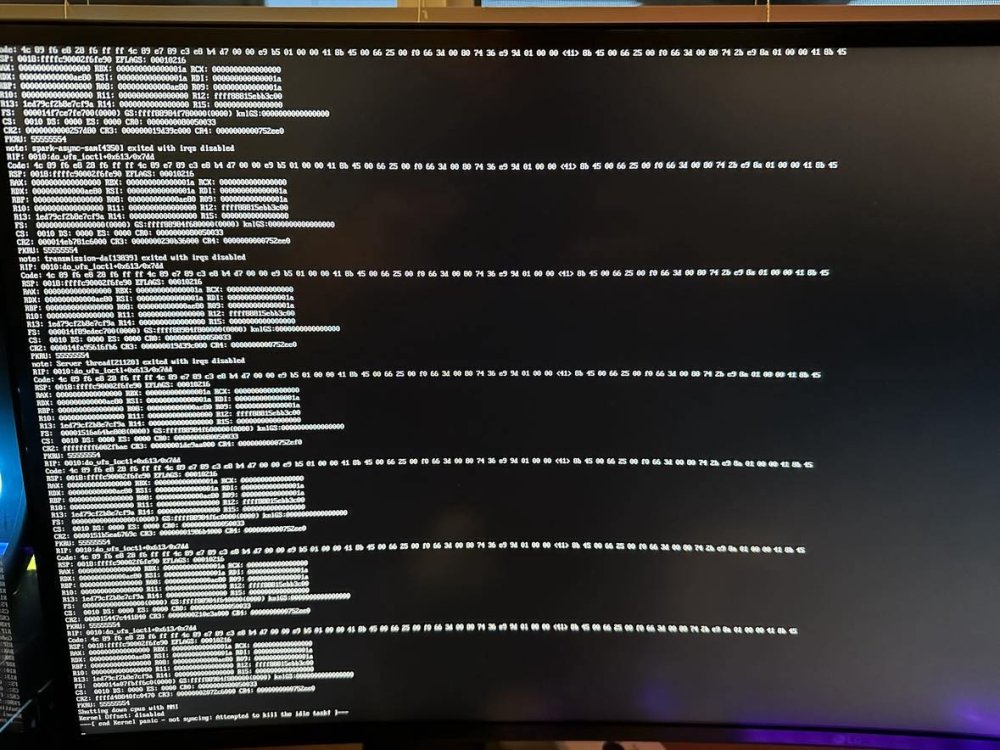
I've been having this issue for while now. I've downgraded, upgraded, disabled dockers, disabled VMs, disabled cstates, swapped out RAM, deleted and re-created docker.img. I'm using a pc from minisforum, the MS-01. I'm not sure if it's just giving out or what. I've setup a logging server and I have 0 logs. Nothing indicating what's going on. I did finally get something on my screen. I've also attached my diagnostic logs. I could really use some help. I'll just wake up and it's unresponsive. I have to hold the power button to get it to turn off. tower-diagnostics-20240324-1153.zip
-
I'm having something similar happen. My unraid keeps going unresponsive every couple days since I've updated to 6.12.8. I have my logs forwarded to a log server and I didn't get any logs. I've just ran a memtest86 all the way through and I'm getting 0 hardware issues. If you look around you'll see there's quite a few people having these random crash issues since 6.12.8
-
I'm getting these same logs. A TON of them. I had my unraid crash last night too.. I now have logs going to Datadog but I'm trying to figure out how to stop these logs.
-
So this has been deprecated but there's a replacement? How do we get the new version?
-
Hey I’m very curious about this as well.
-
I’ve been using an lsi card for awhile now. My only advice is to have great airflow or put a little noctua fan on it. They get hot. I’m debating the 800S or 1600 for my new ms-01 miniforum pc I just got. Did anyone ever get one working?
-
How’s your unraid journey going? I’m debating on getting a similar setup.
-
So I did rename the /appdata/steamcmd folder to /appdata/steamcmd_temp and it worked this time..
-
Hey thanks. I actually enabled that as a test and didn't turn it off. I've deleted and ceated the docker a few times and still no luck. Do I need to remove anything from /appdata/steamcmd ?
-
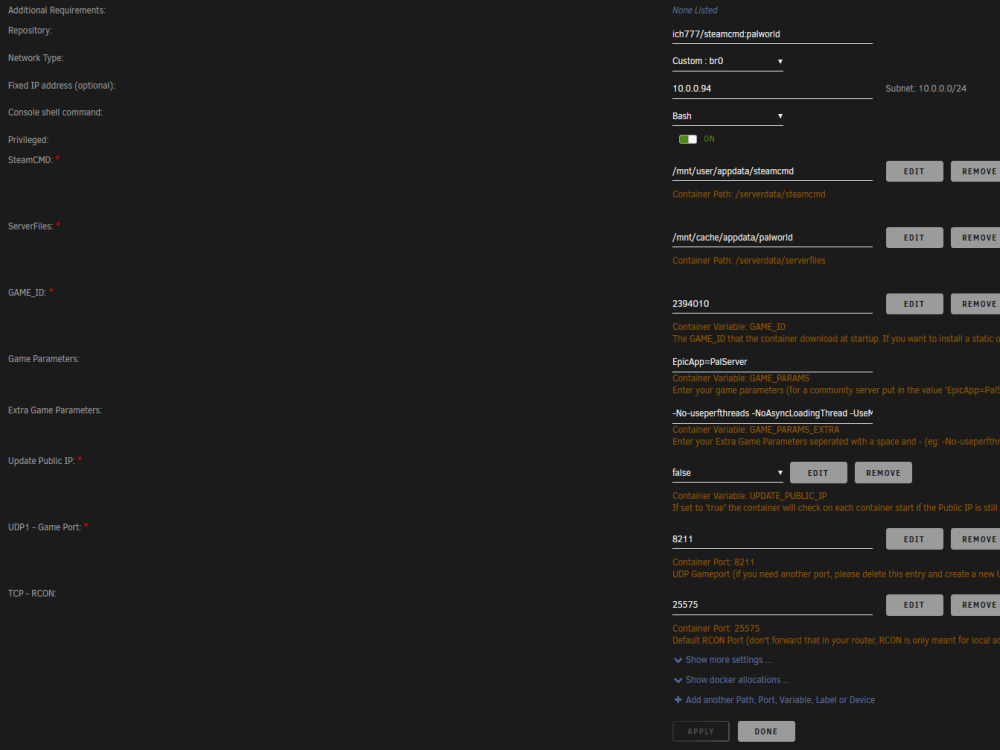
Hey thanks for the quick reply. Specs: System Overview Unraid system:Unraid server Plus, version 6.12.6 Model:Custom Motherboard:Micro-Star International Co., Ltd. PRO Z690-A DDR4(MS-7D25), Version: 1.0, s/n: 07D2512_M21E609403 Processor:13th Gen Intel® Core™ i5-13500 @ 2475 MHz HVM:Enabled IOMMU:Enabled Cache:L1 Cache = 288 KiB (max. capacity 288 KiB) L1 Cache = 192 KiB (max. capacity 192 KiB) L2 Cache = 7680 KiB (max. capacity 7680 KiB) L3 Cache = 24 MiB (max. capacity 24 MiB) L1 Cache = 256 KiB (max. capacity 256 KiB) L1 Cache = 512 KiB (max. capacity 512 KiB) L2 Cache = 4 MiB (max. capacity 4 MiB) L3 Cache = 24 MiB (max. capacity 24 MiB) Memory:64 GiB DDR4 (max. installable capacity 128 GiB) Controller0-DIMMA1: G Skill Intl F4-3200C16-16GVK, 16 GiB DDR4 @ 2133 MT/s Controller0-DIMMA2: G Skill Intl F4-3200C16-16GVK, 16 GiB DDR4 @ 2133 MT/s Controller1-DIMMB1: G Skill Intl F4-3200C16-16GVK, 16 GiB DDR4 @ 2133 MT/s Controller1-DIMMB2: G Skill Intl F4-3200C16-16GVK, 16 GiB DDR4 @ 2133 MT/s Network:eth0: 10000 Mbps, full duplex, mtu 1500 eth1: interface down Kernel:Linux 6.1.64-Unraid x86_64 OpenSSL:1.1.1v Yes my cache drive is only on my SSD. It does not ever move to the array. I'm on the latest release of unraid. Pic also attached.
-
I'm just getting the following and I'm not sure why. Any ideas? cp: cannot stat '/serverdata/serverfiles/linux64/*': No such file or directorySession terminated, killing shell...kill: usage: kill [-s sigspec | -n signum | -sigspec] pid | jobspec ... or kill -l [sigspec]---Ensuring UID: 99 matches user------Ensuring GID: 100 matches user------Setting umask to 000------Checking for optional scripts------No optional script found, continuing------Taking ownership of data...------Starting...------Update SteamCMD------Update Server------Checking if configuration is in place------Configuration found, continuing...------Checking if PublicIP is in place------PublicIP in PalWorldSettings.ini found: x.x.x.x---Prepare Server------Server ready------Start Server------Something went wrong, can't find the executable, putting container into sleep mode!---
-
Did you ever figure this out? I'm running into the same issue currently.
-






