Frank1940
Members
-
Joined
-
Last visited
Everything posted by Frank1940
-
@Snipe3000 (Also pinging @JorgeB For his assistance with this) , found these two entries in the syslogs in your Diagnostics file: May 29 01:59:06 Unraid01 rc.local: +============================================================================== May 29 01:59:06 Unraid01 rc.local: | Installing new package /boot/config/plugins/dynamix.my.servers/dynamix.unraid.net.txz May 29 01:59:06 Unraid01 rc.local: +============================================================================== May 29 01:59:06 Unraid01 rc.local: Verifying package dynamix.unraid.net.txz. May 29 01:59:06 Unraid01 rc.local: Installing package dynamix.unraid.net.txz: May 29 01:59:06 Unraid01 rc.local: PACKAGE DESCRIPTION: May 29 01:59:06 Unraid01 rc.local: Package dynamix.unraid.net.txz installed. May 29 01:59:06 Unraid01 rc.local: Restoring node_modules from '/boot/config/plugins/dynamix.my.servers/node_modules-for-v4.8.0+9485809.tar.xz' to '/usr/local/unraid-api/node_modules' May 29 01:59:06 Unraid01 rc.local: node_modules restored successfully. May 29 01:59:06 Unraid01 rc.local: Starting flash backup (if enabled) May 29 01:59:06 Unraid01 rc.local: Starting the Unraid API May 29 01:59:06 Unraid01 rc.local: [PM2][WARN] Applications unraid-api not running, starting... May 29 01:59:06 Unraid01 rc.local: [PM2][WARN] App unraid-api has option 'wait_ready' set, waiting for app to be ready... May 29 01:59:06 Unraid01 rc.local: [PM2] App [unraid-api] launched (1 instances) May 29 01:59:06 Unraid01 rc.local: ┌────┬───────────────┬─────────────┬─────────┬─────────┬──────────┬────────┬──────┬───────────┬──────────┬──────────┬──────────┬──────────┠May 29 01:59:06 Unraid01 rc.local: │ id │ name │ namespace │ version │ mode │ pid │ uptime │ ↺ │ status │ cpu │ mem │ user │ watching │ May 29 01:59:06 Unraid01 rc.local: ├────┼───────────────┼─────────────┼─────────┼─────────┼──────────┼────────┼──────┼───────────┼──────────┼──────────┼──────────┼──────────┤ May 29 01:59:06 Unraid01 rc.local: │ 0 │ unraid-api │ default │ 4.8.0+… │ fork │ 3270 │ 3s │ 0 │ online │ 0% │ 194.7mb │ root │ disabled │ May 29 01:59:06 Unraid01 rc.local: └────┴───────────────┴─────────────┴─────────┴─────────┴──────────┴────────┴──────┴───────────┴──────────┴──────────┴──────────┴──────────┘ May 29 01:59:06 Unraid01 rc.local: ✅ Installation is complete, it is safe to close this window May 29 01:59:06 Unraid01 rc.local: plugin: dynamix.unraid.net.plg installed And May 29 12:00:30 Unraid01 kernel: i801_smbus 0000:00:1f.3: SMBus is busy, can't use it! ### [PREVIOUS LINE REPEATED 927 TIMES] ### I am not sure what is going on or if it even related to your SMB problem.
-
Please explain this sentence. Where are "my shares"? What "other machines"? How many Client computers are involved? How many different Servers are involved?
-
LimeTech appears to resolved this issue. Contact Support and they can fix it for you. I suspect that everyone who has the issue will have to be proactive in requesting a fix.
-
Look here: https://forums.unraid.net/topic/170027-smb-windows-settings-available-through-power-shell-and-linux-samba-tools-informational-posting/#comment-1545332 And run smbstatus On the Unraid GUI Terminal. And For windows: https://forums.unraid.net/topic/170027-smb-windows-settings-available-through-power-shell-and-linux-samba-tools-informational-posting/#findComment-1441603 Run Get-SmbConnection in a Power Shell with Administrative privileges on the Windows Client.
-
OH! Any time you make a change to your Network settings, always reboot your Windows computer. SMB allows each Windows client to make only one connection to each server. And there is no way to logout from SMB, so a reboot is easiest way to do that.
-
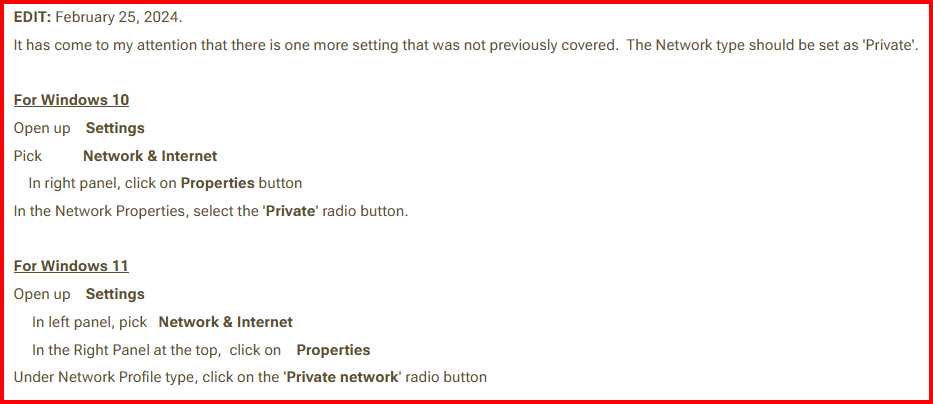
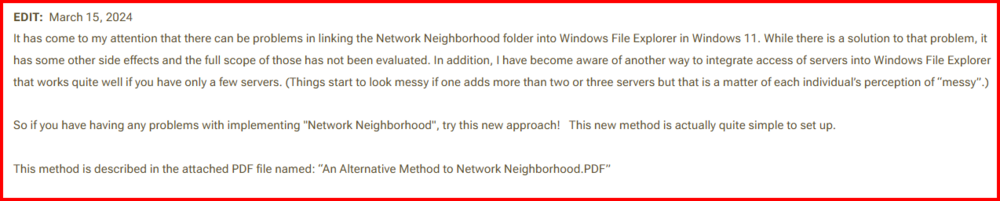
Start by reading this post: https://forums.unraid.net/topic/110580-security-is-not-a-dirty-word-unraid-windows-1011-smb-setup/ And this section in particular: IF your Windows 11 computer's network setting is 'Public', MS may have reset what networking scanning features are allowed to work. Which features allowed seems to very with what version (Home PRO, etc) you are running what is allowed. The 'Private' settings are much looser as the assumption that that a 'Private' network will be a much more secure environment than a 'Public' network! If worse comes to worse, consider using the the Alternative Method. Once you have created the shortcut to the IP address, you can rename to have the DNS name!
-
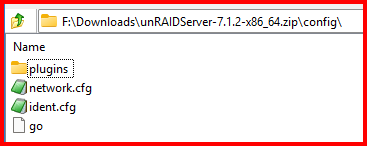
And @ShawnTempesta, Let me guess what happened. Your Boot drive failed and you got a new one. Either, You copied the files from the old one to the new one or, you copied the files from a backup of the old drive. As @itimpi said there was a corruption in that source and the directories on the new drive were not created as required! Even worse, it created a file instead of a directory. There can only be one thing (either a file or directory) for each unique name in any folder or directory. So once, that file, 'shares', was created, the Unraid OS could not create directory named 'shares' as it usually does! So there was no directory (or path) to write the configuration files (.cfg) for each share. This is what the default /config initially looks like: Every other entry you now see on your Boot drive was added by the Unraid OS as you configured your server!
-
From the MAIN tab, click on the 'Flash' under the Boot Device. Now share the drive via SMB and make it read/write. Open this share of your PC. Look on the boot drive at /config/shares and you should find .cfg files. One for every share that this server has. Open these files with a simple text editor (like Notepad). It should contain about 21 lines of text material. If it does not, Modify the file by adding space. Try to write the file back to the flash drive.
-
That would seem to me that, for what ever reason, Unraid is unable to write to your Flash Drive.
-
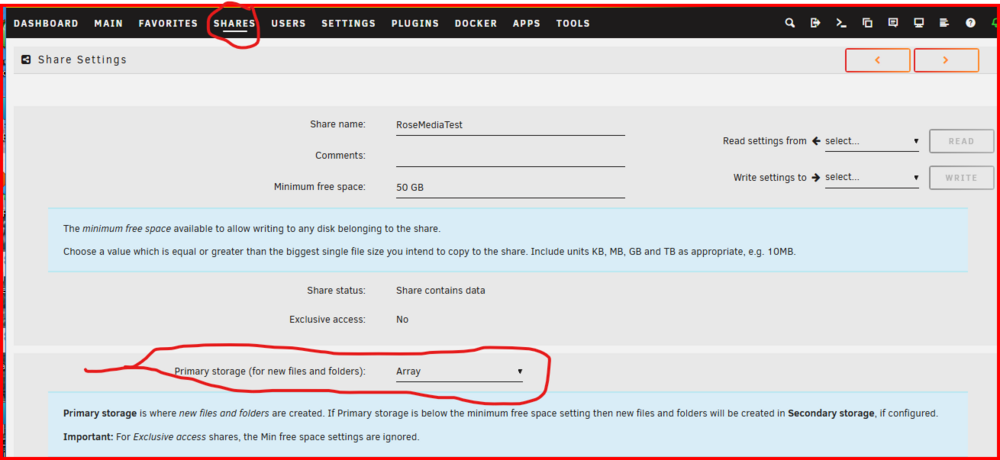
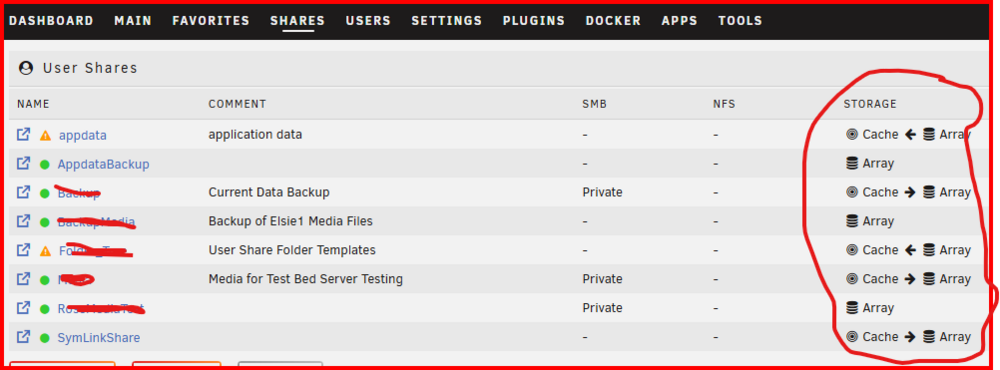
Make sure you have this setup for all your shares: Once you have something besides 'Array' for Primary, you will be give a choice for a secondary location. And you should see something like this:
-
First go to SETTINGS >>>> SMB and check that Enable SMB: is set to "Yes (Workgroup)'.
-
You are not limited to the number of SATA ports on your MB. The are plugin cards to provide additional ports as well as controllers that will plug into the NVME slot. See this thread for more information: https://forums.unraid.net/topic/102010-recommended-controllers-for-unraid You have not really stated what else you want this server to do. Do you want any Docker containers or VM's? ECC RAM is normally not an option with most consumer MB. The amount of RAM need depends on what your answer was to the previous question. Unraid running as strictly a NAS can easily run in 4GB but I think 8GB is a more reasonable choice for the long haul. Having a Video Out is desirable but the Unraid itself does not require a high-power GPU. The onboard Video solution that is available on many MB is adequate for anything that Unraid OS requires. (I have monitors and keyboards on both of my systems. It has been close to year since I last touched either keyboard! You might need it for troubleshooting when you can't get to the WebGUI!) )
-
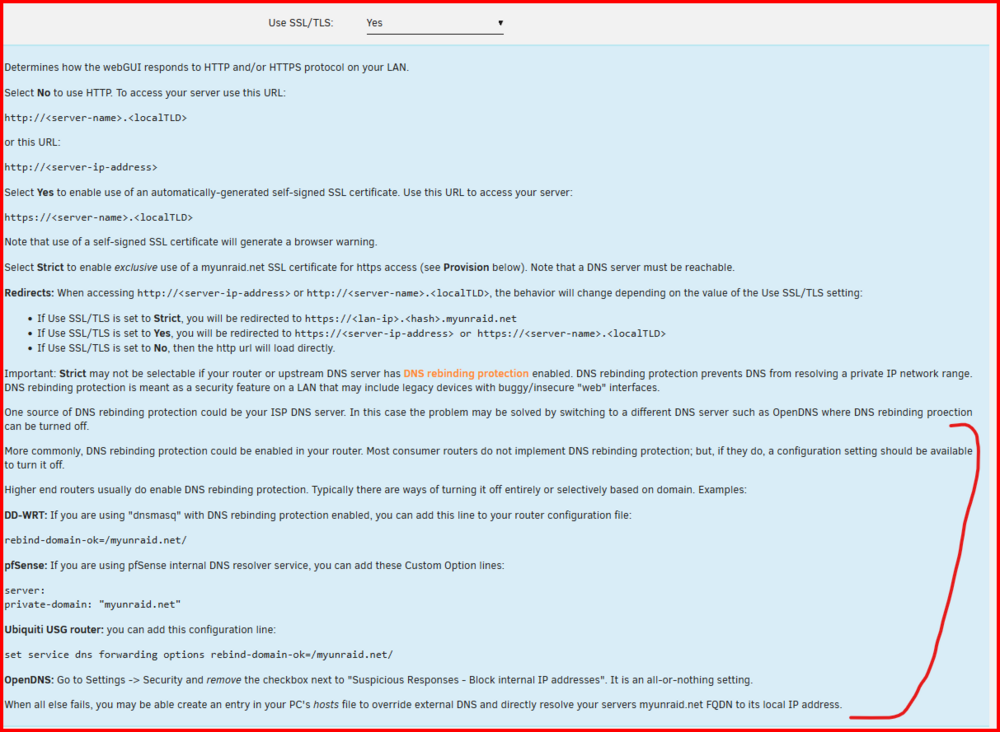
Make sure you are not getting bit by this one: This is found under SETTINGS >>> Management Access EDIT::: Also log into your router and see if it assigning an IP address to your Unraid Server.
-
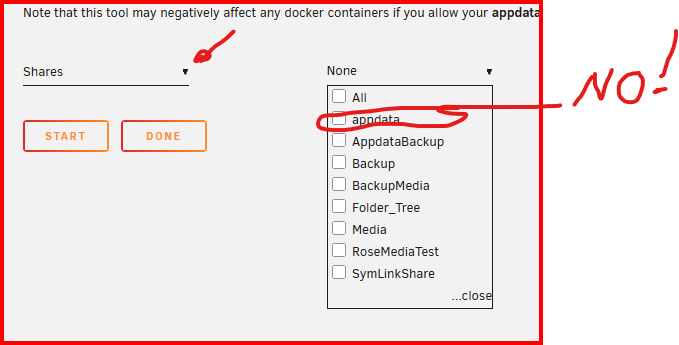
Actually, you wanted to run it on Shares, Not Disks! And not on the appdata share! Pick the other shares that need fixing.
-
Also Double check that SETTINGS >>> Network Services >>> SMB has 'Enable SMB:' turned on
-
See here: https://forums.unraid.net/topic/188600-share-permissions-changed-to-owner-99/#comment-1540351
-
Found this: https://www.samba.org/samba/docs/current/man-html/smb.conf.5.html#STOREDOSATTRIBUTES You might want to try it if you are still having issues. There are four other settings that could be useful. The first is here: https://www.samba.org/samba/docs/current/man-html/smb.conf.5.html#MAPARCHIVE The other three are listed directly below this one.
-
Double check the SMB settings on your Mac. The file permissions should be control by the system writing the file not by the permissions on the source. I am not sure about the extended attributes as I have never had any occasion to use them. As I understand, they are only used with the Active Directory (AD) environment. A quick google on my part indicates that MacOS not longer uses Samba but now uses its own SMB client. (Quick point--- SMB is both a protocol and a software suite for Windows. Both the protocol and the Software are controlled by Microsoft. Samba is a reversed engineered software for the SMB protocol.) What happens if you setup a peer-to-peer direct connection between your Mac and your Windows computers? IF you want to see how to setup a Windows peer-to-peer, see here: https://forums.unraid.net/topic/115125-windows-10-peer%E2%80%93to%E2%80%93peer-file-sharing-guide/
-
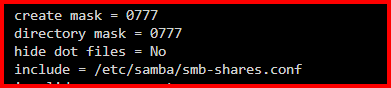
This discussion about Mac is going well beyond my background. I have never used an Apple in my life. (and I am in my 80's!) I am surprised that the permissions for the 'group' and 'other' are not be created correctly when the file is copied back to the Mac. Twenty years ago I played around with Linux on a trial basis. I installed and setup Samba on that system and it was a chore. (No cookbook instructions at the time as I remember.) So I don't remember if there are settings on the client for setting the proper permissions for new files. I would also imagine that there would be settings for handling any extended attributes. You might want to goggle @ in linux file permissions From MacOS and see if you find anything that might be of help. I would also expect that the Archive bit would be set on the copy back from the Unraid server by your Mac. After all, it has not been backed up yet as your Mac should consider it to be a 'new' file. About Windows. I am certain that the setting of the execute bit for the 'owner' was the result of the Create Mask setting that Unraid has chosen (0777). When it is set to 0666, things are behaving on the Windows side as they should. EDIT: you might want to see what happens when you copy files to and from a flash drive plugged into a USB port. The old sneaker net..)
-
@grayraven , please give this a try and let me know the results. If it solves your problem, I will submit a Bug report. It should be a simple fix but I would not expect it before the next minor release. (No bug fix release for just this as it has existed for well over 18 months...)
-
You have to reboot your Windows PC to logoff from your server. If that does not work you may have to double check that you setup the user names and passwords correctly. (Unraid is set up do that if the Credential Manager credentials can't log in, you are autocratically connected to the Unraid server using Guest credentials. Windows allows only one User from each client computer so any attempt to log on with different credentials will fail!!! And the error message does not help. There are some tools (Both Window and Linux) which may help to see what is going on. You can find info on them here: https://forums.unraid.net/topic/170027-smb-windows-settings-available-through-power-shell-and-linux-samba-tools-informational-posting/
-
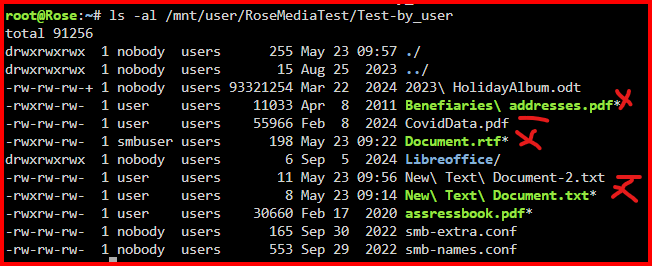
May have found the Solution: The default create mask is 0777 I changed this by adding the following setting in the SMB Extras: create mask = 0666 This is a before-and-after test. The 'X''s are the before and the lines are the after: I also created a Directory and it had the proper permissions on it. Ran some tests and everything seems to be working fine.
-
Quick test. Set acl allow execute always = no in SMB extras. Verified that it was off. Copied file using Windows File Manager (Win 11 Pro 24H2) to server. Execute bit still set. Created file in an application (EditPAd Lite) on this computer and saved it directly to Unraid Share. Execute bit still set Got out an old Win10 laptop. Created file in WordPad and saved it directly to Unraid server. Execute bit still set. Conclusion: It appears that the problem is Samba. It does not appear to be a problem in Windows. At least in a peer-to-peer configuration which is what most Unraid users employ. It would be nice if someone who is running Samba on one of the standard Linux distributions (Ubuntu, SUSE, etc) and see if the problem exists there. Ideally, the test should be both ways--- (1) saving a file to Unraid using SMB and (2) saving a file to that Linux PC.
-
There are three files on your Flash drive that have password information in them. They are in the /config folder/directory. Their names are: shadow smbpasswd passwd If they get clobbered in any way, you lose the ability to log-on using SMB. Delete the files if they exist and recreate all of the Users (I believe it will also remove you password for your 'root' user for the GUI so you may have to setup that one up was well as your Share Access users.) EDIT: You can open these files in a text editor. The passwords themselves are 'hashed' do you can't actually read them.
-
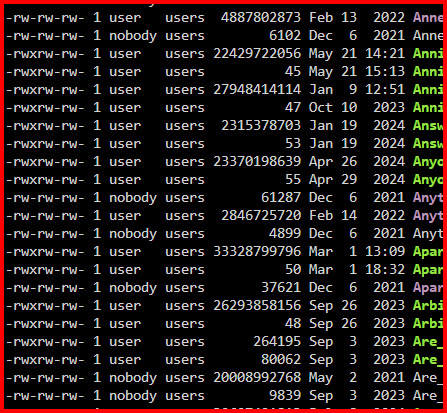
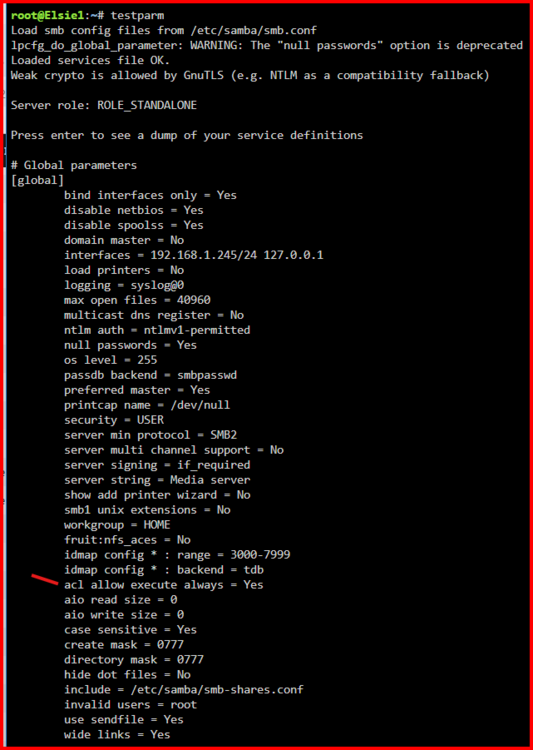
I decided to have a look at my File system (because in the back of my mind was this feeling that I had seen something vaguely familiar). Here is what I found: Notice that the Execute bit is set for the Owner an many of these files. Notice that they are mostly newer files. Let me further state that my Networking environment is strictly a Windows one. The principle involved in transferring these files to my Unraid server are running Windows 11 Pro (23H2 and 24H2 for the time involved for the execute bit being set). Here is portion of my testparm output: Notice the parameter I have marked. Here is the description of what it does: Observe that the default is 'no' but for some reason Limetech has chosen to set it to 'yes'. (The short testparm output shows only those parameters which have been changed from the default.) The point I am making is that is not only Mac OS problem but it exists in the Windows-only environment, too. I know that I would ignored it when I first noticed because Windows uses the file extension to determine if a file is executable or not. Here is the link to the Samba document for the above screenshot: https://www.samba.org/samba/docs/current/man-html/smb.conf.5.html