





Frank1940
Members
-
Joined
-
Last visited
Everything posted by Frank1940
-
First, your Diagnostics file will help us to solve your problem. Now, one thing to realize. Windows and Linux handle file (and directory/folder) names differently. Windows ignores 'case' and Linux does not. The file names Test.txt and test.txt are two different files to Linux. Windows would not allow you to create which ever one is created later. The problem arises when the files are created under Linux and then you look at them from Windows using SMB. Windows will only see one of the two and that choice is somewhat obituary from your Windows perspective! If you are looking for this problem, you have to do from the Linux side of the equation. Use the built-in Dynamix File Manager, Krusader, Midnight Commander (mc), or the CML ls -al command.
-
If that does not fix it, start with this post and the next two posts in this thread: https://forums.unraid.net/topic/191221-some-musings-on-smb-and-samba-and-unraid-and-windows/#findComment-1561581
-
That is an individual's decision which can only be based on their risk tolerance. I (personally) like parity protection because reassembling of that 'non-critical' data (while possible for about 90% of it) would be a monumental time-consuming task compared to the cost of a parity drive.
-
You have to understand that Microsoft, in this day and age, does not want you to log onto any server using a 'guest' account. They (and the rest of government and corporate world) consider this to be a security issue! They are actively blocking any means of doing so. Yes, if you find all of the settings in the Windows registry, you can bypass these blocks. But it becomes a wack-a-mole situation because MS will add a new restriction or reset a Windows registry parameter to its default during a Monthly security update with no warning. Your best (and easiest) option is to do what you did, Set up a Share Access user in Unraid and add a Windows Credentials for that user to your Windows Machine. A once-and-done solution!
-
YES and NO. The last disk failure I had was an SSD (Last year while under warranty). Two SSD's and thirteen 'Spinners'. And it has been more than five years since the last spinner truly died. Different failure modes for the two devices so there are a lot of outside factors that determine the actual reliability in a particular setup.
-
With SSD drives, I think you would want to setup a cache pool. (I believe you can use TRIM on SSD's in pools but not in the array) Here is a brief introduction to pools: https://docs.unraid.net/unraid-os/manual/storage-management/#pool-modes It does not seem up-to-date as ZFS is now a formatting option but it will give you a feel for what your options are. I believe that more RAID formatting options are now available in the latest release. EDIT: PS--- This is an very intersting mini PC. Looks like six M2 slots and that makes it an interest choice for a fast small server!
-
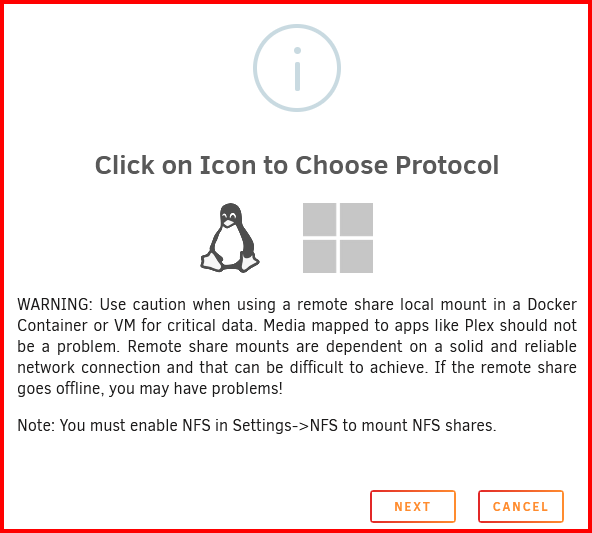
Look at this first screen in the "ADD REMOTE SMB/NFS SHARE": There are two icons for choosing either NFS or SMB which is fine for folks are who are semi-Gurus in both Windows and Linux but it can easily confuse the less knowledgeable Unraid user. I feel that NFS and SMB in text should be shown under (or part of) each icon. (BTW, the two icons are in the reverse order from what is implied from the start link!) IF you are wondering why I am making this request, please see this thread: https://forums.unraid.net/topic/191965-im-new-to-truenas-and-trying-to-connect-the-truenas-smb-share-to-my-unraid-server-im-having-problems-using-unassigneddevices-app-to-see-the-smb-server-for-some-reason/
-
Do you require an IPv6 address? Otherwise, select 'IPv4 only'.
-
Run the Diagnostics tool and upload the file in your NEXT post in this thread/topic.
-
Details about those instances including the MAC addresses and Network Names. Also upload the Diagnostics file from your Unraid server. Then one of the networking Gurus will have a better understanding of what is happening.
-
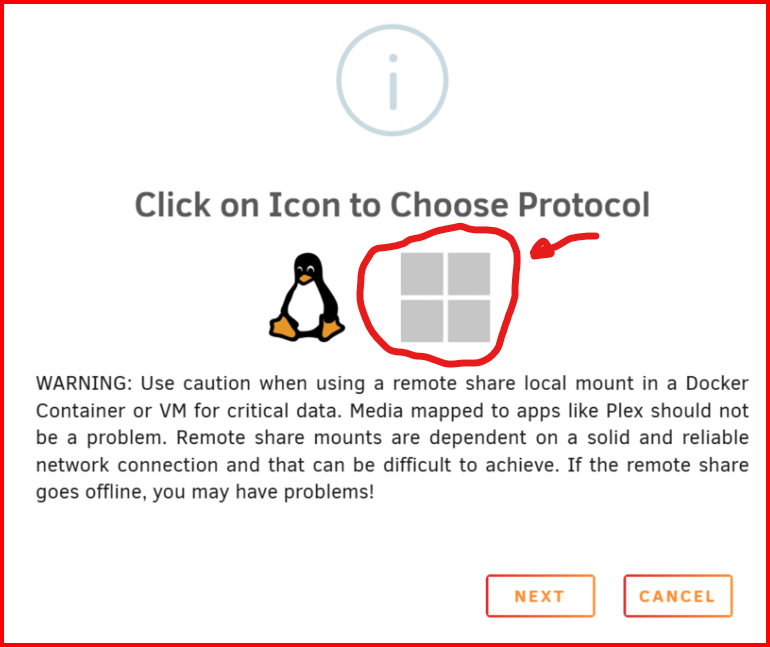
You were looking for an NFS server-- not a SMB server! Click here to look for a SMB server: EDIT: I think this way of offering choices is confusing to the many people!
-
Describe in much more detail the steps that you are taking and what you are seeing. Screenshots would be extremely helpful...
-
Actually, as was pointed out to me by @alturismo, this has already been addressed. SETTINGS >>>> Display Settings Then find: Listing height: and set to 'Fixed'

-
THANKS!!! That worked. The setting did just what I wanted!

-
Feature request here (Not sure where is the best place now that it built-in): https://forums.unraid.net/topic/191940-dynamix-file-manager-fix-action-bar-on-screen-either-top-or-bottom/ EDIT: Solution! See the next two posts.
-
Also see here: https://forums.unraid.net/topic/120982-dynamix-file-manager/ It became a built-in feature of Unraid with the release of version 7.0. Note the PDF file attachment in the first post...
-
In the GUI for the Dynamix File Manager, fix the Action Bar at either the top or the bottom of the GUI Window so that it is always visible. It would simplify things for the user when selecting multiple items for action as the selected items would be visible on the screen when selecting what action is to be performed on the selected items. Action Bar: When working on a single item, there is a right-click action menu but it does not work for multiple items.

-
What are you seeing that makes you think you can't post there? An aside. Most of us are now using the built-in Dynamix File Manager rather than Krusader. Is there a reason why you can not use it. If you need to do file management within the Unraid OS, I would suggest using mc (which has a semi-graphic interface) from the command line. (Dynamix is designed to keep people away from the OS files for what should be obvious reasons.)
-
Let me point out one thing. Adding files to the array while updating/building parity will slow down both operations an probably require more time for complete the combined operation than rebuilding parity first and then adding the new disk. (Which if it is precleared, takes about two minutes!) By the way, while you are rebuilding Parity 2, you only have the illusion of dual parity. You can only have one other disk fail and not loss data. (If you think about it, when you remove PArity2, that becomes a disk "failure"!) You will have only single parity the instant you remove Parity 2 . No rebuild of parity is required for this operation.
-
Set up the Syslog Server and upload that file after the problem. EDIT: I almost hate to add this but make sure that you don't have two devices that end up with the same IP address on your router!
-
There is a section of the Forum for Unraid Connect. You might want to look there for any similiar situations. If not post up your experience and see if they have any suggestions.

-
Sorry but I am stumped. You might want to carefully look at everything in Windows Security to make sure that something is not blocking your server.
-
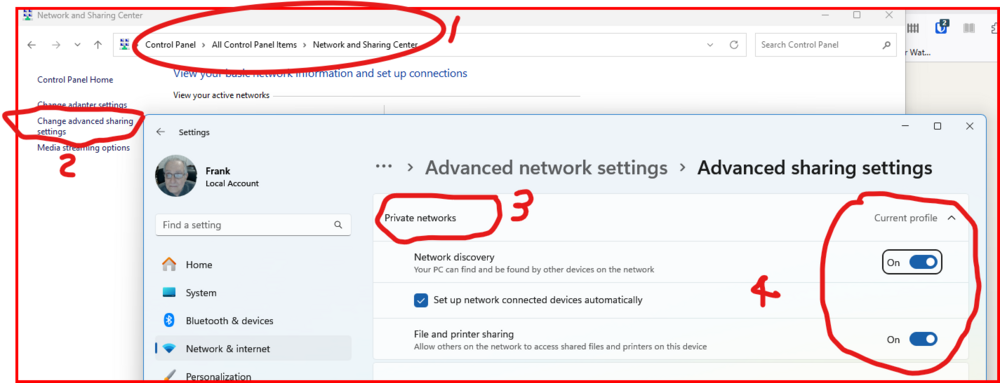
It could be that it (somehow) has become configured to behave as if it was. That is one of the purposes of the 'Public' network type setting that Windows has. To allow a Windows computer to use a Public network (McDonald's, Airports, coffee shops, etc) with as much protection as possible in a potentially hostile environment. Check to see what these settings are in Control Panel (You can get to it from Settings but it has even more steps than this approach):
-
Do you have access to the server files using Windows File Explorer/(manager)? IF you need some help in doing this, see here: https://forums.unraid.net/topic/191221-some-musings-on-smb-and-samba-and-unraid-and-windows/#findComment-1561585 Note that you should try both the server's name and its IP address. (There have been times when only one of them will work and others when both do! Reason completely unknown...)
-
Things look normal on the Unraid side. Have a look at your Firewall and Security settings on the PC. Which one are you using? Is it posting up any issues? Did you try turning it off and testing? Also check that your Network type is Private. See Here: https://forums.unraid.net/topic/191221-some-musings-on-smb-and-samba-and-unraid-and-windows/#findComment-1561581 I assume that you have normal WAN (Internet) connectivity. You probably need to describe your PC. I assume that you are running Windows. But what are the detail? Example: Windows 11 PRO, 24H2. Is it an Employer-provided PC? As you can tell, this is not the type of problem that we hear about so I am not quite sure what assistance we can provide. Google may be your friend in this case.




