





Frank1940
Members
-
Joined
-
Last visited
Everything posted by Frank1940
-
Have a look through these sections of the Docs: https://docs.unraid.net/unraid-os/using-unraid-to/manage-storage/shares/#primary-and-secondary-storage and https://docs.unraid.net/unraid-os/using-unraid-to/manage-storage/array-configuration/ The Docs are not the strongest feature of Unraid. I have been around Unraid for about 14 years now and I find them hard to use when want to find material for folks (like yourself)who have questions.
-
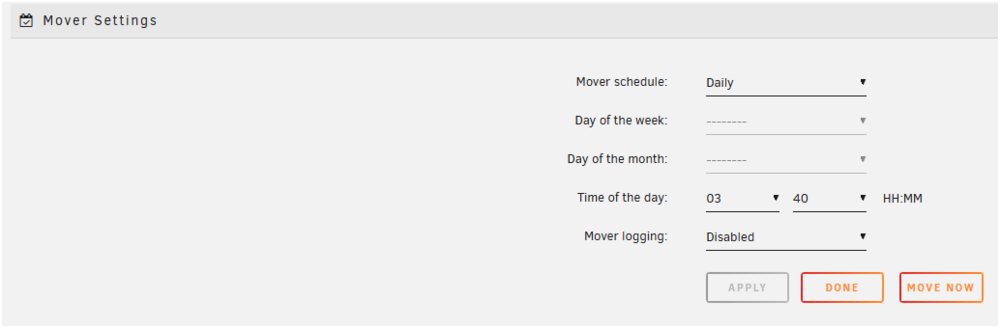
If you set up Unraid shares to use the cache drive for writes, any new files will be written first to the cache drive. Then the 'Mover' will move the files to the array on predetermined interval. See below: As to whether a 250GB drive is large enough is really a question that only you can answer. Normally, the transfer fro the cache to the array is scheduled to the array takes place at night. (This is when most servers are generally idle.) IF you normally upload less then about 150GB per day, you should be fine. BTW, upgrading a cache drive is not that difficult. So don't feel you have get a monster one to begin with. IF you have a lot of data to transfer, you would not use the cache until that is completed. Second, you might also consider not assigning a parity drive until you have done the initial transfer as it will go faster. If you are using the setup suggested above,any files on the cache drive are automatically a part of the share. So you have access to them the second that the write operation is completed.
-
This is a bit off the wall but what happens if you use a Quad HD (QHD) (2560x1440) monitor and then use 1920x1080 resolution for the Windows VM? These monitors are widely available at a rather reasonable cost.
-
A quick question. Did all three have different GUID numbers? (There have been a few cases where flash drives have a GUID but every drive has the same GUID. What happens in this case is that the first one assigned by Unraid to a license purchaser is valid but any attempt to register an subsequent drive with this GUID will result in a Blacklisting.)
-
PS-- If you do purchase these PNY flash drives from Walmart, please sure to post back whether they have unique GUIDs. Folks are always on the outlook for USB2 flash drives that are 32GB or less. They have become very difficult to find.
-
PNY is an old supplier of flash drives. They have had a GUID in the past. I seen that they are being sold and shipped by Walmart. (When ordering online, always check who is the actual merchant as many large online sales organization will provide warehousing and shipping for small merchants!) Walmart is therefore responsible for insuring the product is not a counterfeit item and the ad for this product indicates that it has free 30 day returns. Just check within that window that it has a GUID on it.
-
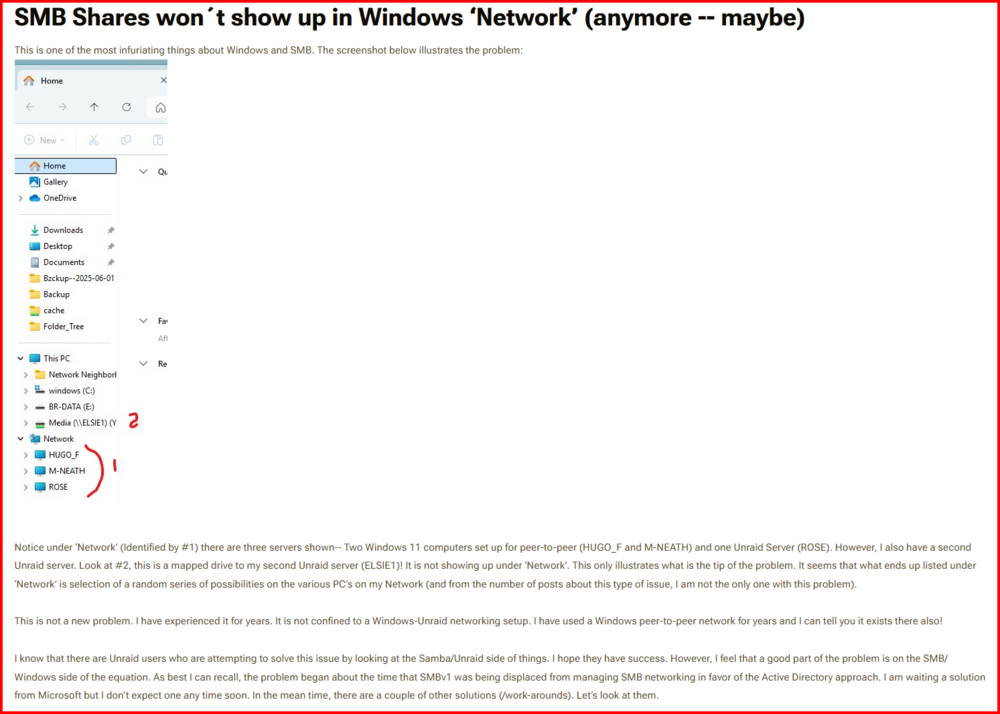
If this is your problem, I can feel for you. Look at this section in this thread: https://forums.unraid.net/topic/191221-some-musings-on-smb-and-samba-and-unraid-and-windows/#findComment-1561585 I think that explains it all at this point in time. What is aggravating is that it sometimes works and sometimes it partially works... I don't expect an solution anytime soon! (This morning after booting this PC that I am composing this message on, either of my two 24-7 Unraid server are showing up! I have gotten to the point that I never even look even look to see what is there. I just use the 'pinned to quick access' shortcuts.) I had a light bulb minute when I was thinking about the .local issue. I suspect that is actually a router thing. The .local tells the router that the resource is on the LAN and not the WAN. That would explain why it shows up so randomly on the forum. (I just check and my router does correctly resolve the \\*server_name*.local correctly. But it does not normally need it.)
-
Two ways that I am aware of: 1-- reboot the Windows client. 2-- This: (I almost hate to suggest this as it seems so obvious to most of us....) Double left-click on the Unraid server name under Network and the share(s) should open up as folders in the right pane of Windows File Explorer. Then double left-click on that folders to open up more folders with in the share. Another possible solution is to re-read this post again and this put the path to the share itself as the path in the shortcut. (Name it something besides 'Network Neighborhood'.) Then pin that shortcut to Windows File Explorer using the “Pin to Quick Access” option.

-
This was a bit confusing to me. If you are having problem seeing your Unraid server under the 'Network section, you are not alone! See here to address that issue: https://forums.unraid.net/topic/191221-some-musings-on-smb-and-samba-and-unraid-and-windows/#findComment-1561585 Having to use ''\\*servername*.local" is something that some folks seem to experience. I am not sure what cause the condition at this point. (I seem to recall that Apple OS users seem to have the problem more than Windows users...) Use whatever works to get to the server. (\\*IP_ADDRESS* may work also.) I hate that tab. What can happen is that if you make a mistake in the user name, Unraid will log you in the 'guest' account. Since Windows allows only one login into each server, you would be denied access to a private share. When you try access to access that share (as I recall), it throws a memory error and puts up the login box which will always fail (even with the correct credentials) because your Windows client already is logged into that server! Also please note that Unraid Share user names have restrictions on the characters in the user name.

-
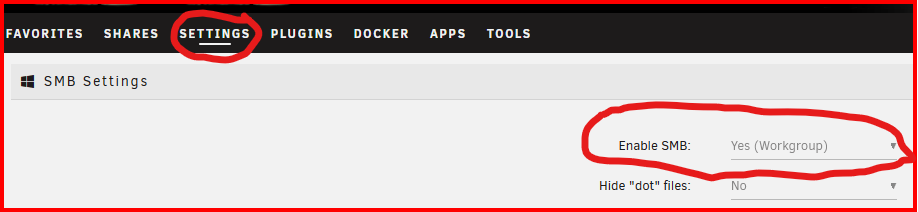
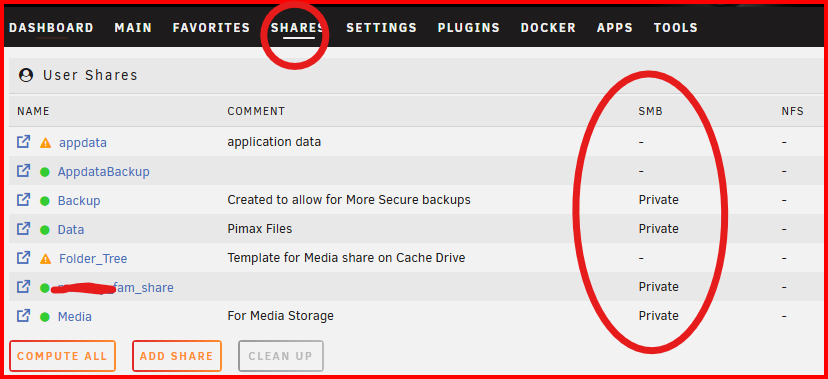
I missed the significance of this statement. Let's have a look at the Unraid side of the equation. (Most of the questions that we see about no connection via SMB are because the security restrictions that MS has on Windows clients!) First, look at SETTINGS >>>> SMB and see that SMB is enabled: Next check to see that you are 'exporting' the share via SMB. See this screen shot before: To enable a share, click on the Share NAME in the left column an look at the settings. If you set the security to anything but 'Public' (Very bad choice-- IMO), you have to set the access right for every user that you want to have access to the share. IF this does not fix the problem, attach your diagnostics file in your next post.
-
Start with this post and the next two posts in this thread: https://forums.unraid.net/topic/191221-some-musings-on-smb-and-samba-and-unraid-and-windows/#findComment-1561581 And you do have to reboot the Windows client after making any change to the SMB/Samba settings on either machine.
-
contact support and explain your problem with details of purchase.
-
Read here: https://docs.unraid.net/unraid-os/manual/storage-management/#multi-device-mode
-
Have you closed up the computer case? Most cases have to closed up to have any air flow over the drives. IF you have to have the case open, try a external fan to provide additional air flow over the fan disk. For servers, you want the air to enter the case from the front, over the drives, and be exhausted in the rear.
-
This is what I have done. 1-- Install all three Unassigned Devices plugins. 2- I setup a Unassigned Devices Share to the share on my second Unraid server: 3- Unraid includes the rysync program which was written to handle any type of file transfer on UNIX like systems. It is a very powerful tool and is virtually bullet-proof in use! I use the following command to copy between my two servers: rsync -avhPX /mnt/remotes/ELSIE1_Media/All\ Movies/ /mnt/user/BackupMedia/All\ Movies/ ...|Switches| ............|...............Source................| ....................................................|........Destination..............| The command is that simple. This one will copy any new or updated file from the source directories (it will recursively scan the entire directory for the source directory) to the destination directory (duplicating the source paths as required) . Notice that the source and destination are complete paths as defined on the computer from where the script is started. Rsync could care less where the source and destination are located. In this case, the source is on the remote computer and the destination is the local computer. It can be run from the Command line in the GUI Terminal. (I have this command stored in a text file on my Windows Desktop. I use the copy-any-paste to put it into the terminal windows.) You could also use it in a BASH Shell script and run it from the terminal. (I basically used this command to move 20TB of data between my two computers when I decided I want to back up my media files. YES, it took a few days!!! TMUX-- google this for info -- is included in one of the Unassigned Devices plugins which allow you to close and resume the terminal window which means you can start the command and close the terminal and reconnect later to check the progress.) If you want to automatic the process, you should look into the User Scripts plugin to implement this. Hope this helps.... EDIT: IF you need more help with rsync, just google and you will get dozens of pages.

-
The choice of one vs two parity drives is a difficult one. If you do regular parity checks to make sure that your hard disk are healthy, you can look at this thread for some thoughts of single vs dual parity using a statistical approach: https://forums.unraid.net/topic/50504-dual-or-single-parity-its-your-choice/ There also a school of thought that looks at dual parity as 'belt and suspenders' approach to data recovery. You can read about that school here: https://forums.unraid.net/topic/50504-dual-or-single-parity-its-your-choice/#findComment-552912 In the end, it all comes down to your comfort level is in dealing with risks to your data. You are the only one who can make that choice in the final analysis. And remember that disk failure is not the only way to lose your data. Think of fire, flooding, lightening, theft of equipment, vandalism, malware to name a few.
-
I believe what those are really saying is that the NIC has power and that is maintaining its presence to the network switch port. Can you ping the server????
-
What are you expecting? Do you want someone to go over to your house, enter it, and see what is going on? I can only assume that you tried out the VPN before you left using conditions similiar to what you would have on your trip. That only leaves something has happened inside your house to your server's running status...
-
Now you see why I would probably just leave them there . (At least most of them.... I might move a few off if I didn't have one-to-two hundred GB free on each drive.)
-
With rsync, you should realize that it backs from the source to the destination. (It is a requirement for rysnc to work that it be installed on both the source and destination computers if you are transferring between computers.) With Unraid, the requirement is met since rsync is included as a component of the Unraid OS. With rsync, it makes no difference where you start the command from. It runs the same if you start it from the destination computer or the source computer. You only change which which computer path is the source and which computer path is the destination. In your case, you would run the two different commands-- one to send the new files from his computer to yours and the second to send the new files from your computer to his computer. They could both be in the same Shell script file. (I believe you could also setup User Scripts plugin to run this on a schedule if you want to automate the entire process. ) EDIT: Example: I have used the Unassigned Devices plugin to mount a SMB share on a remote computer. rsync -avhPX /mnt/remotes/ELSIE1_Media/All\ Movies/ /mnt/user/BackupMedia/All\ Movies/ .............|<<<.... Source....................>>| |<<<......Destination..........>>>| ....|switches| Notice that the source and destination are complete paths as defined on the computer from where the script is started. Rsync could care less where the source and destination are located. In this case, the source is on the remote computer and the destination is the local computer. If the command were changed to this: rsync -avhPX /mnt/user/BackupMedia/All\ Movies/ /mnt/remotes/ELSIE1_Media/All\ Movies/ The Source would now be the local computer and the destination would be the remote computer.
-
Google "what is the .local domain" I tried it here and it did resolve to my Unraid server but I did not have a Windows credential set up for it so I prompted for a login and password. I am not a expert on networking but I am surmising the .local is a required requirement of the router to resolve when the resource is located-- not really SMB issue.
-
Post up your diagnostics in a new post in this thread. EDIT: Also check to make sure that Samba is installed in your OS installation. (With Linux it is sometimes not included...)
-
First thing. To connect via SMB, you need to be using \\unraid In Windows File Explorer (aka, Windows File Manager)--NOT a browser which your http://unraid implies you are trying. Next thing. Start here and read the next three posts. They provide the steps required to setup a SMB connection. https://forums.unraid.net/topic/191221-some-musings-on-smb-and-samba-and-unraid-and-windows/#findComment-1561581
-
The owner and group are also wrong! The group must be 'users' and (ideally) the owner should be a member of that group. The '+' at the end of the permissions means that ACL (Access-control Listing) have been added to the permissions. You can look here for additional information on that: https://en.wikipedia.org/wiki/Access-control_list You must understand that the permissions are under the control of the application that writes them. If it is a copy operation (I did not look up to see what Syncthing does), it could be merely copying the permissions, owner, group and ACL from the source file. Looking at that snippet of the output of the ls command, I can't tell where this file is being stored. I would suspect that it is in the RAM disk that the Unraid OS uses rather then on a physical drive. That is where I would expected /data1/Syncthing file system is located. Is that snippet from a terminal being run inside of a Docker container?????
-
BTW, OCD is not a good reason to restrict storage location. Think carefully if this is your sole reason! The problems it can cause down the road are stories of legend...




